AI disclosure: I built this with AI assistance (Claude), and used it to help write this post too. It comes from my own setup and was tested on a clean Home Assistant 2026.9.4 install with demo devices.
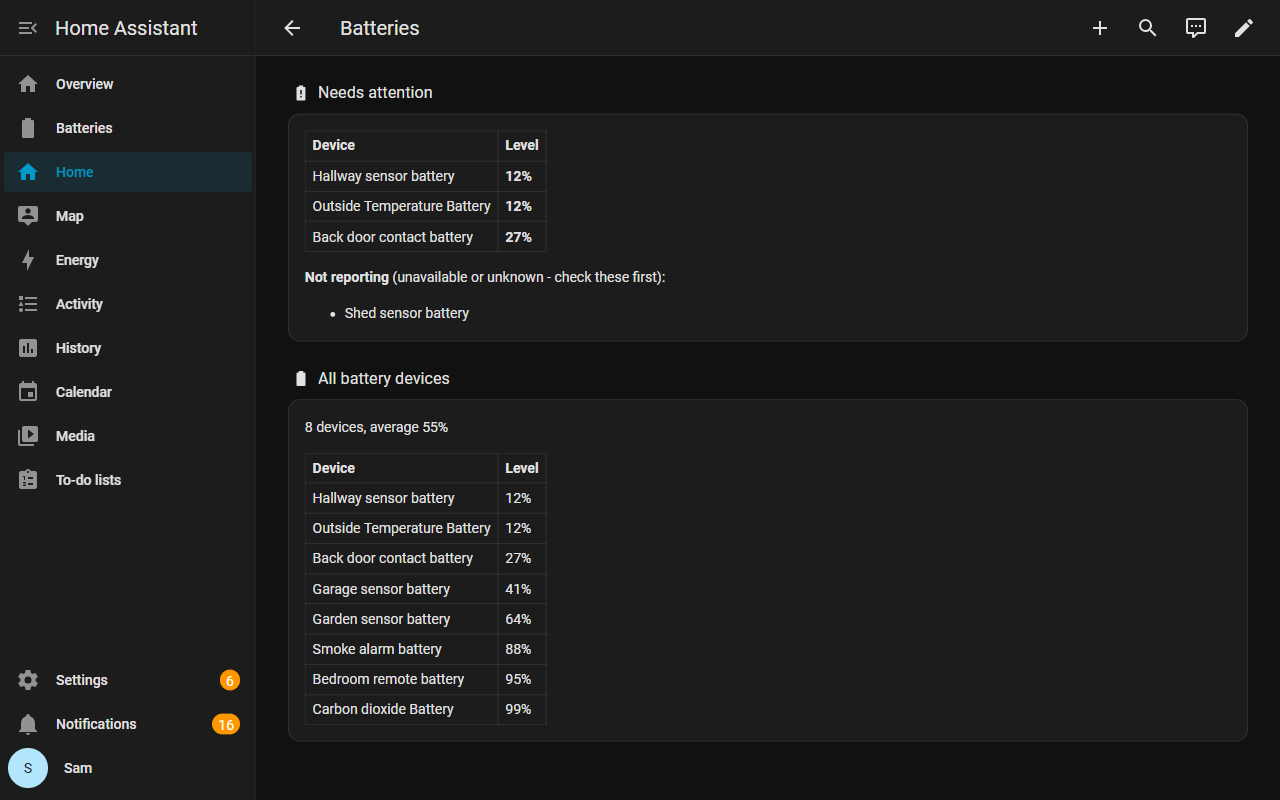
I kept finding out a sensor battery was flat only when an automation quietly stopped working. So this is one dashboard that finds every battery sensor by itself, with no entity list to keep up to date:
- Needs attention: everything below 30%, lowest first. Change
LOWat the top of the first card to set your own threshold. - Not reporting: battery sensors that are
unavailableorunknown. These are often the ones that have already died, and most battery cards just leave them out. - All battery devices: everything, lowest to highest, with a count and the average.
It is core Home Assistant only: two markdown cards with a template that picks up any sensor with device_class: battery. No HACS, no helpers, no placeholders to fill in. Add a device and it appears.
Install (about 3 minutes)
- Settings > Dashboards > Add dashboard > New dashboard from scratch > name it “Batteries” > Create.
- Open it > pencil (top right) > three dots > Raw configuration editor.
- Select everything, paste the YAML below over it, Save, then Done.
Only paste it into a new, empty dashboard, as it replaces the whole dashboard config. Needs 2024.11 or later (sections view and heading cards).
# Battery report - finds every battery sensor in your home automatically.
# No placeholders, no HACS cards, nothing to maintain when you add devices.
#
# Install as its own dashboard (about 2 minutes):
#   Settings > Dashboards > Add dashboard > "New dashboard from scratch" > name it
#   "Batteries" > Create. Open it > pencil (top right) > three dots > Raw configuration
#   editor > select everything (Ctrl+A) > paste this whole file > Save > Done.
#
# Change LOW below (default 30%) to set the "needs replacing soon" threshold.

title: Batteries
views:
  - title: Batteries
    path: batteries
    icon: mdi:battery-heart-variant
    type: sections
    max_columns: 2
    sections:
      - type: grid
        column_span: 2
        cards:
          - type: heading
            heading: Needs attention
            icon: mdi:battery-alert
            heading_style: title
          - type: markdown
            grid_options:
              columns: full
            content: |-
              {%- set LOW = 30 -%}
              {%- set ns = namespace(rows=[], stale=[]) -%}
              {%- for s in states.sensor | selectattr('attributes.device_class', 'defined') | selectattr('attributes.device_class', 'eq', 'battery') -%}
                {%- if s.state | is_number -%}
                  {%- if s.state | float < LOW -%}{%- set ns.rows = ns.rows + [[s.state | float, s.name]] -%}{%- endif -%}
                {%- else -%}
                  {%- set ns.stale = ns.stale + [s.name] -%}
                {%- endif -%}
              {%- endfor -%}
              {% if ns.rows | count == 0 %}### All batteries above {{ LOW }}%
              {% else %}| Device | Level |
              |---|---|
              {% for r in ns.rows | sort(attribute='0') %}| {{ r[1] }} | **{{ r[0] | round(0) | int }}%** |
              {% endfor %}{% endif %}
              {%- if ns.stale | count > 0 %}

              **Not reporting** (unavailable or unknown - check these first):
              {% for n in ns.stale | sort %}
              - {{ n }}{% endfor %}{% endif %}
      - type: grid
        column_span: 2
        cards:
          - type: heading
            heading: All battery devices
            icon: mdi:battery
            heading_style: title
          - type: markdown
            grid_options:
              columns: full
            content: |-
              {%- set ns = namespace(rows=[]) -%}
              {%- for s in states.sensor | selectattr('attributes.device_class', 'defined') | selectattr('attributes.device_class', 'eq', 'battery') | selectattr('state', 'is_number') -%}
                {%- set ns.rows = ns.rows + [[s.state | float, s.name]] -%}
              {%- endfor -%}
              {% if ns.rows | count == 0 %}No battery sensors found.
              {% else %}{{ ns.rows | count }} devices, average {{ (ns.rows | map(attribute='0') | sum / ns.rows | count) | round(0) | int }}%

              | Device | Level |
              |---|---|
              {% for r in ns.rows | sort(attribute='0') %}| {{ r[1] }} | {{ r[0] | round(0) | int }}% |
              {% endfor %}{% endif %}
Limits: it only lists sensor entities with device_class: battery. Integrations that only expose a binary_sensor “battery low”, or a battery level as an attribute, won’t show up. If one of yours is missing, tell me which integration and I’ll have a look.
Disclosure, paid pack: this dashboard is one of 14 templates in a paid pack I’ve put together, the Home Assistant Notification & Watchdog Pack (12 blueprints and 2 dashboards: a notification router with urgency tiers and action buttons, watchdogs for offline devices, stuck integrations and failing automations, motion lights that respect a manual off, and more). It’s US$5 at launch until 1 Nov, then US$12: Home Assistant Notification & Watchdog Pack: 12 Tested Blueprints + 2 Dashboards
The dashboard above is free in full either way. If you’d rather download it as a file, it’s also on Gumroad at no cost: Home Assistant Battery Report Dashboard (Free)