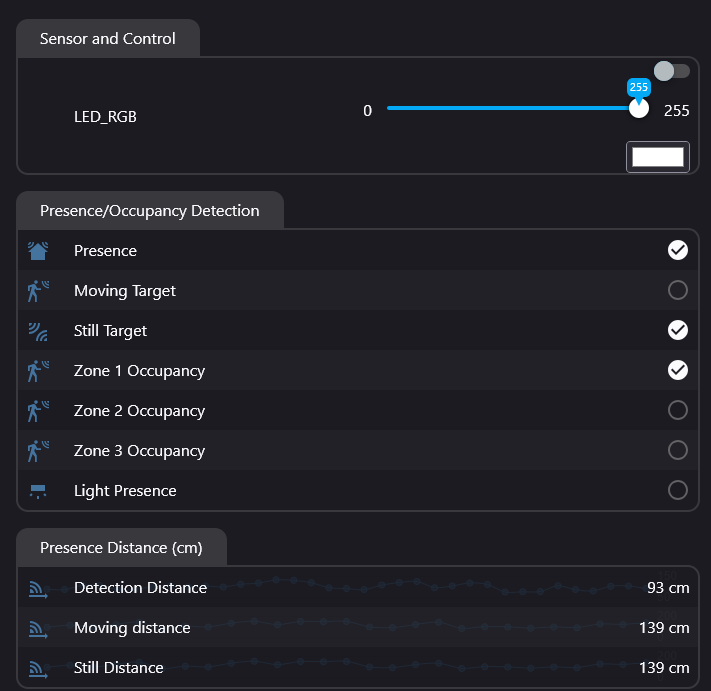
Hi, very new adopter here, I have looked at so many youTubes (they all make this look so easy). This is my first project, so go easy. (i dont really understand uart, let alone anything else at the MOMENT)
ESP32-S3-DevKitC-1 connection to LD2410c only works if i use 3v out on the esp32 board?
If i use the 5v like everybody says to do i get Warning [ld2410:596]: “Max command length exceeded; ignoring”.
I believe if I’m connected to the 3v, its using Bluetooth to connect the LD2410C not the uart pins? Is this right? Very confusing.
This is my Yaml ( sorry stuck everything on there out of desperation).
esphome:
  name: officeble
  friendly_name: OfficeBLE

esp32:
  board: esp32-s3-devkitc-1
  framework:
    type: esp-idf


# Enable logging
logger:

# Enable Home Assistant API
api:
  encryption:
    key: "redacted"

ota:
  - platform: esphome
    password: "redacted"

wifi:
  ssid: !secret wifi_ssid
  password: !secret wifi_password

  # Enable fallback hotspot (captive portal) in case wifi connection fails
  ap:
    ssid: "Officeble Fallback Hotspot"
    password: "ih99rgvDHKr2"

esp32_ble_tracker:
   scan_parameters:
      interval: 1100ms
      window: 1100ms
      active: true

bluetooth_proxy:
  active: True

web_server:

captive_portal:

uart:
  id: uart_1
  tx_pin: GPIO17
  rx_pin: GPIO18
  baud_rate: 256000
  parity: NONE
  stop_bits: 1

ld2410:
  uart_id: uart_1


binary_sensor:
  - platform: ld2410
    has_target:
      name: Presence
    has_moving_target:
      name: Moving Target
    has_still_target:
      name: Still Target
    out_pin_presence_status:
      name: Out pin presence status

sensor:
  - platform: ld2410
    light:
      name: Light
    moving_distance:
      name: Moving Distance
    still_distance:
      name: Still Distance
    moving_energy:
      name: Move Energy
    still_energy:
      name: Still Energy
    detection_distance:
      name: Detection Distance
    g0:
      move_energy:
        name: G0 move energy
      still_energy:
        name: G0 still energy
    g1:
      move_energy:
        name: G1 move energy
      still_energy:
        name: G1 still energy
    g2:
      move_energy:
        name: G2 move energy
      still_energy:
        name: G2 still energy
    g3:
      move_energy:
        name: G3 move energy
      still_energy:
        name: G3 still energy
    g4:
      move_energy:
        name: G4 move energy
      still_energy:
        name: G4 still energy
    g5:
      move_energy:
        name: G5 move energy
      still_energy:
        name: G5 still energy
    g6:
      move_energy:
        name: G6 move energy
      still_energy:
        name: G6 still energy
    g7:
      move_energy:
        name: G7 move energy
      still_energy:
        name: G7 still energy
    g8:
      move_energy:
        name: G8 move energy
      still_energy:
        name: G8 still energy

text_sensor:
  - platform: ld2410
    version:
      name: "LD2410 Firmware Version"
    mac_address:
      name: "LD2410 MAC Address"

switch:
  - platform: ld2410
    engineering_mode:
      name: Engineering mode
    bluetooth:
      name: Control bluetooth

number:
  - platform: ld2410
    timeout:
      name: Timeout
    light_threshold:
      name: Light threshold
    max_move_distance_gate:
      name: Max move distance gate
    max_still_distance_gate:
      name: Max still distance gate
    g0:
      move_threshold:
        name: G0 move threshold
      still_threshold:
        name: G0 still threshold
    g1:
      move_threshold:
        name: G1 move threshold
      still_threshold:
        name: G1 still threshold
    g2:
      move_threshold:
        name: G2 move threshold
      still_threshold:
        name: G2 still threshold
    g3:
      move_threshold:
        name: G3 move threshold
      still_threshold:
        name: G3 still threshold
    g4:
      move_threshold:
        name: G4 move threshold
      still_threshold:
        name: G4 still threshold
    g5:
      move_threshold:
        name: G5 move threshold
      still_threshold:
        name: G5 still threshold
    g6:
      move_threshold:
        name: G6 move threshold
      still_threshold:
        name: G6 still threshold
    g7:
      move_threshold:
        name: G7 move threshold
      still_threshold:
        name: G7 still threshold
    g8:
      move_threshold:
        name: G8 move threshold
      still_threshold:
        name: G8 still threshold

button:
  - platform: ld2410
    factory_reset:
      name: Factory reset
    restart:
      name: Restart
    query_params:
      name: Query params
What I’m trying to do is make a Bluetooth room presence sensor for bermuda that has mmwave as well.
I think this is working but i hear the Bluetooth on the LD2410C can be flakey, so i would like it to run from the esp32. Does that make sense?
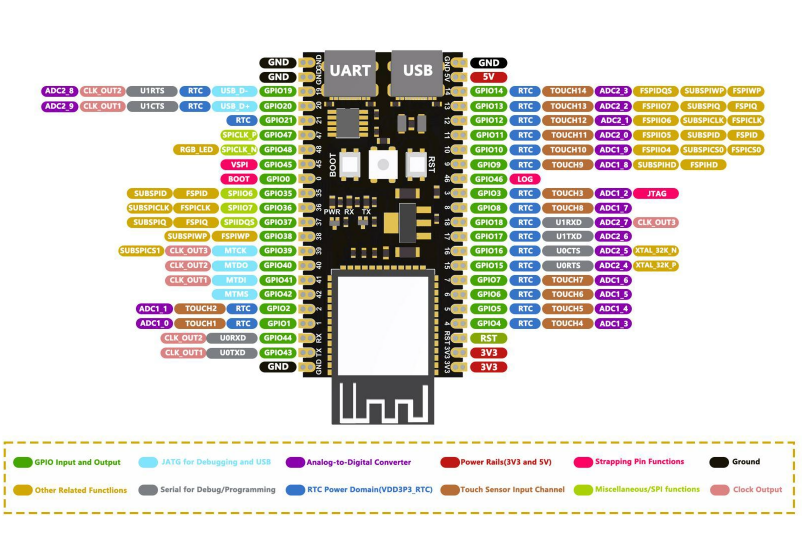
What am i doing wrong? Do i need to define both u0txd pin 43 and u0rxd pin 44 as well as the u1txd and u1rxd? I assume the 5v pin on the esp32 is output?
Can any of you geniuses help me, any help will do, to point me in the right direction.
UPDATE: Actually everything seems to be working as i wanted, i just turned Bluetooth off on the LD2410c…still detecting. I would still like to understand why its not working from the 5V (like everybody seems to suggest in tutorials) . I seemed to have, fluked, my first project lol
 Its hard to tell if “knockoff board” or not on amazon.