You need to add an add-on option to use rtsp, see the COMMAND here: hassio-addons/birdnet-go at master · alexbelgium/hassio-addons · GitHub
1 Like
Ultimately it turned out to be the camera’s RTSP feed not working. As soon as I tried another, detections came through. Thanks so much for your help!
1 Like
Is anyone else’s ‘analytics’ tab in birdnet-go not being populated? Not sure why, but mine is completely empty, despite many detections over the last few days.
EDIT: I figured out the analytics. It doesn’t seem to work through the HASS ingress link to the webUI. I had to use the http://homeassistant.local:8080 link and it’s being populated no worries!
3 Likes
I want to dip my toes in the BirdNET waters using stuff I already have and using an old Android phone with an RPi or NUC to get going would be perfect.
Which Android app do you use and is it capable of sending just audio over RTSP or will it send both audio and video, thereby consuming additional bandwidth on the WiFi network?
Thanks
I’m using the Android IP Webcam app to generate a audio+video stream and trying to pass it through ffmpeg to send audio to a named pipe. The BirdNet-Go add-on still seems to be looking for a real audio input device.
Am I missing a configuration step?
Hi, are you using rtsp ? If yes you should configure the stream in the BirdNET-go ui (or settings)
rtsp from the webcam and probably from the ffmpeg intermediary that strips out the audio. The logs still complain about a missing audio input so I may be using the wrong syntax.
What is the right way to point to a rtsp stream?
Have you set it in the BirdNET go options in the user interface ?
ChatGPT told me to feed the RTSP stream from my Amcrest IP Webcam directly into the addon by putting this into the Configuration Options field as YAML:
COMMAND: >-
  realtime --rtsp
  rtsp://admin:[email protected]:554/cam/realmonitor?channel=1&subtype=1
  --rtsp-transport tcp
Not sure it is legit because it is a video+audio stream as shown by VLC
Log says:
2025/06/08 11:08:45  Audio device validation failed: no hardware audio capture devices found
[11:08:45] INFO: Starting NGinx…
2025/06/08 11:09:45  Running HLS stream cleanup task
2025/06/08 11:09:45  HLS cleanup task completed: no active streams
I played some bird sounds near the IP Webcam microphone and no detection happened.
Ah - it was the old way of working when it was using only the command ; however I deprecated it and now use only the webui for configuration. It is easier for users, aligns with the birdnet go documentation and allows for multiple streams. I’ll do a screenshot a bit later
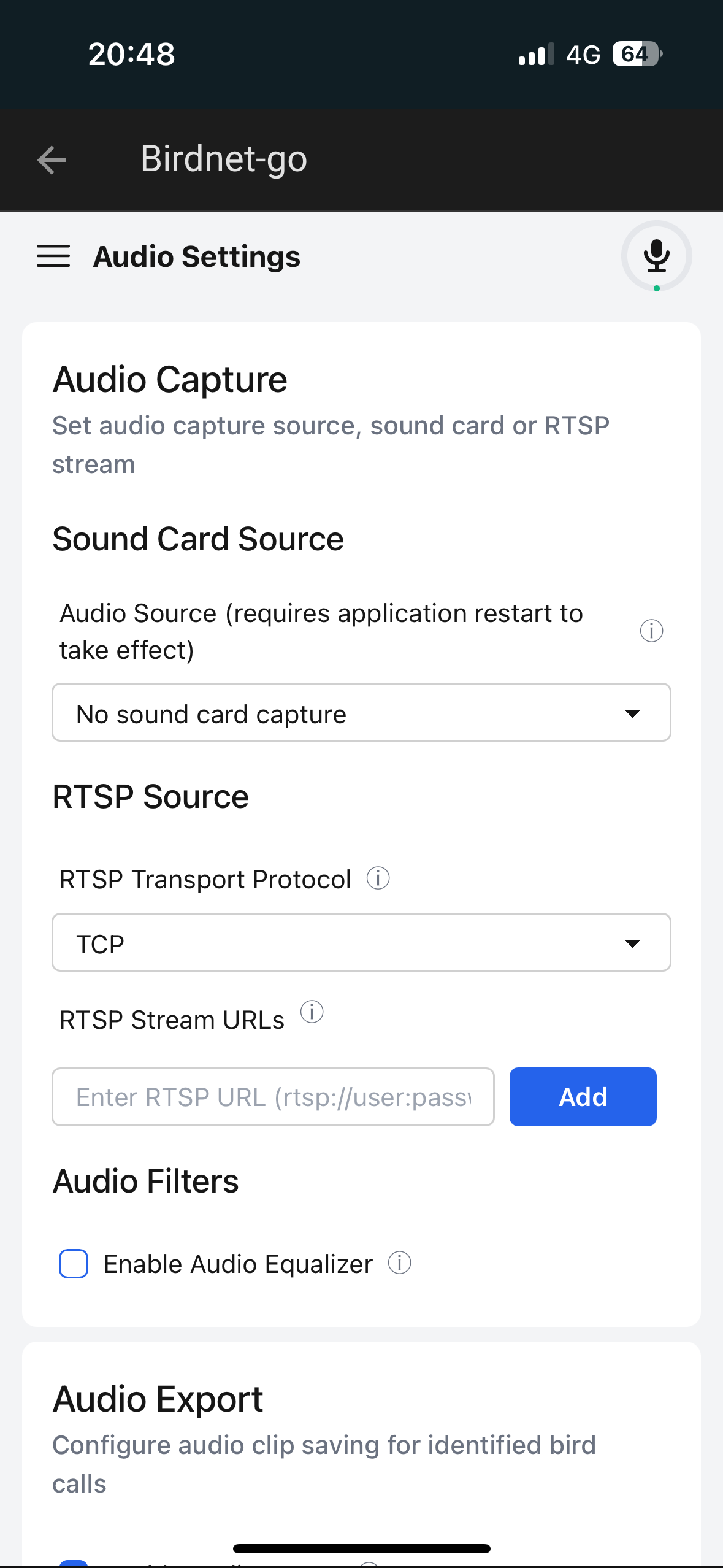
That did it! I’ve been trying to get this to work since yesterday.
Thanks much.
1 Like
Ahah the simplest is often the most complex  I’ve tried to realign the addon as much as possible with the default documentation. Glad it is working for you, have fun with this great app !
1 Like
It seems i live to fart north in the world. I have been wondering why my daily summary has not been working the last few weeks, I only see recent detections.
I receive this error in the log:
ERROR: 2025/06/08 23:14:56 handlers.go:73: Error: Failed to get sunrise time: failed to get sun event times: failed to calculate civil dawn: sun never reaches 6 degrees below the horizon, at this location (Code: 500, Underlying error: failed to get sun event times: failed to calculate civil dawn: sun never reaches 6 degrees below the horizon, at this location)
And yes since around 20th of may the sun barely goes below the horizon where i live.
Anyone has the same issue and have had any luck fixing it?
Nice card on your dashboard! Mind sharing how you built it?
Another option to install via Proxmox:
https://community-scripts.org/scripts/birdnet-go
I’m actually testing it with one reolink camera and result is good.
Awwww, updates wipe out your history.