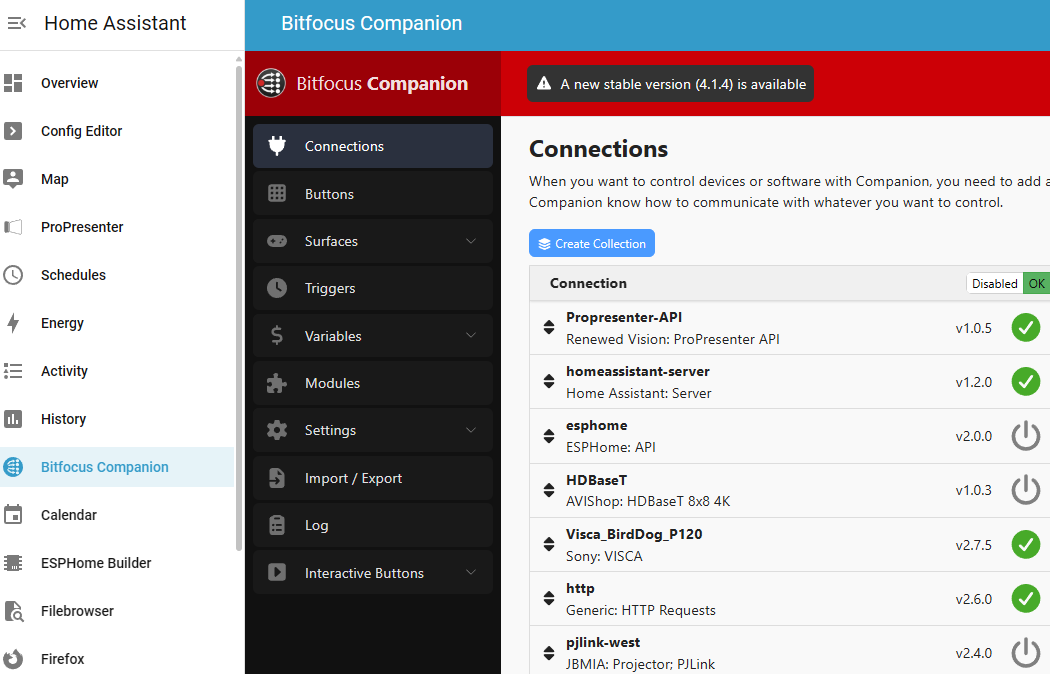
I am probably capable of mashing together the files to make the bitfocus companion docker image into an add-on, but I am unable to maintain it long term, I am sure there is a way of automating it? Is someone better at this than me able to make bitfocus companion into a ha os add-on?
It allows for control of a number of things, namely professional AV things that I wish for control of.
And also allows using stream decks as physical input devices.
I think that is great idea, I personally have PI4 just for the Bitfocus companion only, and then have Yellow for HA, I can help with $ contribution, unfortunately cant with technical side.
You could automate it updating with Github Actions, although I know very little about it.
The only two config options we’d likely need is the config path and Web port.
Bumping this – I was actually very surprised to find that there wasn’t already an add-on given the nature of the two projects. Would be highly convenient to have my companion server on the same device as HA. Companion is also wildly useful as a quick and dirty way of firing off commands for testing other projects, HA automations included.
I’m not sure how hard it is to update the Addon to support ingress to be able to access the Companion Web UI over HTTPS inside of HA, but I did manage to get it working with the ingress
integration.
First install Ingress from HACS store. Restart. Add Ingress integration.
Edit configuration.yaml and add in the following code:
ingress:
  companion:
    title: Bitfocus Companion
    icon: cbi:bitfocus # or phu:bitfocus or mdi:alpha-c-circle
    ui_mode: toolbar  # This shows the HA header/sidebar
    url: http://dd29bdce-bitfocus-companion:8000 # or http://homeassistant.local:8000
    index: /connections

    # Rewrite rules to fix all absolute paths
    rewrite:
      - mode: body
        path: /.*
        match: '((?:href|src|action|data-src|poster|srcset)=")(/(?!api/ingress|http)[^"]+)(")'
        replace: '\1$http_x_ingress_path\2\3'
      - mode: body
        path: /.*
        match: '(url\()([''"]?)(/(?!api/ingress|http)[^''")]+)(\2)(\))'
        replace: '\1\2$http_x_ingress_path\3\4\5'
      - mode: body
        path: /.*
        match: '(\+ ["'']|["'']\/)trpc["'']'
        replace: '\1$http_x_ingress_path/trpc"'
      - mode: body
        path: /.*
        match: 'import\(["'']/((?!api/ingress)[^"'']+)["'']\)'
        replace: 'import("$http_x_ingress_path/\1")'
      - mode: body
        path: /.*
        match: 'import\.meta\.url'
        replace: '(document.baseURI || window.location.href)'
      - mode: body
        path: /.*
        match: 'fetch\(["'']/((?!api/ingress)[^"'']+)["'']'
        replace: 'fetch("$http_x_ingress_path/\1"'
      - mode: body
        path: /.*
        match: '\.open\(["'']([A-Z]+)["''],\s*["'']/((?!api/ingress)[^"'']+)["'']'
        replace: '.open("\1", "$http_x_ingress_path/\2"'
      - mode: body
        path: /.*
        match: 'window\.location\s*=\s*["'']/((?!api/ingress)[^"'']+)["'']'
        replace: 'window.location = "$http_x_ingress_path/\1"'
      - mode: body
        path: /.*
        match: 'location\.href\s*=\s*["'']/((?!api/ingress)[^"'']+)["'']'
        replace: 'location.href = "$http_x_ingress_path/\1"'
      - mode: body
        path: /.*
        match: '(pushState|replaceState)\(([^,]+),\s*([^,]+),\s*["'']/((?!api/ingress)[^"'']+)["'']'
        replace: '\1(\2, \3, "$http_x_ingress_path/\4"'
      - mode: body
        path: /.*
        match: '(["''])\/manifest\.json(["''])'
        replace: '\1$http_x_ingress_path/manifest.json\2'
      - mode: body
        path: /.*
        match: '(["''])\/assets\/'
        replace: '\1$http_x_ingress_path/assets/'
      - mode: body
        path: /.*
        match: '(["''])\/img\/'
        replace: '\1$http_x_ingress_path/img/'
      - mode: body
        path: /.*
        match: '(["''])\/docs\/'
        replace: '\1$http_x_ingress_path/docs/'
      - mode: header
        name: '(?i)^Location$'
        path: /.*
        match: '^/(.+)'
        replace: '$http_x_ingress_path/\1'
      - mode: body
        path: /api/.*
        match: '(["''])/((?!api/ingress|http)[^"'']+)(["''])'
        replace: '\1$http_x_ingress_path/\2\3'
Restart and Companion should now show on the HA sidebar.
To get the Bitfocus Companion icon you can either use Custom Icons or Custom brand icons integrations from the HACS store.
I couldn’t figure out how to also get it to work with the Interactive Buttons /emulator & /tablet

 (github.com)