Telegram command blueprint
This blueprint creates an automation to use custom commands in Telegram.
By default the following commands are added:
/help: This will display all available commands with a description. The descriptions can be provided and/or adjusted in the blueprint settings. The example below shows two custom commands added using the blueprint (/status and /toggle). These examples are shown in the Custom commands settings section.
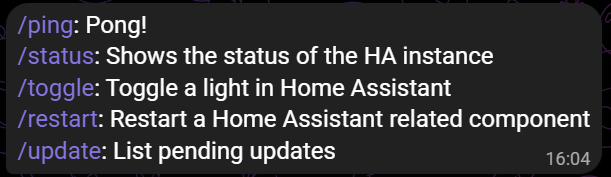
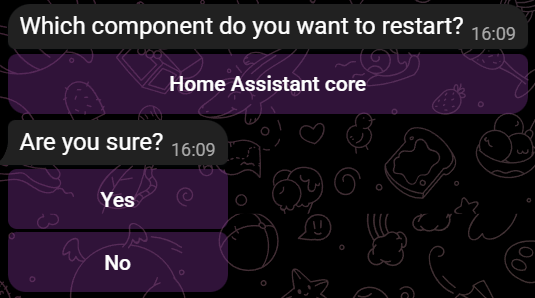
/restart: This command will show Home Assistant components which can be restarted. By default an option to restart Home Assistant Core is added. For each component an argument is provided (for Home Assistant Core this is
core) which can be added as argument to prevent the first message asking which component to restart. For example /restart core will immediately indicate that you want to restart the Home Assistant Core component. Optionally you can let the bot ask for confirmation before the restart command is issued. This is enabled by default. In case no components to restart are provided, so when the default Home Assistant Core option is removed, and no others are added, the command is disabled.
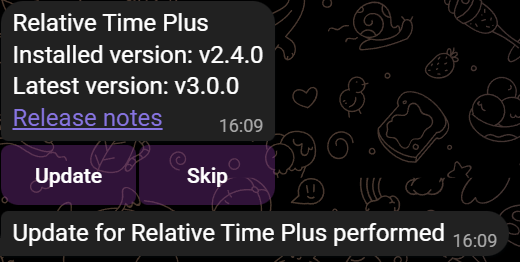
/update: This command will list all pending updates in Home Assistant, and for each of them show some details and buttons to either install or skip the update. You can optionally provide entities or integrations which should not be used for this command. All related text can optionally be amended or translated.
There is also an option to provide custom commands. By default the /ping command is added, which will simply return Pong 🏓 and can be used to test if the automation is working.
All custom commands can return a message, and or perform actions. You can find examples in the Custom commands setting section.
 How to use
Use the button below to import the blueprint

For more information on all settings, check the documentation
 Coffee
If you think I deserve a coffe, please feel free to buy me one (I might spend it on another beverage though).
In case you decide to do so, thanks a lot!

Or you can do a small donation using PayPal.