If you have Brilliant Smart Home Control in-wall touchscreen panels (the ones from brilliant.tech, you've probably tried pairing them into Home Assistant through HomeKit Controller… and watched entities get stuck in setup_retry, pairings drop after restarts, and most of the panel's capabilities stay invisible.
I got tired of that, so I built a proper bridge. brilliant-mqtt runs a small agent on the panel itself that connects to the panel's own internal message bus — the same one Brilliant's HomeKit bridge uses — and publishes everything to your MQTT broker as native Home Assistant MQTT-Discovery entities. Fully local, no cloud, and it coexists with the panel's built-in Alexa and HomeKit.
What you get
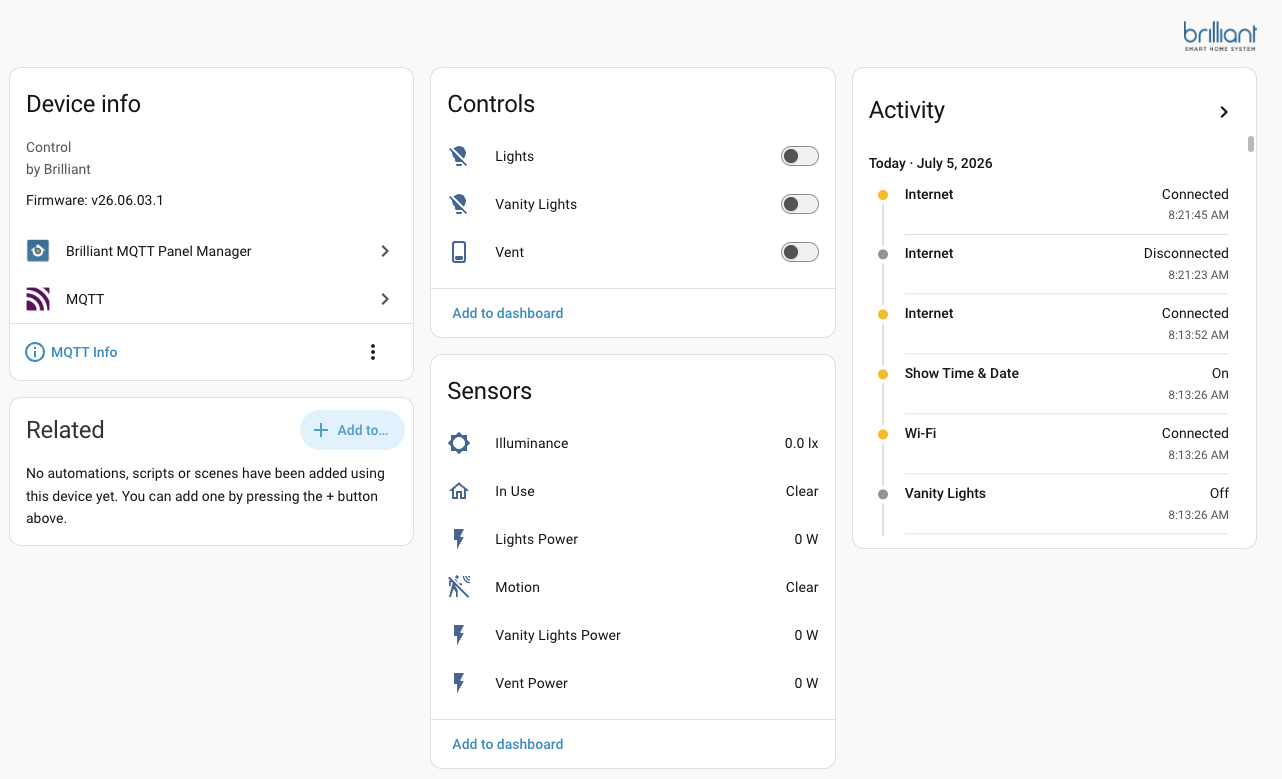
- Lights & switches — every load wired to a panel, plus Brilliant's BLE-mesh dimmers and smart plugs house-wide, with dimming. Mesh devices are published by a single elected panel (with automatic failover), so you get one clean set of entities instead of duplicates from every panel.
- Whole-home power monitoring — live per-circuit wattage for every load, including always-on gangs you can't see anywhere else, plus dimmer temperatures and fault sensors.
- Motion & presence — motion from every mesh dimmer/switch (yes, they have motion sensors — Brilliant never exposed them in their own app!) and from the panel faceplate PIR, plus panel-in-use occupancy.
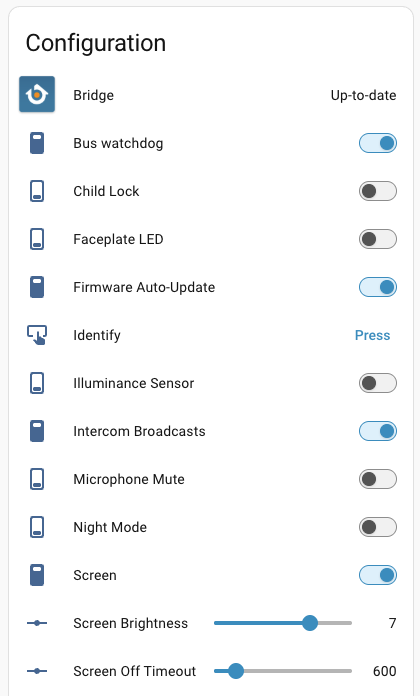
- Panel management — 25+ entities per panel: screen on/brightness, screensaver, volumes, mic mute, night mode, child lock, firmware auto-update control, Wi-Fi diagnostics, and one-click agent updates from HA.
- Voice satellite (opt-in) — turn any panel into a local wake-word voice satellite for HA Assist, using the panel's built-in mic and speaker. Wake word runs on the panel; STT/conversation/TTS run in your own Assist pipeline.
How it works
The agent is ~zero-dependency Python running as a resource-capped systemd service in the panel's persistent storage, so it survives firmware OTA updates. The companion HACS integration handles everything over SSH: guided onboarding, agent install, updates from HA (Update entities), and automatic repair after firmware updates. Root SSH is an official Brilliant feature (a toggle in panel settings) — nothing is jailbroken or modified.
Reliability was the whole point: retained MQTT discovery/state (entities survive HA restarts instantly), auto-reconnect with re-sync, a hot diff-poll, stale-stream watchdog, and a reconnect-storm circuit breaker. New in v0.5.5, a bus-health watchdog reboots a panel if Brilliant's internal message bus ever wedges — a rare failure that only a reboot clears — opt-in per panel and guarded so it can't reboot-loop. My 14-panel install has been running it 24/7 through firmware updates for a month.
Security model in one line: per-panel passwords stored in HA's config store, SSH host-key pinned after first use (verified before the password is ever sent), single auth attempt per connect, everything redacted from diagnostics. Full details in the docs.
Getting started
Requirements: Brilliant panel(s) with Root SSH Login enabled, an MQTT broker connected to HA, HACS.
- Add the custom repository in HACS:
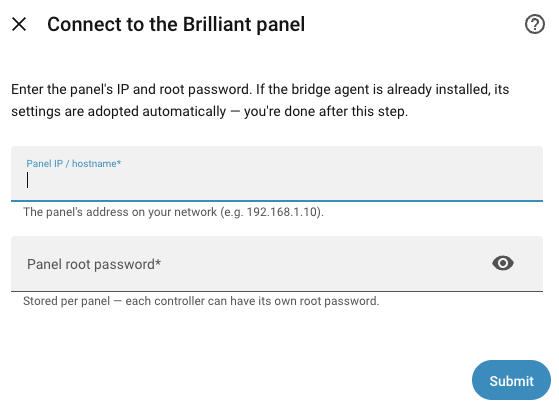
joyfulhouse/brilliant-mqtt(Integration) — or use the one-click badge in the README. - Add the integration; enter one panel's IP + root password.
- The flow installs the agent, and your panel's entities appear. Repeat per panel.

- GitHub / docs / install guide: GitHub - joyfulhouse/brilliant-mqtt: Home Assistant / HACS integration + on-panel bridge for Brilliant Smart Home Control in-wall panels (brilliant.tech, Brilliant NextGen). Publishes each panel as local MQTT-Discovery entities and manages the agent fleet from the HA UI — a robust local replacement for HomeKit Controller. · GitHub
- Current release: v0.5.6 (changelog)
Roadmap-ish
Recent releases added the tier-1 panel controls, Wi-Fi and bus-health watchdogs for flaky panels, and v0.5.0's headline: working mesh-load motion — the firmware's own motion latch turns out to be dead, so the bridge derives motion from the raw sensor score stream (validated against mmwave ground truth at ~85% episode recall with essentially zero false triggers). Ideas and PRs welcome — the docs include a full architecture writeup and the reverse-engineered bus reference.
Support this project
This integration was built almost entirely with AI pair-engineering (Claude), which is genuinely how a one-person project reverse-engineers an undocumented Thrift bus, ships 850+ tests, and supports a fleet — but the token bills are real. If brilliant-mqtt rescues your panels from HomeKit purgatory, a coffee helps keep the releases coming:
- GitHub Sponsors: Sponsor @btli on GitHub Sponsors · GitHub
- Ko-fi: https://ko-fi.com/bryanli
Bug reports and questions welcome here or on GitHub Issues. If you have a panel model or third-party device hanging off Brilliant that behaves oddly, I'd especially love the diagnostics — I can only test against my own fleet.
Not affiliated with or endorsed by Brilliant NextGen, Inc. MIT licensed.