New to HA and also had this problem. Initially I resorted to GitHub - dennypage/mdns-bridge: mDNS Bridge · GitHub, but then I came across The kernel itself can do this · Issue #12 · udp-redux/udp-broadcast-relay-redux · GitHub and realised that I could just use nftables too. Here are the details and it should work on any Linux-based routers running a recent enough kernel.
My setup / what I need:
- Two VLANs:
lan and iot
- IPv6 ULA-prefix
fd00:abcd:abcd::/48
- HA running in
lan (192.168.10.1/24, fd00:abcd:abcd:10::1/60)
- Devices running in
iot (192.168.20.1/24, fd00:abcd:abcd:20::1/60)
- HA should see
iot devices
- Devices in
iot should not see any lan devices
So basically I want to clone mDNS queries from lan to iot, and then clone responses from iot back to lan.
To achieve this, add this to your rule set:
destroy table ip mdns
table ip mdns {
	counter lan_query {
	}
	counter lan_response {
	}

	counter iot_query {
	}
	counter iot_response {
	}

	chain prerouting {
		type filter hook prerouting priority mangle; policy accept;
		udp dport 5353 iif "br-lan" 	@ih,16,1 { 0 }	ip saddr set 192.168.20.1 dup to 224.0.0.251 device "br-iot"	counter name "lan_query" 	comment "mDNS query from br-lan"
		udp dport 5353 iif "br-lan" 	@ih,16,1 { 1 } 																	counter name "lan_response" comment "mDNS response from br-lan"
		udp dport 5353 iif "br-iot" 	@ih,16,1 { 0 }	 																counter name "iot_query" 	comment "mDNS query from br-iot"
		udp dport 5353 iif "br-iot" 	@ih,16,1 { 1 } 	ip saddr set 192.168.10.1 dup to 224.0.0.251 device "br-lan" 	counter name "iot_response" comment "mDNS response from br-iot"
	}
}

destroy table ip6 mdns
table ip6 mdns {
	counter lan_query {
	}
	counter lan_response {
	}

	counter iot_query {
	}
	counter iot_response {
	}

	chain prerouting {
		type filter hook prerouting priority mangle; policy accept;
		udp dport 5353 iif "br-lan" 	@ih,16,1 { 0 }	ip6 saddr set fd00:abcd:abcd:20::1 dup to ff02::fb device "br-iot"	counter name "lan_query" 	comment "mDNS query from br-lan"
		udp dport 5353 iif "br-lan" 	@ih,16,1 { 1 } 																		counter name "lan_response"	comment "mDNS response from br-lan"
		udp dport 5353 iif "br-iot" 	@ih,16,1 { 0 }	 																	counter name "iot_query" 	comment "mDNS query from br-iot"
		udp dport 5353 iif "br-iot" 	@ih,16,1 { 1 } 	ip6 saddr set fd00:abcd:abcd:10::1 dup to ff02::fb device "br-lan"	counter name "iot_response" comment "mDNS response from br-iot"
	}
}
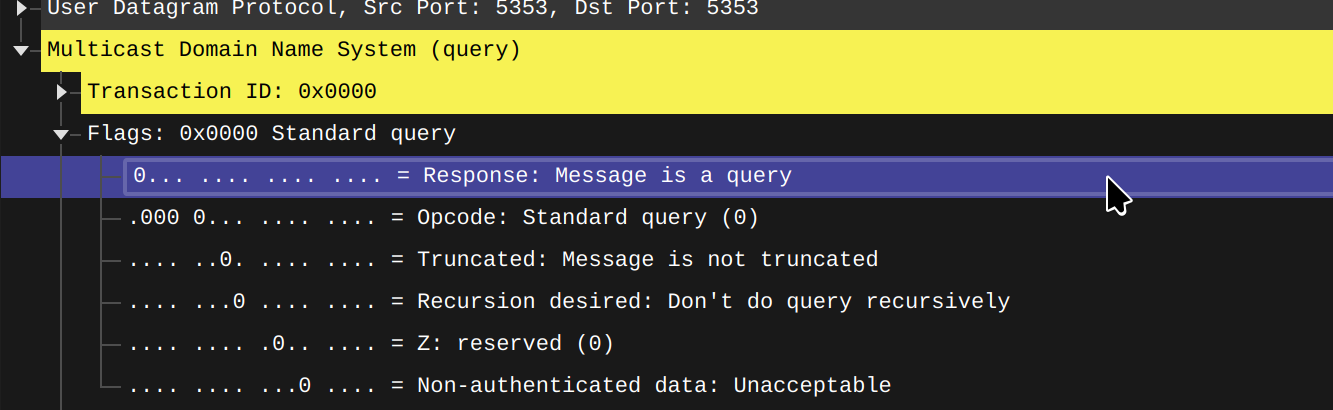
@ih,16,1 matches the message type bit in mDNS. 0 = query, 1 = response.
You can save this file as mdns.nft then load it with nft -f mdns.nft. Of course there are usually more idiomatic ways to do this in your router's distro.
more idiomatic ways
I use OpenWRT and this is how I make this persistent:
- Back up your current config first of all
- Predictable IPv6
a. uci set network.lan.ip6hint='10'
b. uci set network.iot.ip6hint='20'
c. uci commit
d. Restart the interfaces / Reboot the router
e. Confirm the results with ip addr show br-lan # or br-iot
- Save the nftables to
/etc/nftables.inc/mdns.nft
- Edit
/etc/config/firewall, and add this to the end:config include
option type 'nftables'
option path '/etc/nftables.inc/mdns.nft'
option position 'ruleset-post'
- Run
fw4 check to make sure there are no issues
- Run
fw4 reload and confirm the results with nft list table ip mdns / nft list table ip6 mdns
- Finally add
/etc/nftables.inc/ to /etc/sysupgrade.conf
Bonus: I saw a lot of people struggle with Tuya broadcast across VLANs. This too can be solved by nftables:
destroy table ip tuya
table ip tuya {
	chain prerouting {
		type filter hook prerouting priority mangle; policy accept;
		udp dport 6666 iif "br-iot" ip saddr != 192.168.10.1 ip saddr != 192.168.20.1 dup to 192.168.10.1 device "br-lan" counter comment "Tuya 3.1 UDP"
		udp dport 6667 iif "br-iot" ip saddr != 192.168.10.1 ip saddr != 192.168.20.1 dup to 192.168.10.1 device "br-lan" counter comment "Tuya 3.3 UDP Encrypted"
	}
}