I think you need to use type: vertical-stack, not type: custom:vertical-stack-in-card
2 Likes
Wow that was it! I have no idea where the custom:vertical-stack-in-card came from…
I am hoping someone can help me some css styling. I’m trying to mimic an existing minimalist-area card into a bubble card, and struggling to add a background image and borders. In the below here, you can see both cards being used, minimalistic cards above and bubble cards below. I was able to add a background image, but it doesn’t show correctly. And still working on getting the card sizing and border to match as well.
Can anyone help in figuring it out?
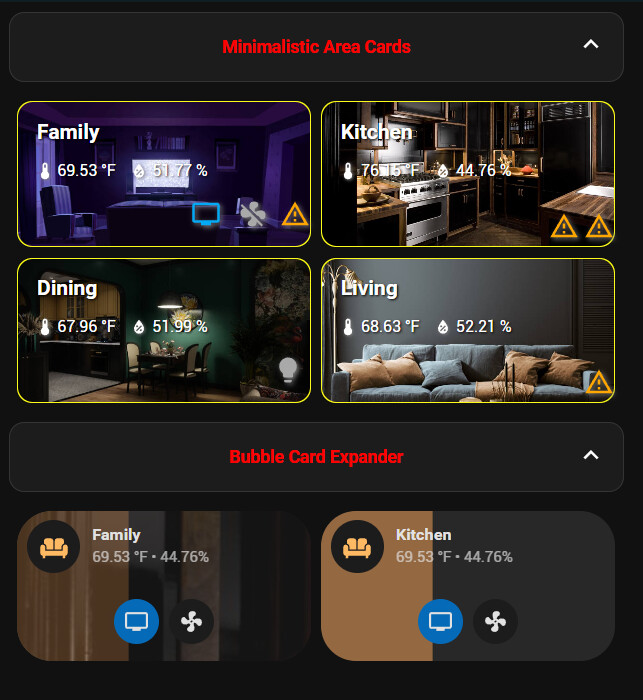
And below here is the current bubble code.
- type: custom:bubble-card
        card_type: button
        modules:
          - subbutton_below
          - get_state_attribute
        rows: "2"
        sub_button:
          - entity: media_player.family_room_tv
            icon: mdi:television
            tap_action:
              action: toggle
              entity: media_player.family_room_tv
          - entity: fan.family_room_ceiling_fan
            tap_action:
              action: toggle
              perform_action: fan.set_preset_mode
              target:
                entity_id: fan.family_room_ceiling_fan
              data:
                preset_mode: Low
        entity: light.family_room_zone
        name: Family
        icon: mdi:sofa
        button_type: slider
        card_layout: large-sub-buttons-grid
        tap_action:
          action: navigate
          navigation_path: "#family"
        button_action: {}
        get_state_attribute:
          - entity: sensor.family_room_temperature
          - entity: sensor.kitchen_humidity
        show_attribute: true
        show_last_changed: false
        show_state: false
        styles: |-
          .bubble-button-background {
           background: url(/local/images/kitchen-dark.jpg);
           border-color: yellow;
           border-width: thin;
          }
Bubble Card 3
v3.0.0-beta.9
If you missed the previous beta releases, please check this changelog (and earlier ones) to discover all the new features and fixes added so far.
Hi everyone!
Okay… I owe a small apology 
The previous beta introduced some unexpected issues on mobile, especially the inability to scroll the page when starting from some cards, tap actions triggering double tap actions, and a few other bugs I was sure were already fixed. Not great…
But the good news is, I’ve focused this update entirely on fixing those bugs, and I really hope this time it’s solid!
Fingers crossed (again!) 

 Bug fixes and improvements
-
Fixed mobile bug where scrolling inside a card prevented page scrolling
You can now scroll the page normally, even if you’re interacting with a card. #1535 -
Tap, double tap, and hold actions are finally fixed… for real this time!
These actions should now behave reliably on all devices. -
Fixed unwanted scrolling in some cards with
large-2-rowlayout and dropdown sub-buttons
This was supposed to be fixed in the previous beta, but the issue was still there. It should now really be resolved, and you should no longer be able to scroll inside cards when this layout is used. #1513 -
Select cards and sub-buttons now open in the correct direction again
A regression in the last betas caused some dropdowns to behave weirdly, this is now back to normal! This fix might even improve performance and stability on some dashboards! -
Select cards and sub-buttons with some attribute modes now update correctly
When an option changes from outside (like automations or other cards), the dropdown now reflects the change as expected. #1536 -
Fixed auto-scrolling to top when opening a pop-up on mobile
Opening a pop-up should no longer jump the whole page to the top. This time for good! #1495
As always, thanks for your patience and feedback! And let’s hope this is the one that holds up! 
How to test this beta?
Go to HACS, search for Bubble Card, and click on it. Then, click the three dots icon in the top-right corner and select “Redownload”. You’ll be able to choose the beta version under “Need a different version?”. You can then change back to your previous version if needed.
Also, make sure to clear your browser or app cache, you can also check this if the new version doesn’t load properly.

4 Likes
That’s great, thanks for the new beta, I was wondering if I’m to stupid to scroll on my mobile. Fixed now, as well as tapping on some buttons didn’t do anything. Works again…
1 Like
I’ve noticed a bug that has been happening for the last few beta updates across browsers and devices. When I try to enter/update the Entity_Id box in UI it just disappears. Though I can do that via YAML. As you can see from the screen shots.
Entity selection is available
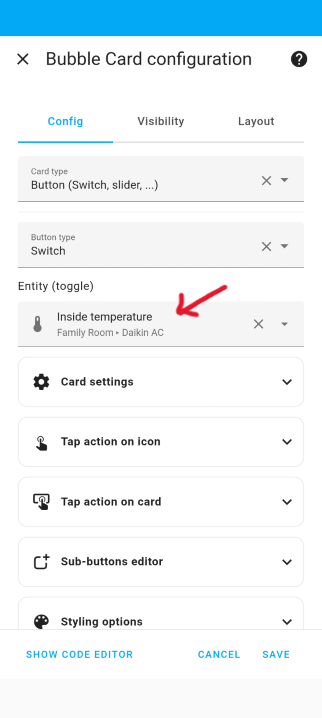
The moment I try to enter anything, it disappears/gone, very annoying as I then have to YAML mode to edit.

I can see that still in YAML and edit, if I want to.
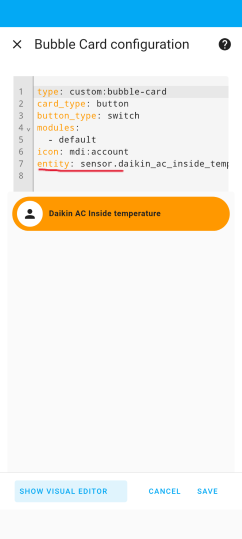
Has anyone facing the same issue. It the same behavior even with sub button entity Ids, and I thought either someone will raise it or will be fixed in subsequent releases. I did fresh install re-install but nothing works. Any help ?
I have a problem with the bottom of the bubble pop-up card. I’ve set the bottom so it doesn’t go to the bottom of the screen, but when scrolling the cards dont have the border radius so the corners jut out. Anyone has a solution? Thanks in advance

Hi, can you check in the editor, at the bottom you will see the version, do you see v3.0.0-beta.9? I’m asking this because HACS is sometimes downloading the wrong version, and also because I already fixed this issue 
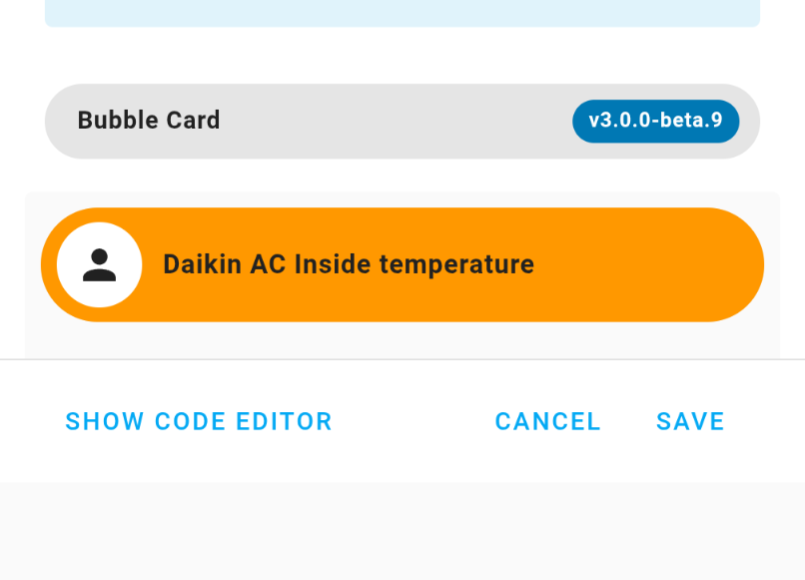
I just tried and I’m unable to reproduce this, could you open your browser console, then reproduce this again, then sen me the error you see in the console?
Check on Google if you never used the browser console
Edit: This would be even better if you could open a new issue for that here.
This happened to me too, but only for card_type: select and only from an early 3.0.0-beta. Since beta.7 it is fixed for me.
I will, but I tested it on iPhone, Android, Edge and Chrome…so was surprised that why no one has reported it.
I made a video but it was 10gb so can’t upload it.
Will add as much info as possible in Git.
Thanks.
1 Like
Are you sure you wiped Home Assistant theme cache, and browser cache?
The caching mechanism of HA is pretty aggressive.
I would personally try the following to fix these kind of things:
- wipe browser cache and HA cache;
- fully reboot HA.
Perhaps it helps…
Can someone tell my why the “darkorange” background is a yellow?
The bubble Icon has the right darkorange
type: custom:auto-entities
card:
  square: false
  type: grid
  columns: 2
card_param: cards
filter:
  include:
    - options:
        type: custom:bubble-card
        card_type: button
        button_type: switch
        icon: mdi:lightbulb-on
        card_layout: normal
        modules:
          - home-assistant-default
        styles: |-
          ha-card {
            --bubble-button-main-background-color: ${state === 'on' ? 'darkorange' : '#333333'};
          }
          .bubble-icon {
            color: ${state === 'on' ? 'darkorange' : ''} !important;
          }
      domain: light
  exclude:
    - options: {}
      entity_id: light.lichter
show_empty: true
sort:
  method: friendly_name
  numeric: false
  reverse: false
  ignore_case: false
  ip: false
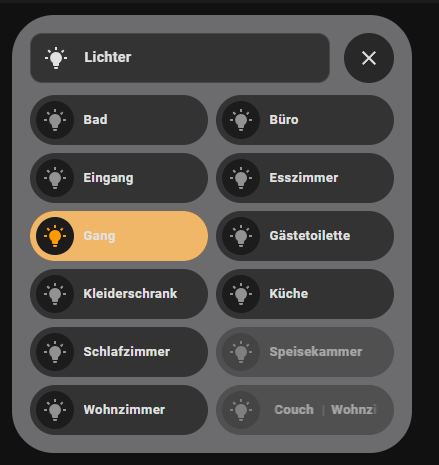
I don’t think it’s yellow but opacity. Adding 'opacity: 1 !important; below the line with “–bubble-button-main-background-color…” might work.
1 Like
I ran the console and when click the entity box, the errors immediately started going up in endless loop but I see a repetition of the following ones.
strip_prefix_from_entity_name.ts:13 Uncaught (in promise) TypeError: e.toLowerCase is not a function
    at a (strip_prefix_from_entity_name.ts:13:43)
    at r (compute_entity_name.ts:55:12)
    at n (compute_entity_name.ts:23:10)
    at ha-entity-combo-box.ts:279:30
    at Array.map (<anonymous>)
    at L.<anonymous> (ha-entity-combo-box.ts:273:10)
    at L.willUpdate (ha-entity-combo-box.ts:387:26)
    at L.performUpdate (reactive-element.ts:1501:14)
    at L.scheduleUpdate (reactive-element.ts:1399:25)

2
reactive-element.ts:1369 Uncaught (in promise) TypeError: e.toLowerCase is not a function
    at a (strip_prefix_from_entity_name.ts:13:43)
    at r (compute_entity_name.ts:55:12)
    at n (compute_entity_name.ts:23:10)
    at ha-entity-combo-box.ts:279:30
    at Array.map (<anonymous>)
    at L.<anonymous> (ha-entity-combo-box.ts:273:10)
    at L.willUpdate (ha-entity-combo-box.ts:387:26)
    at L.performUpdate (reactive-element.ts:1501:14)
    at L.scheduleUpdate (reactive-element.ts:1399:25)
Added more detailed version in here Entity ID disappears from the UI · Issue #1548 · Clooos/Bubble-Card · GitHub
Thanks for reply, but that does not work, no changes when i add it below 
Oke. What happens when you replace ‘darkorange’ in that line with ‘rgba(255, 140, 0, 1)’?
        styles: |-
          ha-card {
            --bubble-button-main-background-color: ${state === 'on' ? 'rgba(255, 140, 0, 1)' : '#333333'};
          }
Same result 

Maybe the Pop-up self make that Problem?
type: custom:bubble-card
card_type: pop-up
hash: "#Licht"
button_type: name
entity: person.penthouse
slide_to_close_distance: "400"
show_header: true
card_layout: normal
width_desktop: 80%
hide_backdrop: false
close_by_clicking_outside: true
name: Lichter
icon: mdi:lightbulb-on
show_icon: true
scrolling_effect: true
show_name: true
sub_button: []
modules:
  - "!default"
bg_color: "#737376"
backdrop_blur: "0"
bg_blur: "10"
bg_opacity: "90"
shadow_opacity: "0"
styles: |-
  /* Abrundungen der Ecken + Rahmen */
  .bubble-button-card-container {
    --bubble-border-radius: 12px;
    border-style: solid;
    border-width: var(--ha-card-border-width,1px);
    border-color: var(--ha-card-border-color,var(--divider-color,#e0e0e0));
  }

  /* Icon Header */
  .bubble-icon-container {
    background: #00000000;
  }

  /* Header */
  .bubble-button-card-container {
    background: #333333;
  }
Not sure tbh.
Perhaps try adding:
.bubble-button-background {
background-color: ${state === ‘on’ ? ‘darkorange’ : ‘333333’} !important;
}
Not in the popup card but in the button card from your first post.
1 Like