@Buddinski88 is it working now?
Yes now everything is working 
I have also added another request to GitHub 
This is great, however, is there a way to change the unit from celsius to Fahrenheit? The only spot I could see, did not change anything for me.
Thank you!

I’ll add it soon in the next update
 Bubble Room v2.3 – Release Announcement
What’s New
 Temperature Units
Added the ability to choose between °C and °F in the visual editor, with live conversion and correct display in the card. Color & Background Management
Improved handling of colors and backgrounds, with sensible default theme fallbacks and easier customization. Bug Fixes
- Fixed sub‑button rendering issues and empty‑entity filtering.
- Ensured all critical config properties (unit, sensors, colors, actions) have reliable defaults.
- Improved propagation of
config-changedevents for temperature and unit fields.
Enjoy! 
Thank you for the update, however, the live conversion is not working correctly. It is converting my input as if it were celcius, even though it is fahrenheit. The only way I can get it to read properly is by templating a sensor that converts my thermometer value to celcius and then using that in the card. Would it be possible to add a toggle to turn the live conversion on and off?
Thank you!


check 2.3.1
1 Like
 Work in progress: Bubble Room v3.0
I’m excited to announce that development on Bubble Room v3.0 is well underway!
This major update will bring new features and improvements based on your feedback.
 Stay tuned — exciting things are on the way!
1 Like
Hello,
I’m eagerly awaiting version 3.
While waiting for the rollout, I’m having a problem with the icons. I can’t customize them (example: mdi:power-socket-fr).
The icon isn’t displayed, only a generic one.
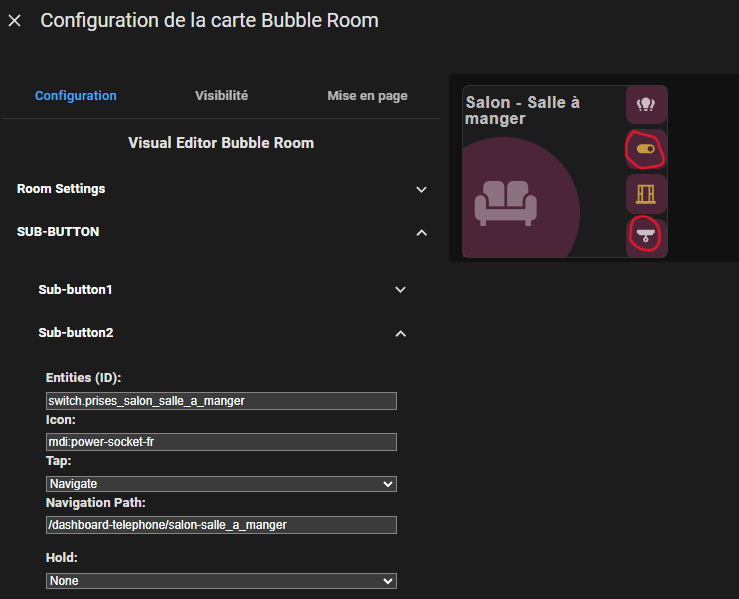
Maybe I missed something?
Thanks in advance.



@iPilla Thank you so much for this amazing card. I’ve been looking for something like this for a long time since ditching minimalist. This is truly great!!!
Any thoughts to do something similar for a welcome card (like the one in minimalist)? That would completely remove the need of having minimalist. The manual ways of doing it now are too complex and dont some out nicely!
Again thanks for all your hard work!