Hi everyone,
I’ve been working for some time on a complete redesign of my Home Assistant dashboard, and I’d like to share the current state of the project and get some feedback from the community.
My goal is not just to create another nice-looking dashboard. I’m trying to build a consistent, modular and configurable UI/UX system for Home Assistant, where the same visual language can be used for the house, rooms, computers, servers and infrastructure.
The design is based around a dark / translucent interface, rounded cards, simple icons and a limited number of accent colors. More importantly, I want the information to remain easy to understand at a glance.
The project is already available here: GitHub - renaldsouder/auralis-cards: Auralis Frame dashboard cards for Home Assistant · GitHub
But there is still some work to do.
What I currently have
I’m progressively creating dedicated cards/views for:
-
 Home overview
 -
 Rooms such as the living room
 -
 Lights, shutters and scenes
 -
 Windows PCs
 -
 Proxmox hosts and virtual machines
 -
 Unraid servers
 -
 Docker containers
 -
 Storage
 -
 CPU / RAM / system monitoring
 -
 Alerts and important system information
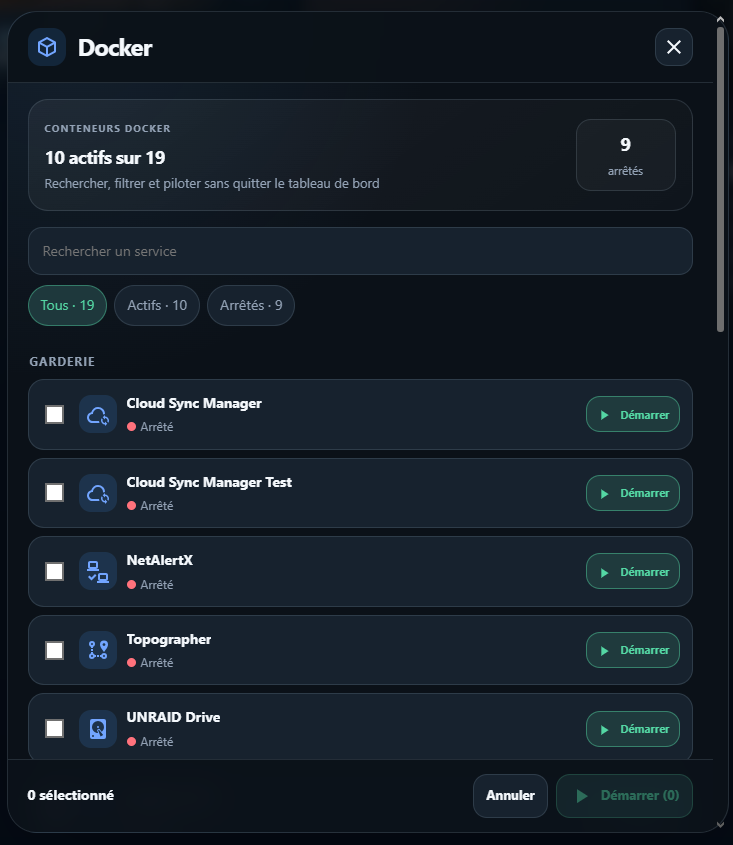
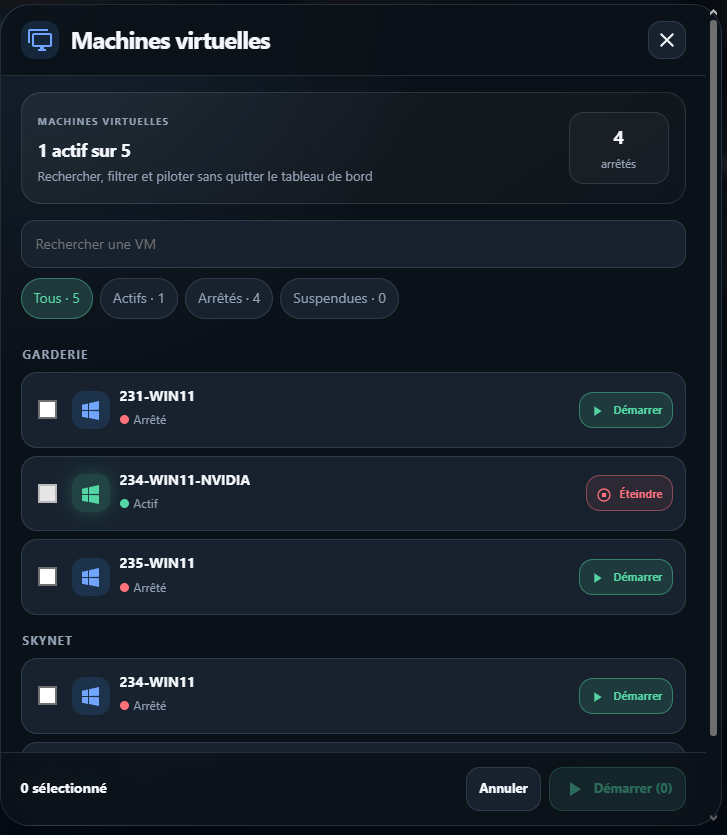
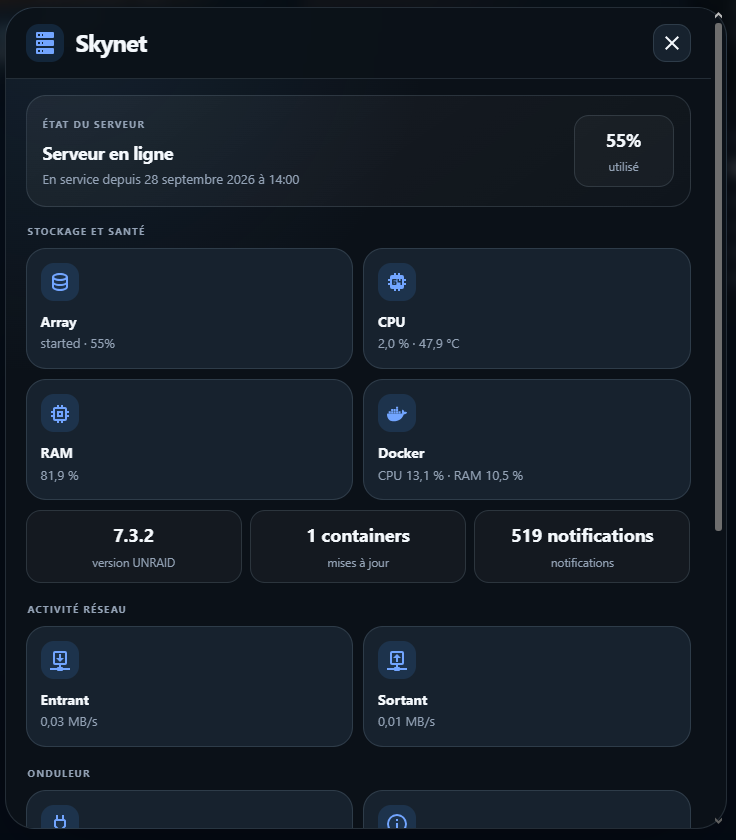
For example, the Unraid card currently provides a quick overview of:
-
CPU usage
-
RAM usage
-
VMs
-
Docker containers
-
selected disks / array / cache information
The idea is to avoid displaying everything at once and instead show the information that is actually useful, while keeping more detailed views available when needed.
Responsive navigation
Another part I’m currently working on is the navigation system.
On desktop, the navigation can be displayed vertically on the left side.
On mobile, it automatically becomes a horizontal floating navigation bar at the bottom of the screen.
More importantly, I don’t want the navigation to be hard-coded.
The goal is to allow the user to decide which Home Assistant dashboards/views should appear in the navbar:
Dashboard / View → Name → Icon → Order → Visibility
So if someone creates a new sub-dashboard in Home Assistant, it should be possible to add it easily to the navigation without redesigning the interface.
Configuration
I’m also trying to keep the system configurable through YAML instead of creating a dashboard that only works with my own entities.
Things such as:
-
entities
-
sensors
-
disks
-
servers
-
views
-
navigation entries
-
icons
-
background images
should be replaceable or configurable.
I’m using existing Home Assistant components where possible, including Mushroom, card-mod, navbar-card and other HACS cards, while creating the overall layout and behaviour around them.
What I’m trying to achieve
Ultimately, I’d like the dashboard to behave more like a Home Assistant control center than a collection of individual Lovelace cards.
The idea is to have the same interface for both:
Smart Home
→ rooms, lights, shutters, scenes, sensors, media…
and
IT infrastructure
→ PCs, Unraid, Proxmox, VMs, Docker, storage, services…
with a consistent design across desktop, tablet and mobile.
It is still very much a work in progress.
I’m posting it here because I’d really like to know what other Home Assistant users think before going much further.
A few questions in particular:
-
Do you like this kind of UI compared with more traditional Home Assistant dashboards?
-
Does combining Home Automation and IT infrastructure in the same interface make sense to you?
-
Would a configurable system like this be useful to other users?
-
Would you prefer something mainly YAML-based, or should configuration eventually be possible through a graphical interface?
-
Are there things you would change in the navigation or card design?
-
Would you be interested if I eventually released the configuration/cards as a reusable project?
I’ll add some screenshots below showing the current Home, Living Room, PC and Unraid interfaces.
Any criticism, ideas or suggestions are very welcome. The project is still evolving, so this is probably the best time to change things.
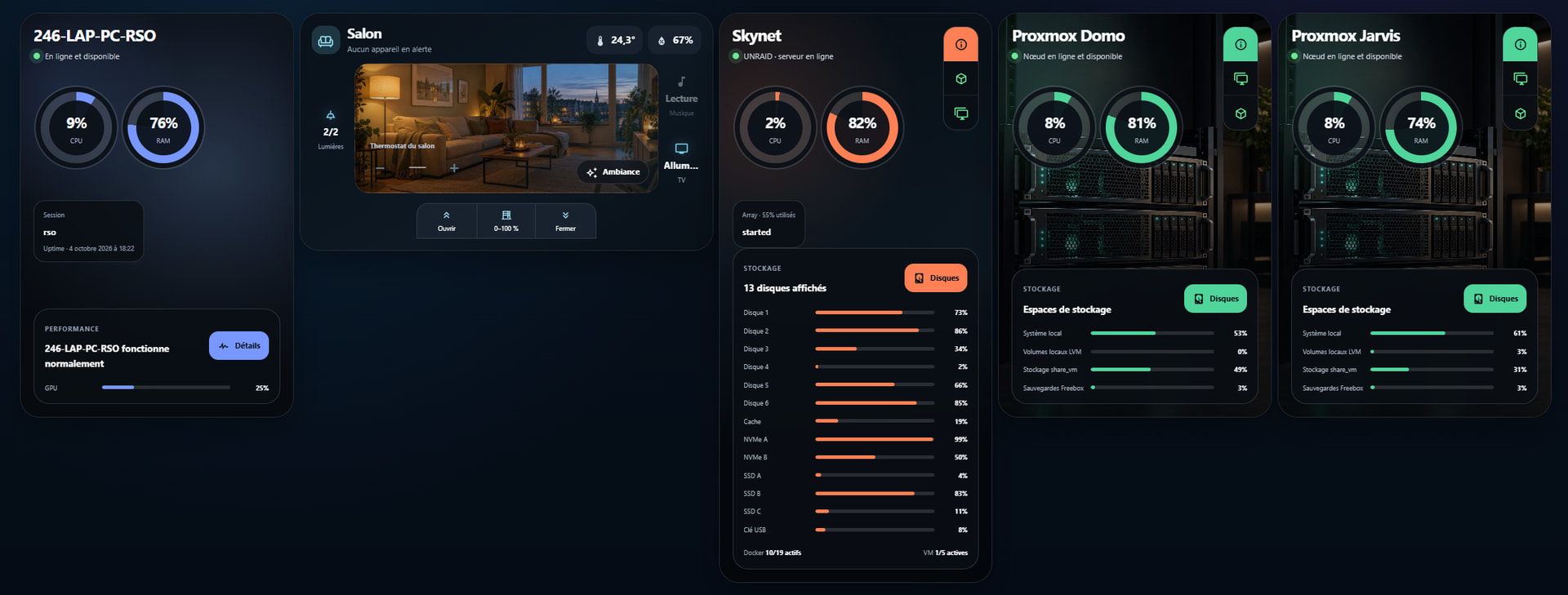
Dashboard :
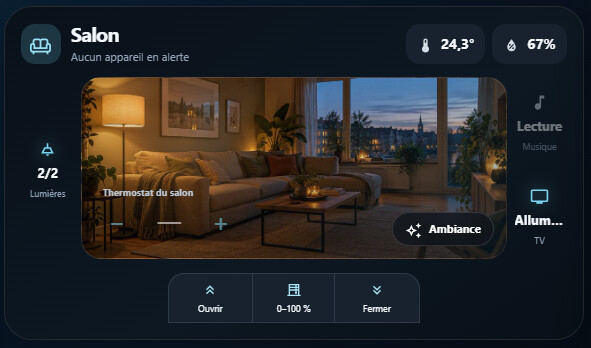
Room card:
Unraid card:

Proxmox card:

Sample configuration:
type: custom:auralis-proxmox-card
name: Proxmox Domo
theme: carbon
accent_color: '#50d59b'
card_background:
  mode: gradient
  gradient: 'linear-gradient(145deg, #0D1A17 0%, #090D12 48%, #060A0D 100%)'
show_grid: false
glass_opacity: 0.84
status_entity: binary_sensor.domo_status
cpu_entity: sensor.domo_utilisation_du_processeur
memory_entity: sensor.domo_memory_usage_percentage
memory_label_entity: sensor.domo_utilisation_de_la_memoire
uptime_entity: sensor.domo_uptime
backup_entity: sensor.domo_last_backup
restart_entity: button.domo_redemarrer
shutdown_entity: button.domo_shut_down
storages:
  - name: Système local
    usage_entity: sensor.storage_local_storage_usage_percentage_2
    capacity_entity: sensor.storage_local_total_storage_2
    status_entity: binary_sensor.storage_local_storage_active_2
    show_on_card: true
  - name: Volumes locaux LVM
    usage_entity: sensor.storage_local_lvm_storage_usage_percentage_2
    capacity_entity: sensor.storage_local_lvm_total_storage_2
    status_entity: binary_sensor.storage_local_lvm_storage_active_2
    show_on_card: true
  - name: Stockage share_vm
    usage_entity: sensor.storage_share_vm_storage_usage_percentage_2
    capacity_entity: sensor.storage_share_vm_total_storage_2
    status_entity: binary_sensor.storage_share_vm_storage_active_2
    show_on_card: true
  - name: Sauvegardes Freebox
    usage_entity: sensor.storage_backup_freebox_storage_usage_percentage_2
    capacity_entity: sensor.storage_backup_freebox_total_storage_2
    status_entity: binary_sensor.storage_backup_freebox_storage_active_2
    show_on_card: true
  - name: Sauvegardes Leonard
    usage_entity: sensor.storage_backup_leonard_storage_usage_percentage_2
    capacity_entity: sensor.storage_backup_leonard_total_storage_2
    status_entity: binary_sensor.storage_backup_leonard_storage_active_2
    show_on_card: false
  - name: Données Leonard
    usage_entity: sensor.storage_data_slow_leonard_storage_usage_percentage_2
    capacity_entity: sensor.storage_data_slow_leonard_total_storage_2
    status_entity: binary_sensor.storage_data_slow_leonard_storage_active_2
    show_on_card: false
  - name: VM rapides Leonard
    usage_entity: sensor.storage_vm_fast_leonard_storage_usage_percentage_2
    capacity_entity: sensor.storage_vm_fast_leonard_total_storage_2
    status_entity: binary_sensor.storage_vm_fast_leonard_storage_active_2
    show_on_card: false
  - name: VM intermédiaires Leonard
    usage_entity: sensor.storage_vm_med_leonard_storage_usage_percentage_2
    capacity_entity: sensor.storage_vm_med_leonard_total_storage_2
    status_entity: binary_sensor.storage_vm_med_leonard_storage_active_2
    show_on_card: false
disks: []
vms:
  - name: Home Assistant Production
    entity: sensor.hass_prod_statut
    icon: mdi:home-assistant
    group: Home Assistant
    node: domo
    cpu_entity: sensor.hass_prod_utilisation_du_processeur
    vcpus: 2
    memory: 4 Gio
    storage: 40 Gio
    start_entity: button.hass_prod_demarrer
    stop_entity: button.hass_prod_stopper
    restart_entity: button.hass_prod_redemarrer
    pause_entity: button.hass_prod_pause
    resume_entity: button.hass_prod_demarrer
  - name: Home Assistant Secours
    entity: sensor.hass_spare_statut
    icon: mdi:home-assistant
    group: Home Assistant
    node: domo
    cpu_entity: sensor.hass_spare_utilisation_du_processeur
    vcpus: 2
    memory: 4 Gio
    storage: 40 Gio
    start_entity: button.hass_spare_demarrer
    stop_entity: button.hass_spare_stopper
    restart_entity: button.hass_spare_redemarrer
    pause_entity: button.hass_spare_pause
    resume_entity: button.hass_spare_demarrer
containers:
  - name: Nginx Proxy Manager
    entity: sensor.nginxproxymanager_statut
    icon: mdi:security-network
    group: Infrastructure
    node: domo
    cpu_entity: sensor.nginxproxymanager_utilisation_du_processeur
    vcpus: 1
    memory: 2 Gio
    storage: 10 Gio
    start_entity: button.nginxproxymanager_demarrer
    stop_entity: button.nginxproxymanager_stopper
    restart_entity: button.nginxproxymanager_redemarrer
  - name: SFTPGo
    entity: sensor.sftpgo_statut
    icon: mdi:folder-swap-outline
    group: Stockage et transferts
    node: domo
    cpu_entity: sensor.sftpgo_utilisation_du_processeur
    vcpus: 2
    memory: 2 Gio
    storage: 500 Gio
    start_entity: button.sftpgo_demarrer
    stop_entity: button.sftpgo_stopper
    restart_entity: button.sftpgo_redemarrer
grid_options:
  columns: 12
  rows: 11
background_image: /local/auralis-cards/images/unraid.png