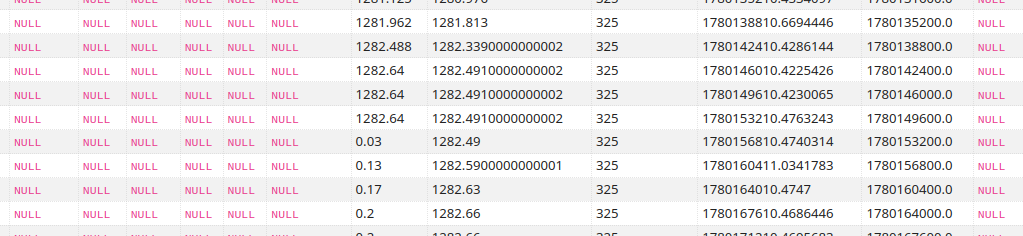
For entities with state class 'total' and 'total-increasing' the Recorder captures both 'state' and 'sum' in the hourly long-term stats. The 'state' is the state value at the end of the given hour period, and the 'sum' is a cumulative-ever counter. For 'total-increasing' sensors, the state and sum will usually be exactly the same, as both always increase monotonically. However, as you have managed to keep the same sensor when changing inverters, and the entity state reset back to zero, the Recorder 'sum' value will just continue to add in the hourly-difference to the sum, as it does for state class 'total'. So yes, you only need the 'newest' 'sum' value...
To actually get values out of the long-terms stats is a bit tricky. Easy to do in the Developer Tools > Actions using the recorder.get_statistics so easy to test.
I think there are (at least) four ways
- use a UI built automation, with variables, to extract the stats, process them in a template, and store the result in an input_number
- use YAML to run a template-trigger with an action / sensor
- use an SQL sensor, doing the SQL request directly
- using Node-RED
Personally I mostly use Node-RED, since it is easy to perform an Action call and capture the response, process the value(s) using JS or JSONata, and pass the result back to HA in a sensor state and/or attributes. If the 'result' of any action call is going to be an array or nested object, then using Node-RED for the data processing I find easier than templating, and NR will permit sending an array back to HA in a sensor attribute.
UI automation
Any automation can run an action, and update an input_number, so easy to start writing something using the UI. The recoder.get_statistics needs a variable start-from, so a variables section has to be added, using the YAML editing mode, with templates that are rendered when the action first triggers.
alias: Test read LT for Sum Value
description: Read Long Term Stats for most recent sum value
triggers:
- trigger: time_pattern
hours: "*"
minutes: "*"
seconds: /15
conditions: []
actions:
- action: recorder.get_statistics
data:
start_time: "{{ read_time }}"
statistic_ids:
- "{{ent_id}}"
period: hour
types:
- sum
response_variable: ending_value
- action: input_number.set_value
metadata: {}
target:
entity_id:
- input_number.help_solar_generated_by_period
data:
value: >-
{% set x = ending_value.statistics %}
{{[x][0][ent_id][0].sum|float()}}
mode: single
variables:
ent_id: sensor.help_ri_solar_energy
read_time: "{{ now().replace(minute=0)-timedelta(hours=2) }}"
I set the trigger to every 15 seconds, just for testing, but this can be run hourly or daily.
The action 'start-from' time needs to be the time at the start of the most recent full hour, hence two hours ago, and this is set into the variable "read_time" and used in the action.
The action response returns in "ending_value", and it requires extracting the sum statistic from the dictionary/array. The use of [x][0][ent_id] is a fudge to place the dictionary into a list, extract it back as the first item, then use a variable "ent_id" to read the entity rather than hard code the entity_id again as a constant.
ending_value:
statistics:
sensor.help_ri_solar_energy:
- start: '2026-06-02T08:00:00+00:00'
end: '2026-06-02T09:00:00+00:00'
sum: 15169.98
And it works - as long as you are happy to run the automation and have the result in an input_number...
Template Trigger Sensor with Action
AFAIK, it is not possible to create a template sensor based on the result from an action in the UI, hence you need to code YAML into the configuration file based on the template platform with a trigger, just as we have to do for getting hourly weather sensors to work.
template:
- trigger:
- platform: time_pattern
hours: "*"
minutes: "*"
seconds: "/15"
action:
- action: recorder.get_statistics
data:
start_time: "{{ now().replace(minute=0)-timedelta(hours=2) }}"
statistic_ids:
- "sensor.help_ri_solar_energy"
period: hour
types:
- sum
response_variable: ending_value
sensor:
- name: "Test LTS Last Sum Value"
unique_id: 20260602110730
state: "{{ending_value.statistics['sensor.help_ri_solar_energy'][0].sum|float() }}"
And, it does appear to work...
Again, every 15 seconds just for testing.
Using SQL sensor
HA has an SQL integration that can be used to create a sensor based on an SQL query, updated regularly, and it is very happy to use the HA database. As long as you don't mind writing SQL.
I make this simple by by-passing the LTS stats meta table lookup and using the meta_id directly for the entity of interest.
SELECT sum
FROM "statistics"
WHERE metadata_id = 134 ORDER BY created_ts DESC LIMIT 1
As long as you can look up and use your metatdata_id (mine is 134 in this case) this will pull the most recent sum value.
The SQL sensor will update the state with the result, and refresh around 25 seconds after the top of the hour. If you add the device class, state class, and unit of measurement then the results, which is always going to be a string, will be interpreted by HA correctly as a number.