Sure, I could use a key word for that, but I would really like to automate all that. As we already populate the location, if we have a vacation somewhere else, this would be a nice base for my case.
The key word would be another manual task my family would definitely ignore 
@Blacky My intention was not to say that your great Blueprint is faulty  I must have misconfigured something, I just want to find out what
The text is a german phrase saying “You must take out trashbin {{ trigger.calendar_event.description }}” but I tested it also without any text and just the variable {{ trigger.calendar_event.description }} and still it does not display.
For the calendar type question I must say that I do not understand the question, the events are displayed in the HA Calendar but are being populated by an integration (Waste Collection Schedule).
At one point I thought it could come from special german characters, but also without using those, it does not display.
In the title everything is displayed correctly.
well I feel stupid now, I mixed up {{ trigger.calendar_event.description }} and {{ trigger.calendar_event.summary }}. With {{ trigger.calendar_event.summary }} it displays the title of the event, this what I need, so everything works fine.
Nice one… glad you found it! We’ve all done that before, but it’s great to hear it’s working for you now. Thanks for getting back to us!
Blacky 
Hello!
I’ve stumbled upon this great blueprint, and I have a simple question; is it possible to trigger it only if there is a description in the event (i.e. description ≠ empty) ?
My use case is, for school, the kids have their schedules, but sometimes we have to prep things before school (e.g. swimming gear, picnic, …) and in those cases I just put it in the description; other days are “empty” meaning that there’s nothing out of the ordinary to prep.
Welcome to the community.
You have 2 options for the trigger.
- Trigger on a key word (like a password)
- Trigger on everything.
Blacky
Hey sorry didn’t notice your reply
Thank you; so there’s no way to trigger it “if description is not empty” ? Is there any way I could ask for a proper feature request? 
@Blacky
I’m getting an error in my traces for calenders all of a sudden. Do you have any idea what this pertains to?
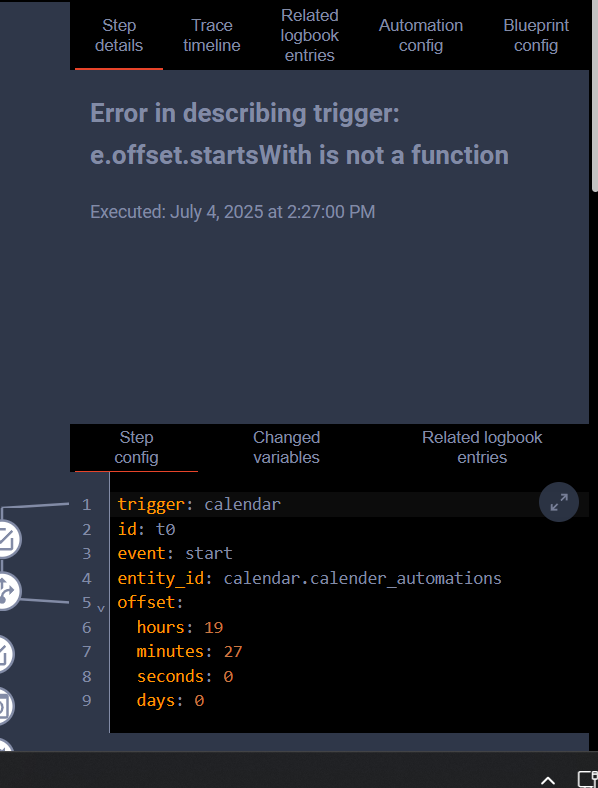
Thanks for the suggestion! I’ll add it to the suggestion list, though to be honest, using a keyword might be a better solution here.
Blacky
I haven’t update to the latest HA so maybe they changed how the offset is handled. Keep an eye on it and let me know if you still get it. I put a note to look at it when I update HA but reading the forum it looks a bit buggy so I may skip this one.
Blacky
1 Like
any way to make the notifications persistent i want them to stay untill an action has been carried out?
Great Blueprint thanks, my challenge is that I’d like my notifications to include the google calendar event start time.
background is, our supermarket, sainsburys, is really good you place an online order and it will put an event in the google calendar, but it would be handy to have a notification call out the time/day of this event. Is this possible ?
Thanks again
I can’t see why not. I know other people are using it with there google calendar (I don’t use google) And then you just need to set up an automation to use a keyword (If supermarket always add a unique word) word in then use that word as your keyword or you can allow all and then use the global condition like this click here
Blacky
Amazing work!
Just one question: any chance of adding a tag to the notification?
That’s enable to use Introduction | Home Assistant Companion Docs
(for example, when anyone takes action on something and needs to remove the notifications from all other devices)
1 Like
Transform Your Calendar: Turn Events Into Notifications and Actions! 


New Feature 
Start & End Notify
Notification Tags - Use a tag to keep your notifications organized. When a new notification with the same tag is sent, it replaces the old one, preventing clutter from multiple notifications for the same appliance.
Notification Icon & Icon Colour - Android Only - This allows you to replace the default Home Assistant icon with one of your choice and set the colour for Start Notify, End Notify, or Watchdog.
If you like this blueprint? Consider hitting the  button in the top post
If you like my blueprints, and would like to show your support or just say thank you? Click Here 
Enjoy
Blacky 
2 Likes
I use the blueprint to control the occupancy status of our vacation rental via the calendar of our channel manager (Smoobu).
Unfortunately, I cannot influence the entries in the calendar, as these are created by Smoobu.
The titles look like this: Guest name, Apartment name (with comma as separator)
When the vacation rental is closed, the title looks like this: Apartment Name
I had always used the following trigger: , Apartment Name (main trigger was the comma)
Unfortunately, the comma is now being ignored as it´s a separator for several triggers.
When the apartment is closed, the attributes show Blocked or Auto-Blocked in the description.
How can I configure the blueprint so that it is not triggered when Blocked or Auto-Blocked is in the attributes description, or alternatively, so that it is triggered when there is a comma in the title?
Welcome to the community.
In global conditions add a condition, then search for template, select it then copy & past this code in.
{{ (trigger.calendar_event.description or '') not in ['Blocked', 'Auto-Blocked'] }}
Then in Use The Calendar Trigger - Key Word select Don’t use “Key Word” in calendar. Now everything will be trigger but "Blocked" or "Auto-Blocked" in the description.
Blacky
1 Like
Thank you @Blacky!
I have adapted the automation accordingly, but unfortunately the automation is still triggered with every calendar entry.
Here is my blueprint as yaml:
alias: "Fewo Status Host: Smoobu Kalender"
description: ""
use_blueprint:
  path: Blackshome/calendar-notifications-and-actions.yaml
  input:
    calendar: calendar.smoobu_haus
    calendar_trigger: ", Haus"
    start_calendar_offset:
      hours: 12
      minutes: 30
      seconds: 0
      days: 0
    start_action_1:
      - target:
          entity_id: switch.ccu3_webui_sv_fewo_status_host
        data: {}
        action: switch.turn_on
    start_notify_device:
      - phone1
      - phone2
    include_start_auto_actions:
      - enable_start_action_1
    include_end_auto_actions:
      - enable_end_action_1
    end_action_1:
      - target:
          entity_id: switch.ccu3_webui_sv_fewo_status_host
        data: {}
        action: switch.turn_off
    end_time_delay:
      hours: 0
      minutes: 15
      seconds: 0
    include_end_action_button_confirmation: disable_end_action_button_confirmation
    include_end_action_buttons:
      - enable_end_action_button_1
    end_action_button_1: Frei bestätigen
    end_action_button_stop: Abbruch
    end_notify_device:
      - phone1
      - phone2
    include_end_notify: enable_end_notify_options
    end_calendar_offset:
      hours: 11
      minutes: 15
      seconds: 0
      days: 0
    include_start_notify: enable_start_notify_options
    global_conditions:
      - condition: template
        value_template: >-
          {{ (trigger.calendar_event.description or '') not in ['Blocked',
          'Auto-Blocked'] }}
    start_notify_tag: Fewo-Belegung
    start_notify_icon: mdi:bed
    end_title: "Check-Out {{ trigger.calendar_event.summary }} "
    start_title: Check-In {{ trigger.calendar_event.summary }}
    end_notify_icon: mdi:bed
    start_notify_icon_colour:
      - 255
      - 41
      - 41
    include_calendar_trigger: disable_key_word

Do you have an idea what the failure could be?