I just published my first custom Lovelace card for Home Assistant and wanted to share it here. Looking for feedback before submitting to the default HACS store.
What it is
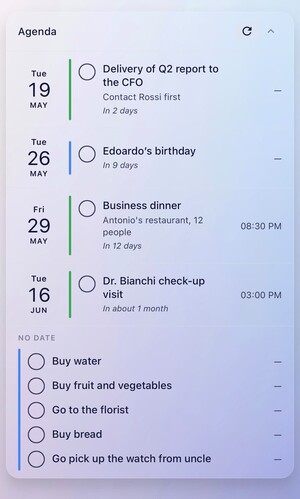
Calendar & Tasks Card is a unified agenda view that combines calendar events and todo tasks in a single, sorted timeline.
Most existing cards show either calendar events OR todos, not both. I built this because I have a shared CalDAV calendar with my partner and a shared todo list, and I wanted to see "what's coming up" at a glance, mixing appointments and reminders.
Main features
Calendar events + todo tasks in one timeline
Dedicated "Overdue" section (highlighted in red)
"No Date" section for undated tasks
Complete tasks directly from the card (checkbox)
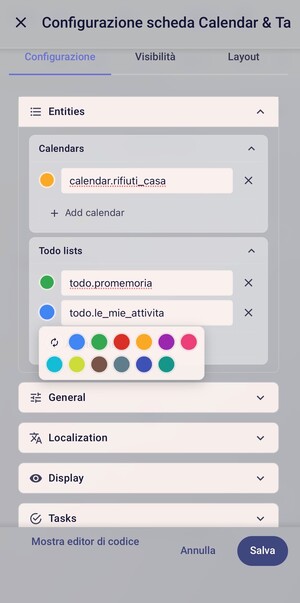
Customizable colors per entity (12-color palette)
Event location display, optionally clickable to open Google Maps
Multilingual: English and Italian (auto-detect from HA)
Optional ISO week numbers
Relative time labels ("Tomorrow", "In 3 days", "Yesterday")
CalDAV iCloud (read works, task completion broken due to known HA core bug)
Google Tasks (works, but no time-of-day due to Google API limitation)
Calendar entities (Apple/Google/CalDAV - standard HA support)
Feedback welcome!
This is my first card on HACS, so I'm sure there's room for improvement. If you try it and find bugs, weird behavior, or have suggestions, please open an issue on GitHub or reply here.
I wish it was possible to see Google Tasks subtasks so far I can't find any card that supports that unless its just a weird Google Tasks API limitation
Hey, thanks for trying the card!
As far as I know, it's not really a Google Tasks API issue but more of an HA limitation todo.get_items returns subtasks as flat items without any parent reference. So my card has no way to know which tasks are subtasks of which.
If that ever changes on the HA side, I'll happily add it!
It’s not a Google Calendar issue — the card currently matches events only by
their start date, so multi-day events show up on the first day only.
I’ll fix it in the next release so they appear on every day they span.
Thanks again for the report, and glad you’re enjoying the cards!
Custom backgrounds: transparent mode or a background image with a light/dark overlay slider
Add event/task button: create calendar events and todo tasks right from the card, no page switching — pick the type, the calendar/list, and fill in the details
v1.8.0 is out — Monthly grid view & French translation
Hi everyone! A update just landed:
Monthly grid view
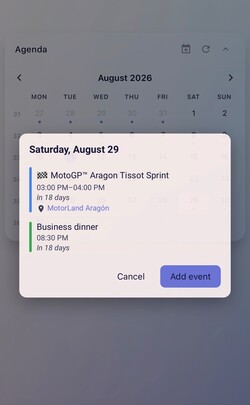
You can now optionally switch the card to a month calendar grid (month_view: true) — the classic agenda list is still here and stays the default.
Today is highlighted, event dots show which days have events or tasks, and tapping any day opens a popup with the full details for that day.
Month navigation
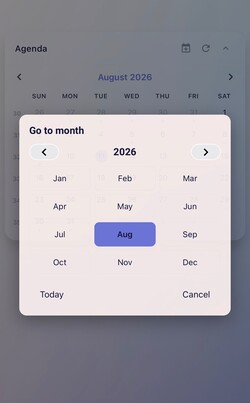
Move between months with the arrows, or tap the month name to open a picker — a grid
of the 12 months with year arrows and a “Today” button to jump back.
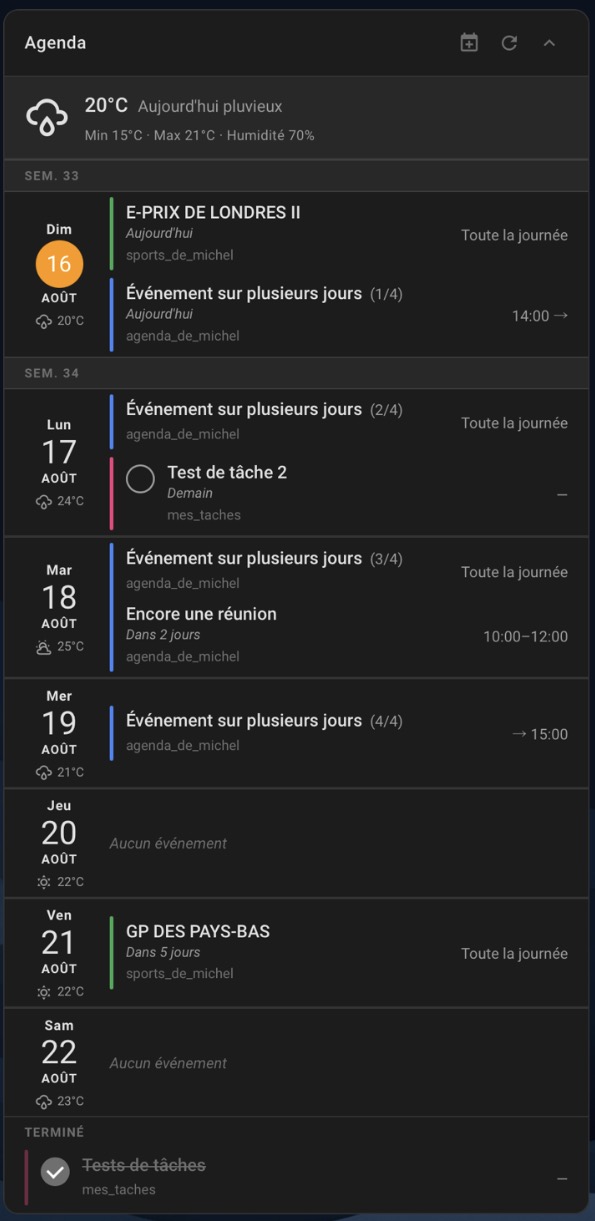
French translation
The card and the visual editor are now available in French, thanks to @ValMarDav !
(Italian, English, German and French are all supported, auto-detected from your system.)
The month view is fully optional — it defaults to off, so existing setups keep the
agenda view exactly as before. All your display toggles (compact mode, week numbers,
day details) work in the grid too.
A big update focused on making the card feel fully native inside Home Assistant, plus two new display features.
New
Event progress bar — an event that’s happening right now can show a thin bar under it, filled in the calendar’s colour (event_progress: line). In the screenshot below you can see two in-progress events, each bar showing how far along that event is. For multi-day events the bar shows only on today, filled to the real progress across the whole event, so you can tell at a glance how far along it is. It advances on its own every minute.
Hour / minute countdown — imminent events and tasks with a precise time now show “In 3 hours” / “In 45 min” instead of a generic “Today”.
Native ha-form editor — the whole editor is rebuilt on Home Assistant’s native controls (entity pickers, colour pickers, dropdowns, action editors), consistent with the built-in cards.
Native colour system — per-entity colours now use HA’s native colour picker, with automatic rotation from the theme palette for entities left unset.
Native collapsible sections in the editor.
After updating, please re-pick your calendar colours
The colour system moved to Home Assistant’s native palette, and colours set in older versions are not carried over. Open the card editor and re-pick the colour for each calendar/list you had customised — anything left unset uses the new automatic rotation.
Hi there! Thank you so much for creating this amazing card. It’s exactly what I needed to unify my events and tasks!
I would love to request a new feature: a start_days_ahead (or offset) option.
Currently, the card always starts showing events from “today.” However, I would like to create a dashboard that shows an “upcoming view” starting from tomorrow or next week (e.g., start_days_ahead: 1).
Is this something that could be considered for a future update? Thank you for your hard work!
Hi, and thank you for the kind words — really glad the card is useful to you!
That’s a good idea. A “start from tomorrow / next week” offset would be a nice way to build an upcoming-only dashboard, and it’s something I’ll definitely look into for a future release.
You can now set overdue_position: top to show the overdue section above the days. There’s also an overdue_days option if you want to limit how far back overdue tasks are shown.
I also reworked the overdue section visually: the coloured bar now follows each list’s colour and it lines up with the rest of the agenda.

 Calendar events + todo tasks in one timeline
 Dedicated "Overdue" section (highlighted in red)
 "No Date" section for undated tasks
 Complete tasks directly from the card (checkbox)
 Customizable colors per entity (12-color palette)
 Event location display, optionally clickable to open Google Maps
 Multilingual: English and Italian (auto-detect from HA)
 Optional ISO week numbers
 Relative time labels ("Tomorrow", "In 3 days", "Yesterday")
 Collapsible card with persistent state
 Full visual editor (no YAML editing required)


 Monthly grid view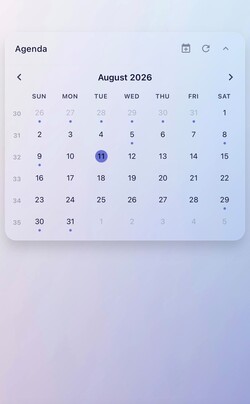
 French translation
 GitHub:
 View switch button — a header button to flip between agenda and month view without opening the editor (
 Hide “No Date” section — new
  New
New Event progress bar — an event that’s happening right now can show a thin bar under it, filled in the calendar’s colour (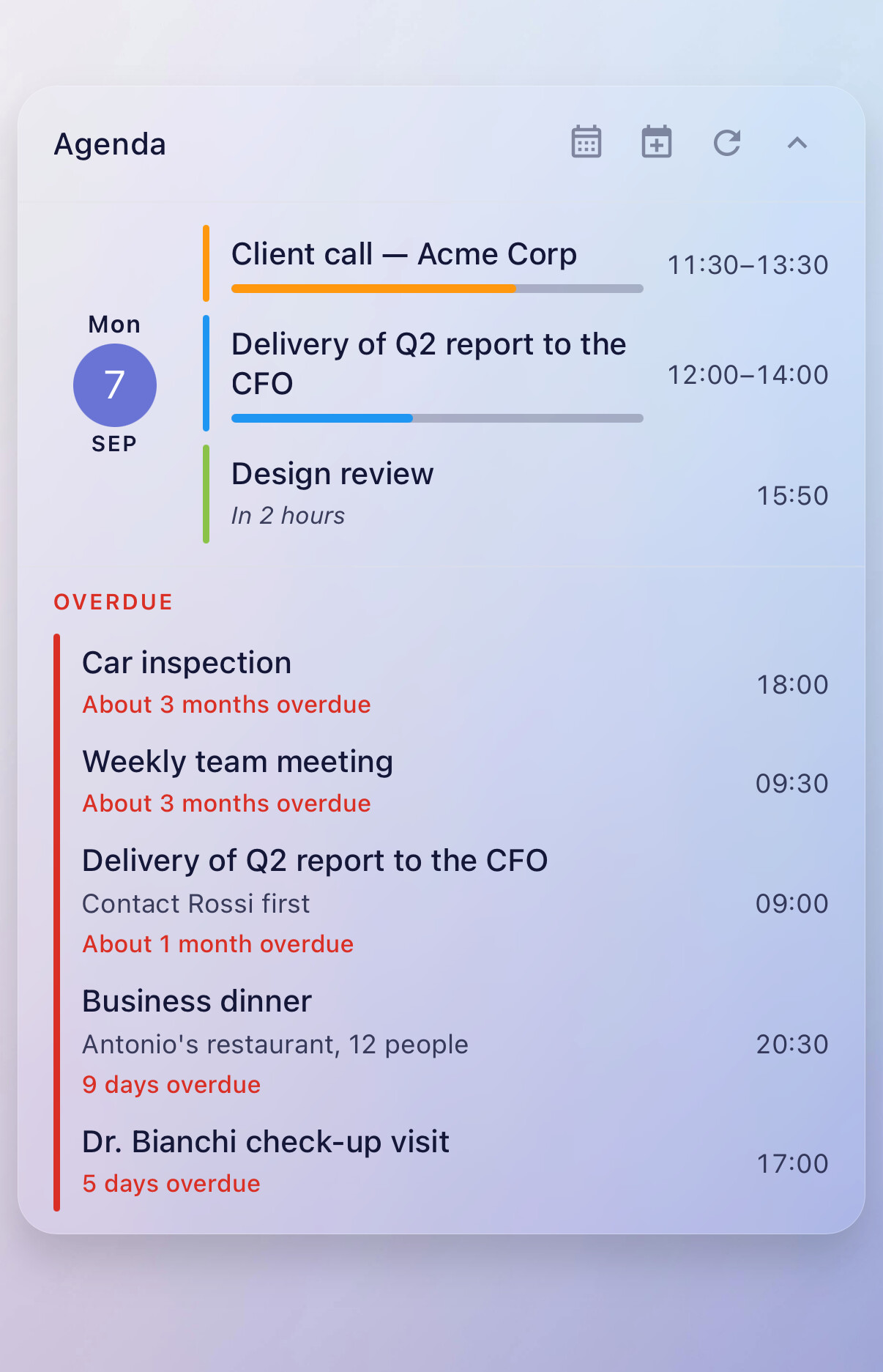
 Changed
 Native
  Native collapsible sections in the editor.
 After updating, please re-pick your calendar colours