hi is your downloader integration setup to use “downloads” folder? If so, try removing config
I set up downloader to use the folder “download” this folder is setup in config/download.
I use home assistant in docker is there a difference to hass os installation?
When I only use download instead of config/download I get the error shown below
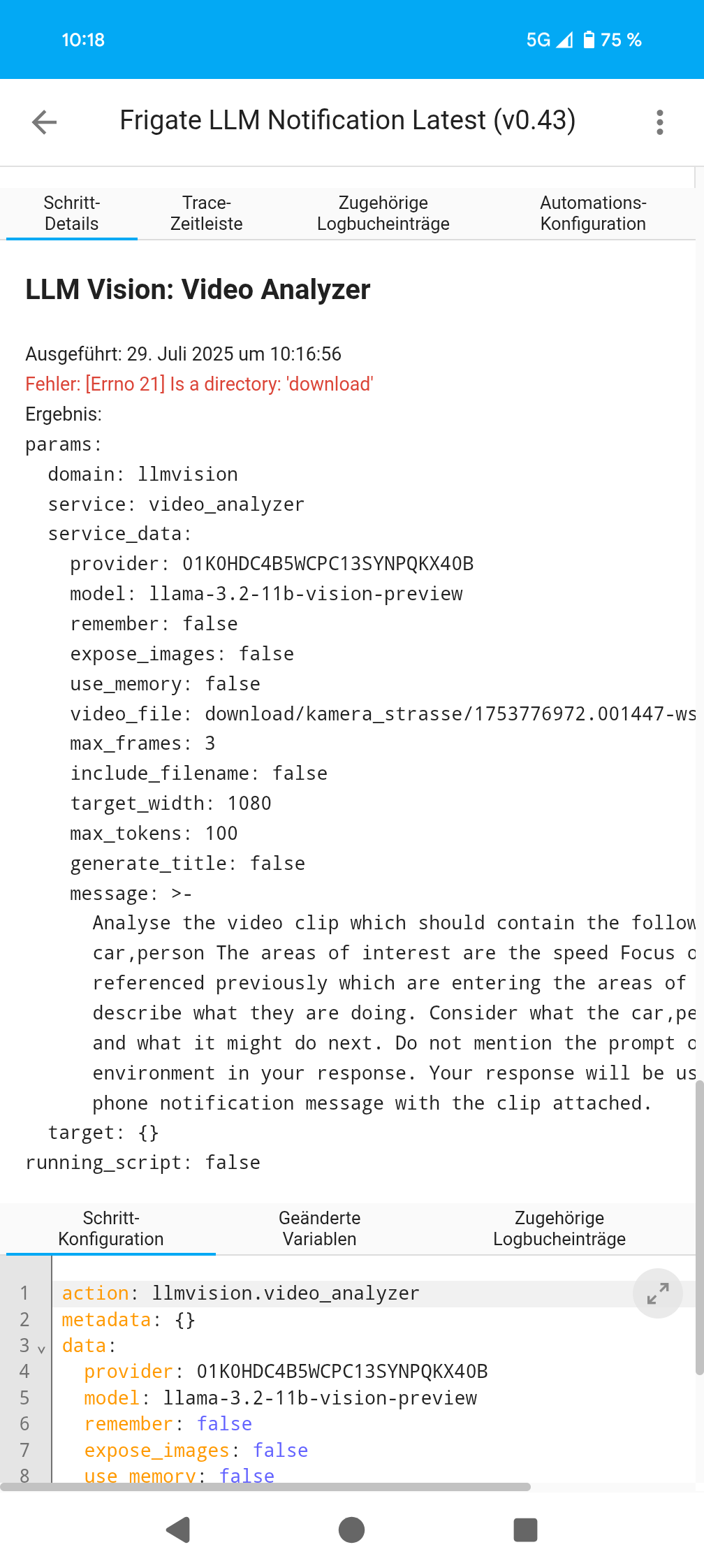
hi is the file present in the “download” folder?
can you provide a full trace?
This is a super handy blueprint. I have a question about its design, though – is there a reason it’s downloading the videos for analysis (and, thus, requiring something to be set up to clean them up again) rather than passing the frigate ID to LLM Vision directly? The notifications seem to be using the Frigate proxy URLs, so they don’t need to be downloaded for that.
In testing, this works well for me, but as a general rule I avoid using things that need to be separately managed/cleaned up, so avoiding the downloads entirely would be nice. (Really, all LLM Vision is doing is downloading them, too, but it’s an integration and not a blueprint, so it can delete them again.)
You are 100% correct i did this when I was having consistent issues with LLM Vision directly using Frigate api urls even with LLMs retry and timeouts parameters setup, i did see the problem was common among various posts at the time so thats why this blueprint was created tbh. I would be open and would prefer to having the downloader step removed all together but i would like to test how it is currently running direct before removing the option.
The secondary benefit to downloader is you get feedback if the file exists so we know that LLM Vision will actually get an image or clip to analyse.
Maybe I will add a simple input switch for users to bypass the downloader logic and see how it performs.
dev build added with downloader integration bypass input
Replaced llmvision.image_analyzer with llmvision.video_analyzer this fixes frigate api url errors for new event inital image analysis.
 Update August 2025 - Dev build
- Ability to bypass the downloader integration
Version: v0.5 dev
Author: whag
Last Updated: 01 Aug 2025

how can i run this automation only if i m not at home?
At the minute you cannot. You could manually disable the automation, I can add a person location condition to the main condition checks.
that would be cool.
i will do it for the moment by turning off the automation with another automation.
Tried to load 0.5 and got this error:
Invalid blueprint: extra keys not allowed @ data[‘blueprint’][‘input’][‘frigate’][‘input’][‘in_camera’][‘selector’][‘reorder’]. Got None
Hi there, strange I just imported from the above link it worked okay, are you sure the frigate camera was selected?
Possible issue if this dev version overwrite any original blueprint if you had the main branch imported previously because the yaml file was named the same as the main branch version, I have renamed the file now so if you import it again via the link it should create a new instance rather than overwriting any older file.
This was during import; I didn’t even get to select a camera.
I copy and pasted the yaml manually to try and trouble shoot, then asked ChatGPT and it had this to say:
Home Assistant blueprints do not allow
reorderunder anentityselector. The valid keys for anentityselector are:
domainintegrationdevice_classmultipleTo fix this, you need to remove the
reorder: falseline from this section:in_camera: name: Frigate Camera description: Frigate cameras only selector: entity: multiple: false filter: - integration: frigate domain: - camera reorder: false # <-- INVALIDThe corrected version should be:
        in_camera:
          name: Frigate Camera
          description: Frigate cameras only
          selector:
            entity:
              multiple: false
              filter:
              - integration: frigate
                domain:
                - camera
I made the changes it suggested, and was able to load and save the blueprint as expected.
Now that I have it working however, I was interested if you could provide more detail into how the downloader function is supposed to work, and how the automation functions if you do not enable downloader?
This has been the most solid foundation for a Frigate AI automation I have seen, so thanks for the hard work! I would love to try and help contribute what I can to get this working perfectly!
Hi that is interesting and that has been in there since i have added this blueprint so i cannot explain it due to recent changes unless its a HA version issue. Out of curiosity which version are you running.
Hi again, the Downloader integration was the my inital workaround for my initial problem with llm vision using frigate urls and the fact you cannot use urls for image analysis so I created this blueprint.
As of the recent dev build i added the option to override the need for the Downloader integration so llm vision would interact directly with the frigate urls.
Why i like using Downloader is the fact it has an event to monitor when the file is downloaded which you do not get with direct LLM Vision to Frigate but in my recent testng the legacy issues have been resolved and i personally get the results expected i.e. no errors with file not found etc… so i plan hopefully to continue with the downloader integration enable set to disabled.
the downloader integration option will not be removed regardless.
Currently testing V1.0:
Running offline atm, new action buttons aswell as my current click actions similar to other frigate blueprints out there , i have also included an option to enable a silence action button with configurable time input at the notification level which will disable the automation for the time input on the app, a call number button with configurable input at the setup level and then the usual options view live , view snapshot etc… buttons
I’m getting the same error, I’ve tried just adding the yml to my blueprint folder too but it isn’t appearing
No matter what I try I can’t get the automation to trigger on version 4.3 and I can’t get version 5 to work at all
Hi there, Can you post a failed trace please