I assumed the downloader put them in there. I created the downloader folder using samba. Then it created a subfolder for each camera and had a image and video in each. So something seemed to be working. Or at least that’s how I was understanding it. I really don’t know, I just know I didn’t put them there.
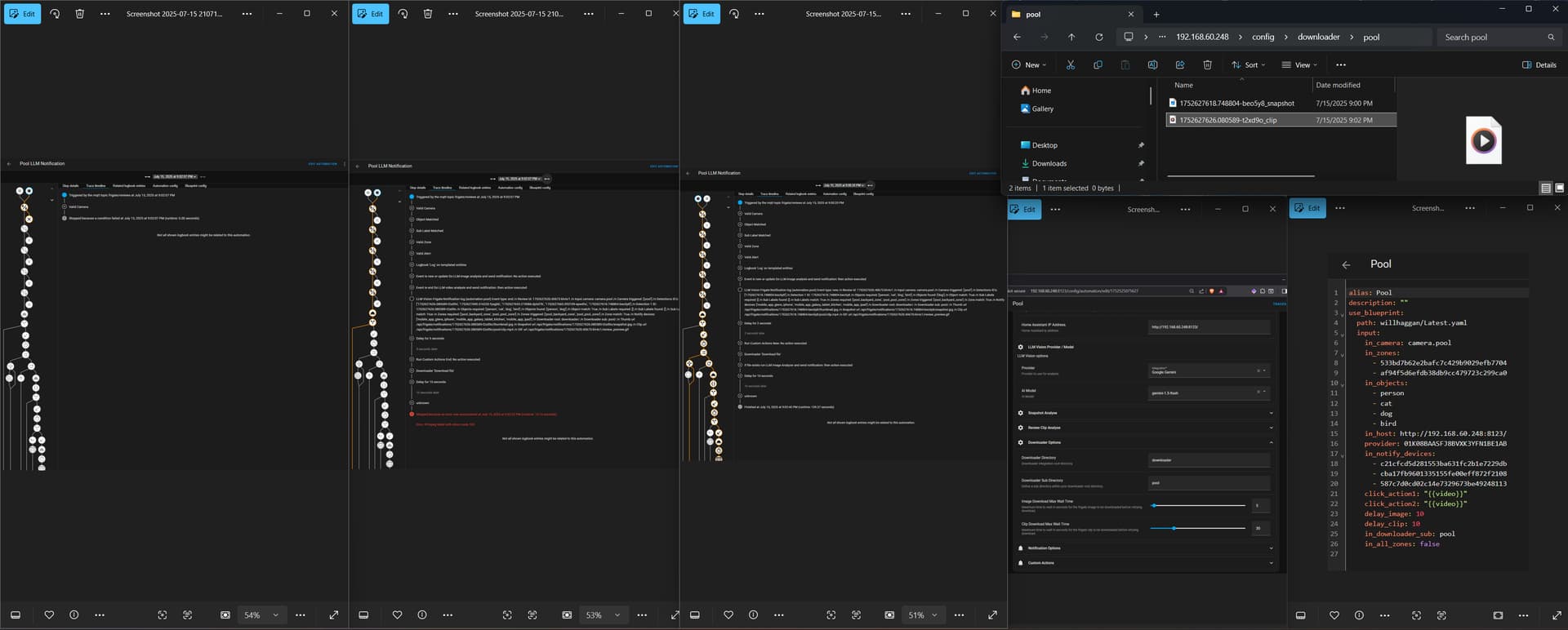
I used samba to create a downloader folder inside of config. I then updated the downloader entry to say “downloader”. I walked around to trigger my pool camera. There are 3 traces with identical times, first failed early, second had a “FFmpeg failed with return code 163” error. Then the third finished!
I received a notification on my phone that stated there was no activity and had a video that will not play. The video in the config>downloader>pool folder won’t play either. I tried /api/frigate/notifications/1752627626.080589-t2xd9o/pool/clip.mp4 and that comes up, but also doesn’t play. Frigate issue?
My assumption is the notification had no activity due the corrupted video or maybe the long delays in my yaml. Just guessing though.
Am I looking at the right area for the traces? I have been selecting the Trace Timeline tab. Is there anywhere the gives more detail, especially when it fails early? Somewhere better for me to pull data from the share?
Thanks for all the help, looks like I am getting really close!
Hi there shouldn’t be any device triggers in this blueprint it’s a mqtt event trigger from Frigate.
I can’t explain the problem you have with the notify device name although, you could just convert it to an automation and take control of it and change anything you like the notify devices etc.
Let us know how you get on.
No problem although did you actually install downloader integration.on home assistant.
Okay so you have downloader working now. It is hard to see what that error says within the screen grabs you posted.
If it’s not playing directly from the API then theres another problem. Is the camera functioning correctly on frigate.
Sorry about that, looks like the image was compressed a little too much. I will get it reposted if needed. It’ll have to wait until I get home though.
Currently everything is working! The API is now working correctly, my FFMPEG on frigate failed, the log was blood red. I have that corrected and traces are finishing. I even have the dashboard LLM Vision cards updating now.
The only thing I need to figure out now is there is about a 7 minute delay in my iPhone notifications. I assume adjusting some of the timings in the blueprint should help.
After that, I want to group my cameras for integrated notifications. Then I will work on cleaning up my prompts with the suggestions you have posted.
This is a excellent product. Thank you for helping with my issues, these were all due to lack of experience and misunderstanding on my part.
Any ideas on this? Nothing is showing in my downloader folder.
can you share your trace or any details on your downloader directory etc.
I’ve attempted a manual download via the action in Dev Tools. It’s now failing much earlier than that. Something about it not being a valid camera?
Yes that’s correct the cameras do not match, that trace was from a camera called garage_door_cam you are looking for front_door_cam.
Also just looking at some of the other parameters, your local IP address and the downloader directory correct.
 Updates July 2025
-
Frigate Severity Selection:Select Alert or Detections
-
Clickaction Options Expanded
-
MQTT before_zones Added to Zone Match Logic
-
Temperature parameter removed to align with LLM Vision 1.5
Version: v0.42
Author: whag
Last Updated: July 2025 -
Allow different providers/models for image and clip analyse
-
Description tidy up
-
New Groq models
Version: v0.43
Author: whag
Last Updated: 22 July 2025
Here’s an updated trace. Any idea why I’m not getting a notification?
Hi, Can you upload the trace, paste it here directly rather than any external links please
I assumed uploading it here was frowned upon. I see that I forgot to include the pastebin URL. Oops.
If you still prefer it uploaded here, I will do so.
Hi thanks for the upload although hard to read from pastebin.
I can see the cameras , zones , severity, objects match so basically conditions are met.
Can you supply a screenshot of the trace as shown in HA.
So to be sure if you can confirm a few things:
I see sub directory for downloader as none… is this correct.
Your HA instance is on 192.1618.1.1 and your downloader integration folder is named “downloader” are these correct ?
Ugh, I had the IP wrong! It works now! Thanks!
Can you expand on Family Member Recognition from your examples and usecases?
- How do I define family?
- What is the purpose of the YAML there? It doesn’t seem to be something I can C&P then just update with my specific settings.
Well its good you found the issue, are you getting valid notifications then?
The examples require alot of testing and setup obviously as you would expect and adjusting prompts etc, but ultimately using AI, the sky is the limit and using cutom actions is the final key.
Use Memory: true
With the LLM vision integration as the core anything is possible and the family members is acheived by enabling the memory function and ensuring it is populated and naming the memory files accordingly, so maybe name a memory image file “family member flyize.jpg” or make a prompt to acknowledge a person(i.e. flyize) and if true then “FAMILY” should be stated in the response.
Similar results can be had with frigate’s built in sub_labels which can give you recognised objects i.e.post man, amazon man, family member names and use similar logic in the custom actions via a template.
Which is better only you will know, there is alot of factors at play with camera res, angle and the rest, play about with it and let us know.
Using Frigate v16: for example you could use a simple sub label check from frigate when the automation runs to check if the sub label is not “” or null and check if its “will” or “grace” and from there adjust the notification announce action from “person at the front door” to “Mummy is home” or “Daddy is home” so similar to what you mentioned but does not take LLM Vision to decide the result. Using LLM Vision you will require memory enabled and setup although frigate also requires input to verify these images with facial recognition so personal preference.
i don t get it running on docker.
frigate is in a different stack. home assistant has its own stack.
but all the time i get the error that :…
LLM Vision: Video Analyzer
Ausgeführt: 27. Juli 2025 um 18:19:31
Fehler: [Errno 21] Is a directory: 'download'
Ergebnis:
params:
  domain: llmvision
  service: video_analyzer
  service_data:
    provider: 01K0HDC4B5WCPC13SYNPQKX40B
    model: llama-3.2-11b-vision-preview
    remember: false
    expose_images: false
    use_memory: false
    video_file: /config/download/kamera_strasse/1753633128.386908-yrs7iq_clip.mp4
    max_frames: 3
    include_filename: false
    target_width: 1080
    max_tokens: 100
    generate_title: false
    message: >-
      Analyse the video clip which should contain the following objects
      car,person,motorcycle,bicycle The areas of interest are the speed Focus on
      the objects referenced previously which are entering the areas of interest
      and describe what they are doing. Consider what the
      car,person,motorcycle,bicycle is doing, why, and what it might do next. Do
      not mention the prompt or describe the environment in your response. Your
      response will be used for a mobile phone notification message with the
      clip attached.
  target: {}
running_script: false
i don t get what i have to do??