Admittedly “your topic is similar to” probably has the answer, but it’s not getting through my thick head.
My scenario is a camera that has an intrusion field set. I have triple checked that there are no other “crossings” enabled in Hikvision. The field area is for when the dog is at the back door. I have the automation turn on certain lights. The lights stay on for 6 seconds.
What I think is happening is the dog is in and out of the set field, which starts the automation over again. When the dog is inside and not triggering the intrusion, the lights still turn on again, sometimes twice.
Can I have the automation not run for say a minute after the first time it’s run?
alias: Bella ready to come in
description: ""
triggers:
  - trigger: state
    entity_id:
      - binary_sensor.mpr_field_detection_5
    from:
      - "off"
      - "on"
conditions:
  - condition: time
    after: "07:00:00"
    before: "22:00:00"
    weekday:
      - sun
      - mon
      - tue
      - wed
      - thu
      - fri
      - sat
actions:
  - alias: Turn on the light
    action: light.turn_on
    target:
      entity_id:
        - light.switchlinc_dimmer_43_28_d0
        - light.lamplinc_dimmer_3a_25_f8
    data: {}
  - alias: Wait until there is no motion from device
    wait_for_trigger:
      trigger: state
      entity_id: binary_sensor.mpr_field_detection_5
      from: "on"
      to: "off"
    continue_on_timeout: true
    timeout:
      hours: 0
      minutes: 0
      seconds: 0
      milliseconds: 0
  - alias: Wait the number of seconds that has been set
    delay:
      hours: 0
      minutes: 0
      seconds: 6
      milliseconds: 0
  - alias: Turn off the light
    action: light.turn_off
    target:
      entity_id:
        - light.switchlinc_dimmer_43_28_d0
        - light.lamplinc_dimmer_3a_25_f8
    data: {}
mode: restart
max_exceeded: silent
Adding this did not work. I added the condition via the “add condition” button. Not sure if I was supposed to edit the phrase THIS_AUTOMATIONS_ID, I did not.
alias: Bella ready to come in
description: ""
triggers:
  - trigger: state
    entity_id:
      - binary_sensor.mpr_field_detection_5
    from:
      - "off"
      - "on"
conditions:
  - condition: time
    after: "07:00:00"
    before: "22:00:00"
    weekday:
      - sun
      - mon
      - tue
      - wed
      - thu
      - fri
      - sat
  - condition: template
    value_template: >-
      {{ now()|as_timestamp -
      state_attr('automation.THIS_AUTOMATIONS_ID','last_triggered')|as_timestamp(0)
      > 60 }}
actions:
  - alias: Turn on the light
    action: light.turn_on
    target:
      entity_id:
        - light.switchlinc_dimmer_43_28_d0
        - light.lamplinc_dimmer_3a_25_f8
    data: {}
  - alias: Wait until there is no motion from device
    wait_for_trigger:
      trigger: state
      entity_id: binary_sensor.mpr_field_detection_5
      from: "on"
      to: "off"
    continue_on_timeout: true
    timeout:
      hours: 0
      minutes: 0
      seconds: 0
      milliseconds: 0
  - alias: Wait the number of seconds that has been set
    delay:
      hours: 0
      minutes: 0
      seconds: 6
      milliseconds: 0
  - alias: Turn off the light
    action: light.turn_off
    target:
      entity_id:
        - light.switchlinc_dimmer_43_28_d0
        - light.lamplinc_dimmer_3a_25_f8
    data: {}
mode: restart
max_exceeded: silent
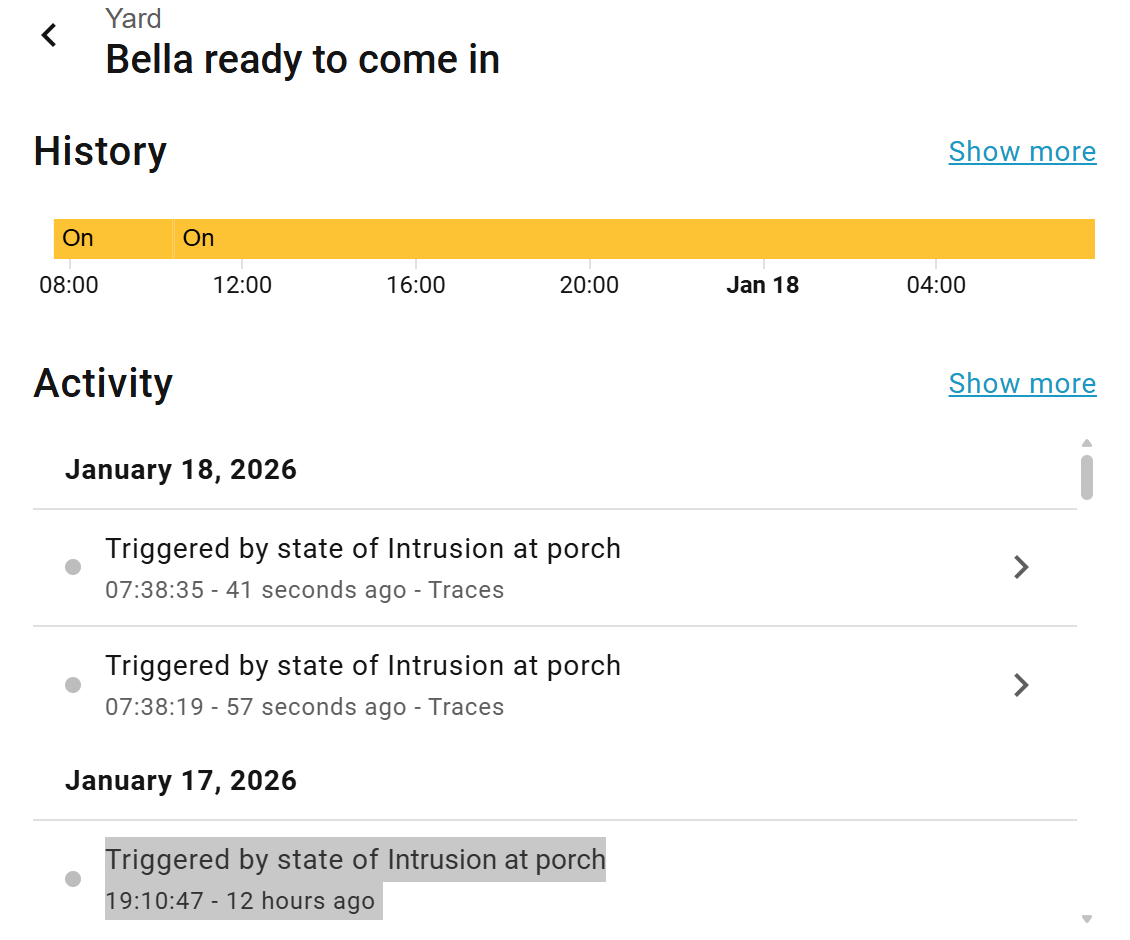
The history indicates the state being changed a second time within seconds of the first.
Thank you. Editing the YAML I discovered that my trigger was formatted wrong. I had trigger ‘from detected’ and ‘from clear’. I changed it to ‘from detected to clear’. Problem solved, for now. It will depend on how antsy Bella is waiting for me to let her in.