Per subject. There are posts and examples on sending notification based on updater.updater but I can’t see how that works for Hassio.
I have the updater component enabled, but can’t see it in the states menu.
I am on 0.57.2 and 0.57.3 is showing as an available update.
3 Likes
I would like to know this as well. I did try the updater.updater and it did not send a notification.
2 Likes
I would be also interested. I don’t look regularly in the front end. I would appreciate an option I could combine with a telegram notification.
- alias: Update notifications
  trigger:
    - platform: state
      entity_id: updater.updater
  action:
    service: notify.kodiebot
    data_template:
      title: 'Homeassistant update disponibile'
message: "Versione {{ states.updater.updater.state }} disponibile."I was wondering the same, how to get notified when there is a new release available. I was looking into the updater but when I went tho their site, it says " As Hass.io has its own schedule for release it doesn’t make sense to use this component on Hass.io.", so I disabled it.
Is there any other way to do this?
Still no solution for this? Looking for something like this too.
I just use the version sensor here:
Works for me
Thanks! Will play with that option. Thanks!
Can you post an automation example? My sensor says that it’s the current version. Isn’t that just the current version installed?
sure, I use this in my automations to check if I’m running the latest version:
  condition:
    - condition: template
      value_template: "{{ states('sensor.version_available') != states('sensor.version_current') }}"
1 Like
nice, but what’s you trigger? and how did you implement the version sensor? because I’m only getting the sensor.current_version in my states 
You need 2 version sensors, one for local and one for pypi/hassio/docker.
what’s do I put in my configurations.yaml file then?
what do you have now?
This is what I’m using at the moment. I think it was @frenck who made this. There are now prob. better ways to do this, but this is working for me.
Just keep in mind that when a update is released it doesnt mean it’s also right away available for you to install in Hassio. It could take a little while while it’s being build for Hassio.
This is what it looks like

From left to right. iOS notification & Home Assistant Notification area
This is in my configuration.yaml
    ###############################################
    #                                             #
    #          SCRAPING HA RELEASE VERSION        #
    #                                             #
    ###############################################
  - platform: scrape
    resource: https://www.home-assistant.io
    name: Release
    select: ".current-version h1"
    value_template: '{{ value.split(":")[1] }}'
Also this is in my configuration.yaml
    ###############################################
    #                                             #
    #                SYSTEM VERSION               #
    #                                             #
    ###############################################
  - platform: version
This is in my automations.yaml
Edit to your liking and according to your device(s).
- id: '1552424898989'
  alias: system_upgrade_alert
  trigger:
    platform: state
    entity_id: sensor.release
  condition:
  - condition: template
    value_template: "{{\n  states('sensor.release')\n  !=\n  states('sensor.current_version')\n\
      }}"
  action:
  - service: notify.mobile_app_iphone_YOUR ENTITY
    data_template:
      title: Upgrade!
      message: Er staat een Home Assistant upgrade klaar voor Hass.io! Versie {{ states('sensor.release')
        }} is zojuist released!
      data:
        attachment:
          content-type: png
          url: https://EXTERNAL-ADRESS:8123/local/images/upgrade.png
  - service: persistent_notification.create
    data_template:
      title: Upgrade!
      message: Er staat een Home Assistant upgrade klaar voor Hass.io! Versie {{ states('sensor.release')
        }} is zojuist released!
      notification_id: hassio_upgrade
You don’t need to scape… The version integration can do that for you
I’ll check it out, thanks. Always happy to replace a scrape with a integration/plugin
I’m using multiple triggers, here’s my automation including the triggers:
# Send notification when next version of Home Assistant is avaliable
- alias: "HA Update Notification"
  initial_state: true
  trigger:
    # 1st trigger
    - platform: state
      entity_id: sensor.version_available
    # 2nd trigger
    - platform: homeassistant
      event: start
  condition:
    - condition: template
      value_template: "{{ states('sensor.version_available') != states('sensor.version_current') }}"
  action:
You need version_current and version_available sensors for this to work
I only have: - platform: version
Here’s my config:
- platform: version
  name: Installed Version
  source: local

- platform: version
  name: Latest Version
  beta: false
  image: raspberrypi3
  source: pypi
It produces these sensors:
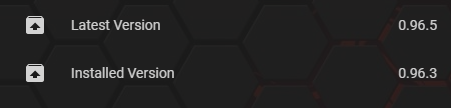
2 Likes