I dont get the device into tuya. Tuya don’t find them. What i have to chose in the tuya app, that the app finds the device?
Hi all,
I integrated iBBQ-4T in home assistant without problems months ago, but I’m now seeing that when I detach the probe, I continue to have my last temperature value on probe and not “unavailable”. Haven’t had the problem before. Have anyone the same problem?
Thank you.
Interested if you had made any ground on this one?
I tried following previous instructions but seems they’re no longer working…
Can confirm the local integration still works, and KBrowns code still works!
That is great. I regifted my IBBQ to my son and integrated the meater block. Not as perfect but works well!
The new one I just got returned all probes as a base64 encoded string. This is how I got it working. Add this to your configuration.yaml. This assumes your temp sensor (ID 107) is named temp_2:
template:
  - sensor:
      - name: "BBQ Probe 1 Temperature"
        unit_of_measurement: "°F"
        state: >
          {% set raw_temp = states('sensor.temp_2') | base64_decode(none) | unpack('h', 0) %}
          {% if raw_temp / 100.0 != -0.1 %}
            {{ raw_temp / 100.0 }}
          {% else %}
            {{ none }}
          {% endif %}

      - name: "BBQ Probe 2 Temperature"
        unit_of_measurement: "°F"
        state: >
          {% set raw_temp = states('sensor.temp_2') | base64_decode(none) | unpack('h', 4) %}
          {% if raw_temp / 100.0 != -0.1 %}
            {{ raw_temp / 100.0 }}
          {% else %}
            {{ none }}
          {% endif %}

      - name: "BBQ Probe 3 Temperature"
        unit_of_measurement: "°F"
        state: >
          {% set raw_temp = states('sensor.temp_2') | base64_decode(none) | unpack('h', 8) %}
          {% if raw_temp / 100.0 != -0.1 %}
            {{ raw_temp / 100.0 }}
          {% else %}
            {{ none }}
          {% endif %}

      - name: "BBQ Probe 4 Temperature"
        unit_of_measurement: "°F"
        state: >
          {% set raw_temp = states('sensor.temp_2') | base64_decode(none) | unpack('h', 12) %}
          {% if raw_temp / 100.0 != -0.1 %}
            {{ raw_temp / 100.0 }}
          {% else %}
            {{ none }}
          {% endif %}
Ok trying to get this IBBQ-4T to work and is there a trick to actually add it to Tuya itself? I get a few errors when trying to add it via. the Tuya smart app and I also am unable to change the language definition:
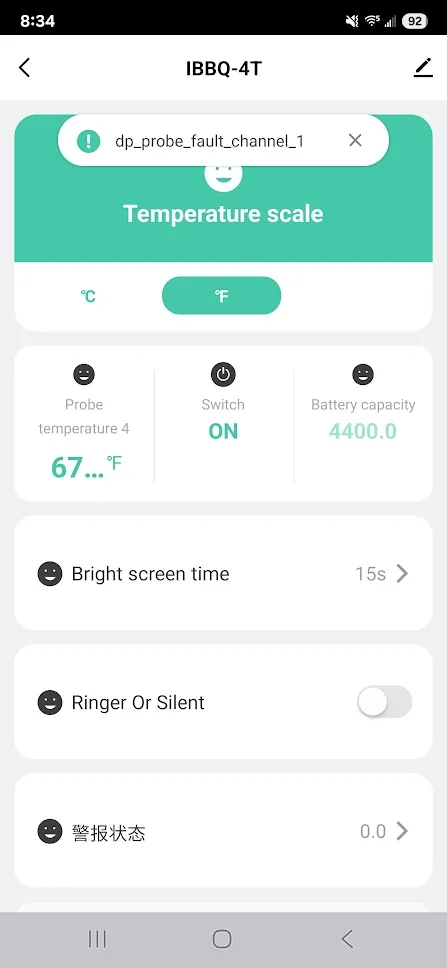
Im at this same point, did you get anwhere with it?
I was able to “add” the device to HA but its not right, no values are displaying
They seemed to have messed things up, my setup is also not working.
So Tuya sees the Inkbird as it should, it’s when I link Tuya to Hassio that Hassio sees it as a thermostat rather than a BBQ meter.
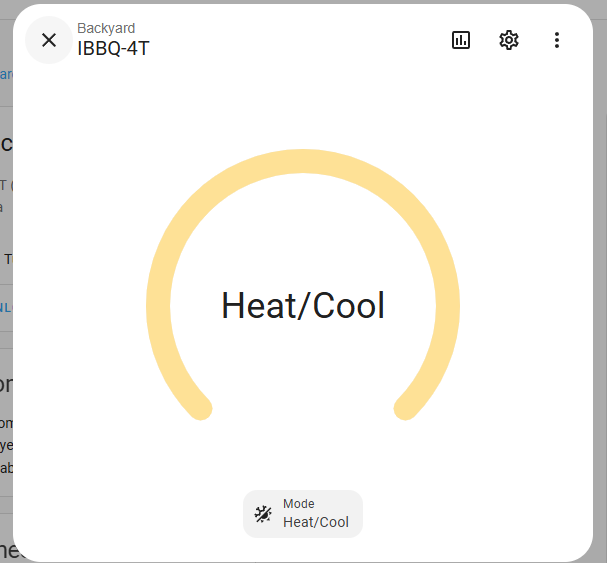
I had everything setup correctly previously but for some reason, I lost connection to the iBBQ-4T in Home Assistant. Removed from Tuya, SmartLife app, and Home Assistant. When I try to add back, I come across the same issue. Hopefully we can get it figured out as I’ve got several automations in place when I use the iBBQ-4T.
I’ve opened a ticket with the Hassio Tuya dev but they closed it. I’m guessing it’s the end for iBBQ-4T and Hassio.
This is unfortunate as it was extremely helpful when I do smokes, especially overnight ones. I liked the dashboard I created much better than the Inkbird app. But, I agree. Looks like it’s just not going to work unless someone much smarter than me creates an intergration.
I’ve bought last week an IBBQ-4T to work this together with HA. At this moment I’ve got a Heat icon and can switch on or off this meter. Do I understand correctly that’s it not possible anymore to get the temperatures in HA by local Tuya ?
Maybe we can use the hack : Inkbird IBBQ-4T - Hackerspace ACKspace
On Christmas Eve my IBBQ-4T decided it wasn’t going to connect to my WIFI, after working on it for a bit I was able to get it to connect to the WIFI, however after that it was no longer connected to home assistant. I went to try the original method I used but Local Tuya had updated its set up configuration since I had originally added it (Jan 2023) so the old method I used no longer worked (Blue stacks and inkbird.APK).
after reading the thread and finding that others weren’t able to re add the device but saw that a few people where able to add it in slightly different ways I decided I was going to give it a shot ( I’m to cheap to buy something else and to stubborn to walk away lol)
I was able to get it to work for me, I was able to add all four probes, Power state, and battery percentage. I’m a novice with Home Assistant so hopefully I explain everything well enough for you to follow
Start by adding your IBBQ-4T to the SmartLife app
I watched this video on how to install and configure a different version of LocalTuya, start around the nine minute mark and follow along until around the 19 minute mark: https://www.youtube.com/watch?v=M-sQcS3KEm8&t=539s
after you have followed the video and have your developer account setup and configured in home assistant its time to configure the IBBQ-4T
got to settings > Devices > LocalTuya
click gear icon
select Add new device
Select IBBQ-4T
(the top half of the form should be filled in)
Click Submit at the bottom
click Configure device entities manually
Choose Entity:
Binary Sensor
click Submit
DP ID
1 ( code: switch, value True )
Friendly name for Entity:
Power
Device Class:
Power
Click Submit
Probes
‘Choose the type of entity you want to add’
Choose entity: Sensor
Un-Check ‘Finish configuring entities’
click submit
DP ID:
107 (code: Temperature_1 value: **** )
Friendly name:
Probe 1
Unit of Measurement:
F
Device Class
temperature
Scaling factor (changes temperature reading from 7544 to 75.44)
0.01
click submit
Probes
Repeat the Probes section for each probe
107 (code: Temperature_1 value: **** ) = Probe 1
108 (code: Temperature_2 value: **** ) = Probe 2
109 (code: Temperature_3 value: **** ) = Probe 3
110 (code: Temperature_4 value: **** ) = Probe 4
‘Choose the type of entity you want to add’
Choose entity: Sensor
Un-Check ‘Finish configuring entities’
DP ID:
101 ( code: Battery_Percentage , value: ** )
Friendly Name:
Battery
Unit of Measurement
%
Device Class:
battery
click submit
on the next window leave ‘Finish configuring entities’ checked
click submit
click finish
click on your IBBQ-4T Device
you should now have a sensor for
Battery
Power
Probe 1
Probe 2
Probe 3
Probe 4
this must all be done at once from what I can tell. so if you mess up you have to remove the device and re-add all the entities…
Note: you might be able to reconfigure the device but I didn’t catch it in the video until I was writing this post so I can’t say that it will work. TechHut uses it in the same video at the 20 minute and 10 second mark https://www.youtube.com/watch?v=M-sQcS3KEm8&t=1210s