I would like to report an issue with API authentication on my CloudKey Gen2 Plus (UCK-G2-PLUS) when trying to connect UniFi Protect to Home Assistant using the official integration.
Environment
Device: CloudKey Gen2 Plus
UniFi OS Version:current production version as of Dec 2025
UniFi Protect Version: 6.1.79
Home Assistant Version: 2025.11.x (latest)
Network: Same LAN (no VLAN separation)
Port: 443
SSL verification: attempted both ON and OFF
What I am trying to do
Connect UniFi Protect → Home Assistant using the official integration described here:
I created a local-only user with:
Admin privileges
“Restrict to Local Access Only” enabled
Full Management permissions
Local username + password
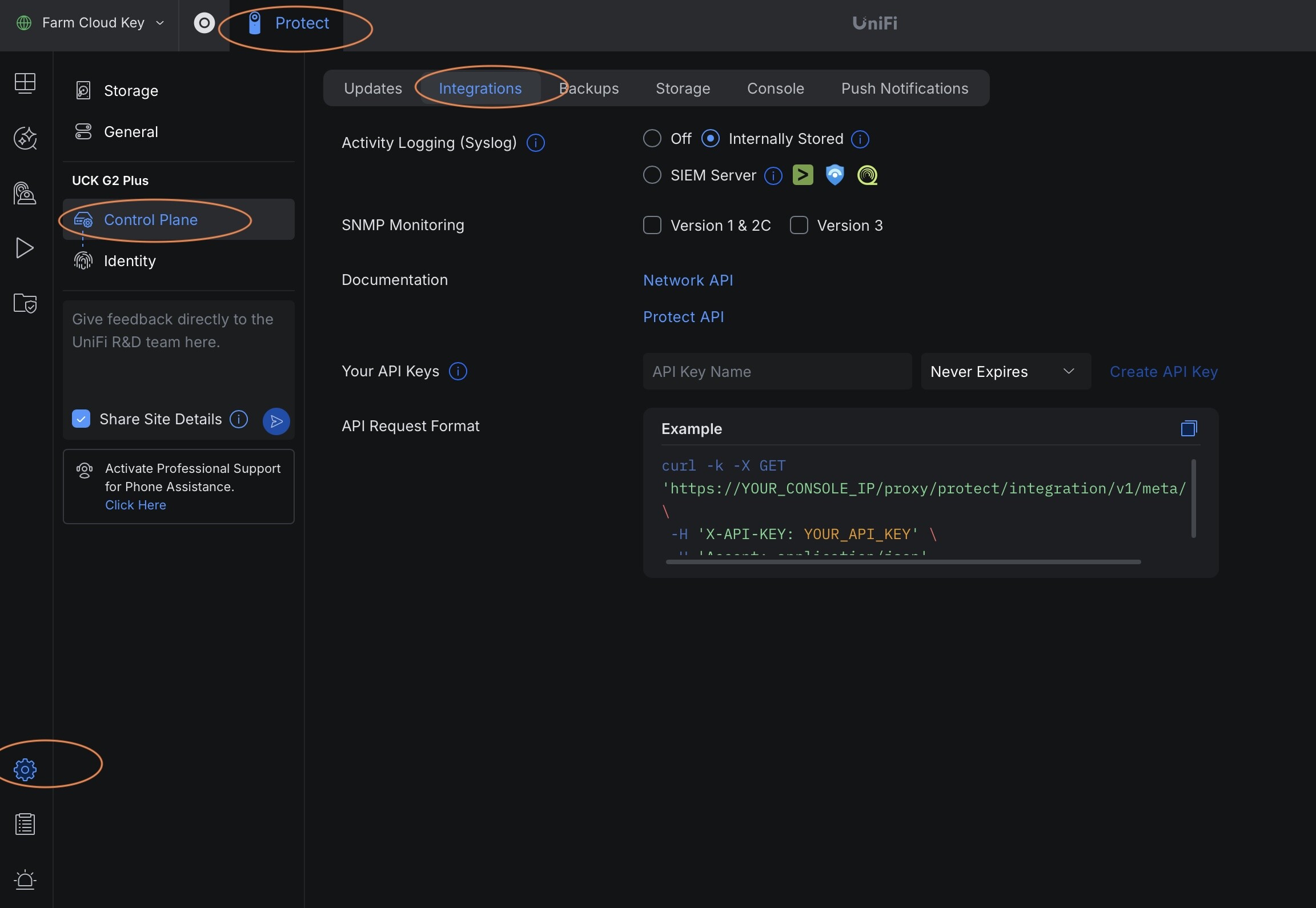
API Key generated under Control Plane → Integrations
The API key is generated successfully and shown only once, as expected.
Issue
When I enter the following into the Home Assistant “Add UniFi Protect” setup screen:
Home Assistant documentation explicitly states the integration requires a local UniFi OS user and API key.
Everything matches the requirements, but UniFi OS refuses to authenticate.
Screenshots
I have screenshots showing:
User creation with local credentials
API Key generation
UniFi Protect connection setup
“Invalid authentication” error in Home Assistant
(Available on request.)
Question
Is this a known issue with:
CloudKey Gen2 Plus,
UniFi OS (local user authentication),
or Protect API authentication using local users?
Could you please confirm if:
Local users with API keys are fully supported on Protect 6.1.79?
There are any additional permissions required for API authentication?
Any specific logs I should collect to assist debugging?
Thank you very much for your help.
This issue seems to be related to UniFi OS / Protect not accepting valid API-based authentication from a local admin user.
Hi, I am trying to do this integration also but i cannot generate the api key as my local control plane does not have an option for integrations. If i go to unifi.ui.com i can setup the API key there in the site manager but as its not local it doesnt work.
How did you generate the API key?
I have what seems like the same issue but with a UDM Pro.
I have a local user, and I can use it to log in. I have upgraded it to superuser permissions. I created an API key with that same account, and verified that the API key works using curl. I have deleted the Protect integration and started over.
But no matter what I do, I get “Invalid Authentication”, and the log doesn’t show anything, even with debug logging enabled.
Aaron, did you ever get the solution? I am having the same problem. UDP Pro, enabled Professional Installer. Enabled Side Tabs. New superuser/admin Local Access Only, can log in locally using credentials, but no Integrations or Create API Key anywhere.
Mikayla, did you obtain the API key while logged into the cloud (unifi.ui.com) or locally? I cannot find a way to create the API key locally, only from the cloud login, and that doesn’t work. UDM Pro here too.
I have the same issue. Working great until I had to reauthorize with an api key.
UNVR and UDM Pro are all up-to-date on Official branch.
Home Assistant is also up to date.
I do not see any errors in HA logs.
I have a separate UNVR for protect. This is where the local user is created. (ive tried both)
You can’t create API key in UNVR (no ‘Integrations’ section). I created it in UDM Pro
With all this, I get “Invalid Authentication” just above the API key entry. Within UNVR → Admin pane I see “Last Activity” updates when I try this from HA. So, it appears the user is correct, just not the API key, which I have tried creating a new one a few times.
Solution:
Documentation is incorrect for those with UNVR which is separate hardware. The docs only give instructions for when the ‘Protect App’ is installed and used within UDM hardware.
What was the solution here? We run a UNVR with Protect and Access and cannot create an API key separate for Access. HomeAssistant keeps telling us the key is associated with Protect
 Environment
 What I am trying to do
 Issue
Issue Screenshots
 Question