Jasperx
October 30, 2025, 10:08pm
1
So I just set up a new ha install on my new RPi 5. Decided to do a complete fresh install, re-paired my Zigbee lightbulbs just fine, added the ZBT-1 which installed OpenThread Border router, following which I added the Matter integration.
Reset my first Thread device (a smart plug) and tried pairing it to the new thread network.
Gets stuck at the last step “Checking network connectivity to MyWifi”
ipv6 is enabled and it was working just fine an hour ago on my 3B+
Any ideas?
Jasperx
October 30, 2025, 11:33pm
2
So it seems related to the Android phone?
opened 02:26PM - 20 Jan 24 UTC
bug
**Home Assistant Android app version(s):**
2024.1.2-full
**Android version(s… ):**
14
**Device model(s):**
Pixel Pro 8
**Home Assistant version:**
2024.1.3
**Last working Home Assistant release (if known):**
**Description of problem, include YAML if issue is related to notifications:**
When creating a new `home-assistant` Thread network in Home Assistant (e.g. via "Reset border router" feature in the Home Assistant Thread integration configuration page) updating the Thread credentials seems not to work.
To reproduce:
1. "Clear all data" of "Google Play services" method to make sure to start from a clear slate
2. Have a `home-assistant` network as preferred set in Core (say `home-assistant` network 1)
3. Select "Sync Thread credentials" -> "✅ Added network from Home Assistant to this device"
4. Select "Sync Thread credentials" -> "✅ Home Assistant and this device use the same network" :+1:
5. Create a `home-assistant` Thread network e.g. by using "Reset border router"
6. Select "Make preferred network" to mark this new `home-assistant` network as preferred
7. Select "Sync Thread credentials" -> "✅ Updated network from Home Assistant to this device"
8. Select "Sync Thread credentials" -> "✅ Updated network from Home Assistant to this device"
Up to 7 everything is as expected. However, when trying to commission a device after step 7, it won't work because the credentials didn't really got updated. Step 8 also proves that. It seems the app is not able to update the dataset.
<details>
**Screenshot and log of step 3:**

```
01-20 14:36:30.259 7110 7110 W WindowOnBackDispatcher: sendCancelIfRunning: isInProgress=falsecallback=com.google.android.material.motion.MaterialBackOrchestrator$Api34BackCallbackDelegate$1@288a0ce
01-20 14:36:30.268 7110 7110 W InputEventReceiver: Attempted to finish an input event but the input event receiver has already been disposed.
01-20 14:36:30.282 7110 7110 D ServerConnectionInfo: localUrl is: false, usesInternalSsid is: false, usesWifi is: true
01-20 14:36:30.282 7110 7110 D WebSocketRepository: Sending message 49: {type=get_config, id=49}
01-20 14:36:30.282 7110 7110 D WebSocketRepository: Message number 49 sent
01-20 14:36:30.343 7110 13794 D WebSocketRepository: Websocket: onMessage (text)
01-20 14:36:30.344 7110 13794 D WebSocketRepository: Message number 49 received
01-20 14:36:30.365 7110 7110 D WebSocketRepository: Sending message 50: {type=thread/list_datasets, id=50}
01-20 14:36:30.365 7110 7110 D WebSocketRepository: Message number 50 sent
01-20 14:36:30.372 7110 13794 D WebSocketRepository: Websocket: onMessage (text)
01-20 14:36:30.373 7110 13794 D WebSocketRepository: Message number 50 received
01-20 14:36:40.384 7110 7110 D WebSocketRepository: Sending message 51: {type=thread/get_dataset_tlv, dataset_id=01H7SF0EZ6CZR08N4P2G77R6ZG, id=51}
01-20 14:36:40.384 7110 7110 D WebSocketRepository: Message number 51 sent
01-20 14:36:40.396 7110 13794 D WebSocketRepository: Websocket: onMessage (text)
01-20 14:36:40.397 7110 13794 D WebSocketRepository: Message number 51 received
01-20 14:36:40.472 7110 7110 D ThreadManagerImpl: Thread import to device completed
01-20 14:36:49.002 7110 7110 W WindowOnBackDispatcher: sendCancelIfRunning: isInProgress=falsecallback=android.app.Dialog$$ExternalSyntheticLambda2@e6e29be
01-20 14:36:49.018 7110 7110 W InputEventReceiver: Attempted to finish an input event but the input event receiver has already been disposed.
01-20 14:36:49.031 7110 7110 D IntegrationRepository: isAppLocked(): false. (LockEnabled: false, appActive: true, expireMillis: 0, currentMillis: 1705757809031)
01-20 14:36:49.031 7110 7110 D IntegrationRepository: setAppActive(): true
01-20 14:36:49.891 7110 7277 D LogcatReader: Read logcat for pid 7110
```
**Screenshot and log of step 8:**

```
01-20 14:39:22.718 7110 7110 W WindowOnBackDispatcher: sendCancelIfRunning: isInProgress=falsecallback=com.google.android.material.motion.MaterialBackOrchestrator$Api34BackCallbackDelegate$1@53b36cf
01-20 14:39:22.730 7110 7110 W InputEventReceiver: Attempted to finish an input event but the input event receiver has already been disposed.
01-20 14:39:22.732 7110 7110 D ServerConnectionInfo: localUrl is: false, usesInternalSsid is: false, usesWifi is: true
01-20 14:39:22.733 7110 7110 D WebSocketRepository: Sending message 59: {type=get_config, id=59}
01-20 14:39:22.733 7110 7110 D WebSocketRepository: Message number 59 sent
01-20 14:39:22.742 7110 13794 D WebSocketRepository: Websocket: onMessage (text)
01-20 14:39:22.742 7110 13794 D WebSocketRepository: Message number 59 received
01-20 14:39:22.757 7110 7110 D WebSocketRepository: Sending message 60: {type=thread/list_datasets, id=60}
01-20 14:39:22.757 7110 7110 D WebSocketRepository: Message number 60 sent
01-20 14:39:22.768 7110 13794 D WebSocketRepository: Websocket: onMessage (text)
01-20 14:39:22.768 7110 13794 D WebSocketRepository: Message number 60 received
01-20 14:39:32.788 7110 7110 D WebSocketRepository: Sending message 61: {type=thread/get_dataset_tlv, dataset_id=01HMKD0FR3Q9J27680PM3293DQ, id=61}
01-20 14:39:32.789 7110 7110 D WebSocketRepository: Message number 61 sent
01-20 14:39:32.797 7110 13794 D WebSocketRepository: Websocket: onMessage (text)
01-20 14:39:32.797 7110 13794 D WebSocketRepository: Message number 61 received
01-20 14:39:42.843 7110 7110 D ThreadManagerImpl: Thread: device doesn't prefer core preferred dataset
01-20 14:40:02.974 7110 7110 D ThreadManagerImpl: Thread device prefers app added dataset: home-assistant (PAN 19939, EXTPAN /��xɎ)
01-20 14:40:02.974 7110 7110 D ThreadManagerImpl: Thread: device prefers dataset from app
01-20 14:40:02.975 7110 7110 D WebSocketRepository: Sending message 62: {type=thread/get_dataset_tlv, dataset_id=01HMKD0FR3Q9J27680PM3293DQ, id=62}
01-20 14:40:02.975 7110 7110 D WebSocketRepository: Message number 62 sent
01-20 14:40:02.997 7110 13794 D WebSocketRepository: Websocket: onMessage (text)
01-20 14:40:02.998 7110 13794 D WebSocketRepository: Message number 62 received
01-20 14:40:03.064 7110 7110 D ThreadManagerImpl: Thread update device completed: deleted 1 datasets, updated 1
01-20 14:40:10.140 7110 7110 W WindowOnBackDispatcher: sendCancelIfRunning: isInProgress=falsecallback=android.app.Dialog$$ExternalSyntheticLambda2@d20115
01-20 14:40:10.146 7110 11187 D OpenGLRenderer: endAllActiveAnimators on 0xb4000077e690e3a0 (RippleDrawable) with handle 0xb400007846579d40
01-20 14:40:10.170 7110 7110 D IntegrationRepository: isAppLocked(): false. (LockEnabled: false, appActive: true, expireMillis: 1705757942197, currentMillis: 1705758010170)
01-20 14:40:10.170 7110 7110 D IntegrationRepository: setAppActive(): true
01-20 14:40:14.569 7110 7110 D IntegrationRepository: isAppLocked(): false. (LockEnabled: false, appActive: true, expireMillis: 1705757942197, currentMillis: 1705758014569)
01-20 14:40:14.569 7110 7110 D IntegrationRepository: setAppActive(): true
01-20 14:40:14.811 7110 7174 D LogcatReader: Read logcat for pid 7110
```
**Additional information:**
I tried clearing google store services and resyncing credentials, didn’t help
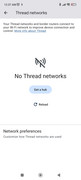
Edit: Also my android phone is not finding any thread networks:
But home assistant shows one network with a key next to it.
Jasperx
October 31, 2025, 12:21am
3
Okay so as I said I tried clearing “Google store” services not the “Google Play services” as described.sigh
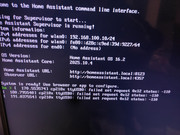
Looking at the CLI I’m getting this error when trying to install OTBR anew (or stopping the addon after a reboot)
I tried unplugging the Sonoff and using the ZBT-1 by itself in an unpowered usb hub (where the sonoff is supposed to be) and the provided 0.5m cable and I tried two different USB ports.
Help?
Solved it!
Off to the races!
Edit: Also, looks like the web flasher is unavailable as of yesterday.
WallyR
October 31, 2025, 2:56am
6
Google Home = Google Matter.
The way pairing is working looks like Google first pairs the device to new Matter fabric and then joins that Matter fabric with HA, so the Android device needs Matter functionality to do it.
elrosso
March 9, 2026, 7:49pm
8
foundthe solution with a bleutooth adapter. See an other post of me.
Joe32
April 14, 2026, 7:12am
9
This video solved it for me https://youtu.be/mMQubi-sa5c (from 5:30)
Turns out I had IPv6 disabled in the HA network settings. Set it to Automatic and my devices connected immediately!
nmbgeek
May 21, 2026, 9:29am
11
I'm glad I scrolled to the bottom and found your comment. IPv6 was disabled in my network settings as well.
Something fun I might add that may help someone in the future. I was actually getting this as well when attempting to pair some new Matter over thread devices to my network, and turns out my Pixel Watch being connected to my phone via bluetooth was disrupting the handshake process eventually resulting in erroring out my addition. The moment I disconnected my pixel watch from my phone's bluetooth the process picked up as normal and added the device in Home Assistant.


 It was an Android issue after all. Had to do some wizardly (I don’t even know what I didn’t try, tried installing Google Home as suggested in one of their docs, looks like that triggered Matter back into action after wiping google play services data. Looks like Matter itself was disabled on the Android side.