Can't create JSON list from string

Hey there,
probably this problem ist easy to solve, but after hours of trying, reading and talking to ChatGPT you are my last chance!

I would like to write some data into a json string and display this data ina table in my dashboard. However, I cannot create a working json variable. It always stays a string and I cannot properly access the entries. Here is the code of my test automatisation, which is working but not as I want to :dotted_line_face:

alias: TEST
description: ""
triggers: []
conditions: []
actions:
  - variables:
      start: "{{ states('input_datetime.bewaesserung_start') }}"
      ende: "{{ now().strftime('%Y-%m-%d %H:%M:%S') }}"
      liter: "{{ states('input_number.bewaesserung_aktuelle_menge') | float(0) }}"
      new_entry: |
        {{ {"start": start, "ende": ende, "liter": liter} | tojson }} 
  - variables:
      old_log: |
        {{ state_attr('var.watering_log', 'log') | from_json(default=[]) }}
  - variables:
      new_log: |
        {% if old_log %}
          {{ ([new_entry] + old_log)[:10] }}
        {% else %}
          {{[new_entry]}}
        {% endif %}
  - target:
      entity_id: var.watering_log
    data:
      value: "{{ new_log | length }}"
      attributes:
        log: |
          "{{ new_log  }}"
    action: var.set
mode: single

The log of my var.watering_log looks quite fine e.g. log: “[{‘ende’: ‘2025-08-22 22:03:58’, ‘liter’: 166.070287227631, ‘start’: ‘2025-08-21 21:00:03’}, {‘ende’: ‘2025-08-22 22:03:56’, ‘liter’: 166.070287227631, ‘start’: ‘2025-08-21 21:00:03’}, {‘ende’: ‘2025-08-22 22:03:54’, ‘liter’: 166.070287227631, ‘start’: ‘2025-08-21 21:00:03’}]”

However, it is a sting and I cannot access is like a dict. E.g. this code in the template-Editor:

{% set old_log = state_attr('var.watering_log', 'log')  %}
{% set test_log = old_log | from_json  %}
{{ test_log[1] }}

gives the result {

I’m very thankful for any idea!

Thanks,

Felix

One of these variables is supposed output json, the other is not. Later you want to combine them as is, but the types differ.

Besides the fact that the first template will give an error (always test in developer tools: it is to_json, not tojson), it shouldn’t be needed because variables and attributes can be any type. They do nit need to be json. So try to remove both filters and try to keep them objects. Only use to_json and from_json if you need it to be string and convert back from string.

1 Like

In addition to Edwin’s answer…

Just some FYI’s:

  1. If you do not have a defined trigger, it is best practice to use a Script not an Automation. There is a long history of users experiencing reliability issues using automations without defined triggers.
  2. LLM’s are bad at Home Assistant.
  3. The hass-variables/home-assistant-variables custom integrations haven’t received any major updates in years and are now pretty far behind the abilities of the core Template integration.
1 Like

Thanks a lot @Edwin_D and @Didgeridrew!

Removed to_json and from_json in the code. However, now I get the error message:
TypeError: can only concatenate list (not “str”) to list
for this part of the code

variables:
  new_log: |
    {% if old_log %}
      {{ ([new_entry] + old_log)[:10] }}
    {% else %}
      {{[new_entry]}}
    {% endif %}

So to combine the old and new entries I have to declare them as list instead of string? I don’t know how to do this and thought that works via json :smiley:

Furthermore, transferred the code from automation to script.

What type is the old log? maybe from previous attempts it is not an object but a string?

1 Like

If the attribute is currently a string you either must discard it or do a from_json once and store it as data .that is much easier to work with if you want to create a markdown table.

Maybe put this in temporarily above where you add the new and old log together.:

{% if old_log is string %}
{% set old_log = old_log | from_json %}
{% endif %}
1 Like

Let me explain, what I want to do, maybe that makes it more clear:
I have an irrigation system. Now I want to track every irrigation process. The last 10 watering sessions should then be displayed in a table in the dashboard.

I don’t know what the best way to implement this is. At first I thought via a input_text helper, but it can only store 256 characters in the state, which is not enough for 10 entries. That’s why I thought it is a good idea to store the entries as an attribute of a variable.

“old_log:” is always empty at the beginning, but of course it should grow with each execution of the script until it has 10 entries, and then delete the oldest one whenever a new one is added.

If it is empty at start (as in empty list, not undefined) then you are fine, but your initial post showed a log that looked like it was a string, representing json.

Yes, that was already after some iterations.But now: If it is empty first time executing the script works. Second time I get the same error message as posted above…

Test the append template in developer tools. See what type the old data is there. According the the error you got it is still a string, not an empty list. Maybe an empty string?

Not sure what you meant by append template, but I check if it is string and yes old_log is always string.

Implemented your code in here:

      new_log: |
        {% if old_log %}
          {% if old_log is string %}
            {% set old_log = old_log | from_json %}
          {% endif %}
          {{ (new_entry + old_log)[:10] }}
        {% else %}
        {{new_entry}}
        {% endif %}

Results in:
ValueError: Template error: from_json got invalid input ‘“{“start”:“2025-08-21 21:00:03”,“ende”:“2025-08-23 22:42:51”,“liter”:166.070287227631}”’ when rendering template ‘{% if old_log %} {% if old_log is string %} {% set old_log = old_log | from_json %} {% endif %} {{ (new_entry + old_log)[:10] }} {% else %} {{new_entry}} {% endif %}’ but no default was specified

Maybe it is easier to start from the scratch? If you know a better way how to solve create such a table please let me know :slight_smile:

From this article https://www.home-assistant.io/docs/configuration/templating/ I understand that I have to use from_json at first in order to create a json object:

{% set temp = '{"temperature": 25, "unit": "°C"}'|from_json %}
The temperature is {{ temp.temperature }}{{ temp.unit }}

However, transferring this to my code:

    new_entry: |
      {{ '{"start": start, "ende": ende, "liter": liter}' | from_json}}

yields :

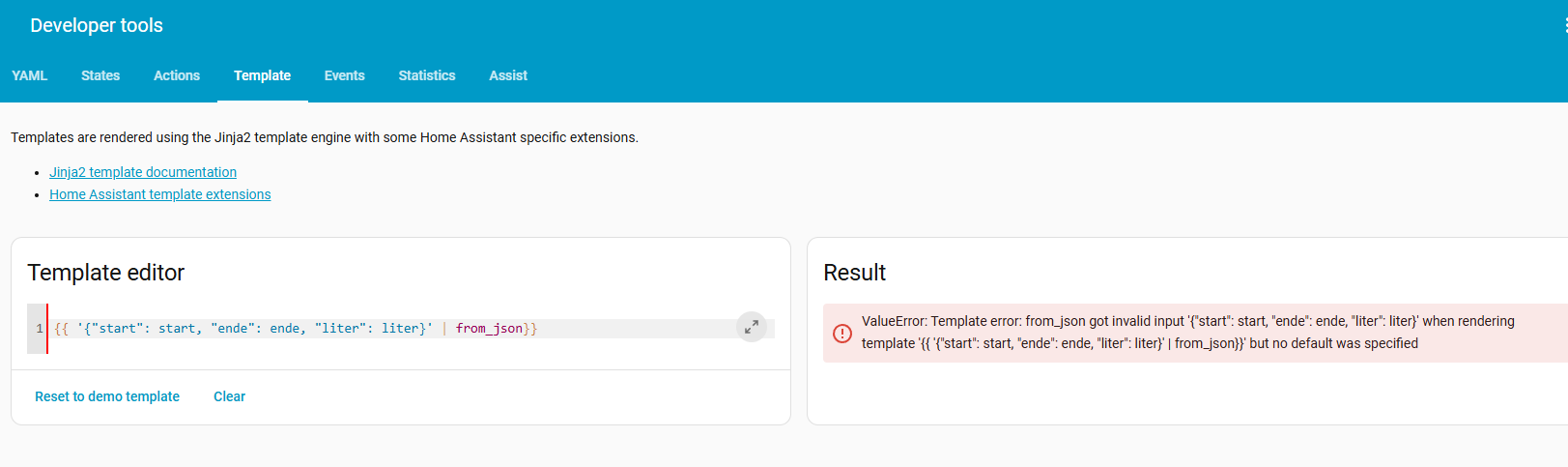
ValueError: Template error: from_json got invalid input ‘{“start”: start, “ende”: ende, “liter”: liter}’ when rendering template ‘{{ ‘{“start”: start, “ende”: ende, “liter”: liter}’ | from_json}}’ but no default was specified

Why this is invalid input?

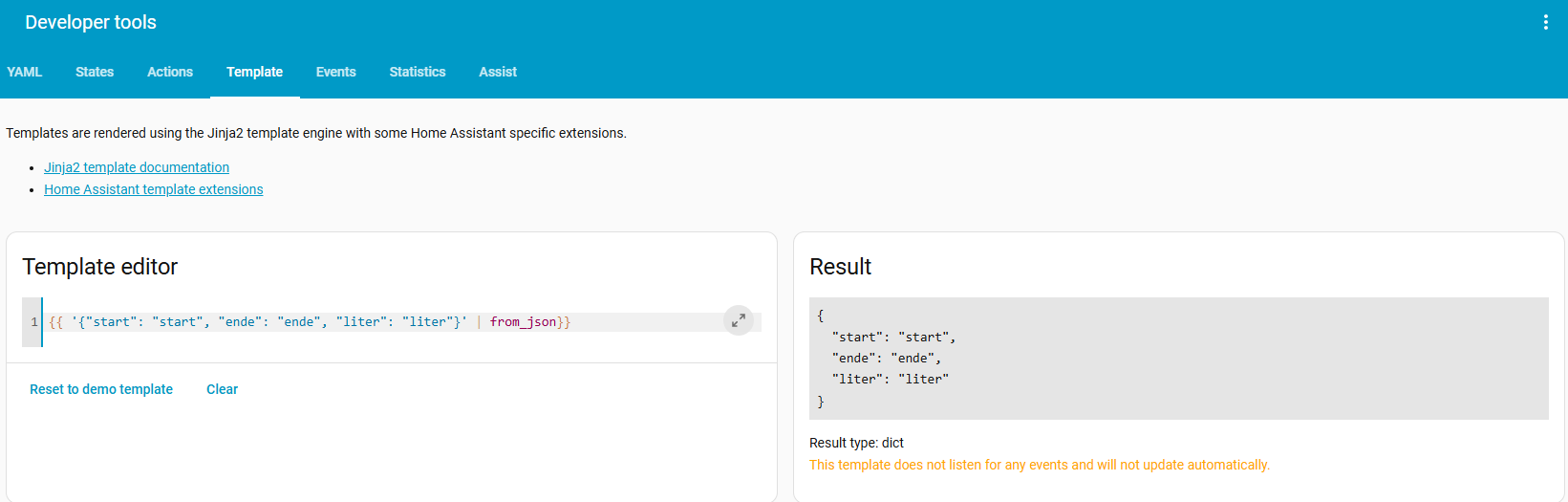
Check your quotes, two of which seem to be left double quote. The you cannot have a value like start it should be "start"

Your example:

Corrected:

{"start": "start", "ende": "ende", "liter": "liter"}

1 Like

You do not need to use from_json to assign a dictionary as the value of a variable and attributes can hold non-string data types, so you shouldn’t need to do any conversions.

Either of the following are valid:

actions:
  - variables:
      new_entry: |
        {{ {"start": start, "ende": ende, "liter": liter} }}
actions:
  - variables:
      new_entry:
        start: "{{ start }}"
        ende: "{{ ende }}"
        liter: "{{ liter }}"

...
actions:
  - variables:
      new_entry:
        start: "{{ states('input_datetime.bewaesserung_start') }}"
        ende: "{{ now().isoformat() }}"
        liter: "{{ states('input_number.bewaesserung_aktuelle_menge') | float(0) }}"
      old_log: "{{ state_attr('var.watering_log', 'log') }}"
      new_log: "{{ ([new_entry] + old_log|default([], true))[:10] }}"
  - target:
      entity_id: var.watering_log
    data:
      value: "{{ new_log | length }}"
      attributes:
        log: "{{ new_log }}"
    action: var.set
1 Like

Tried that code:

Results in an error message at first execution:
template value should be a string for dictionary value @ data[‘attributes’][‘log’]

See your point, but I don’t want the word “start”, but its value… How could I access this value and use quotes?

Please post a link to the custom integration you are actually using, there are a number of versions out there some of which use non-standard configuration syntax…

home-assistant-variables
Would you recommend to do it with another integration or even without if possible?

I think I have to change the approach… I now try to use the attribute of a template sensor. However, I think I have a similar problem, which might be in line with the problem I had already.

This code works in the template-editor:

{% set temp = '{"temperature": 25, "unit": "°C"}'|from_json %}
The temperature is {{ temp.temperature }}{{ temp.unit }}

This code does not:

{% set temp = '{"start": states('input_datetime.bewaesserung_start')}'|from_json %}
Start at {{ temp.start }}

Any idea why this does not work and how to solve it?

Solved the problem :slightly_smiling_face: Maybe interesting for someone facing the same problem, here the code:

template:

Trigger calculation of values if irrigation is finished:

  - trigger:
      - platform: state
        entity_id: input_boolean.irrigation_running
        from: "on"
        to: "off"
    sensor:
      - name: "Irrigation Recording"
        unique_id: irrigation_recorder

I do not use state for saving as it can contain 256 characters max

        state: >
          {{"random"}}
        attributes:
          log: >

I splitted the code for the first entry and following entries

            {% if state_attr('sensor.irrigation_recorder', 'log') is none %}
              {{
                [(
                  '{
                    "start": "' ~ states('input_datetime.irrigation_start') ~ '",
                    "end": "' ~ now().strftime('%Y-%m-%d %H:%M:%S') ~ '",
                    "liter": "' ~ (states('input_number.irrigation_current_volume') | float(0)) ~ '"
                  }'
                ) | from_json]
              }}
            {% else %}
              {% set old = state_attr('sensor.irrigation_recorder', 'log') %}
              {% if old|count == 10 %}
                {% set old = old[-9:] %}
              {% endif %}  
              {% set new_entry = ('{
                  "start": "' ~ states('input_datetime.bewaesserung_start') ~ '",
                  "ende": "' ~ now().strftime('%Y-%m-%d %H:%M:%S')~ '",
                  "liter": "' ~ states('input_number.irrigation_current_volume') | float(0) ~ '"
                }') | from_json
               %}

                {{ old + [new_entry] }}
            {% endif %}