Can't re-add Philips Wiz Matter bulb after removing it

One of my smart bulbs became really laggy and unresponsive, with many timeouts reported in the Matter server logs, so I removed it from the Matter integration UI, and attempted to re-add it. The bulb is a Philips WiZ A21.E26, which is Matter over WiFi.

Re-adding fails; the companion app connects, goes into “Setting up”, and then says I might need to factory-reset the device. Here are the Matter server log messages:

2025-09-01 09:46:01.419 (Dummy-2) CHIP_ERROR [chip.native.CTL] Discovery timed out
2025-09-01 09:46:01.419 (Dummy-2) CHIP_PROGRESS [chip.native.CTL] Stopping commissionable node discovery over DNS-SD
2025-09-01 09:46:01.419 (Dummy-2) CHIP_ERROR [chip.native.ZCL] Secure Pairing Failed
2025-09-01 09:46:01.420 (Dummy-2) WARNING [chip.ChipDeviceCtrl] Failed to establish secure session to device: src/controller/python/ChipDeviceController-ScriptDevicePairingDelegate.cpp:96: CHIP Error 0x00000003: Incorrect state
2025-09-01 09:46:01.420 (MainThread) ERROR [matter_server.server.client_handler] [548110983312] Error while handling: commission_with_code: Commission with code failed for node 14.

and similar messages in the companion app:

2025-09-01 09:36:27.824 [Info] [hakit-work-queue] [Environment.swift:74] init() > WebSocket: Received: auth: required
2025-09-01 09:36:27.825 [Info] [hakit-work-queue] [Environment.swift:74] init() > WebSocket: Sending: (auth)
2025-09-01 09:36:27.828 [Info] [hakit-work-queue] [Environment.swift:74] init() > WebSocket: Received: auth: ok(version: "2025.8.3")
2025-09-01 09:36:27.828 [Info] [main] [Environment.swift:74] init() > WebSocket: phase transition to command(version: "2025.8.3")
2025-09-01 09:36:27.828 [Info] [hakit-work-queue] [Environment.swift:74] init() > WebSocket: Sending: {"code":"0[redacted]","id":1,"type":"matter\/commission"}
2025-09-01 09:36:27.828 [Info] [hakit-work-queue] [Environment.swift:74] init() > WebSocket: Sending: {"event_type":"core_config_updated","id":2,"type":"subscribe_events"}
2025-09-01 09:36:27.828 [Info] [hakit-work-queue] [Environment.swift:74] init() > WebSocket: Sending: {"event_type":"component_loaded","id":3,"type":"subscribe_events"}
2025-09-01 09:36:27.981 [Info] [hakit-work-queue] [Environment.swift:74] init() > WebSocket: Received: result success HARequestIdentifier(rawValue: 2)
2025-09-01 09:36:27.981 [Info] [hakit-work-queue] [Environment.swift:74] init() > WebSocket: Received: result success HARequestIdentifier(rawValue: 3)
2025-09-01 09:36:57.939 [Info] [hakit-work-queue] [Environment.swift:74] init() > WebSocket: Received: result failure HARequestIdentifier(rawValue: 1): external(HAKit.HAError.ExternalError(code: "1", message: "Commission with code failed for node 13.")) via {"id":1,"type":"result","success":false,"error":{"code":"1","message":"Commission with code failed for node 13."}}

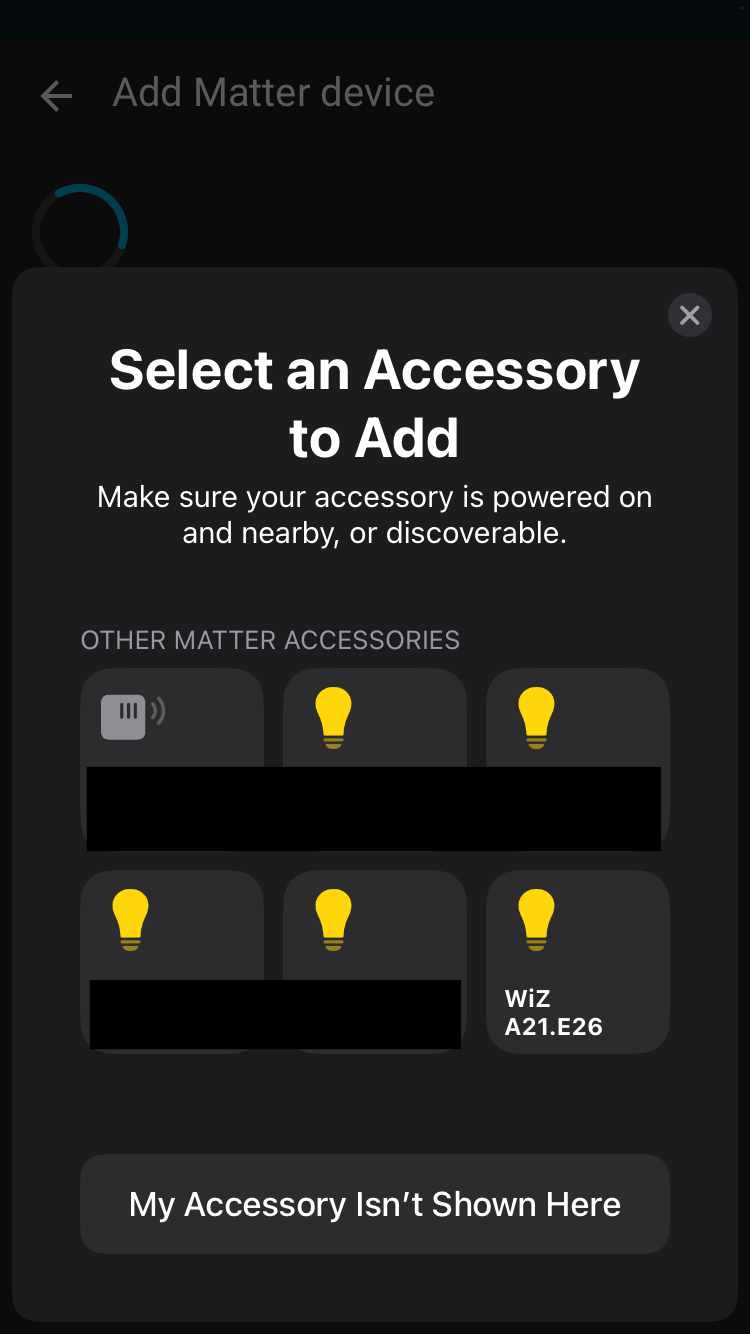
Now the curious thing is when I go to add a Matter device, select “No, it’s new”, and then tap “More options…” in the dialog that pops up, the bulb appears both in “Nearby” and in “Other Matter accessories”:

Is there some dangling reference I need to hunt down to really remove this device?

– Mike

Factory reset bulb

Turn power ON/OFF quickly several time may do it

Right, the question wasn’t how to factory reset the bulb. It’s why the bulb appears both in “Nearby” and “Other Matter accessories”.

– Mike

Because it’s acting as part of a network and can be seen by your network but cannot be joined to a network because…it needs to be factory reset

Just a guess though

hello,

the bulb is still connected to your wifi network but not to your HA instance.

Yes you need to reset the bulb sadly…

Yes, I have reset the bulb, but commissioning is nonetheless failing.

– Mike

Are you using the WiZ app to reset it? The on/off a few times does not reset anything, it just put it into pairing mode for the WiZ app and, if it’s not added in few minutes, it reverts back to normal.

What I would do is add it to WiZ app, let it auto-update the firmware, use the app to put the bulb in Matter discovery mode (settings - integrations - matter) and try again. Also, try both with the QR code and the numeric code.

I haven’t used the WiZ app and would like to avoid it if at all possible.

I’ve removed and re-added this light before, so I’m not sure the app is actually necessary.

The real question remains, which is why is this light appearing as an “Other Matter accessory” when I’ve removed it from the Matter add-on. Is there some dangling reference I need to track down?

– Mike

Is it still connecting to your WiFi? doesn’t that mean it was never factory reset?

Clearly this time is different and something is not in the state it should be, either in the bulb or HA side.

My point was that you didn’t actually reset the bulb since there’s no way to reset a WiZ bulb without the app, confirmed by WiZ staff.

I see. Thanks for the reference. I remember not being able to find any information like this on WiZ’s actual website, which is where you’d expect it to be.

– Mike

I downloaded the WiZ app, added the light to it, and then deleted it again, following the instructions in the linked Reddit comment. The bulb is no longer on my WiFi network, but it does still show up in “Other Matter accessories” in the HA companion app, even when not in pairing mode.

Does anybody know if that list is kept on the phone, or is communicated from the Matter server?

– Mike

1 Like

It want you ti select “accessoriy to add”.
Don’t you want to add it?

Discovered via Bluetooth I believe

Well, the bulb is not in pairing mode. Even when not in pairing mode it appears under “Other Matter accessories”. That is what I’m trying to understand.

When the bulb is in pairing mode, it appears under “Nearby”, as shown in the first screenshot.

– Mike

I updated to 2025.9.0 last night and I am now able to pair the light. I recall seeing a recent bug report with the errors I found in my log, so my first guess is that is fixed in this version.

– Mike

1 Like