setting 0px to all of my tile card features border-radius’s, I can not find the correct path to the counter button…
according to the Dom inspection it should be
            card_mod:
              style: |
                ha-tile-icon {
                  {% set count = states(config.entity)|float(-5) %}
                  --tile-color:
                    {% if count > 0 %} var(--warning-color)
                    {% else %} var(--success-color)
                    {% endif %};
                }
                hui-card-features $:
                  hui-card-feature $:
                    hui-counter-actions-card-feature $:
                      ha-control-button-group $:
                        ha-control-button $: |
                          .button {
                            --control-button-border-radius: var(--ha-card-border-radius);
                            opacity: 0.8;;
                          }
but the button remains rounded:

of course I did try !important, and other css properties, but it just isnt the correct element Ingress.
Could any of you please check?
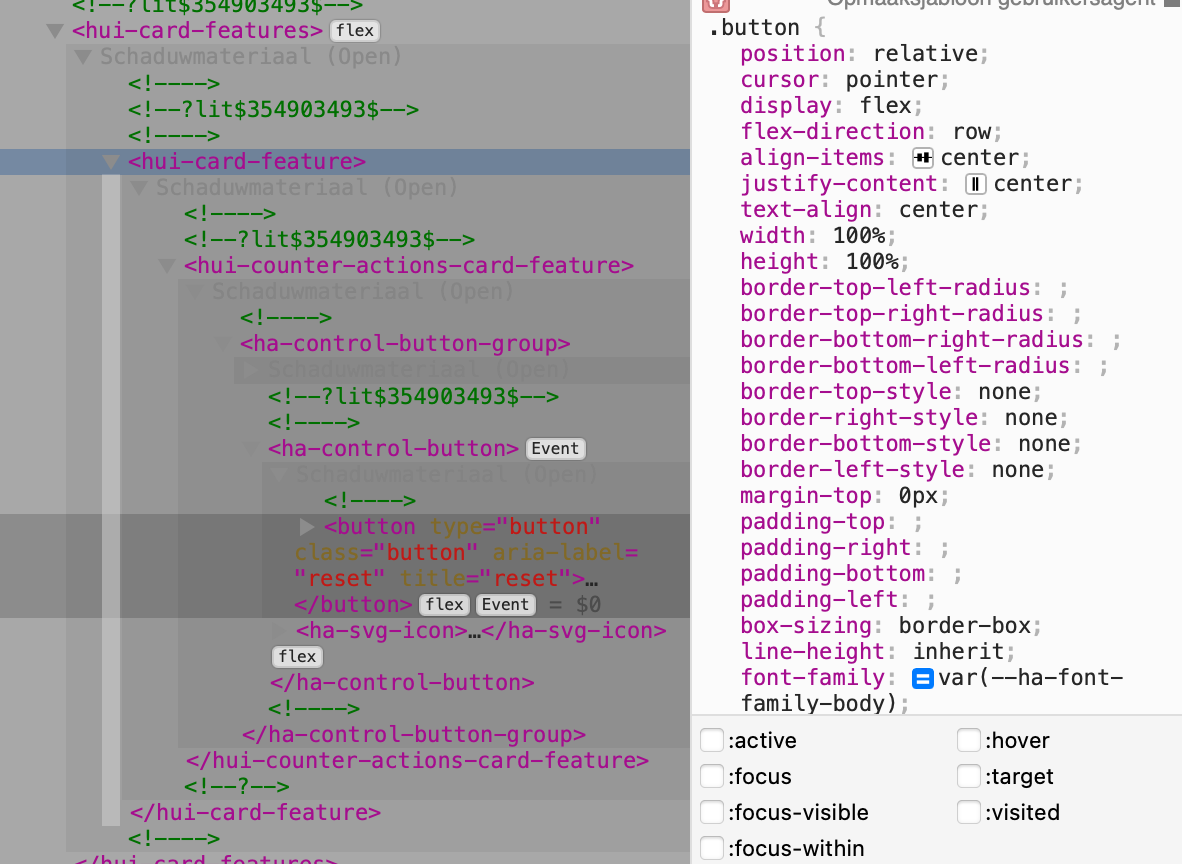
manually setting there to .button does make it happen
see How to set border-radius on Tile card Features - #8 by Mariusthvdb for the other tiles I managed to set 0px to…