MelleD
September 8, 2025, 3:40pm
9086
Did you forget some card_mod CSS?
I copy paste your example:
     - type: vertical-stack
        cards:
          - type: custom:mushroom-template-card
            icon: mdi:mushroom
            icon_color: orange
            primary: Example
            card_mod:
              style: |
                ha-card{
                  background: none;
                }
          - type: custom:layout-card
            layout_type: custom:grid-layout
            layout:
              grid-template-columns: 1fr 1fr 1fr
              margin: -15px 0
            cards:
              - type: custom:ring-tile
                entity: sensor.wohnzimmer_temperatur
                ring_only: true
              - type: custom:ring-tile
                entity: sensor.wohnzimmer_temperatur
                ring_only: true
              - type: custom:ring-tile
                entity: sensor.wohnzimmer_temperatur
                ring_only: true
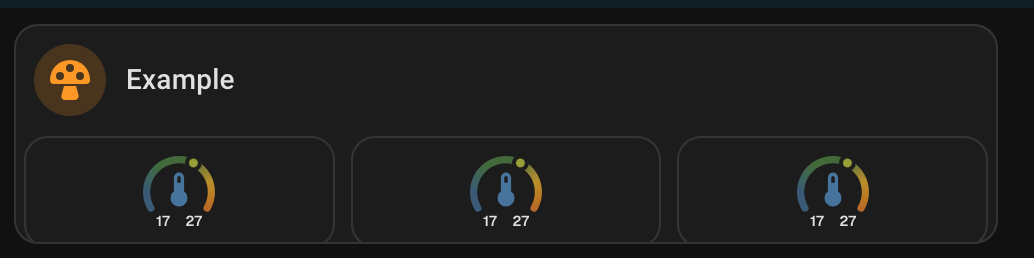
Looks complete different and not like one card.
I think I need a vertical-stack-in-card to looks like one card together:
And then withour card_mod card i cannot change the tile card to change the background
image969
September 8, 2025, 5:22pm
9087
I use
type: custom:stack-in-card
mode: vertical
MelleD
September 9, 2025, 7:05am
9088
Makes no different when I use some kind of vertical stack in card it likes one card. But the card_mod inside is not working without card_mod card
      - type: custom:stack-in-card
        mode: vertical
        cards:
          - type: custom:mushroom-template-card
            icon: mdi:mushroom
            icon_color: orange
            primary: Example
            card_mod:
              style: |
                ha-card{
                  background: none;
                  border: none;
                }
          - type: custom:layout-card
            layout_type: custom:grid-layout
            layout:
              grid-template-columns: 1fr 1fr 1fr
              margin: -15px 0
            cards:
              - type: custom:ring-tile
                entity: sensor.wohnzimmer_temperatur
                ring_only: true
                card_mod:
                  style: |
                    ha-card {
                        background: red;
                        border-radius: var(--ha-card-border-radius,12px);
                        box-shadow: none;
                        border: none;
                        margin: 0px;
                    }
              - type: custom:ring-tile
                entity: sensor.wohnzimmer_temperatur
                ring_only: true
              - type: custom:ring-tile
                entity: sensor.wohnzimmer_temperatur
                ring_only: true
dcapslock
September 9, 2025, 9:23am
9089
custom:stack-in-card has ha-card so standard card_mod can apply. I expect you were looking too high or low in the DOM tree.
This works for me.
type: custom:stack-in-card
mode: vertical
card_mod:
  style:
    .: |
      ha-card {
          background: red;
          border-radius: var(--ha-card-border-radius,12px);
          box-shadow: none;
          border: solid;
          margin: 0px;
      }
Chykan
September 9, 2025, 10:11am
9091
Chykan:
It is a good thing I did post and ask for clarification. Yes it was referred to three times in my original.
This when I had it referred to twice in frontend and once in the resources.
/local/community/lovelace-card-mod/card-mod.js
/hacsfiles/lovelace-card-mod/card-mod.js
This is now with just the frontend and no resource added.
frontend:
  extra_module_url:
    - /hacsfiles/lovelace-card-mod/card-mod.js
But now Card-Mod is applying when viewing dashboards on a computer but not applying when viewing dashboards on my cast devices.
EDIT: Took the frontend module out all together and just used the dashboard resource and now the cast view has card-mod applied.
Just an update on this one.
While only having card-mod loaded as a dashboard resource and not as a frontend module
Experiencing card-mod render failures on casted dashboards, unless I casted them twice
I was looking through my browser console log and found a message along the lines of. “You are missing out on performance improvements by not using card-mod as a frontend module”
I took another look at the Card-Mod 3 ReadMe
Performance improvements
While card-mod can be installed as a lovelace resource , some functionality will benefit greatly from it being installed as a frontend module instead.
To do that, add the following to your configuration.yaml file and restart Home Assistant:
frontend: extra_module_url: - /local/card-mod.js
You’ll need to adjust that path according to where you have installed card-mod.js. If you installed through HACS, this is probably /hacsfiles/lovelace-card-mod/card-mod.js.
Any resource definitions automatically added by HACS can be kept as is even after adding extra_module_url.
So I added card-mod as a frontend module again
frontend:
  extra_module_url:
    - /hacsfiles/lovelace-card-mod/card-mod.js
While leaving my resource definitions automatically added by HACS in place
RESULTS
Dashboards casting reliably again and loading card-mods a lot faster
Dashboards displayed on PC, Raspberry Pi and Chrome OS all have card-mods loading a lot faster.
I feel this line has been added to the ReadMe since we last visited this.
Any resource definitions automatically added by HACS can be kept as is even after adding extra_module_url.
dcapslock
September 9, 2025, 10:15am
9092
No it has been that way for a while. You can have in both dashboard resources (needed for cast) and Frontend module (best for performance) but the URLs must MATCH EXACTLY, otherwise non CAST browsers will run card-mod Javascript file twice.
1 Like
MelleD
September 9, 2025, 11:11am
9093
dcapslock:
This works for me.
I edit my post, the issue is not the card_mod from the stack-in card.
The problem is when I use a stack-in card the card_mod of the ring tile card is not working.
Chykan
September 9, 2025, 11:13am
9094
I am assuming the way I have it above is the same url? With the hacstag being the only difference?
dcapslock
September 9, 2025, 11:17am
9095
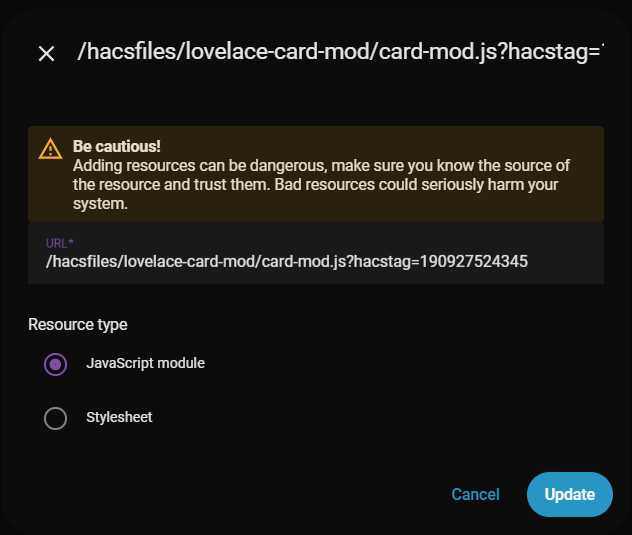
Yes, so in your Frontend module url, incude the hacstag, and update whenever card-mod is updated by HACS. Basically take the HACS dashabord URL in full and paste into Frontend module section.
Chykan
September 9, 2025, 11:25am
9096
Will do, thanks for the clarification. This probably needs to be a bit more explicit in the ReadMe
dcapslock
September 9, 2025, 11:30am
9097
For now I point to my comment in the issue where this was discussed. I may submit a PR for the readme, but anyone can
1 Like
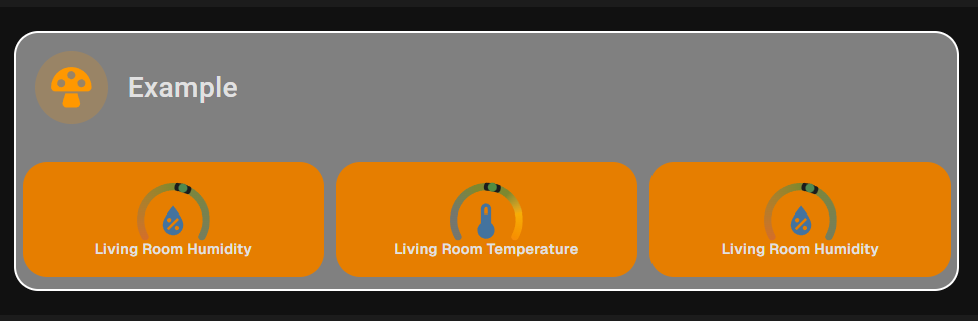
Stack in Card rearranges the layout so you’d have to use something like this
type: custom:stack-in-card
mode: vertical
cards:
  - type: custom:mushroom-template-card
    icon: mdi:mushroom
    icon_color: orange
    primary: Example
  - type: custom:layout-card
    layout_type: custom:grid-layout
    layout:
      grid-template-columns: 1fr 1fr 1fr
      margin: "-5px 0"
    cards:
      - type: custom:ring-tile
        entity: sensor.living_room_humidity
        ring_only: true
        bottom_element: name
      - type: custom:ring-tile
        entity: sensor.living_room_temperature
        ring_only: true
        bottom_element: name
      - type: custom:ring-tile
        entity: sensor.living_room_humidity
        ring_only: true
        bottom_element: name
card_mod:
  style:
    hui-vertical-stack-card$:
      layout-card$:
         grid-layout$:
          ring-tile:nth-child(1n)$: |
            .background {
               background: #e67e00 !important;
                    }
    .: |
      ha-card {
          background: grey;
          border-radius: var(--ha-card-border-radius,12px);
          box-shadow: none;
          border: 1px solid white;
          }
Color only for effect
1 Like
dcapslock
September 9, 2025, 11:50am
9099
Noted. Looking at ring-tile it uses the property _cfg and not config or _config so card_mod can’t read the config so you would need mod-card in this case.
EDIT: Noting @LiQuid_cOOled solution which is valid styling from a parent where card_mod can be applied.
I avoid stack-in-card for the complexity it adds and use vertical-stack-in-car d instead.
But why??
Why not stick to entities or vertical-stack (or grid for certain requirements)
Those container cards can do everything (helped by card-mod here and there)
And 100% stock cards is always preferable
Especially to vertical-stack-in-card which has a history of causing inconsistencies and trouble…
MelleD
September 9, 2025, 12:58pm
9102
But with a vertical-stack-in-card I need the same card_mod right? Because I tried both cards and always same issue directly on the ring tile card is not working. So you would recommend to use custom:vertical-stack-in-card, right?
Just for my interest what is better to use this complex css instead of the card mod card?
    hui-vertical-stack-card$:
      layout-card$:
         grid-layout$:
          ring-tile:nth-child(1n)$: |
            .background {
               background: #e67e00 !important;
                    }
    .: |
Don’t get me wrong, I use stock cards before any mod card. Grid card is my go to.
card_mod:
  style: |
     ha-card {
          background: red;
           }
I get better load response times with this vs the stack-in-card
Try both side by side and refresh your browser.
type: custom:vertical-stack-in-card
cards:
  - type: custom:mushroom-template-card
    icon: mdi:mushroom
    icon_color: orange
    primary: Example
    card_mod:
      style: |
        ha-card {
          background: grey;
          }
  - type: custom:layout-card
    layout_type: custom:grid-layout
    layout:
      grid-template-columns: 1fr 1fr 1fr
      margin: "-5px 0"
    cards:
      - type: custom:ring-tile
        entity: sensor.living_room_humidity
        ring_only: true
        bottom_element: name
      - type: custom:ring-tile
        entity: sensor.living_room_temperature
        ring_only: true
        bottom_element: name
      - type: custom:ring-tile
        entity: sensor.living_room_humidity
        ring_only: true
        bottom_element: name
card_mod:
  style:
    layout-card$:
      grid-layout$:
        ring-tile:nth-child(1n)$: |
          div.background {
           background: #e67e00 !important;
               }
    .: |
      ha-card {
           background: grey;
           border-radius: var(--ha-card-border-radius,12px);
           box-shadow: none;
           border: 1px solid white;
           }
1 Like
image969
September 9, 2025, 1:58pm
9105
In case anyone else has this issue, I’ve found the right path with the inspector.
    card_mod:
      style:
        hui-call-service-row $: |
          ha-button::part(base) {
            background: transparent !important;
            box-shadow: none !important;
            border: none !important;
          }
          ha-button::part(label) {
            color: grey !important;
          }
MelleD
September 9, 2025, 2:04pm
9106
Cool works
Thanks a lot