☑️ ChoreOps - Level Up Your Household Tasks

Hi everyone,

I’m incredibly excited to announce the 1.0.0 release of ChoreOps, a professional-grade household task and routine manager.

This project is the evolution of the fantastic KidsChores integration by VaReTaS. Supporting that original project was eye-opening. We built just enough capability into it to make a lot of parents very happy, but through community feedback, I noticed a fascinating trend: adults were creating “kids” accounts for themselves just to get a structured way to manage their own chores and coordinate with housemates.

Seeing all those unique use cases turned this into a massive passion project for me. With @VaReTaS blessing, I decided to take all the learnings from KidsChores and completely overengineer a new system from the ground up.

The result is ChoreOps. It is built to Home Assistant Platinum quality standards and designed to be a pleasure to use for everyone in the household. Whether you want a silent “Operations Center” just to ensure the trash gets taken out on time, or you want to utilize the optional gamification engine—which is engineered as a first-class citizen, not a tacked-on afterthought—ChoreOps adapts to your lifestyle.
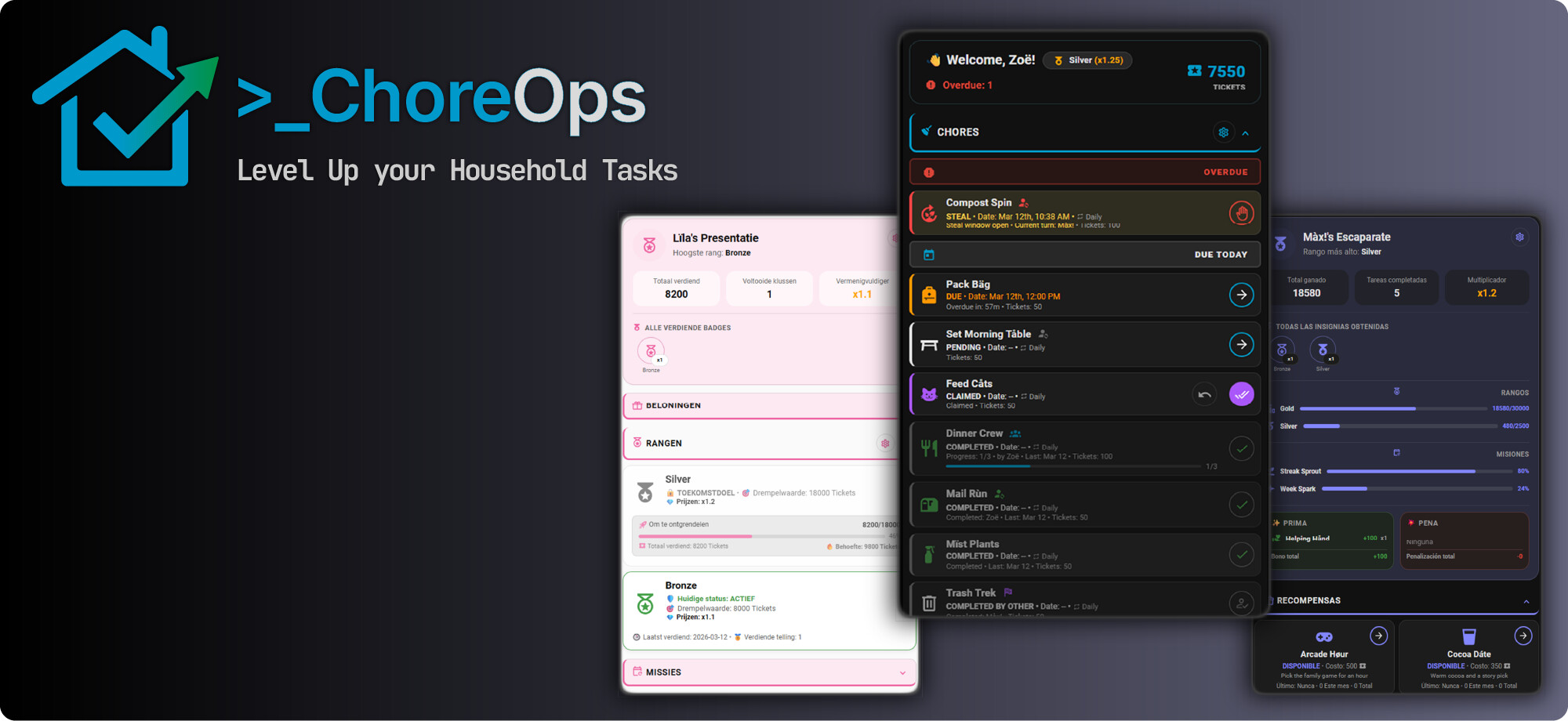
:star2: Key Features

  • 100% Native & Tinker-Friendly: No Docker containers, no external cloud, and no side-apps required. Everything runs purely within Home Assistant. It exposes a massive, rich set of sensors, attributes, and buttons directly to your UI. Paired with a robust set of API services, it’s built to give power users full access to tinker, build custom automations, and mold the system to perfectly fit their home.
  • Next-Level Dashboards: We’re pushing the limits of Lovelace. These templates achieve capabilities you rarely see even in fully custom cards. Hosted in a fully decoupled “Over-The-Air” registry, they support native Dark/Light themes and premium translations for 13+ languages without needing a core integration update. (No yaml required)
  • Rock-Solid Task Management: Smart rotations, shared/competitive chores, and precise due windows with missed-state tracking and actionable notifications.
  • First-Class Gamification: Earn points, track XP, unlock Bronze/Silver/Gold ranks, and complete daily/weekly quests.
  • OpsCenter Admin View: A unified dashboard for parents or house managers to easily approve claimed chores and requested rewards. It also provides control to change chore details, award bonuses or penalties, and make manual point adjustments on the fly.

:heart: Support the Project

If ChoreOps helps keep your household running smoothly, consider fueling its development! Your support is a token of appreciation that keeps the fire burning and prevents open-source burnout.

:sparkling_heart: Sponsor on GitHub
:coffee: Buy Me A Coffee


:books: Getting Started

Everything you need to install via HACS and configure the integration is documented in the Wiki:
:point_right: ChoreOps GitHub Repository
:point_right: Installation & Configuration Wiki

I’d love for you to try it out and let me know what you think!

9 Likes

Hi everyone, and a special shout-out to @ccpk1!

I wanted to take a moment to express my appreciation for the incredible effort @ccpk1 put into KidsChores, and especially for taking the initiative to evolve the project into ChoreOps.

It’s been an amazing journey developing the original integration, but as life has gotten busier, I haven’t been able to dedicate the time needed to keep it moving forward. I’m thrilled to see the project find a new life.

ChoreOps is the future of this project, and I highly recommend everyone check it out, so I hope you’ll all join me in supporting it.

It’s in great hands, and I’m confident it will be a fantastic resource for the community. I’ll still be around and will help out whenever I can!

4 Likes

I’ve been running and customizing this for a few days now. @ccpk1 really has thought of most everything. And it was just in time for my spring re-write of the chores and dashboard.

1 Like

Hi everyone,
thanks for the new integration “ChoreOps”! In the last days i found the “older” version, which is now deprecated and now i try to configure “ChoreOps”.

There are plenty of configuration possibilities! This is so awesome! :smiley: Even the language-possibility is great!

I try to get through the manuals, but the more i read this, the more i got distracted xD For me is the problem to see the difference between the possibilities of Chores (the task), rewards (the points), badges (?), Achievements (?) and challenges (?).

I set up a rewars named “Finishing Homework” with a bonus like “Bonus Homework finished”. But on the dashboard of the children there is no possibility to check on “Bonus Homework finished”.

Also i make a reward like “To watch a video” for 30 Points. But i dont see the rewards on the children dashboard, even the child has more than 30 points.

By the way - if you need german support, i would gladly help. I think, that this project has so much potential for parents, who “fight” with their children to get the work done :wink:

Hi there! :wave: Welcome to ChoreOps, and thank you so much for the kind words!

Because ChoreOps has a lot of features, it can definitely feel a little overwhelming at first. Let’s take a “crawl, walk, run” approach to make it simple.

First, let’s clear up the vocabulary:

  • Chores: The work you do to earn points. Example: “Take out the trash” or “Do Homework”.
  • Rewards: The fun things you buy with your points. Example: “Watch a video for 30 mins”.
  • Bonuses / Penalties: Extra points that only the Admin (Parents) can add or take away in the OpsCenter.
  • Ranks & Quests (Achievements): Automatic long-term goals. The system handles these automatically as kids earn points over time (like reaching “Silver Rank” or finishing a “7-Day Streak”).

Fixing your setup:

  1. The “Homework” Confusion
    It sounds like you accidentally set up “Finishing Homework” as a Reward. Because it is work, you need to create “Finishing Homework” as a Chore. That way, your child will see it on their dashboard, and they can click it to say it is finished and earn their points.
    Also, children cannot click their own “Bonuses.” Bonuses are specifically designed for the Parents. If your child did a really great job on their homework, you (the Admin) can go into the OpsCenter and click the Bonus button to give them extra points.

  2. The “Watch a Video” Reward
    If the child has 30 points but cannot see the “Watch a Video” reward, please check two things:

  • Make sure it is created in the system as a Reward (not a Chore).
  • Make sure your child’s dashboard is using one of the Gamification templates (like user-gamified-v1). If they are using a basic chores layout, the Rewards section might be hidden!
  1. German Translation Support! :de:
    We would absolutely LOVE your help with the German translation! This is a community project, and having native speakers makes a huge difference.
    I just opened a brand new central hub for all our translators. It’s all machine translation now, but using the Crowdin application allows a structured way for translators to fix those context misses. You can find all the instructions on how to help with the German language files right here:
    :point_right: ChoreOps Translators Discussion - Welcome Translators! Coordination & Help · ccpk1/ChoreOps · Discussion #20 · GitHub

Please let me know if changing Homework to a Chore fixes your dashboard! We are glad you are here.

This looks great. We’ve been using kids chores successfully for several months now but will migrate to choreops as soon as I have time. Thank you all for the great work!

ChoreOps 1.0.2 is now available.

This release focuses on stability and polish, including calendar and recurrence fixes, due-date and scheduling improvements, UI and options-flow cleanup, service and workflow fixes, and general reliability improvements across the integration.

Release notes:

If you reported an issue that was targeted for 1.0.2, please update, restart Home Assistant, and test again. If the issue involves dashboards or generated UI, also make sure frontend dependencies such as button-card are updated to the newest available version before opening or reopening an issue.

If the problem is still reproducible after the update, restart, and dependency check, reopen the issue or post a follow-up with details.

This is really awesome. Thank you!

1 Like

@ccpk1 Thanks for your answer :slight_smile: I searched and searched until i found the problem. It was indeed the dashboard. If someone create a new user with a dashboard, then it took the “Chores Standard” and not “Gamification Premier”, so it was in my home assistant. Maybe i clicked first wrong? :smiley:

Glad you got it sorted out. Chores Standard is the default when creating a new dashboard, so you are correct that you need to select the gamification template when creating the dashboard to see the gamified components.

I’m considering changing that default in the next update, but the idea is that many different kinds of templates can be added in the future. Thanks for posting, it’s good for people to know the selection option is there.

:rocket: ChoreOps 1.0.5: One Week In & A Big Thank You!

ChoreOps 1.0.5 is now available, and since we are officially one full week past the 1.0.0 launch, I wanted to take a moment to pause and say thank you.

The response has been incredibly encouraging. The issue reports, migration feedback, translation help, and overall engagement have pushed the project forward quickly. A lot of your early feedback has already turned into fixes and polish across these first few minor releases, and that real-world testing has been invaluable.

Before we get into some cool features you might have missed, here are a few housekeeping notes from Week 1.

:warning: Important Upgrade Reminder: Regenerate Dashboards

If you update ChoreOps, please regenerate your dashboards.

Your existing dashboards will technically still work, but regenerating them is the only way to pick up the latest template fixes, compatibility improvements, and the new UI action/setup errors we shipped in 1.0.5.
(Need help? Check out the Dashboard Generation Overview and Troubleshooting Guide).

:bulb: Top Takeaways from Week 1

To save you some troubleshooting time, here are the most common answers to questions we saw this week:

  • UI looks weird after an update? Be sure to restart Home Assistant after updating and regenerate the dashboard before assuming the underlying integration is broken.
  • Missing badges or rewards? Ensure you generated a gamification-oriented dashboard template, not the default chores-focused layout.
  • Older device struggling to load dashboards? We just added a new “Lite” dashboard template! It strips out the heavy custom JavaScript so older devices can run the UI for basic chores and rewards.
  • Claim or action buttons not working? Check your user linking and kiosk mode behavior if being used on a shared device. Many “broken button” reports are actually permission errors by design! (See Access Control Docs).

Tip: The ChoreOps Wiki is fully stocked with setup guides, FAQs, and advanced configs. It will answer “how is this supposed to work?” much faster than guesswork!

:hammer_and_wrench: Hidden Gems: Features to Explore

If you have the basics running, here are a few advanced features worth checking out:

  • Rotation with “Allow-Steal”: Perfect for turn-based chores where you want fairness, but still want to allow someone else to pick up the slack if the assigned person misses their window. (Docs: Rotation Strategies)
  • Due Windows & Claim Locks: Ideal for when you don’t want a chore to be claimable too early, opening it up only during a specific part of the day. (Docs: Claim Timing)
  • Weekly Activity Reports: A per-user service that details what happened over the last week. You can test it in Developer Tools, or use an automation to email yourself a scheduled weekly summary! (Docs: Weekly Reports)

:tada: Milestones & Gratitude

I want to say a special thank you for helping push the project forward visibly. ChoreOps just hit 46 GitHub stars, which is a huge milestone for week one! Every star helps more people discover the project and gives new users confidence that it is active and supported. If you haven’t yet, :star: dropping a star on the repo is a massive help.

To everyone currently sponsoring the project or sending tips: thank you. That support means more than you might realize. It goes beyond just helping justify the hours spent building this and covering the out-of-pocket costs for translations and support tools—it validates that the community is finding real, practical value in this work, rather than it just being a “nice to have.” That kind of validation keeps the momentum going and makes it easier to invest in polish and new ideas without burning out. (If you’d like to help support development, you can find my :heart: GitHub Sponsors here or :coffee: Buy Me a Coffee here).

:memo: Share Your Setup & Join the Discussion

If ChoreOps is working well for your household, I would love to hear about it. Did you find a dashboard layout, automation, or workflow that just clicked for your family? Please share it below! Real-world examples are incredibly helpful for new users.

If you have technical questions, need setup help, or just want to dive into a topic in much more detail than makes sense for a general community thread, please jump into our GitHub Discussions!

:speech_balloon: Quote of the Week

As a quick throwback to our KidsChores roots, I want to leave you with a comment from community member @xeor (github) this week that really made me smile:

“There aren’t many integrations with the potential to actually make better humans! Keep up the great work!”

That right there is one of the big reasons this project exists.

Thanks again for such a fantastic first week. I’m really looking forward to seeing your success stories and continuing to improve ChoreOps with all of you!

1 Like

I just installed this today as a migration from KidsChores. After the migration, I followed the steps to create a dashboard. This includes making sure I had the required items to generate the dashboard. When it is generated I get ButtonCardJSTemplateError. Not sure where to go to fix this :frowning:

First step is always restartg home assistant and check the system logs for any related errors.

If that doesn’t do it, then head over to the repo to take a look at the troubleshooting guide or enter an issue. Technical: Troubleshooting · ccpk1/ChoreOps Wiki · GitHub

Hi,

This is great! The transition from Kids Chores was seamless!!

Unfortunately there are a few entities that are missing from the previous integration – I’m unsure of them all since I removed Kids Chores but – might it be possible to add a sensor that displays the amount of claimed chores? (And requested awards)… I used it to show a badge on my main dashboard when the value was >0. The badge links to the chore dashboard and so far I’m really missing that shortcut.

Also, wondering the logic of sensor._kidsname__choreops_chores ? Is it a never-resetting tally?
I’m using it to create mini graphs that shows points/chores over the past 2 weeks, and wanted to verify the functionality.

Thanks for all the work that’s gone into this!

EDIT: I just found “Show Extra Entities” in the General Settings, but doesn’t seem to include the current amount of claimed/requested.

EDIT2: Found it under “system” !

I am in the midst of migrating from KidsChores to ChoreOps and I am struggling with something on the Dashboards.

I love the Gamification Premier dashboard and successfully generated them for my kids which by default created /cod-chores/[child]

I wanted to move them to be a subview of their personal dashboards ie /dashboard-[child]/cod-chores however both moving the dashboard using the HA interface, or simply copy and paste the yaml both throw up configuration errors.

Am I missing something in the way to achieve this?

Glad to hear it went smoothly for you. Couple of things to be aware of.

  • Each sensor has a ‘purpose’ attribute when you look at it in developer options or more info. That attribute will tell you what the sensor is for and what the state is. So yes, for _chores it is a tally

  • You can use the extra entities option you found already, however one of the reasons that isn’t enabled by default is because you can easily end up with 1000’s of entities and still not have what you want. ChoreOps, by default, uses attributes heavily in each of the sensors to provide rich information and statistics about the item. It’s worth spending a few minutes to look and understand. Also, since not everyone is as familiar with how those attributes can be used in dashboards or automations, I created this “cookbook” to help get you going in the right direction. Tips & Tricks: Template Cookbook for Chores, Rewards, and Approvals · ccpk1/ChoreOps Wiki · GitHub

The reason this breaks is that the Chores cards in the Standard Chores and Gamification dashboards are not fully self-contained. They rely on shared template code that lives at the dashboard level, outside the individual view/card because all the smart logic is too big for the normal dashboard template engine to handle. So when you move or copy only the user chores card into another dashboard, the chores section loses those shared definitions and shows a configuration error.

Right now, you have three practical options:

  • Use the dashboard generator to create the full dashboard first, then make your custom changes there. You can generate multiple dashboards with different names if you want separate layouts.
  • Use the Chores Essential template instead. It has fewer features, but it is much easier to place into an existing dashboard and rearrange with drag-and-drop.
  • If you want to move the Standard or Gamification version into another dashboard, open the raw dashboard editor and copy over the shared template definitions as well, not just the visible card/view. Those shared pieces are required for the chores card to work.

All other cards are self contained and can be copied and moved independently, it’s on the chores card with the special logic.

Let me know if that points you in the right direction.

Thanks for your reply! Reading through your cookbook! I think I’ve almost got everything running as it should — although I haven’t set up any achievements yet.

I’ve been looking at the attributes as well, and it’s giving me some ideas!

One other thing – sensor.kidsname_choreops_chores_completed_total does not seem to be increasing. Remains at 0. Daily, Weekly & Monthly seem to be working though.

@ccpk1 is there an easy way to get a filtered chore list that ONLY contains the chores that are due today or that are overdue?

Hi @ccpk1

This all looks very impressive.

Is it possible to have repeating chores appear in a calendar so that all occurances are shown? That is, I want to see, say, empty trash on the calendar this week, next week, the week after that…

Is it possible to combine calendars so that tasks for multiple people appear on the same calendar?

Thanks