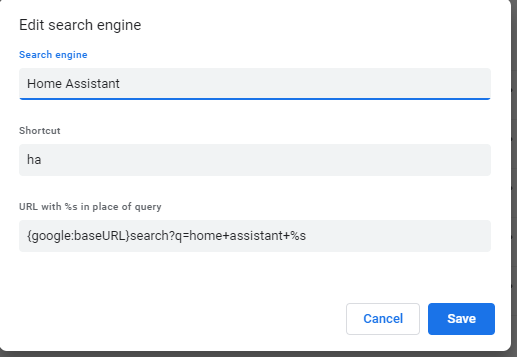
I do a lot of searching for phrases that start with “Home assistant” and I got tired of typing it all the time. If you use Chrome, you can create a custom “search engine” that does this for you - you just type “ha<space” followed by the rest of your query. It might work in Edge too, not sure.
In settings, search for “manage search engines” and then add a “site”. You can see in the screen shot how to do it.
3 Likes
Alternatively you could use something like AutoHotkey to expand a string of characters into a full word. For example you could type in “HA” followed by a space and it would expand to “Home Assistant”.
It achieves the same task but it would be universal across all browsers.
Love this, never knew this function was available, learn something new every day 
I use similar on my ios devices under keyboard setting and text replacement to type out ‘home assistant’ when I type ‘ha’
1 Like