Hi everyone,
After Agenda, here is its little brother: Clan.
You know the question that always comes at the worst moment: “why does the garage alert go to the old phone sitting in a drawer?” 
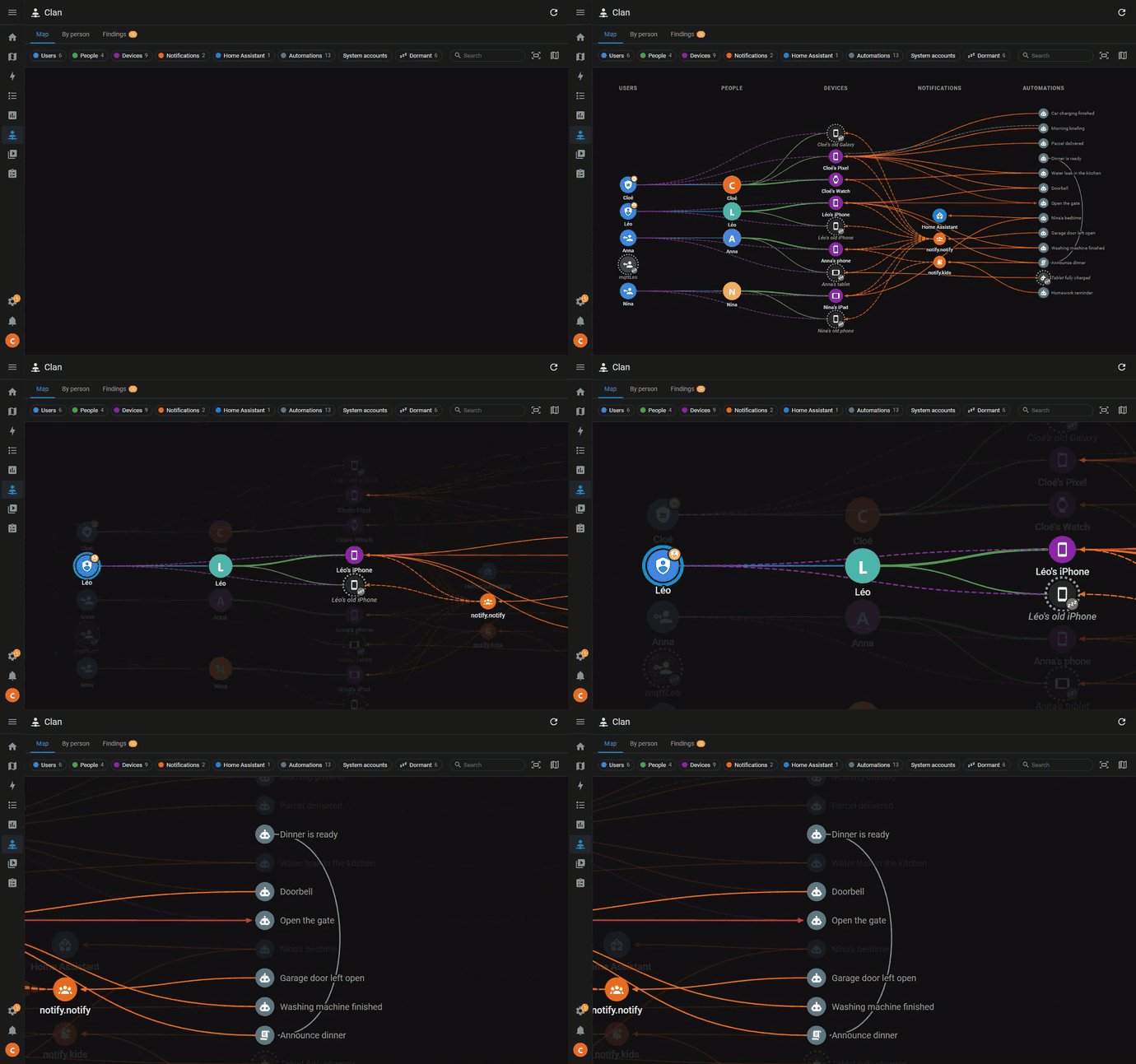
Clan answers it in one picture: an admin panel that draws the human side of your Home Assistant, from accounts to automations.
What you see
- users, their role, how they sign in, two-factor authentication and long-lived tokens
- the person behind each account, and the trackers that follow them
- the phones, watches and tablets of the companion app, and the account that registered each one
- every automation, script or alert that sends a notification, and the phone it reaches (directly, through a group, or through
notify.notify) - the automations that use someone’s presence or a phone sensor, and what a notification button runs
- who can open the gate, the garage or a lock: from a dashboard, a notification button, an NFC tag, on arrival, or by voice with Assist
- when each phone got its last notification, and which dashboards each user can open
And it finds things  : old phones silent for months, accounts nobody uses any more, automations calling a notification service that is gone…
It only reads: nothing is changed in Home Assistant, and the panel is for administrators only.
Installation 
Clan is in the default list: search for Clan in Settings > Marketplace (in HACS before Home Assistant 2026.11).

Feedback welcome, especially if your house is big, odd or crowded 