Two years ago, I jumped into Home Assistant with a tutorial and did not really know what i was doing - but this is now my prod homeassistant server.
Now I have a thriving system with over 30 devices, but my initial setup might be a bit messy.
I’m facing two challenges: Multiple IPs: My Home Assistant VM somehow has 3 IP addresses assigned, and I can’t remember why I set it up that way or how to remove them.
Remote Access: My config still references an outdated Dynamic DNS address and potentially expired certificates. While Home Assistant seems to function i have a new adress trough a reverseproxy that signs certs as well on the host server.
I’m moving to local hostnames for services and devices so I don’t need to remember IPs
I’m considering making most devices and services dhcp. maintaining IP for a single service is easy but 20 services and 50+ devices and trying to maintain some scheme for assigning static IPs is a pain
Ok, You are !, your system keeps communicating as designed thou, be careful what you “try” to accomplice, not that i know what you actually means with your post
172.30.x.x IS HA’s internal … DON’T remove
192.168.1.x Is most likely your local-lan … Don’t remove
As you haven’t told/showed anything in regards to your local-network-environment, nor your HA-Network setup/Settings, it’s pretty impossible to give you any advises/tips
Somehow / at some point, you decided to write this " http: " in your config.yaml HTTP - Home Assistant.
Decide from above, and in regards to your HA-Setup, i.e SSL ? How Do you have external access via HTTPS ? , or are you infact running HTTPS locally ?
Have you installed a " Reverse-Proxy " , own DNS-Server ?
Why ? , beside what do you actually means by “potentially”, Either it iS, or it’s Not
Sorry, it sounds like you have no Idea of What you have, Nor Why.
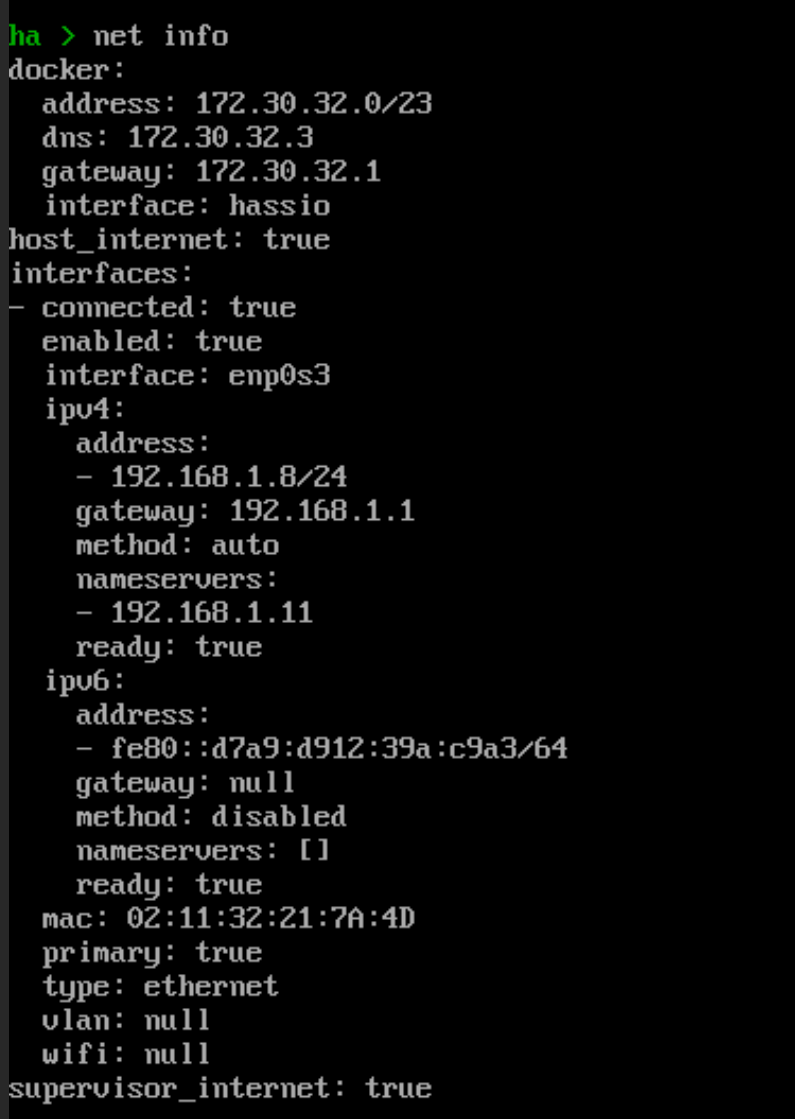
PS: Ijust noticed that “tiny/small” line was a pic , 192.168.1.8 is most likely HA’s Lan IP, and as mentioned 172.30.x.x Is HA’s Internal , so this Pic is “normal” that’s what you should see Even in HA’s Console
EDIT: In HA-Console type:
net info … post the result
I’m sorry if I’m upsetting you.
I think I entered the http at the time because it was in the tutorial to get remote access and of course you are right; I have no idea about the Hasso.config - that’s why I turn to this forum.
I’ll do have a own-DNS Server and a nginx server for reverese proxy running.
The certs are from lets encrypted and get automatic refreshed for the host mashine!
The old dns and old certs are from 2 years ago where i used a service called dyndns - since that isnt the case anymore; my adress changed therefore the config changed and the certs aswell. but i never updated the config file in home assistant, i just forgot about that.
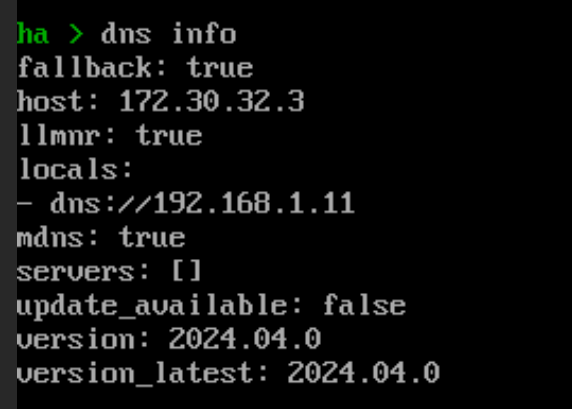
dns info:
Ok so far, it is normal that besides my local ip (192.168.1.8) there are IS /HA’s internal IP adresses.
I did not know that; and im happy that this is fine therefore my proxyconfig is fine.
This seems to be the only " ? " , everything else looks good to me ( Beside as me, you also have the gateway/dns set to same )
Thou what does your “own-DNS Server” have for function (Is it Your “Router” ?
Anyways, 172.17.0.0/24 is a “private” network, as your others are, question is what is this for ?, it’s not in HA’s Settings, Do you have something on this Network ? (Any devices using this Network ? ) , try to ping 172.17.0.1, and other random numbers ( From i.e HA-Terminal )
If you don’t get any responses i guess you can remove this from your config
PS: Thou do check you Nginx and DNS-Server also,to make sure that no 172.17.x.x is used anywhere
I think base_url is actually “deprecated” , never seen this
Try to remove it and place this above or below the " http: - section" i.e below
“# ssl_ca: /ssl/chain.pem”