I second Majel Barrett, I’d be willing to do the training if I knew how.
I replied to someone upthread who had exactly that, as well as some tricks for getting it working in piper
Took me forever to get these custom models working and showing up in the Piper list:
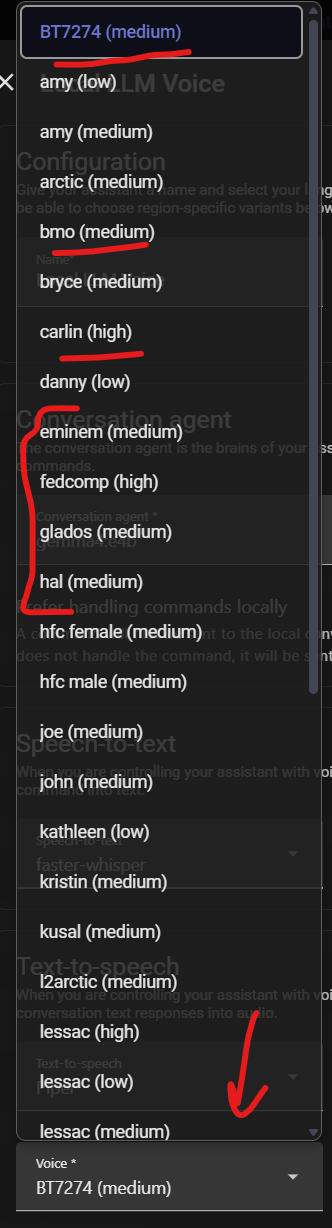
First things first, I had to make sure the dataset field matched the exact filename of the .onnx file:
{
  "dataset": "BT7274",
  ...
}
After that, I renamed everything to match for my benefit:
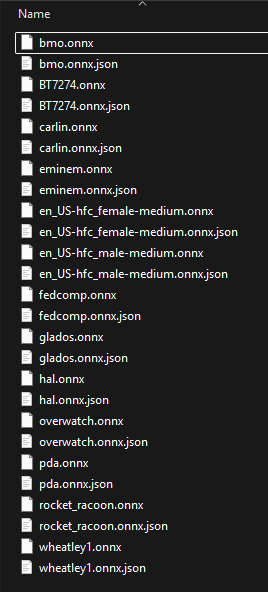
Default voices get downloaded and put into this directory (since I have the Docker container), and they will have the funky en_US-xxx-medium names.
Last, I updated the JSON in every single one to match the quality and add the language info:
{
  "dataset": "BT7274",
  "audio": {
    "sample_rate": 22050,
    "quality": "medium"
  },
  "espeak": {
    "voice": "en-us"
  },
  "language": {
    "code": "en_US",
    "family": "en",
    "region": "US",
    "name_native": "English",
    "name_english": "English",
    "country_english": "United States"
  },
  ...
}
The sample_rate needs to match, but all of these were 22050Hz.
What I need to do check the filesize. Anything ~60MB is a medium quality and ~110MB is high. That made it easy to put in the right info into each one.
They all work now and show up in the dropdown  .
.
Just wanted to say thanks for the addition of the Subnautica PDA voice! One minor note... I did need to add a "dataset": "pad" entry in the .onnx.json file to get it working for my use case. Thanks again!
Can someone make Charlie Kelly (Charlie Day) from It's always sunny?
I just trained a Baymax model that sounds pretty good, but I'm too scared of Disney to post it. If anyone wants it, DM me.
I made a few voices, be gentle it's my first time trying this. I think Tom Servo turned out great, not sure on the others, they seem kinda meh so far but I haven't listened to them much since Servo was the main reason I started it. I already had the voices broken out for Joel and Crow so decided to spend some time on them.
- Jake the Dog from Adventure Time
- Tom Servo from MST3K
- Crow from MST3K
- Joel from MST3K
I've got my training system up and running I should be adding 1-2 voices a week for a while:
Non-English:
Thank you to everyone for these samples. Just starting to use Home Assistant and Voice Assist and these are great. My son is addicted to Top Gear and would love to find some voices for Clarkson, May, Hammond. A bit overwhelming, but will post if I am able to figure out how to train them.
Wow, incredible work everyone! I would like to make a request, Rick from Rick and Morty as .onnx to use in piper. That would be awesome!
I don’t know how to DM you here but I would greatly love your baymax voice, please?
No problem! Sent.
GitHub - TacitusCornelius/shodan-piper-tts: Piper TTS voice model of SHODAN (System Shock Remake) — en_US medium quality · GitHub Great voices in this thread, thanks all. It inspired me to train a SHODAN model from System Shock. It was tricky due to the post-processing effects tending to bleed into the dataset too much and led to unintelligible outputs or dropped words on my previous attempts. This one was my cleanest so far but lacks SHODAN’s characteristic glitch effects or stuttering. May update with Xerxes from System Shock 2 if I can produce one with good output quality (I am still tweaking it some). Enjoy.
I’d love a link as well, plz! I’m going to pretend it’s the Baymax Stormtrooper 
The computer Colossus from the film Colossus: The Forbin Project.
Has anyone found an Alfred Pennyworth voice?
This is great!
Now all we need are WOPR and a Cylon 
There’s a large collection of custom piper voices here:
Are you still looking for this?