Love the compass card and it has been on my kiosk dashboard from the start. However some styling has changed and I cannot get it. Can somebody help me?
This is how it currently looks
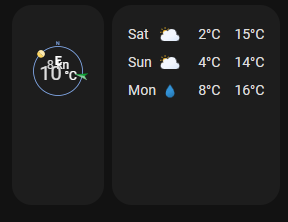
vs earlier

The compass is much smaller and the card is somehow long then necessary.
I have already tried to adjust the styling code but without success. Anybody that can help me in the right direction? Below is my current code.
                - type: custom:compass-card
                  view_layout:
                    grid-area: wind
                  indicator_sensors:
                    - sensor: sensor.wind_direction
                      indicator:
                        image: arrow_inward
                        dynamic_style:
                          sensor: sensor.wind_speed
                          bands:
                            - from_value: 0
                              color: "#039BE5"
                            - from_value: 5.0
                              color: "#0da035"
                            - from_value: 10.0
                              color: "#e0b400"
                            - from_value: 15.0
                              color: "#e45e65"
                    - sensor: sun.sun
                      attribute: azimuth
                      indicator:
                        image: circle
                  value_sensors:
                    - sensor: sensor.wind_speed
                    - sensor: sensor.outdoor_temperature
                  compass:
                    north:
                      show: true
                      offset: 0
                  card_mod:
                    style: |
                      ha-card {
                        box-shadow: none;
                        height: 100px !important;
                      }
                      compass-card {
                        box-shadow: none;
                        height: 100px !important;
                      }
                      .compass {
                        height: 100px !important;
                      }
                      .sensors {
                        height: 100px !important;
                      }
                      .sensor-0 {
                        line-height: 20px;
                      }
                      .sensor-0 .abbr {
                        --secondary-text-color: white;
                        font-size: 12px !important;
                      }
                      .sensor-0 .value {
                        --secondary-text-color: white;
                        font-size: 12px !important;
                      }
                      .sensor-0 .measurement {
                        --secondary-text-color: white;
                        font-size: 12px !important;
                      }
                      .sensor-0.indicator-sensor {
                        font-size: 12px !important;
                        line-height: 10px !important;
                        top: 20px !important;
                      }
                      .sensor-1 {
                        line-height: 20px;
                      }
                      .sensor-1 .abbr {
                        --secondary-text-color: white;
                        font-size: 12px !important;
                      }
                      .sensor-1 .value {
                        --secondary-text-color: white;
                        font-size: 20px !important;
                      }
                      .sensor-1 .measurement {
                        --secondary-text-color: white;
                        font-size: 12px !important;
                      }
                      .sensor-1.indicator-sensor {
                        font-size: 12px !important;
                        line-height: 10px !important;
                        top: 40px !important;
                      }
And this was my style that worked before
                    card_mod:
                      style: |
                        ha-card {
                          box-shadow: none;
                        }
                        .indicator-sensors {
                          font-size: 12px !important;
                          line-height: 10px !important;
                          top: 20px !important;
                        }
                        .value-sensors {
                          top: 35px !important;
                          line-height: 16px !important;
                        }
                        .value-sensors .value {
                          font-size: 20px !important;
                        }
                        .value-sensors .measurement {
                          font-size: 12px !important;
                        }
                        .compass {
                          height: 100px !important;
                        }
                        .content {
                          height: 100px !important;
                          margin-top: 10px !important;
                        }