Just came home after half a day with my 2½ years old grandchild 
Below is the output what I should try:
root@SynElkiaer3:/dev# docker inspect homeassistant \
–format ‘RestartCount={{.RestartCount}} OOMKilled={{.State.OOMKilled}} ExitCode={{.State.ExitCode}} Error={{.State.Error}} StartedAt={{.State.StartedAt}} FinishedAt={{.State.FinishedAt}}’
RestartCount=0 OOMKilled=false ExitCode=0 Error= StartedAt=2026-09-29T19:30:36.228052723Z FinishedAt=2026-09-29T19:30:23.216374235Z
My guess is that my Nass is somehow changing the ttyACM1 to ttyACM2 and that maybe why the HA was restarting.
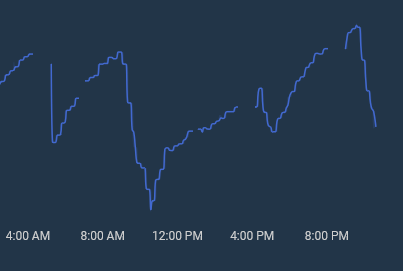
I have had the dropout while I have not been at home, as you can see below.
As you can see the dropouts are approximate 1 hour, the short dropout is when I have done the above mention proceder to get the Conbee back to ttyACM1.
Below you can see the logfile for the period just after 3.00 PM. Just before the dropouts, that can been seen on the chart there are errors in the logfile, Maybe that can help.
2026-09-30 14:30:17.084 ERROR (MainThread) [aiohttp.server] Error handling request from 66.132.195.73
Traceback (most recent call last):
File “/usr/local/lib/python3.14/site-packages/aiohttp/web_protocol.py”, line 433, in data_received
messages, upgraded, tail = self._parser.feed_data(data)
~~~~~~~~~~~~~~~~~~~~~~^^^^^^
File “aiohttp/_http_parser.pyx”, line 687, in aiohttp._http_parser.HttpParser.feed_data
aiohttp.http_exceptions.BadHttpMessage: 400, message:
Pause on PRI/Upgrade:
b’\x00\x00\x18\x04\x00\x00\x00\x00\x00\x00\x02\x00\x00\x00\x00\x00\x04\x00\x00Bh\x00\x06\x00\x04\x00\x00\x00\x03\x00\x00\x00\n’
^
2026-09-30 15:07:52.347 WARNING (MainThread) [homeassistant.helpers.entity] Updating state for sun.sun (<class ‘homeassistant.components.sun.entity.Sun’>) took 0.691 seconds. Please create a bug report at Issues · home-assistant/core · GitHub
2026-09-30 15:08:17.765 ERROR (MainThread) [kasa.smart.smartdevice] Error querying 192.168.0.211 for modules ‘Time, AutoOff, DeviceModule’ after first update: ('Unable to query the device: 192.168.0.211: ', TimeoutError())
2026-09-30 15:08:30.059 WARNING (MainThread) [homeassistant.helpers.entity] Updating state for sensor.test_maling_current_consumption (<class ‘homeassistant.components.tplink.sensor.TPLinkSensorEntity’>) took 5.153 seconds. Please create a bug report at Issues · home-assistant/core · GitHub
2026-09-30 15:08:32.556 ERROR (MainThread) [homeassistant.components.synology_dsm.coordinator] Error fetching SynElkiaer3 SynologyDSMCentralUpdateCoordinator data: Error communicating with API: {‘api’: ‘SYNO.Core.System.Utilization’, ‘code’: 1052, ‘reason’: ‘Unknown’, ‘details’: {‘err_line’: 194, ‘err_msg’: ‘Transmition get failed Result.’}}
2026-09-30 15:08:32.625 ERROR (MainThread) [reolink_aio.baichuan.baichuan] Baichuan host 192.168.0.48: lost event subscription after 52.58 s, last reestablish 55.88 s ago
2026-09-30 15:08:32.626 ERROR (MainThread) [kasa.smart.smartdevice] Error querying 192.168.0.78 for modules ‘Time, AutoOff, DeviceModule’ after first update: ('Unable to query the device: 192.168.0.78: ', TimeoutError())
2026-09-30 15:08:32.657 ERROR (MainThread) [kasa.smart.smartdevice] Error querying 192.168.0.134 for modules ‘Time, AutoOff, Cloud, DeviceModule, Energy, PowerProtection’ after first update: ('Unable to query the device: 192.168.0.134: ', TimeoutError())
2026-09-30 15:08:32.658 ERROR (MainThread) [kasa.smart.smartdevice] Error querying 192.168.0.60 for modules ‘Time, DeviceModule’ after first update: ('Unable to query the device: 192.168.0.60: ', TimeoutError())
2026-09-30 15:08:32.659 ERROR (MainThread) [kasa.smart.smartdevice] Error querying 192.168.0.29 for modules ‘Time, AutoOff, DeviceModule, Energy, PowerProtection’ after first update: ('Unable to query the device: 192.168.0.29: ', TimeoutError())
2026-09-30 15:08:32.660 ERROR (MainThread) [kasa.smart.smartdevice] Error querying 192.168.0.120 for modules ‘Time, AutoOff, DeviceModule’ after first update: ('Unable to query the device: 192.168.0.120: ', TimeoutError())
2026-09-30 15:08:32.660 ERROR (MainThread) [kasa.smart.smartdevice] Error querying 192.168.0.221 for modules ‘Time, AutoOff, DeviceModule’ after first update: ('Unable to query the device: 192.168.0.221: ', TimeoutError())
2026-09-30 15:08:32.819 ERROR (MainThread) [homeassistant.components.brother.coordinator] Timeout fetching brother data
2026-09-30 15:08:32.821 ERROR (MainThread) [kasa.smart.smartdevice] Error querying 192.168.0.211 individually for module query ‘get_device_time’ after first update: ('Unable to query the device: 192.168.0.211: ', TimeoutError())
2026-09-30 15:08:32.822 ERROR (MainThread) [homeassistant.components.foscam] Timeout fetching foscam data
2026-09-30 15:08:32.823 ERROR (MainThread) [custom_components.tapo.coordinators] Error fetching tapo data: Unexpected exception:
2026-09-30 15:08:36.780 WARNING (MainThread) [kasa.smart.smartdevice] Error processing Time for device 192.168.0.211, module will be unavailable: get_device_time for Time (error_code=INTERNAL_QUERY_ERROR)
2026-09-30 15:08:41.274 WARNING (MainThread) [homeassistant.components.go2rtc.server] Go2rtc server didn’t terminate gracefully. Killing it
2026-09-30 15:08:41.274 WARNING (MainThread) [homeassistant.components.go2rtc.server] Go2rtc unexpectedly stopped, server log:
2026-09-30 15:08:41.274 WARNING (MainThread) [homeassistant.components.go2rtc.server] 13:07:01.388 INF go2rtc platform=linux/amd64 revision=b5948cf version=1.9.14
2026-09-30 15:08:41.274 WARNING (MainThread) [homeassistant.components.go2rtc.server] 13:07:01.396 INF config path=/tmp/go2rtc-w6gq42zd/go2rtc_vv0hhmwo.yaml
2026-09-30 15:08:41.274 WARNING (MainThread) [homeassistant.components.go2rtc.server] 13:07:01.397 INF [rtsp] listen addr=127.0.0.1:18554
2026-09-30 15:08:41.274 WARNING (MainThread) [homeassistant.components.go2rtc.server] 13:07:01.398 INF [webrtc] listen tcp addr=[::]:18555
2026-09-30 15:08:41.274 WARNING (MainThread) [homeassistant.components.go2rtc.server] 13:07:01.399 INF [api] listen addr=/tmp/go2rtc-w6gq42zd/go2rtc.sock
2026-09-30 15:08:45.593 WARNING (MainThread) [homeassistant.components.go2rtc.server] exit with signal: terminated
2026-09-30 15:09:55.144 WARNING (MainThread) [homeassistant.helpers.entity] Updating state for sensor.presence_sensor_fp2_9ae2_light_sensor_light_level_2 (<class ‘homeassistant.components.homekit_controller.sensor.HomeKitLightSensor’>) took 4.483 seconds. Please create a bug report at Issues · home-assistant/core · GitHub
2026-09-30 15:09:57.194 WARNING (MainThread) [homeassistant.components.media_player] Updating panasonic_viera media_player took longer than the scheduled update interval 0:00:10
2026-09-30 15:09:57.244 WARNING (MainThread) [homeassistant.helpers.entity] Update of media_player.58dx700_elkiaer_2 is taking over 10 seconds
2026-09-30 15:10:11.109 ERROR (MainThread) [kasa.smart.smartdevice] Error querying 192.168.0.29 for modules ‘Time, AutoOff, Cloud, DeviceModule, Energy, PowerProtection’ after first update: ('Unable to query the device: 192.168.0.29: ', TimeoutError())
2026-09-30 15:10:11.639 ERROR (MainThread) [kasa.smart.smartdevice] Error querying 192.168.0.134 for modules ‘Time, AutoOff, DeviceModule, Energy, PowerProtection’ after first update: ('Unable to query the device: 192.168.0.134: ', TimeoutError())
2026-09-30 15:10:15.644 ERROR (MainThread) [homeassistant.components.wiz.coordinator] Error fetching WiZ Dimmable White 528DD6 data: Failed to update device at 192.168.0.209:
2026-09-30 15:10:15.690 ERROR (MainThread) [homeassistant.components.wiz.coordinator] Error fetching WiZ Socket A14E25 data: Failed to update device at 192.168.0.158:
2026-09-30 15:10:15.690 ERROR (MainThread) [homeassistant.components.wiz.coordinator] Error fetching WiZ Dimmable White 048282 data: Failed to update device at 192.168.0.140:
2026-09-30 15:10:16.045 WARNING (MainThread) [zigpy.application] Watchdog failure
Traceback (most recent call last):
File “/usr/local/lib/python3.14/site-packages/zigpy_deconz/api.py”, line 587, in _command
return await fut
^^^^^^^^^
asyncio.exceptions.CancelledError
The above exception was the direct cause of the following exception:
Traceback (most recent call last):
File “/usr/local/lib/python3.14/site-packages/zigpy/application.py”, line 941, in _watchdog_loop
await self.watchdog_feed()
File “/usr/local/lib/python3.14/site-packages/zigpy/application.py”, line 927, in watchdog_feed
await self._watchdog_feed()
File “/usr/local/lib/python3.14/site-packages/zigpy_deconz/zigbee/application.py”, line 88, in _watchdog_feed
await self._api.write_parameter(
NetworkParameter.watchdog_ttl, int(2 * self._watchdog_period)
)
File “/usr/local/lib/python3.14/site-packages/zigpy_deconz/api.py”, line 847, in write_parameter
await self.send_command(
…<3 lines>…
)
File “/usr/local/lib/python3.14/site-packages/zigpy_deconz/api.py”, line 506, in send_command
return await self._command(cmd, **kwargs)
^^^^^^^^^^^^^^^^^^^^^^^^^^^^^^^^^^
File “/usr/local/lib/python3.14/site-packages/zigpy_deconz/api.py”, line 586, in _command
async with asyncio_timeout(COMMAND_TIMEOUT):
~~~~~~~~~~~~~~~^^^^^^^^^^^^^^^^^
File “/usr/local/lib/python3.14/asyncio/timeouts.py”, line 115, in _aexit_
raise TimeoutError from exc_val
TimeoutError
2026-09-30 15:10:38.549 ERROR (MainThread) [kasa.smart.smartdevice] Error querying 192.168.0.211 for modules ‘Time, AutoOff, Cloud, DeviceModule’ after first update: ('Unable to query the device: 192.168.0.211: ', TimeoutError())
2026-09-30 15:10:38.768 ERROR (MainThread) [homeassistant.components.wiz.coordinator] Error fetching WiZ Socket 98F6B1 data: Failed to update device at 192.168.0.228:
2026-09-30 15:10:38.922 WARNING (MainThread) [homeassistant.components.media_player] Updating denonavr media_player took longer than the scheduled update interval 0:00:10
2026-09-30 15:10:38.922 WARNING (MainThread) [homeassistant.helpers.entity] Update of media_player.marantz_sr5011 is taking over 10 seconds
2026-09-30 15:10:38.923 WARNING (MainThread) [homeassistant.components.media_player] Updating panasonic_viera media_player took longer than the scheduled update interval 0:00:10
2026-09-30 15:10:38.924 WARNING (MainThread) [homeassistant.helpers.entity] Update of media_player.58dx700_elkiaer_2 is taking over 10 seconds
2026-09-30 15:10:42.116 ERROR (MainThread) [kasa.smart.smartdevice] Error querying 192.168.0.60 for modules ‘Time, Cloud, DeviceModule, LightPreset, LightTransition’ after first update: ('Unable to query the device: 192.168.0.60: ', TimeoutError())
2026-09-30 15:10:42.123 ERROR (MainThread) [kasa.smart.smartdevice] Error querying 192.168.0.78 for modules ‘Time, AutoOff, Cloud, DeviceModule’ after first update: ('Unable to query the device: 192.168.0.78: ', TimeoutError())
2026-09-30 15:10:42.138 ERROR (MainThread) [kasa.smart.smartdevice] Error querying 192.168.0.221 for modules ‘Time, AutoOff, Cloud, DeviceModule’ after first update: ('Unable to query the device: 192.168.0.221: ', TimeoutError())
2026-09-30 15:10:42.153 ERROR (MainThread) [kasa.smart.smartdevice] Error querying 192.168.0.120 for modules ‘Time, AutoOff, Cloud, DeviceModule’ after first update: ('Unable to query the device: 192.168.0.120: ', TimeoutError())
2026-09-30 15:10:42.198 ERROR (MainThread) [kasa.smart.smartdevice] Error querying 192.168.0.134 individually for module query ‘get_device_time’ after first update: ('Unable to query the device: 192.168.0.134: ', TimeoutError())
2026-09-30 15:10:42.210 ERROR (MainThread) [kasa.smart.smartdevice] Error querying 192.168.0.29 individually for module query ‘get_device_time’ after first update: ('Unable to query the device: 192.168.0.29: ', TimeoutError())
2026-09-30 15:10:43.528 WARNING (MainThread) [homeassistant.components.denonavr.media_player] Timeout connecting to Denon AVR receiver at host 192.168.0.197. Device is unavailable
2026-09-30 15:10:49.628 WARNING (MainThread) [homeassistant.components.denonavr.media_player] Denon AVR receiver at host 192.168.0.197 is available again
2026-09-30 15:10:49.879 WARNING (MainThread) [homeassistant.config_entries] Unloading (zha) config entry. Task <Task pending name=‘None zha 01M3KVH59EQHNMTD02MBTPK101’ coro=<ZHAGatewayProxy.shutdown() running at /usr/src/homeassistant/homeassistant/components/zha/helpers.py:866> wait_for= cb=[set.remove(), set.remove()]> did not complete in time
2026-09-30 15:10:57.530 WARNING (MainThread) [kasa.smart.smartdevice] Error processing Time for device 192.168.0.134, module will be unavailable: get_device_time for Time (error_code=INTERNAL_QUERY_ERROR)
2026-09-30 15:10:57.533 WARNING (MainThread) [kasa.smart.smartdevice] Error processing Time for device 192.168.0.29, module will be unavailable: get_device_time for Time (error_code=INTERNAL_QUERY_ERROR)
 , at 4.15 AM to 5.15 AM lost connection to the Conbee - and again 6.40 AM. At 6.40 AM (about 10 minuts later) I just remove the Conbee and connect it again after 10 second and it was up running again.