Hello! This is my first post on this forum, and I have to apologize for having to use a translator. My level of English is minimal.
I use Overkiz to control a TaHoma Premium, and I would like to be able to use a roller shutter’s position as a condition in an automation.
I have no problem scheduling an action to position a blind at, for example, 22%, but I cannot use a relative position (for example, 22%) as a condition.
I don’t know if I’ve done something wrong, or if an update (I couldn’t say which one) changed how my Home Assistant works, but I have some old automations that allowed me to select many more conditions than when I create a new automation now.
Among these conditions, there is one that states: "Current value of ‘Salón 4’ Target closure
Greater than XX
Less than XX
However, in the current version:
1st Possibility.- I find that when I try to “add condition”—selecting Target > Home > Blinds—the response is: No conditions available for Blinds.
2nd Possibility.- I find that when I try to “add condition”—selecting Target > Devices > Living Room 4—the only options offered are: blind open or blind closed.
If possible, I would appreciate it if someone could tell me what I might be doing wrong.
In any case, I apologize for my lack of knowledge and, once again, for having to use a translator.
Thanks a lot, Kristoffer. I don’t have any knowledge of YAML, but I’ll try out your solution.
In any case, if anyone knows a solution using the user interface, that would be more practical for me.
Thanks again, Kristoffer. I’ll give your solution a try.
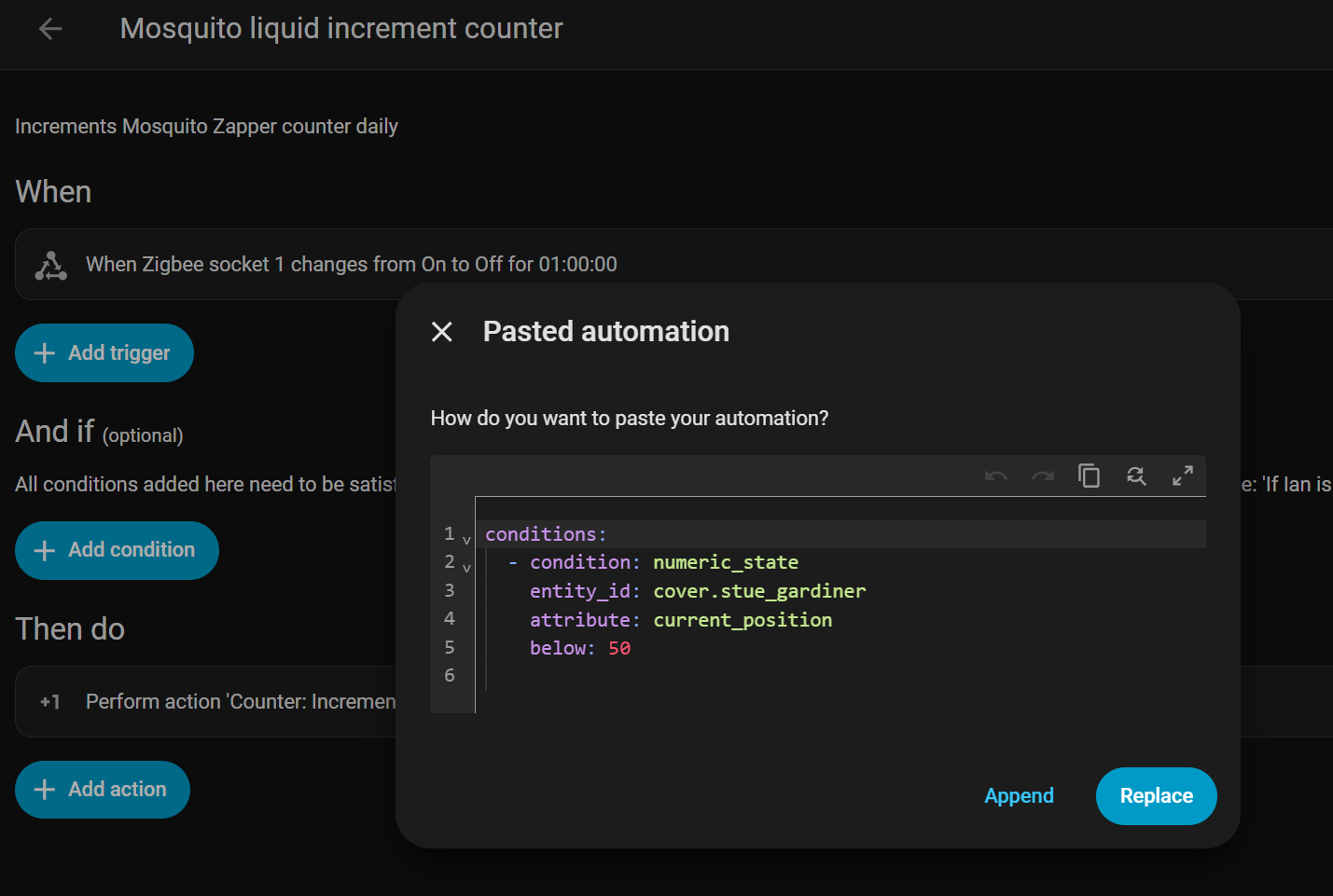
Paste the above yaml in the UI of your automation & you’ll see the visual representation of it. Alternatively just type in numeric state in the search bar when you add a condition & it’ll show up.
Thanks a lot for your replies.
Regarding pasting the YAML code Kristoffer suggested, I don’t even know which line to paste it on. I’m running tests, and something always goes wrong.
As for entering “numeric state” when adding a condition, I’ve been tinkering with it a bit, and it seems to work.
Thanks again.
You don’t need to paste it in a specific line. Just open the Automation page & hit ctrl+v. It’ll detect that this is a condition & asks you whether you want to append it to the existing automations (choose this) or replace the automation entirely
Or if you want a more visual way you can choose to add a condition → choose by type → scroll down to the bottom and select entity, and then you get the option to add numeric state condition.
Many thanks for your solutions. They all worked for me (specifically the YAML solution: copying the code Kristoffer provided, opening the automation page, and pressing Ctrl+V).
Puño de Sombra
Paste the YAML code above into your automation’s user interface, and you’ll see its visual representation. You can also type “numeric state” into the search bar when adding a condition, and it will appear.
You don’t need to paste it on a specific line. Just open the Automation page and press Ctrl+V. It will detect that it’s a condition and ask if you want to add it to existing automations (choose this option) or replace the automation entirely.
Or, if you prefer a more visual approach, you can choose to add a condition → choose by type → scroll down and select “entity,” and then you’ll have the option to add a numeric state condition.
Many thanks. Problem solved in record time.