I’m trying to get the OpenAI TTS custom integration (sfortis/openai_tts) working with Kokoro but what I’m seeing doesn’t match the readme in the OpenAI TTS Custom Component for Home Assistant repo.
First, a bit of background regarding my setup: I have HAOS installed on a VMware VM running on a Windows 11 box (Intel Core Ultra 7 265 with 32GB RAM). Kokoro is running on the same box in a Docker container and I can access it from other computers on my network by browsing to http://192.168.11.100:8880/web/ and I can generate and play speech.
I added the the OpenAI TTS integration from HACS using the instructions provided in the repo readme, specifically:
HACS installation ( preferred! )
Go to the sidebar HACS menu

Search for "OpenAI TTS" in the integrations

Click on the integration and download it. Restart Home Assistant to apply the component.
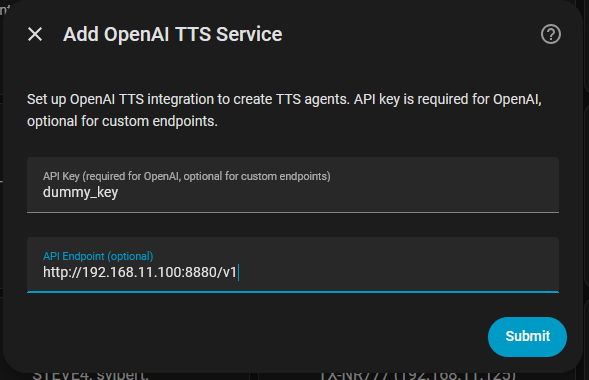
Next, added the integration from Settings->Devices & services, clicked Add integration, searched for “tts” and selected “OpenAI TTS” from the search results. Here’s where I’m running into a problem. According to the docs, the “Add OpenAI TTS Service” UI should have fields for:
API Key (optional for custom endpoints)
API Endpoint
model
voice
I’m only seeing API Key and API Endpoint–model and voice are missing.
OK, I got this working. There are a couple of things missing from the repo’s readme and hopefully this helps someone else down the line.
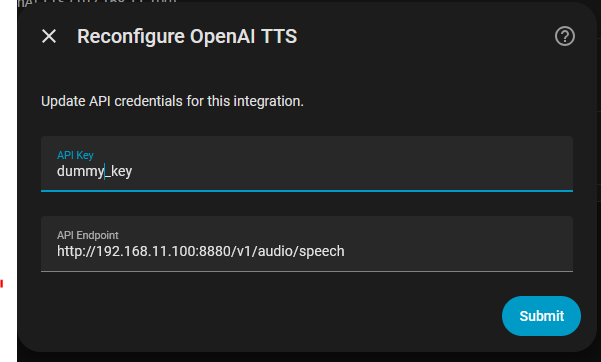
First, make sure you use the full endpoint URL to the kokoro server. All of the search results I was seeing suggested the URL should be:
http://YOUR_KOKORO_SERVER_IP:8880/v1
The correct URL is:
http://YOUR_KOKORO_SERVER_IP:8880/v1/audio/speech
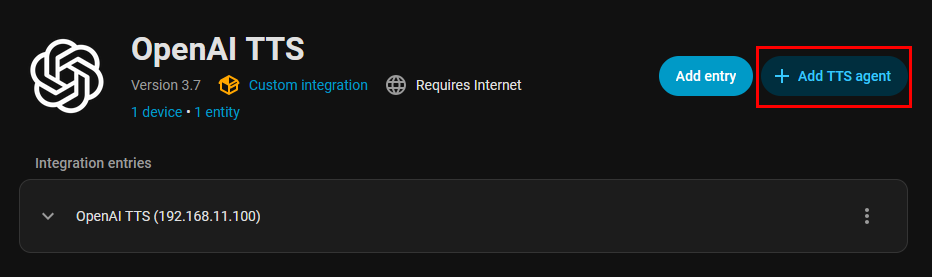
On the Add TTS Agent UI, enter Kokoro (or whatever strikes your fancy) for the Profile name, select tts-1 from the Model dropdown, and enter the name of the Kokoro voice you want to use tine Voice field. NOTE: the Add TTS Agent will only display the OpenAI TTS voices so you’ll need to manually enter the Kokoro voice.
NOTE2: You can see the list of voices by browsing to the Kokoro’s web interface URL: http://YOUR_KOKORO_SERVER_IP:8880/web/
NOTE3: The Kokoro web interface only works on Chromium based browsers. Firefox will display an “Error generating speech…” message if you try to generate speech from text.
You can leave the other fields at their default values. Click the Submit button to save your changes and restart Home Assistant.
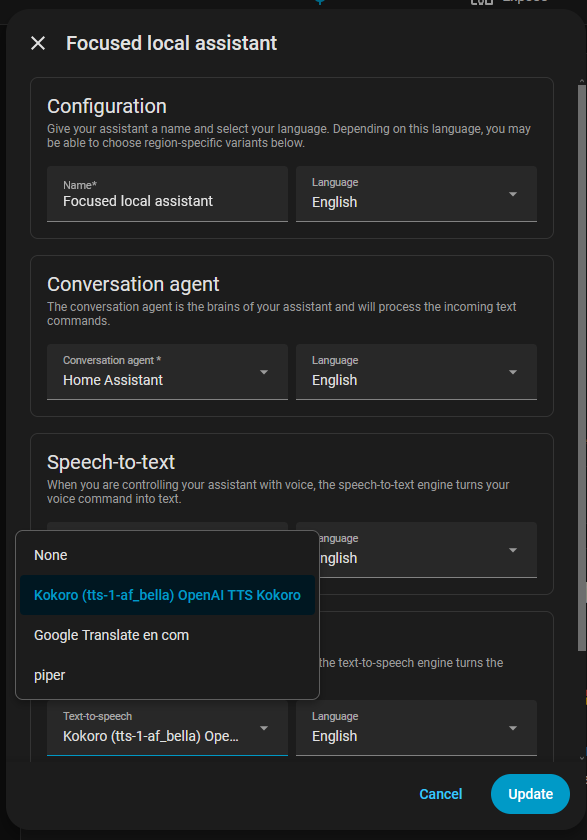
Lastly, go to Settings->Voice assistants and click the voice assistant you want to use with Kokoro.
Scroll down to Text-to-speech and click on the Text-to-speech dropdown. You should see Kokoro as one of the available options:
I’m probably (likely!) being dense here but I’m confused. The Wyoming Protocol integration is already installed and includes the 3 default services (Piper, Speech-to Phrase, Whisper). I assume I’m to add another Wyoming Protocol service using the Add service button?
When I do that the UI is looking for a host and a port. I’m entering http://192.168.11.100 and 8880 respectively, but I’m getting a Failed to connect error.
Wyoming is, first and foremost, a protocol.
In practical terms, this means that various speech recognition or speech synthesis engines are wrapped in it. You can find various projects on GitHub and run them on your own host. After that, they are connected via a Wyoming component (the thing you’re showing in the screenshot).
Thanks for pointing me in the right direction. I was able to setup a docker container for roryeckel/wyoming_openai, get it working with Kokoro, and add the openai_streaming service to the Wyoming integration.
Everything appears to be working as it should and looking at the docker wyoming_openai logs it appears to be chunking/streaming the audio:
INFO:wyoming_openai.handler:Detected 3 ready sentences for immediate synthesis: ['This is a test of the emergenc...', 'I am currently generating this...', 'If you can hear the beginning ...']
INFO:wyoming_openai.handler:Starting concurrent synthesis for 3 sentences
INFO:httpx:HTTP Request: POST http://192.168.11.100:8880/v1/audio/speech "HTTP/1.1 200 OK"
INFO:httpx:HTTP Request: POST http://192.168.11.100:8880/v1/audio/speech "HTTP/1.1 200 OK"
INFO:httpx:HTTP Request: POST http://192.168.11.100:8880/v1/audio/speech "HTTP/1.1 200 OK"
INFO:wyoming_openai.handler:Processing final remaining text: 'We are no longer waiting for the full audio file to render before playback begins.'
INFO:wyoming_openai.handler:Starting concurrent synthesis for 1 sentences
INFO:httpx:HTTP Request: POST http://192.168.11.100:8880/v1/audio/speech "HTTP/1.1 200 OK"
INFO:wyoming_openai.handler:Successfully completed incremental streaming synthesis, final timestamp: 21910.42