configuration.yaml and network address
Over a month ago I changed the address of my IoT home network, from 192.168.1.0/24 to 10.121.1.0/24. All my devices are on DHCP so I did not see an issue, until today. I am completely current with all HASS updates/upgrades. I run HASS standalone on a mini PC, no Docker or VM.
I had to reboot the HASS server last night, and this morning when I tried to log in to it, using the saved bookmark in my browser (that has been working fine for over 4 years now) http://homeassistant.local:8123/ the browser reported it could not be found. I’ve read some posts about this, and it is not a big deal for me, as I already changed the bookmark address to the actual IP address of the server http://10.121.1.60:8123 to avoid any future issues.
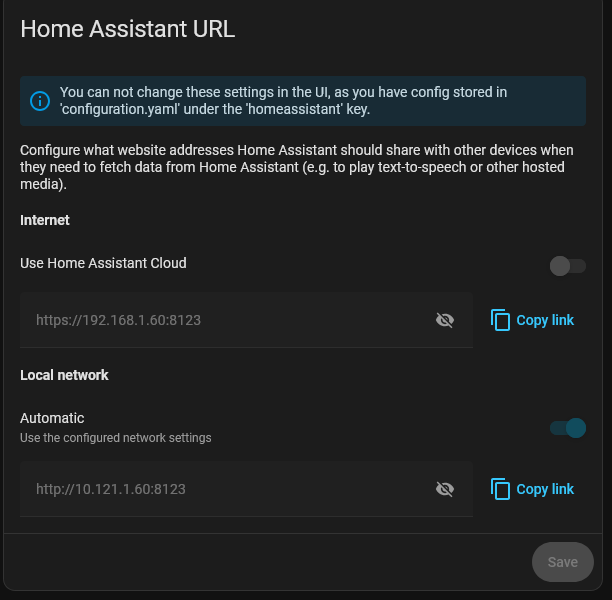
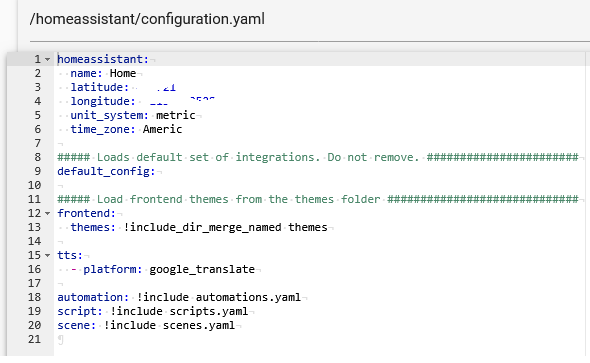
However went to Settings >System > Network > Home Assistance URL, and noticed this (see pic below). As you can see the old network address is still registered for the Home Assistant Cloud entry, and I could not change it, presumably because of the configuration.yaml. However I opened my configuration.yaml file and there is no network address there that I can change.
So my question is, where do I go to change this so that there is zero future confusion in my HASS instance ?, especially when I am away from home ?