I've got some problems with setting up ZIgbee here. I've cross-posted this to some relevant communities:
I included all details everywhere, so this is quite long, just in case some help. The "Questions" part below is always adjusted for the questions for this community.
Use case
I've got a SLZB-Ultima device, which is running multiple chips for Zigbee, Matter etc. Let's focus on Zigbee first, which I tried to connect via USB to Home Assistant, which is running Zigbee2MQTT as an app (aka in a docker container, but this is shipped as is from Home Assistant as an "app" [formerly called add-on], so I expect no problems.). Home Assistant OS is running as a VM upon IncusOS aka virtualization via Incus, so I forwarded the USB as a device to the VM and then configured it in HA/Zigbee2MQTT "as usual".
In short the stack is this: Zigbee2MQTT -> (Docker/HA app) -> Home Assistant OS -> Incus -> IncusOS
What I did in detail
-
What most guides miss: On SLZB-Ultima, enable USB mode. Go to
/mode(the main page mostly), and enable USB mode, which disables network mode. -
Find out the serial number of the USB device, You can do this from another device with tools like
lsusb -vor similar.
Otherwise, the system logs (web interface at/ui/os/logs) also show an USB connect with all needed details. You can then copy the serial. -
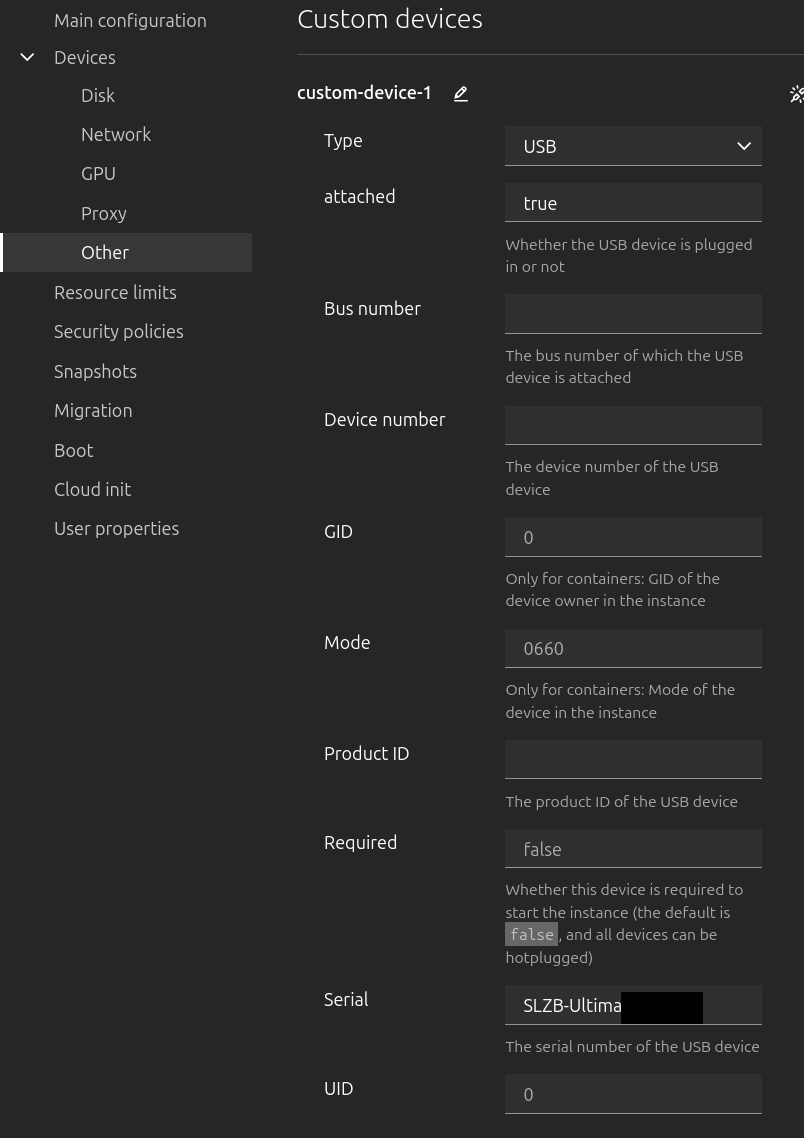
Then configure a "device" in IncusUI ("Devices" -> "Other"). You obviously want to choose USB devices:
This can be checked/is equivalent to:
$ incus config show IncusOS:HAOS
// ....
devices:
  custom-device-1:
    attached: "true"
    serial: SLZB-Ultima******
    type: usb
(Yeah, I also wonder why
attachedis a string type, but hmm?) -
Now you can check e.g. with
lsusbthat the USB devices actually appear. As it exposes two serial interfaces, it's apparently two "devices". Or even better, in then log UI of IncusOS, you also see it:26. Juni, 17:46:04 localhost kernel: usb 2-6: New USB device found, idVendor=303a, idProduct=4002, bcdDevice= 1.00 26. Juni, 17:46:04 localhost kernel: usb 2-6: New USB device strings: Mfr=1, Product=2, SerialNumber=3 26. Juni, 17:46:04 localhost kernel: usb 2-6: Product: SMLIGHT SLZB-Ultima3 26. Juni, 17:46:04 localhost kernel: usb 2-6: Manufacturer: SMLIGHT 26. Juni, 17:46:04 localhost kernel: usb 2-6: SerialNumber: SLZB-Ultima**** -
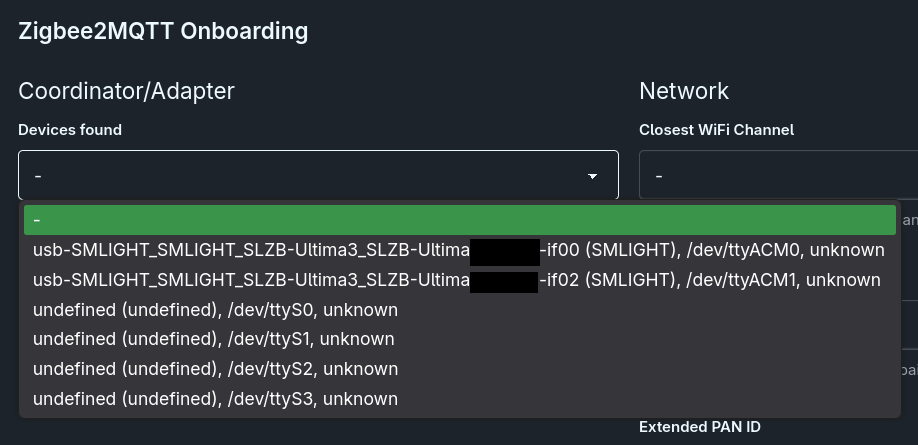
The documentation explains how to then configure it or you can use the onboarding web UI in HomeAssistant.
Thus, I just used the UI this time (also tried with YAML, did not make a difference):
You can also see it's properly passed to the VM, when checking in the VM:
# lsusb
Bus 001 Device 001: ID 1d6b:0002 Linux 6.18.35-haos xhci-hcd xHCI Host Controller
Bus 002 Device 001: ID 1d6b:0003 Linux 6.18.35-haos xhci-hcd xHCI Host Controller
Bus 001 Device 002: ID 303a:**** SMLIGHT SMLIGHT SLZB-Ultima3
So far, this looks all fine and I'm glad it works so well… but actually, it does not and fails.
Error for #0
If I select it to configure with /dev/ttyACM0, it cannot even connect:
[2026-06-28 17:56:55] info: 	zh:zstack:znp: Skip bootloader for CC2652/CC1352
[2026-06-28 17:57:14] error: 	z2m: Error while starting zigbee-herdsman
[2026-06-28 17:57:14] error: 	z2m: Failed to start zigbee-herdsman
[2026-06-28 17:57:14] error: 	z2m: Check https://www.zigbee2mqtt.io/guide/installation/20_zigbee2mqtt-fails-to-start_crashes-runtime.html for possible solutions
[2026-06-28 17:57:14] error: 	z2m: Exiting...
[2026-06-28 17:57:14] error: 	z2m: Error: Failed to connect to the adapter (Error: SRSP - SYS - ping after 6000ms)
    at ZStackAdapter.start (/app/node_modules/.pnpm/[email protected]/node_modules/zigbee-herdsman/src/adapter/z-stack/adapter/zStackAdapter.ts:95:27)
    at Controller.start (/app/node_modules/.pnpm/[email protected]/node_modules/zigbee-herdsman/src/controller/controller.ts:146:29)
    at Zigbee.start (/app/lib/zigbee.ts:70:27)
    at Controller.start (/app/lib/controller.ts:117:29)
    at start (/app/index.js:156:5)
But I also guess this is the wrong device/"port" aka it's the "Zigbee router" instead of "Zigbee Coordinator" (I guess, or reverse?). So I just checked this for completeness.
Error for #1
If I choose the /dev/ttyACM1 device, I get weird PAN-ID errors:
Onboarding page is available at http://0.0.0.0:8099/
[2026-06-28 17:52:29] info: 	z2m: Logging to console, file (filename: log.log)
[2026-06-28 17:52:29] info: 	z2m: External JS (converters/extensions) is disabled
[2026-06-28 17:52:29] info: 	z2m: Starting Zigbee2MQTT version 2.12.0 (commit #unknown)
[2026-06-28 17:52:29] info: 	z2m: Starting zigbee-herdsman (10.4.0)
[2026-06-28 17:52:29] info: 	zh:zstack:znp: Opening SerialPort with {"path":"/dev/ttyACM1","baudRate":115200,"rtscts":false,"autoOpen":false}
[2026-06-28 17:52:29] info: 	zh:zstack:znp: Serialport opened
[2026-06-28 17:53:30] error: 	z2m: Error while starting zigbee-herdsman
[2026-06-28 17:53:30] error: 	z2m: Failed to start zigbee-herdsman
[2026-06-28 17:53:30] error: 	z2m: Check https://www.zigbee2mqtt.io/guide/installation/20_zigbee2mqtt-fails-to-start_crashes-runtime.html for possible solutions
[2026-06-28 17:53:30] error: 	z2m: Exiting...
[2026-06-28 17:53:30] error: 	z2m: Error: network commissioning timed out - most likely network with the same panId or extendedPanId already exists nearby (Error: AREQ - ZDO - stateChangeInd after 60000ms
    at Object.start (/app/node_modules/.pnpm/[email protected]/node_modules/zigbee-herdsman/src/utils/waitress.ts:68:23)
    at ZnpAdapterManager.beginCommissioning (/app/node_modules/.pnpm/[email protected]/node_modules/zigbee-herdsman/src/adapter/z-stack/adapter/manager.ts:376:31)
    at ZnpAdapterManager.start (/app/node_modules/.pnpm/[email protected]/node_modules/zigbee-herdsman/src/adapter/z-stack/adapter/manager.ts:90:21)
    at ZStackAdapter.start (/app/node_modules/.pnpm/[email protected]/node_modules/zigbee-herdsman/src/adapter/z-stack/adapter/zStackAdapter.ts:135:16)
    at Controller.start (/app/node_modules/.pnpm/[email protected]/node_modules/zigbee-herdsman/src/controller/controller.ts:146:29)
    at Zigbee.start (/app/lib/zigbee.ts:70:27)
    at Controller.start (/app/lib/controller.ts:117:29)
    at start (/app/index.js:156:5))
    at ZnpAdapterManager.beginCommissioning (/app/node_modules/.pnpm/[email protected]/node_modules/zigbee-herdsman/src/adapter/z-stack/adapter/manager.ts:378:23)
    at ZnpAdapterManager.start (/app/node_modules/.pnpm/[email protected]/node_modules/zigbee-herdsman/src/adapter/z-stack/adapter/manager.ts:90:21)
    at ZStackAdapter.start (/app/node_modules/.pnpm/[email protected]/node_modules/zigbee-herdsman/src/adapter/z-stack/adapter/zStackAdapter.ts:135:16)
    at Controller.start (/app/node_modules/.pnpm/[email protected]/node_modules/zigbee-herdsman/src/controller/controller.ts:146:29)
    at Zigbee.start (/app/lib/zigbee.ts:70:27)
    at Controller.start (/app/lib/controller.ts:117:29)
    at start (/app/index.js:156:5)
Note I already tried these buttons to re-generate the IDs (so they should be random):
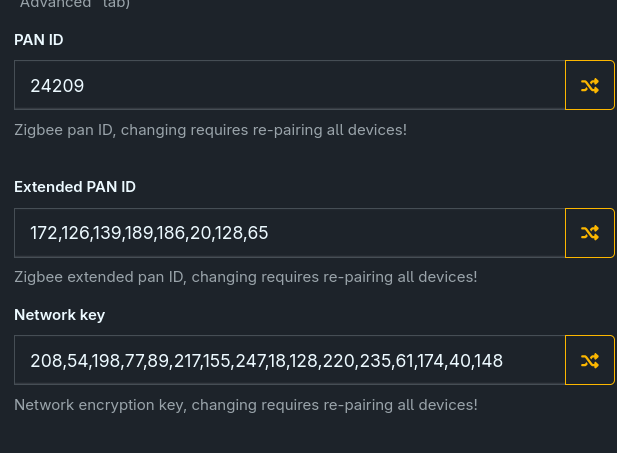
I found this thread but it also just seems to be about re-generating random IDs.
This is a new Zigbee network, so I do not have nor should need a migration or existing network/pan IDs.
Note I tried around with the SLZB and set the second chip to "Hub mode", but yeah… just for basic functionality tests, as I want to integrate it into Home Assistant
SLZB configuration
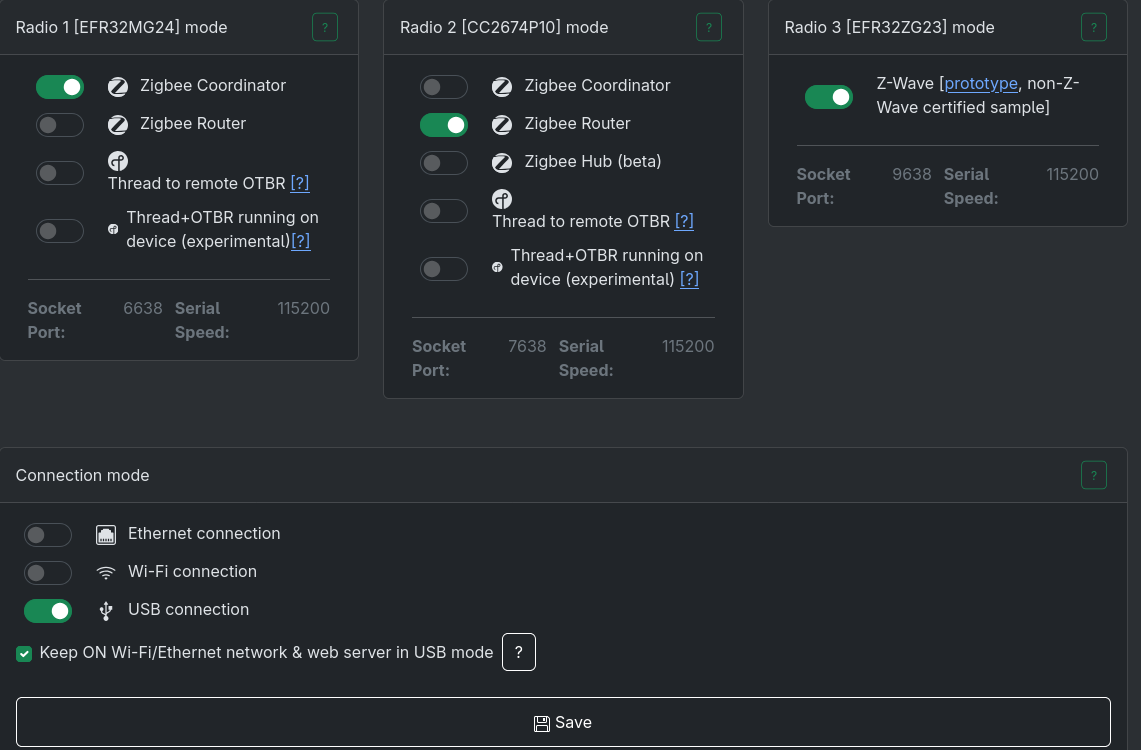
To my knowledge, this should be the correct configuration for the SLZB:
- one chip as Zigbee Coordinator
- and one as Zigbee Router
- and, as I want to use USB, enable USB mode
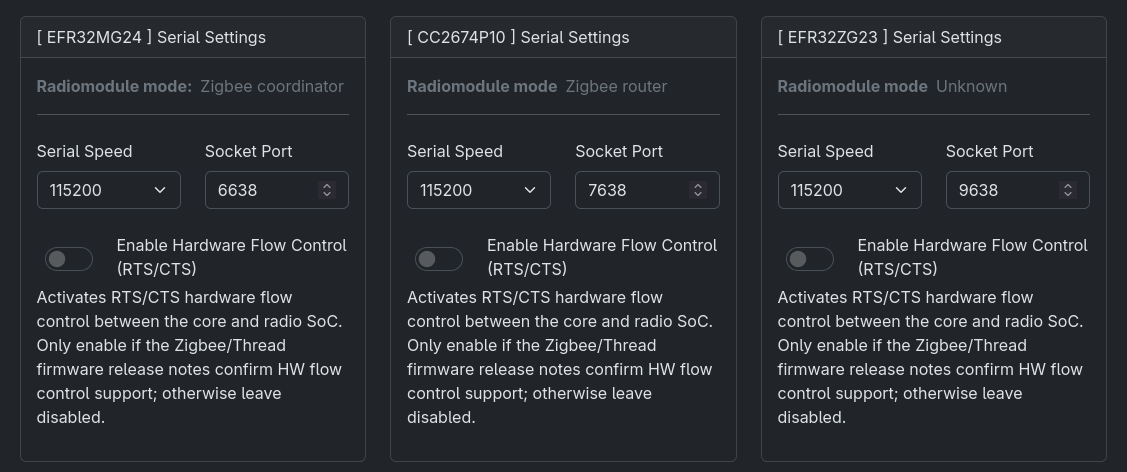
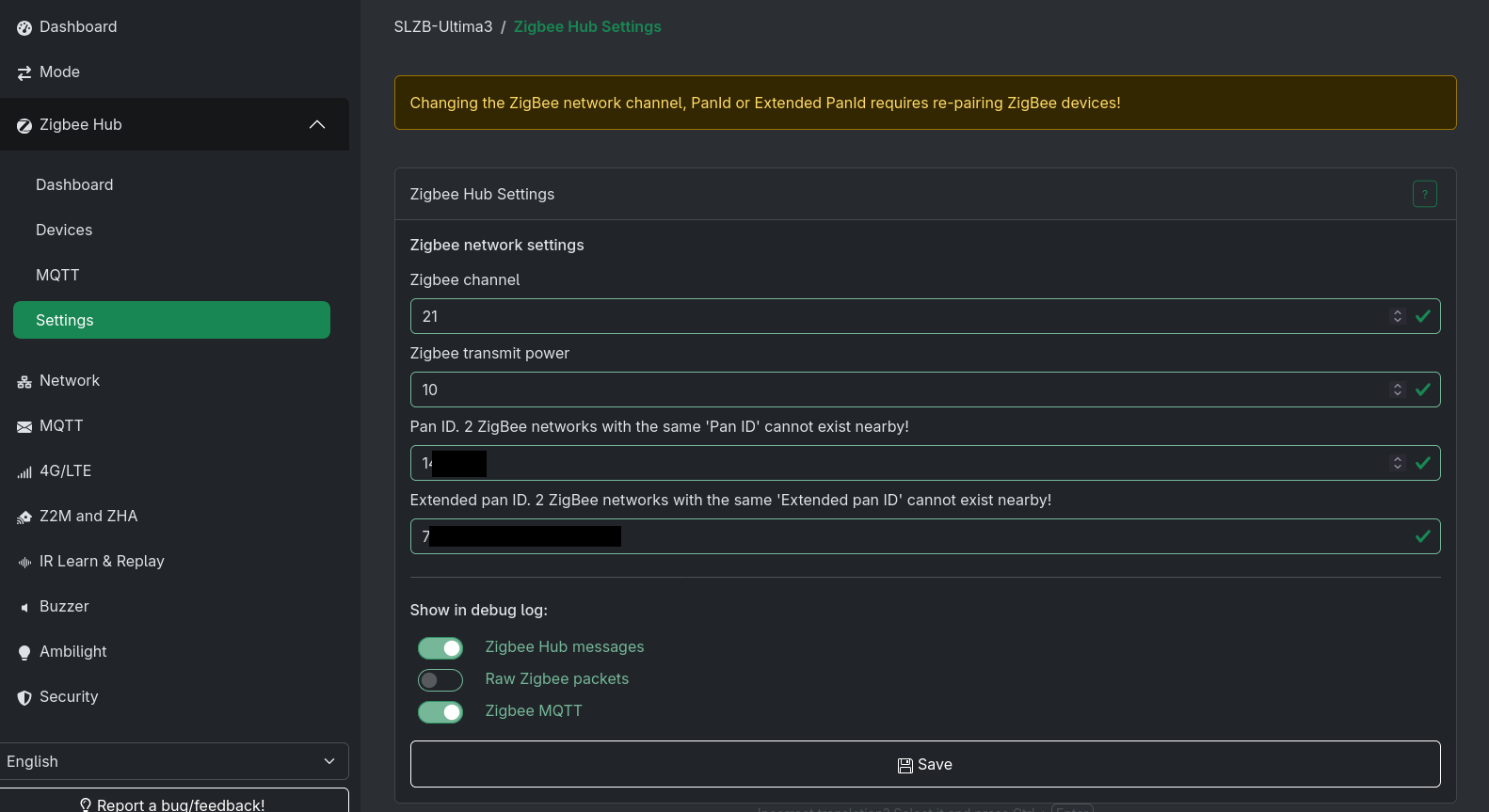
I also have Zigbee network IDs etc. in /zhub/config (Zigbee Hub -> Settings), I am unsure whether these need to be in sync with Zigbee2MQTT? (in contrast to all other hub settings, I can access this one page without hub mode being enabled, so this is kinda confusing)
Questions
So do I do something wrong here? Is there anything else to try?
I have no dedicated USB card, of course, as this thread suggests. And yes, I would try the option via LAN if everything fails, but I suppose USB should also work and offer much less overhead/latency.
System
SLZB OS: v3.3.1
Zigbee-Coordinator Firmware-Revision: 20250212
Zigbee-Router Firmware-Revision: 20240716
incus 202606230053
Home Assistant v2026.6.4
Home Assistant OS: 18.0
| Radio 1 [EFR32MG24] Mode | Zigbee coordinator |
|---|---|
| Radio 2 [CC2674P10] Mode | Zigbee router |
| Connection mode: | USB mode |

 Here some rubbish an LLM would never write: no no no AI, AI is dumb, stupid AI slop, thanks no AI, finish, perfect - (<- this is no an em dash) improper CaPiTaLiSaTiOn.
