Hello,
I have installed Home assistant OS on a Ubuntu server 24.04 LTS host according to the instructions found here:Linux - Home Assistant
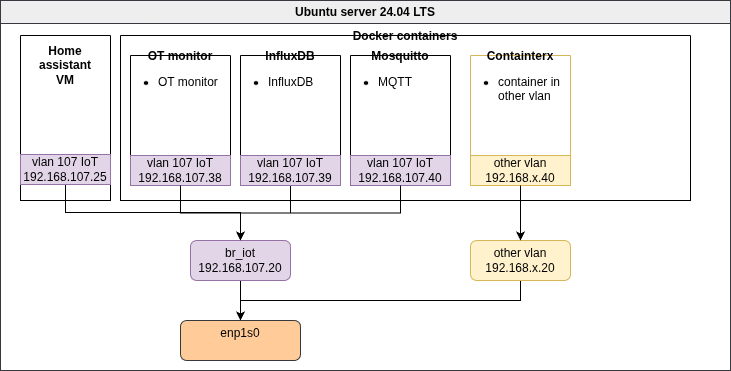
That has been working alright for quite some time. But now I want to segregate my network more. Therefore I created on the host (Ubuntu server) a couple of network bridges. One of them beïng br_iot with IP 192.168.107.20.
On this host I have also docker running with several containers that I have connected with macvlan to the br_iot bridge. These containers have IP addresses in the same subnet.
I also wanted Home assistant in the same subnet, so with virsh edit hassos I changed the network bridge from “br0” to “br_iot”. Then I started the VM again and it got an IP from the DHCP server: 192.168.107.25. Also in the correct subnet.
But I can’t get a connection between Home assistant and the docker containers. When I connect to the VM with virsh console hassos and I try to ping one of the containers on the host it works just fine. But from within Home assistant it self I can’t get a connection to the containers. Also the connection to the internet is gone.
How can I solve this?
Although I’ve done a fair bit of research, I still haven’t figured out completely how a macvlan based kernel bridge actually works, but I understand there are a few modes it can operate in. man page says vepa is the default and I think that means an external switch is required to hairpin messages back in to other namespaces. Perhaps try bridge mode
Thank you for your response. Bridge mode is really not what I want, because I want each container to have an IP adres in the same subnet.
In the mean time I did some further digging and it turns out that my initial problem statement is not entirely correct: I can connect to the containers on the host. MQTT is working fine now. There are a number of integrations that won’t make connection to either an IP on the same subnet or the internet.
I have a P1 monitor integration that should connect to 192.168.107.5. It doesn’t when connected to br_iot. The same goes for my SMA solar inverter that has IP 192.168.107.90.
Also a weather integration of met.no is not able to connect.
The strange thing is though that I can ping all of those without a problem. I have the terminal integration in Home assistant. When I ping from there I can reach both the internal IP’s as the external adresses.
Also when I connect to the VM from virsh (virsh console hassos) and try to ping from there I can also reach everything.
Then, from that console when I connect to the home assistant containers with docker exec -it homeassistant, I can also ping everything.
So I guess the problem lies somewhere inside Home Assistant OS, but where?
After doing a little more research, I understand now that macvlan is kind of like an Ethernet interface with a MAC address but has its own special rx handler/filtering based on the various modes (vepa, bridge, etc).
What I have seen is that the macvlan interface is often associated/bound to a physical Ethernet port or a VLAN on that port. This type of association streamlines the forwarding performance somewhat as it skips the kernel bridge code.
However in your case it looks like each container’s macvlan interface is associated to a kernel bridge. I’m not sure whether virsh created a veth interface or a macvlan interface when it connected it to br_iot. Anyway, I’m not sure but there may be some weird mac address filtering going on compared to HA-VM being connected to br0.
On the other hand, if you can go into the HA-VM’s homeassistant container and can ping an external device’s IP address (ex. SMA solar inverter), but the HA integration inside the HA container doesn’t work, then I too am a bit of a loss as the only difference would likely be an IP-port (in addition to the IP address), and I would think IP port filtering should be outside the filter of macvlan/br_iot.