2/2
sensor:
  - platform: ble_client
    type: characteristic
    ble_client_id: deye_ble
    id: ble_raw_notify
    name: 'BLE Raw Notify'
    service_uuid: '${service_uuid}'
    characteristic_uuid: '${read_uuid}'
    notify: true
    internal: true
    update_interval: never
    lambda: |-
      std::string raw_str(x.begin(), x.end());
      ESP_LOGD("deye", "RX block=%d: %s", id(current_block), raw_str.c_str());
      if (x.size() < 5 || x[0] != '+' || x[1] != 'o' || x[2] != 'k' || x[3] != '=') {
        ESP_LOGW("deye", "Respuesta inesperada: %s", raw_str.c_str());
        return NAN;
      }
      std::string hex_str;
      for (size_t i = 4; i < x.size(); i++) {
        if (x[i] == '\r' || x[i] == '\n') break;
        hex_str += (char)x[i];
      }
      if (hex_str.size() % 2 != 0) { ESP_LOGW("deye", "Hex impar"); return NAN; }
      auto h = [](char c) -> uint8_t {
        if (c >= '0' && c <= '9') return c - '0';
        if (c >= 'A' && c <= 'F') return c - 'A' + 10;
        if (c >= 'a' && c <= 'f') return c - 'a' + 10;
        return 0;
      };
      std::vector<uint8_t> buf;
      buf.reserve(hex_str.size() / 2);
      for (size_t i = 0; i < hex_str.size(); i += 2)
        buf.push_back((h(hex_str[i]) << 4) | h(hex_str[i+1]));
      if (buf.size() < 3 || buf[0] != 0x01 || buf[1] != 0x03) { ESP_LOGW("deye", "No es Modbus"); return NAN; }
      uint8_t byte_count = buf[2];
      if (buf.size() < (size_t)(3 + byte_count + 2)) { ESP_LOGW("deye", "Frame incompleto"); return NAN; }
      auto reg = [&](int n) -> uint16_t { size_t p = 3 + n * 2; return ((uint16_t)buf[p] << 8) | buf[p + 1]; };
      auto reg_s = [&](int n) -> int16_t { return (int16_t)reg(n); };

      switch (id(current_block)) {
        case 1:  // Block C 0x006C
          id(daily_production).publish_state(reg(0) * 0.1f);
          id(pv1_voltage).publish_state(reg(1) * 0.1f);
          id(pv1_current).publish_state(reg(2) * 0.1f);
          id(pv2_voltage).publish_state(reg(3) * 0.1f);
          id(pv2_current).publish_state(reg(4) * 0.1f);
          break;
        case 2:  // Block Q 0x00BA — PV power
          id(pv1_power).publish_state((float)reg(0));
          id(pv2_power).publish_state((float)reg(1));
          break;
        case 3:  // 0x0073 devuelve 0 → PV total = PV1+PV2
          if (id(pv1_power).has_state() && id(pv2_power).has_state())
            id(total_pv_power).publish_state(id(pv1_power).state + id(pv2_power).state);
          break;
        case 4:  // Block D 0x0096
          id(grid_voltage_1).publish_state(reg(0) * 0.1f);
          id(grid_voltage_2).publish_state(reg(1) * 0.1f);
          break;
        case 5:  // 0x00A9 Grid Power (signed; +export/-import)
          id(grid_power).publish_state((float)reg_s(0));
          break;
        case 6:  // Block E 0x009D
          id(load_l1_voltage).publish_state(reg(0) * 0.1f);
          break;
        case 7:  // Block F 0x00A4
          id(current_l1).publish_state(reg_s(0) * 0.01f);
          id(internal_ct_l1_power).publish_state((float)reg_s(3));
          id(external_ct_l1_power).publish_state((float)reg_s(6));
          id(inverter_l1_power).publish_state((float)reg_s(11));
          break;
        case 8:  // Block G 0x00B0
          id(total_load_power).publish_state((float)reg_s(0));
          id(load_l1_power).publish_state((float)reg_s(2));
          break;
        case 9:  // Block H 0x00B6
          id(battery_temperature).publish_state((reg(0) - 1000) * 0.1f);
          id(battery_voltage).publish_state(reg(1) * 0.01f);
          id(battery_soc).publish_state((float)reg(2));
          // SIGNO CORREGIDO para esta unidad (AM2-P): raw +=descarga, así que negamos
          // para que la convención sea +=carga / -=descarga.
          id(battery_power).publish_state((float)(-reg_s(8)));
          id(battery_current).publish_state(-reg_s(9) * 0.01f);
          id(load_frequency).publish_state(reg(10) * 0.01f);
          break;
        case 10: // Block B 0x005A
          id(dc_temperature).publish_state((reg(0) - 1000) * 0.1f);
          id(ac_temperature).publish_state((reg(1) - 1000) * 0.1f);
          break;
        case 11: // Block A 0x0054
          id(daily_load_consumption).publish_state(reg(0) * 0.1f);
          id(total_load_consumption).publish_state(((uint32_t)reg(2) << 16 | reg(1)) * 0.1f);
          break;
        case 12: // 0x0060 Total Production DWORD
          id(total_production).publish_state(((uint32_t)reg(1) << 16 | reg(0)) * 0.1f);
          break;
        case 13: // 0x0035 Max Solar Power
          id(max_solar_power).publish_state((float)reg(0));
          break;
        case 14: // Block O 0x0046 (contadores nativos)
          id(daily_battery_charge).publish_state(reg(0) * 0.1f);
          id(daily_battery_discharge).publish_state(reg(1) * 0.1f);
          id(total_battery_charge).publish_state(((uint32_t)reg(3) << 16 | reg(2)) * 0.1f);
          id(total_battery_discharge).publish_state(((uint32_t)reg(5) << 16 | reg(4)) * 0.1f);
          id(daily_energy_bought).publish_state(reg(6) * 0.1f);
          id(daily_energy_sold).publish_state(reg(7) * 0.1f);
          id(total_energy_bought).publish_state(reg(8) * 0.1f);
          id(total_energy_sold).publish_state(((uint32_t)reg(12) << 16 | reg(11)) * 0.1f);
          break;
        case 15: // Block I 0x00C8
          id(battery_equalization_voltage).publish_state(reg(0) * 0.01f);
          id(battery_absorption_voltage).publish_state(reg(1) * 0.01f);
          id(battery_float_voltage).publish_state(reg(2) * 0.01f);
          id(battery_capacity).publish_state((float)reg(4));
          id(battery_empty_voltage).publish_state(reg(5) * 0.01f);
          id(max_charge_current).publish_state((float)reg(10));
          id(max_discharge_current).publish_state((float)reg(11));
          break;
        case 16: // Block J 0x00D9
          id(battery_shutdown_pct).publish_state((float)reg(0));
          id(battery_restart_pct).publish_state((float)reg(1));
          id(battery_low_pct).publish_state((float)reg(2));
          id(battery_shutdown_voltage).publish_state(reg(3) * 0.01f);
          id(battery_restart_voltage).publish_state(reg(4) * 0.01f);
          id(battery_low_voltage).publish_state(reg(5) * 0.01f);
          break;
        /* ── CASOS SELLING/TOU DESACTIVADOS — quita esta línea y la de cierre para reactivar ──
        case 17: { // Block K 0x00F8
          id(tou_enabled).publish_state((float)reg(0));
          auto fmt_time = [](uint16_t raw) -> std::string {
            char b[6]; snprintf(b, sizeof(b), "%d:%02d", raw / 100, raw % 100); return std::string(b);
          };
          id(selling_time_1).publish_state(fmt_time(reg(2)));
          id(selling_time_2).publish_state(fmt_time(reg(3)));
          id(selling_time_3).publish_state(fmt_time(reg(4)));
          id(selling_time_4).publish_state(fmt_time(reg(5)));
          id(selling_time_5).publish_state(fmt_time(reg(6)));
          id(selling_time_6).publish_state(fmt_time(reg(7)));
          break;
        }
        case 18: // Block L 0x0100
          id(selling_power_1).publish_state((float)reg(0));
          id(selling_power_2).publish_state((float)reg(1));
          id(selling_power_3).publish_state((float)reg(2));
          id(selling_power_4).publish_state((float)reg(3));
          id(selling_power_5).publish_state((float)reg(4));
          id(selling_power_6).publish_state((float)reg(5));
          break;
        case 19: // Block M 0x010C
          id(selling_soc_1).publish_state((float)reg(0));
          id(selling_soc_2).publish_state((float)reg(1));
          id(selling_soc_3).publish_state((float)reg(2));
          id(selling_soc_4).publish_state((float)reg(3));
          id(selling_soc_5).publish_state((float)reg(4));
          id(selling_soc_6).publish_state((float)reg(5));
          break;
        case 20: // Block N 0x0112
          id(selling_charge_flag_1).publish_state((float)reg(0));
          id(selling_charge_flag_2).publish_state((float)reg(1));
          id(selling_charge_flag_3).publish_state((float)reg(2));
          id(selling_charge_flag_4).publish_state((float)reg(3));
          id(selling_charge_flag_5).publish_state((float)reg(4));
          id(selling_charge_flag_6).publish_state((float)reg(5));
          break;
        case 21: // Block P 0x0106
          id(selling_voltage_1).publish_state(reg(0) * 0.01f);
          id(selling_voltage_2).publish_state(reg(1) * 0.01f);
          id(selling_voltage_3).publish_state(reg(2) * 0.01f);
          id(selling_voltage_4).publish_state(reg(3) * 0.01f);
          id(selling_voltage_5).publish_state(reg(4) * 0.01f);
          id(selling_voltage_6).publish_state(reg(5) * 0.01f);
          break;
        ── fin casos desactivados ── */
        case 22: // Block R 0x0138 BMS
          id(bms_charging_voltage).publish_state(reg(0) * 0.01f);
          id(bms_discharge_voltage).publish_state(reg(1) * 0.01f);
          id(bms_charge_current_limit).publish_state((float)reg(2));
          id(bms_discharge_current_limit).publish_state((float)reg(3));
          id(bms_soc).publish_state((float)reg(4));
          id(bms_voltage).publish_state(reg(5) * 0.01f);
          id(bms_current).publish_state((float)reg_s(6));
          id(bms_temperature).publish_state((reg(7) - 1000) * 0.1f);
          break;
        case 23: // 0x0028 Active Power Regulation
          id(active_power_regulation).publish_state(reg(0) * 0.1f);
          break;
      }
      id(last_successful_poll) = millis();
      return NAN;

  # ── Producción / PV ──
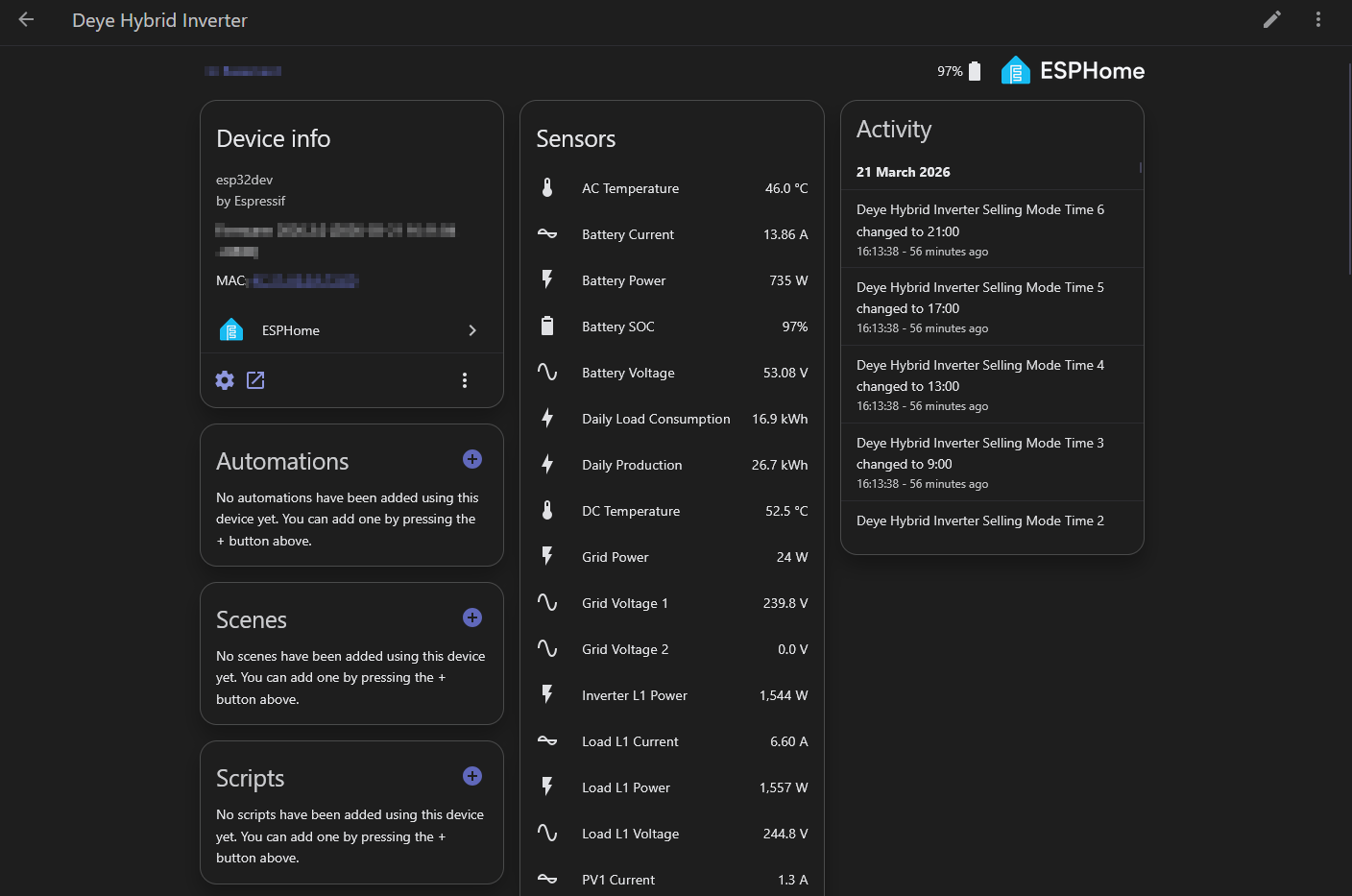
  - {platform: template, name: 'Total Production', id: total_production, unit_of_measurement: 'kWh', device_class: energy, state_class: total_increasing, accuracy_decimals: 1}
  - {platform: template, name: 'Daily Production', id: daily_production, unit_of_measurement: 'kWh', device_class: energy, state_class: total_increasing, accuracy_decimals: 1}
  - {platform: template, name: 'PV1 Voltage', id: pv1_voltage, unit_of_measurement: 'V', device_class: voltage, state_class: measurement, accuracy_decimals: 1}
  - {platform: template, name: 'PV1 Current', id: pv1_current, unit_of_measurement: 'A', device_class: current, state_class: measurement, accuracy_decimals: 1}
  - {platform: template, name: 'PV1 Power', id: pv1_power, unit_of_measurement: 'W', device_class: power, state_class: measurement, accuracy_decimals: 0}
  - {platform: template, name: 'PV2 Voltage', id: pv2_voltage, unit_of_measurement: 'V', device_class: voltage, state_class: measurement, accuracy_decimals: 1}
  - {platform: template, name: 'PV2 Current', id: pv2_current, unit_of_measurement: 'A', device_class: current, state_class: measurement, accuracy_decimals: 1}
  - {platform: template, name: 'PV2 Power', id: pv2_power, unit_of_measurement: 'W', device_class: power, state_class: measurement, accuracy_decimals: 0}
  - {platform: template, name: 'Total PV Power', id: total_pv_power, unit_of_measurement: 'W', device_class: power, state_class: measurement, accuracy_decimals: 0}
  - {platform: template, name: 'Max Solar Power', id: max_solar_power, unit_of_measurement: 'W', device_class: power, state_class: measurement, accuracy_decimals: 0, entity_category: diagnostic}

  # ── Red ──
  - {platform: template, name: 'Grid Voltage 1', id: grid_voltage_1, unit_of_measurement: 'V', device_class: voltage, state_class: measurement, accuracy_decimals: 1}
  - {platform: template, name: 'Grid Voltage 2', id: grid_voltage_2, unit_of_measurement: 'V', device_class: voltage, state_class: measurement, accuracy_decimals: 1}
  - {platform: template, name: 'Grid Power', id: grid_power, unit_of_measurement: 'W', device_class: power, state_class: measurement, accuracy_decimals: 0}
  - {platform: template, name: 'Internal CT L1 Power', id: internal_ct_l1_power, unit_of_measurement: 'W', device_class: power, state_class: measurement, accuracy_decimals: 0}
  - {platform: template, name: 'External CT L1 Power', id: external_ct_l1_power, unit_of_measurement: 'W', device_class: power, state_class: measurement, accuracy_decimals: 0}

  # ── Carga ──
  - {platform: template, name: 'Daily Load Consumption', id: daily_load_consumption, unit_of_measurement: 'kWh', device_class: energy, state_class: total_increasing, accuracy_decimals: 1}
  - {platform: template, name: 'Total Load Consumption', id: total_load_consumption, unit_of_measurement: 'kWh', device_class: energy, state_class: total_increasing, accuracy_decimals: 1}
  - {platform: template, name: 'Load L1 Voltage', id: load_l1_voltage, unit_of_measurement: 'V', device_class: voltage, state_class: measurement, accuracy_decimals: 1}
  - {platform: template, name: 'Load L1 Current', id: current_l1, unit_of_measurement: 'A', device_class: current, state_class: measurement, accuracy_decimals: 2}
  - {platform: template, name: 'Total Load Power', id: total_load_power, unit_of_measurement: 'W', device_class: power, state_class: measurement, accuracy_decimals: 0}
  - {platform: template, name: 'Load L1 Power', id: load_l1_power, unit_of_measurement: 'W', device_class: power, state_class: measurement, accuracy_decimals: 0}
  - {platform: template, name: 'Inverter Output Power', id: inverter_l1_power, unit_of_measurement: 'W', device_class: power, state_class: measurement, accuracy_decimals: 0}

  # ── Temperaturas / frecuencia ──
  - {platform: template, name: 'DC Temperature', id: dc_temperature, unit_of_measurement: '°C', device_class: temperature, state_class: measurement, accuracy_decimals: 1}
  - {platform: template, name: 'AC Temperature', id: ac_temperature, unit_of_measurement: '°C', device_class: temperature, state_class: measurement, accuracy_decimals: 1}
  - {platform: template, name: 'Load Frequency', id: load_frequency, unit_of_measurement: 'Hz', device_class: frequency, state_class: measurement, accuracy_decimals: 2}

  # ── Batería ──
  - {platform: template, name: 'Battery Temperature', id: battery_temperature, unit_of_measurement: '°C', device_class: temperature, state_class: measurement, accuracy_decimals: 1}
  - {platform: template, name: 'Battery Voltage', id: battery_voltage, unit_of_measurement: 'V', device_class: voltage, state_class: measurement, accuracy_decimals: 2}
  - {platform: template, name: 'Battery SOC', id: battery_soc, unit_of_measurement: '%', device_class: battery, state_class: measurement, accuracy_decimals: 0}
  - {platform: template, name: 'Battery Power', id: battery_power, unit_of_measurement: 'W', device_class: power, state_class: measurement, accuracy_decimals: 0}
  - {platform: template, name: 'Battery Current', id: battery_current, unit_of_measurement: 'A', device_class: current, state_class: measurement, accuracy_decimals: 2}
  - {platform: template, name: 'Battery Capacity', id: battery_capacity, unit_of_measurement: 'Ah', state_class: measurement, accuracy_decimals: 0, entity_category: diagnostic}
  - {platform: template, name: 'Battery Empty Voltage', id: battery_empty_voltage, unit_of_measurement: 'V', device_class: voltage, state_class: measurement, accuracy_decimals: 2, entity_category: diagnostic}
  - {platform: template, name: 'Max Charge Current', id: max_charge_current, unit_of_measurement: 'A', device_class: current, state_class: measurement, accuracy_decimals: 0, entity_category: diagnostic}
  - {platform: template, name: 'Max Discharge Current', id: max_discharge_current, unit_of_measurement: 'A', device_class: current, state_class: measurement, accuracy_decimals: 0, entity_category: diagnostic}
  - {platform: template, name: 'Battery Equalization Voltage', id: battery_equalization_voltage, unit_of_measurement: 'V', device_class: voltage, state_class: measurement, accuracy_decimals: 2, entity_category: diagnostic}
  - {platform: template, name: 'Battery Absorption Voltage', id: battery_absorption_voltage, unit_of_measurement: 'V', device_class: voltage, state_class: measurement, accuracy_decimals: 2, entity_category: diagnostic}
  - {platform: template, name: 'Battery Float Voltage', id: battery_float_voltage, unit_of_measurement: 'V', device_class: voltage, state_class: measurement, accuracy_decimals: 2, entity_category: diagnostic}
  - {platform: template, name: 'Battery Shutdown %', id: battery_shutdown_pct, unit_of_measurement: '%', state_class: measurement, accuracy_decimals: 0, entity_category: diagnostic}
  - {platform: template, name: 'Battery Restart %', id: battery_restart_pct, unit_of_measurement: '%', state_class: measurement, accuracy_decimals: 0, entity_category: diagnostic}
  - {platform: template, name: 'Battery Low %', id: battery_low_pct, unit_of_measurement: '%', state_class: measurement, accuracy_decimals: 0, entity_category: diagnostic}
  - {platform: template, name: 'Battery Shutdown Voltage', id: battery_shutdown_voltage, unit_of_measurement: 'V', device_class: voltage, state_class: measurement, accuracy_decimals: 2, entity_category: diagnostic}
  - {platform: template, name: 'Battery Restart Voltage', id: battery_restart_voltage, unit_of_measurement: 'V', device_class: voltage, state_class: measurement, accuracy_decimals: 2, entity_category: diagnostic}
  - {platform: template, name: 'Battery Low Voltage', id: battery_low_voltage, unit_of_measurement: 'V', device_class: voltage, state_class: measurement, accuracy_decimals: 2, entity_category: diagnostic}

  # ── Contadores de energía nativos ──
  - {platform: template, name: 'Daily Battery Charge', id: daily_battery_charge, unit_of_measurement: 'kWh', device_class: energy, state_class: total_increasing, accuracy_decimals: 1}
  - {platform: template, name: 'Daily Battery Discharge', id: daily_battery_discharge, unit_of_measurement: 'kWh', device_class: energy, state_class: total_increasing, accuracy_decimals: 1}
  - {platform: template, name: 'Total Battery Charge', id: total_battery_charge, unit_of_measurement: 'kWh', device_class: energy, state_class: total_increasing, accuracy_decimals: 1}
  - {platform: template, name: 'Total Battery Discharge', id: total_battery_discharge, unit_of_measurement: 'kWh', device_class: energy, state_class: total_increasing, accuracy_decimals: 1}
  - {platform: template, name: 'Daily Energy Bought', id: daily_energy_bought, unit_of_measurement: 'kWh', device_class: energy, state_class: total_increasing, accuracy_decimals: 1}
  - {platform: template, name: 'Daily Energy Sold', id: daily_energy_sold, unit_of_measurement: 'kWh', device_class: energy, state_class: total_increasing, accuracy_decimals: 1}
  - {platform: template, name: 'Total Energy Bought', id: total_energy_bought, unit_of_measurement: 'kWh', device_class: energy, state_class: total_increasing, accuracy_decimals: 1}
  - {platform: template, name: 'Total Energy Sold', id: total_energy_sold, unit_of_measurement: 'kWh', device_class: energy, state_class: total_increasing, accuracy_decimals: 1}

  # ── BMS ──
  - {platform: template, name: 'BMS Charging Voltage', id: bms_charging_voltage, unit_of_measurement: 'V', device_class: voltage, state_class: measurement, accuracy_decimals: 2, entity_category: diagnostic}
  - {platform: template, name: 'BMS Discharge Voltage', id: bms_discharge_voltage, unit_of_measurement: 'V', device_class: voltage, state_class: measurement, accuracy_decimals: 2, entity_category: diagnostic}
  - {platform: template, name: 'BMS Charge Current Limit', id: bms_charge_current_limit, unit_of_measurement: 'A', device_class: current, state_class: measurement, accuracy_decimals: 0, entity_category: diagnostic}
  - {platform: template, name: 'BMS Discharge Current Limit', id: bms_discharge_current_limit, unit_of_measurement: 'A', device_class: current, state_class: measurement, accuracy_decimals: 0, entity_category: diagnostic}
  - {platform: template, name: 'BMS SOC', id: bms_soc, unit_of_measurement: '%', device_class: battery, state_class: measurement, accuracy_decimals: 0, entity_category: diagnostic}
  - {platform: template, name: 'BMS Voltage', id: bms_voltage, unit_of_measurement: 'V', device_class: voltage, state_class: measurement, accuracy_decimals: 2, entity_category: diagnostic}
  - {platform: template, name: 'BMS Current', id: bms_current, unit_of_measurement: 'A', device_class: current, state_class: measurement, accuracy_decimals: 0, entity_category: diagnostic}
  - {platform: template, name: 'BMS Temperature', id: bms_temperature, unit_of_measurement: '°C', device_class: temperature, state_class: measurement, accuracy_decimals: 1, entity_category: diagnostic}
  - {platform: template, name: 'Active Power Regulation', id: active_power_regulation, unit_of_measurement: '%', state_class: measurement, accuracy_decimals: 1, entity_category: diagnostic}
  # ── SENSORES SELLING/TOU DESACTIVADOS (descomentar para reactivar) ──
  # - {platform: template, name: 'Time of Use Enabled', id: tou_enabled, state_class: measurement, accuracy_decimals: 0, entity_category: diagnostic}
  # - {platform: template, name: 'Selling Power 1', id: selling_power_1, unit_of_measurement: 'W', device_class: power, accuracy_decimals: 0, entity_category: diagnostic}
  # - {platform: template, name: 'Selling Power 2', id: selling_power_2, unit_of_measurement: 'W', device_class: power, accuracy_decimals: 0, entity_category: diagnostic}
  # - {platform: template, name: 'Selling Power 3', id: selling_power_3, unit_of_measurement: 'W', device_class: power, accuracy_decimals: 0, entity_category: diagnostic}
  # - {platform: template, name: 'Selling Power 4', id: selling_power_4, unit_of_measurement: 'W', device_class: power, accuracy_decimals: 0, entity_category: diagnostic}
  # - {platform: template, name: 'Selling Power 5', id: selling_power_5, unit_of_measurement: 'W', device_class: power, accuracy_decimals: 0, entity_category: diagnostic}
  # - {platform: template, name: 'Selling Power 6', id: selling_power_6, unit_of_measurement: 'W', device_class: power, accuracy_decimals: 0, entity_category: diagnostic}
  # - {platform: template, name: 'Selling SOC 1', id: selling_soc_1, unit_of_measurement: '%', accuracy_decimals: 0, entity_category: diagnostic}
  # - {platform: template, name: 'Selling SOC 2', id: selling_soc_2, unit_of_measurement: '%', accuracy_decimals: 0, entity_category: diagnostic}
  # - {platform: template, name: 'Selling SOC 3', id: selling_soc_3, unit_of_measurement: '%', accuracy_decimals: 0, entity_category: diagnostic}
  # - {platform: template, name: 'Selling SOC 4', id: selling_soc_4, unit_of_measurement: '%', accuracy_decimals: 0, entity_category: diagnostic}
  # - {platform: template, name: 'Selling SOC 5', id: selling_soc_5, unit_of_measurement: '%', accuracy_decimals: 0, entity_category: diagnostic}
  # - {platform: template, name: 'Selling SOC 6', id: selling_soc_6, unit_of_measurement: '%', accuracy_decimals: 0, entity_category: diagnostic}
  # - {platform: template, name: 'Selling Charge Flag 1', id: selling_charge_flag_1, accuracy_decimals: 0, entity_category: diagnostic}
  # - {platform: template, name: 'Selling Charge Flag 2', id: selling_charge_flag_2, accuracy_decimals: 0, entity_category: diagnostic}
  # - {platform: template, name: 'Selling Charge Flag 3', id: selling_charge_flag_3, accuracy_decimals: 0, entity_category: diagnostic}
  # - {platform: template, name: 'Selling Charge Flag 4', id: selling_charge_flag_4, accuracy_decimals: 0, entity_category: diagnostic}
  # - {platform: template, name: 'Selling Charge Flag 5', id: selling_charge_flag_5, accuracy_decimals: 0, entity_category: diagnostic}
  # - {platform: template, name: 'Selling Charge Flag 6', id: selling_charge_flag_6, accuracy_decimals: 0, entity_category: diagnostic}
  # - {platform: template, name: 'Selling Voltage 1', id: selling_voltage_1, unit_of_measurement: 'V', device_class: voltage, accuracy_decimals: 2, entity_category: diagnostic}
  # - {platform: template, name: 'Selling Voltage 2', id: selling_voltage_2, unit_of_measurement: 'V', device_class: voltage, accuracy_decimals: 2, entity_category: diagnostic}
  # - {platform: template, name: 'Selling Voltage 3', id: selling_voltage_3, unit_of_measurement: 'V', device_class: voltage, accuracy_decimals: 2, entity_category: diagnostic}
  # - {platform: template, name: 'Selling Voltage 4', id: selling_voltage_4, unit_of_measurement: 'V', device_class: voltage, accuracy_decimals: 2, entity_category: diagnostic}
  # - {platform: template, name: 'Selling Voltage 5', id: selling_voltage_5, unit_of_measurement: 'V', device_class: voltage, accuracy_decimals: 2, entity_category: diagnostic}
  # - {platform: template, name: 'Selling Voltage 6', id: selling_voltage_6, unit_of_measurement: 'V', device_class: voltage, accuracy_decimals: 2, entity_category: diagnostic}

  # ── Energía integrada (Riemann) para el Energy Dashboard de HA ──
  # Fuentes internas pre-filtradas (no negativas). battery_power: +=carga / -=descarga.
  - platform: template
    name: 'Grid Export Power'
    id: grid_export_power
    internal: true
    unit_of_measurement: 'W'
    device_class: power
    accuracy_decimals: 0
    update_interval: 30s
    lambda: 'if (id(grid_power).has_state()) return id(grid_power).state > 0 ? id(grid_power).state : 0.0f; return NAN;'
  - platform: template
    name: 'Grid Import Power'
    id: grid_import_power
    internal: true
    unit_of_measurement: 'W'
    device_class: power
    accuracy_decimals: 0
    update_interval: 30s
    lambda: 'if (id(grid_power).has_state()) return id(grid_power).state < 0 ? -id(grid_power).state : 0.0f; return NAN;'
  - platform: template
    name: 'Battery Charge Power'
    id: battery_charge_power
    internal: true
    unit_of_measurement: 'W'
    device_class: power
    accuracy_decimals: 0
    update_interval: 30s
    lambda: 'if (id(battery_power).has_state()) return id(battery_power).state > 0 ? id(battery_power).state : 0.0f; return NAN;'
  - platform: template
    name: 'Battery Discharge Power'
    id: battery_discharge_power
    internal: true
    unit_of_measurement: 'W'
    device_class: power
    accuracy_decimals: 0
    update_interval: 30s
    lambda: 'if (id(battery_power).has_state()) return id(battery_power).state < 0 ? -id(battery_power).state : 0.0f; return NAN;'
  - {platform: integration, name: 'Grid Export Energy', id: grid_export_energy, sensor: grid_export_power, unit_of_measurement: 'kWh', device_class: energy, state_class: total_increasing, accuracy_decimals: 3, time_unit: h, filters: [{multiply: 0.001}]}
  - {platform: integration, name: 'Grid Import Energy', id: grid_import_energy, sensor: grid_import_power, unit_of_measurement: 'kWh', device_class: energy, state_class: total_increasing, accuracy_decimals: 3, time_unit: h, filters: [{multiply: 0.001}]}
  - {platform: integration, name: 'Battery Charge Energy', id: battery_charge_energy, sensor: battery_charge_power, unit_of_measurement: 'kWh', device_class: energy, state_class: total_increasing, accuracy_decimals: 3, time_unit: h, filters: [{multiply: 0.001}]}
  - {platform: integration, name: 'Battery Discharge Energy', id: battery_discharge_energy, sensor: battery_discharge_power, unit_of_measurement: 'kWh', device_class: energy, state_class: total_increasing, accuracy_decimals: 3, time_unit: h, filters: [{multiply: 0.001}]}
  - {platform: integration, name: 'PV1 Energy', id: pv1_energy, sensor: pv1_power, unit_of_measurement: 'kWh', device_class: energy, state_class: total_increasing, accuracy_decimals: 3, time_unit: h, filters: [{multiply: 0.001}]}
  - {platform: integration, name: 'PV2 Energy', id: pv2_energy, sensor: pv2_power, unit_of_measurement: 'kWh', device_class: energy, state_class: total_increasing, accuracy_decimals: 3, time_unit: h, filters: [{multiply: 0.001}]}

################################################################################
# Tiempos de venta (texto HH:MM) — DESACTIVADO (descomentar para reactivar)
################################################################################
# text_sensor:
#   - {platform: template, name: 'Selling Time 1', id: selling_time_1, entity_category: diagnostic}
#   - {platform: template, name: 'Selling Time 2', id: selling_time_2, entity_category: diagnostic}
#   - {platform: template, name: 'Selling Time 3', id: selling_time_3, entity_category: diagnostic}
#   - {platform: template, name: 'Selling Time 4', id: selling_time_4, entity_category: diagnostic}
#   - {platform: template, name: 'Selling Time 5', id: selling_time_5, entity_category: diagnostic}
#   - {platform: template, name: 'Selling Time 6', id: selling_time_6, entity_category: diagnostic}

################################################################################
# Control mínimo del ciclo BLE
################################################################################
number:
  # Segundos que el ESP32 permanece DESCONECTADO entre polls.
  # 0 = conexión permanente (acapara el BLE, la nube NO sincroniza).
  # 110 (por defecto) = poll cada ~2 min, BLE ocupado ~10% → nube tiene margen.
  # Baja a ~50 para poll cada ~1 min. Ajustable en vivo desde HA.
  - platform: template
    name: 'BLE Reconnect Interval'
    id: ble_reconnect_interval
    unit_of_measurement: 's'
    icon: mdi:bluetooth-connect
    min_value: 0
    max_value: 600
    step: 10
    restore_value: true
    initial_value: 110
    optimistic: true
    on_value:
      then:
        - if:
            condition:
              lambda: 'return x == 0 && !id(deye_ble).connected();'
            then:
              - lambda: 'id(ble_reconnect_counter) = 0;'
              - switch.turn_on: inverter_ble_switch

switch:
  - platform: ble_client
    ble_client_id: deye_ble
    name: 'Inverter BLE Connection'
    id: inverter_ble_switch
    icon: mdi:bluetooth-connect
    restore_mode: RESTORE_DEFAULT_ON
    internal: true