Control a light plugged into Siemens LOGO! 8.4 with MQTT

Hello,

I’m quite new to Home Assistant and to LOGO! Siemens, and I’m trying to figure out how to control a light with both of them.

LOGO! side setup

  • Several push buttons in the house are connected in parallel to one LOGO! input (I1)
  • The light is connected to a LOGO! output (Q1)
  • The LOGO! program is as follow:
  • The LOGO! is publishing on Logo_Pub topic on MQTT and subscribed to Logo_Sub
  • Q1 is published on changes and M1 is set to writable

This means that I can still control the light with the physical push buttons even if HA is down.

What I'm trying to achieve

I’m trying to add a light entity in HA with these properties:

  1. The on/off state of the light entity is updated according to the actual on/off state of the physical light, by listening on changes of the Q1 value on the Logo_Pub topic.
  2. Toggling the light should push a message on the Logo_Sub topic with a message telling the LOGO! to change the state of M1.

So far, I can achieve point 2 with this mqtt light:

mqtt:
  - light:
      command_topic: "Logo_Sub"
      payload_on: '{"state": {"M1": {"value": [1]}}}'
      payload_off: '{"state": {"M1": {"value": [0]}}}'
      state_topic: "Logo_Pub"
      state_value_template: "{{ value_json['state']['reported']['Q1']['value'][0]}}"
      unique_id: "my_unique_id"

With that, when I click the “on” or “off” part of the light, the payload_on/off is correctly send to MQTT, the LOGO! reads it and the physical light turns on/off.

The problem is the feedback. The light is always on the “unknown” state and I can’t figure out why it does not read the values published by the LOGO!.

However, this sensor is working, receiving value 1 or 0 depending on the state of Q1:

mqtt:
  sensor:
    - name: "LOGO Q1"
      state_topic: "Logo_Pub"
      value_template: "{{ value_json['state']['reported']['Q1']['value'][0]}}"

Any help would be greatly appreciated :slight_smile:

What’s the actual payload on the “Logo_Pub” topic?

Thanks you for your interest.

The payload sent by the LOGO! on Logo_Pub is:

{"state":{"reported":{"Q1":{"desc":"Q-bit-1-1","value":[0]}}}}

Note that if I want to do it for several lights, the message will be:

{"state":{"reported":{"Q1":{"desc":"Q-bit-1-1","value":[1]},"Q2":{"desc":"Q-bit-2-1","value":[0]},"$logotime":1729527696}}}

So both values are published on an array when they are both changed (here, Q1 turned on and Q2 turned off), but the message contains only Q1 if Q2 hasn’t changed.

The logotime value is published every 10 seconds and unfortunately this cannot be silenced.
So when there are no changes in neither Q1 or Q2, the message is:

{"state":{"reported":{"$logotime":1729527897}}}

Then maybe:

value_template: >
  {% if value_json['state']['reported']['Q1'] != null %}
    {{ value_json['state']['reported']['Q1']['value'][0]}}      
  {% else %}
    {{ states("sensor.logo_q1") }}
  {% endif %}

I just tried it, no luck.

Would it be because the sensor has a 0 or 1 value, but the light is expecting “on” or “off”. I have no idea how to translate it.

I was able to define a mqtt.binary_sensor which reflect correctly the state of Q1:

- binary_sensor:
    - name: logo_q1
      state_topic: "Logo_Pub"
      value_template: "{{ value_json['state']['reported']['Q1']['value']}}"
      payload_on: "[1]"
      payload_off: "[0]"

And I can define a mqtt.light that has the correct status feedback:

- light:
    state_topic: "Logo_Pub"
    state_value_template: "{{ value_json['state']['reported']['Q1']['value']}}"
    payload_on: "[1]"
    payload_off: "[0]"
    command_topic: "Logo_Sub"
    unique_id: "my_unique_id"

But unfortunately, the mqtt.light cannot command the physical light since the message sent to Logo_Sub is now “[0]” or [“1”] instead of:

{"state": {"M10": {"value": [1]}}}

So basically, the problem is that the payload_on/off is used both for the state feedback (Logo_Pub topic) and the command (Logo_Sub topic) :confused:

Unless the json you showed is not the actual one, I don’t quite get it

{% set value_json = {
  "state": {
    "reported": {
      "Q1": {
        "desc": "Q-bit-1-1",
        "value": [
          1
        ]
      },
      "Q2": {
        "desc": "Q-bit-2-1",
        "value": [
          0
        ]
      },
      "$logotime": 1729527696
    }
  }
}
%}

{{ value_json['state']['reported']['Q1']['value'][0] == 1 }}  // True
{{ value_json['state']['reported']['Q1']['value'] == "[1]" }}  // False

You can use state_value_template to “build” the payload to find out the state

Hi There,

I have done it like this:

light:
  - name: "Light 1"
    command_topic: "LOGO_Sub"
    state_topic: "LOGO_Pub"
    state_value_template: '{{ {"state": {"M1": {"value": value_json["state"]["reported"]["M10001"]["value"]}}} | tojson }}'
    payload_on: '{"state": {"M1": {"value": [1]}}}'
    payload_off: '{"state": {"M1": {"value": [0]}}}'
    retain: false
    unique_id: 10001

I have used the same network input as output with some loopback mechanism, but you could use a different network output than input. For me it was the “| tojson” that was the final key in making it work.

Hi there!

I have the same dilema. I want double control, but it just seems imposible on Logo. Here’s what I found out tho:

Modbus & MQTT can write the same M flag in LOGO.
Logo 8.4 sends MQTT data as an Array (checkbox on Logo MQTT, down left if I remember corectly), so you have to take into consideration the paranthesis.

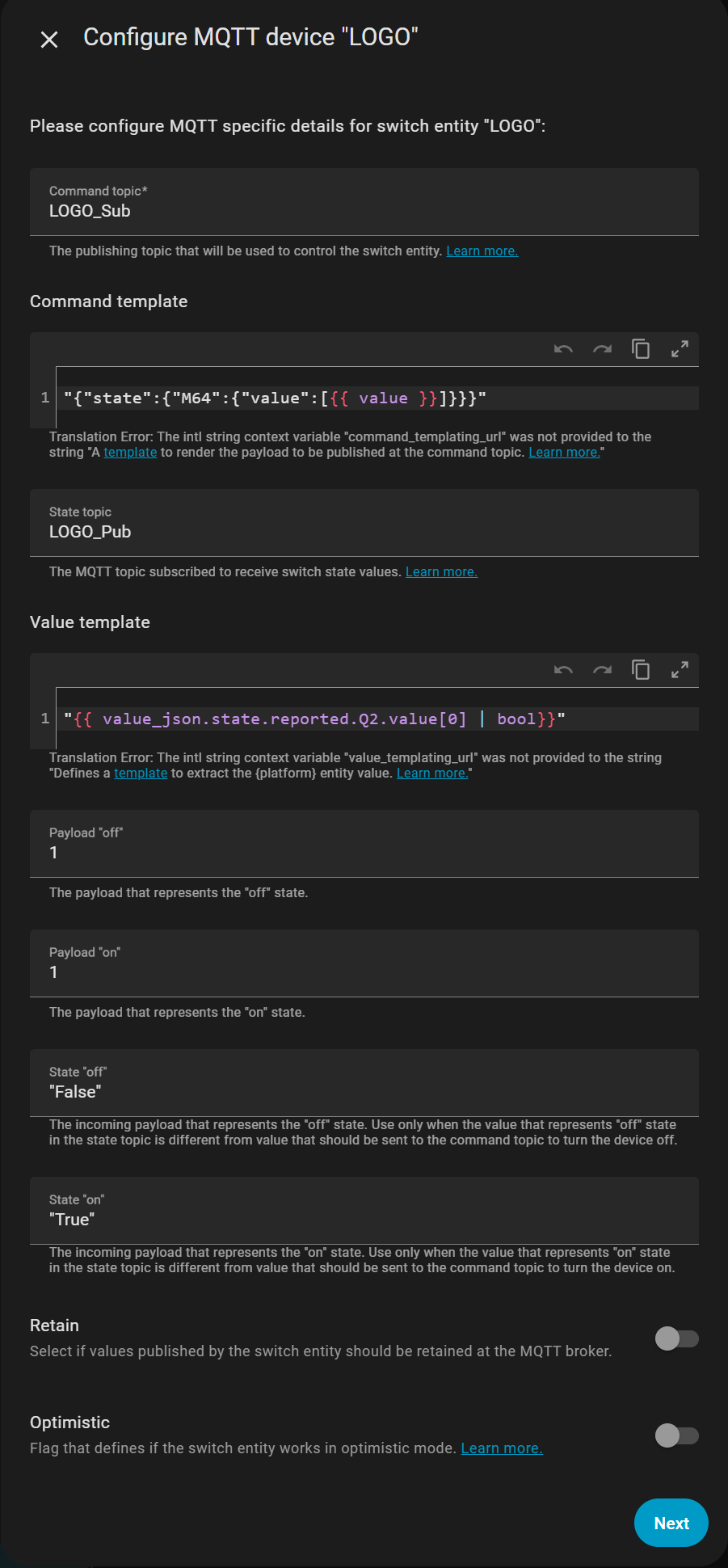
I configured my switches from HA’s UI instead of the .yaml file.

Hopefully, you can see the picture I’ve attached. Now, there I treated de feedback as a string, comparing it to [1] and [0] strings I was expecting.

As an alternative,

“{{ value_json.state.reported.Q2.value[0] | int}}” → and now I can compare it to integers 1 and 0. This will come in handy for AIs. Keep in mind to put anything as a unit, otherwise it will show the AI as a state instead of a measurement.

Back to the LOGO problem.

HA only aligns the feedback of the switch with whatever receives via MQTT. That means of last command was 1, then someone acted locally to switch off Qx → the next command to open will be, again, 1.

The problem is the M flag still is 1, thus no change → unable to give a command. If you connect the input of M flag to Q output, you won’t be able to change M from MQTT. I was hoping to override the input at least 1 cycle, but unfortunately, no.

If you can find a way to override something for at least one cycle, that will be absolutely amazing.

The only workaround I could find is a VERY DIRTY ONE, I don’t encourage. Remember, MQTT and ModBus can write to the same flag…?

You can use this the following way:
Logo!:
M flag - trig AND - OR - TRIG RS - Q
HA:

MQTT SWITCH - send 1 on “ON”, send 1 on “OFF”. no typo there.
Feedback from Q

Modbus button - send 0 on “press”

Automation: MQTT SWITCH toggle → Modbus button press.

So basically, you’ll have an autoreset on M flag.

If you find a cleaner way, please let me know. I really don’t like messing with 2 communication types just for a switch…
It might work with MQTT only, but it will still require an automation, which is not acceptable

Hi MihaiC,

It is possible to have both physical switch and Home assistant switch to seamlessly work together. With only 1 communication method in place. In the Logo I have a network input and output on the same address, so whenever a physical switch is used, the output changes on HA as well, and vice versa.

I have used the mechanism from this post in my logo program and it works quite well: link to post

I looked at that post and the logo FBD looks quite complex IMO.
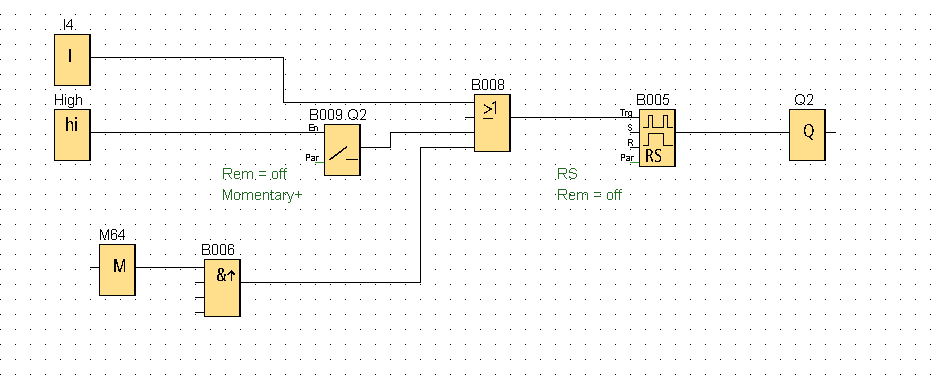
My solution is a bit simpler:

I4 is a non-latching input switch (if it was latching, 2 AND (edge) should be used, one for up, one for down usage).
B009 is just a software button (I have the Logo! with screen so I can control stuff from there as well) - it can be removed anytime.
M64 is the flag I used for testing. It is connected to HA via MQTT.

The problem with HA is that if “ON” feedback is received, it does not align the command. Basically, it still sends on MQTT ‘OFF’. So:

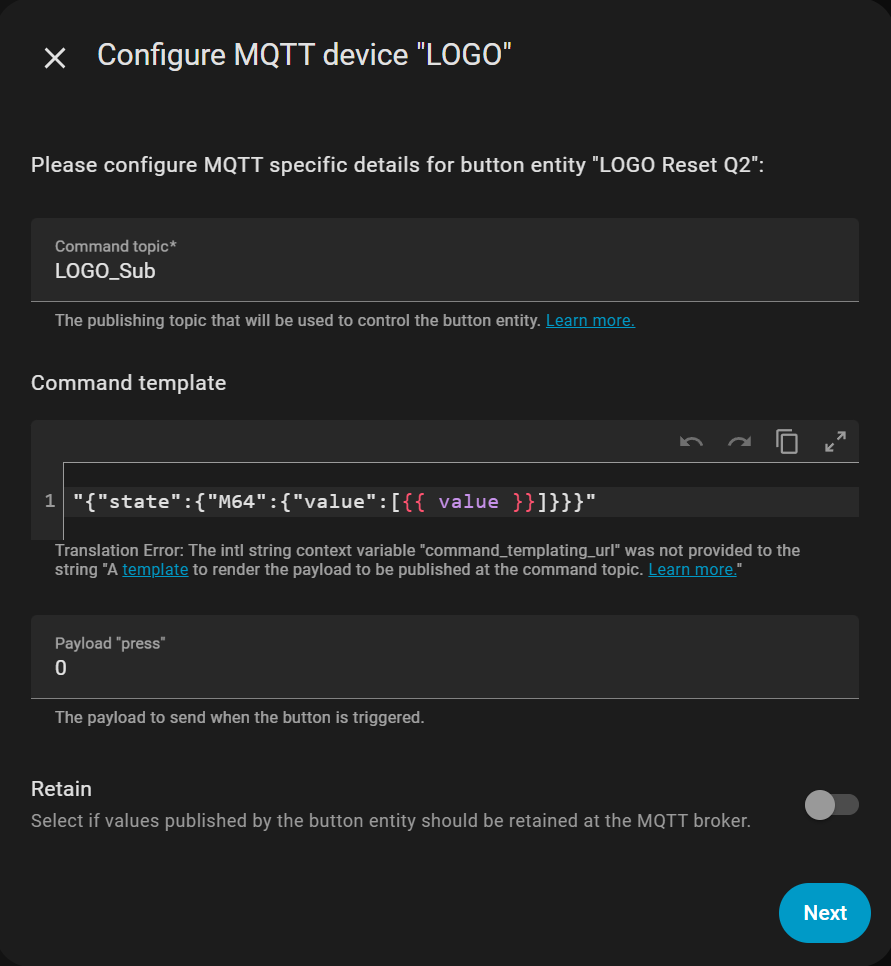
I now send a “1” every time I change the state. I reset M64 with a button that sends “0”.

I have an automation witch triggers The ‘reset Q2’ button every time the actual switch toggles. As reset is also send via MQTT, I don’t need Modbus anymore, yey :slight_smile:

How did you deal with the output of the switch in HA? How did you reset the M flag in the Logo?

To be 100% honest with you, THANK YOU for reminding me I was trying to do something with my LOGO. It was already collecting dust, plugged in the router and outlet. I was blinded by the ‘M’ flags and I did not see before I can write to the local variables ‘V’.

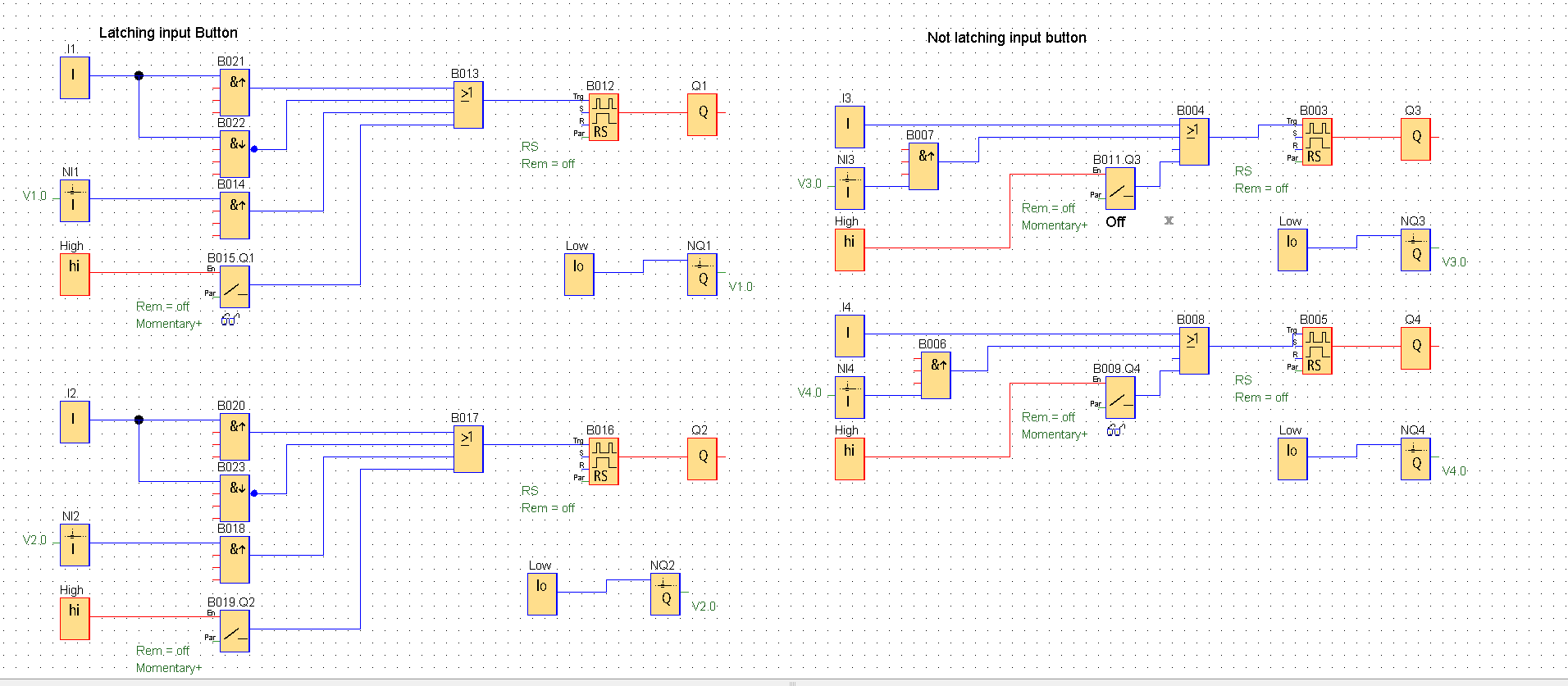
To answer my own question then, I write the same “1” and “1” on commands, but I reset the local variable by force, at the end of the cycle, as follows:

That being said, having a (modestly powered) PLC is overkill for just turning things on and off (Shelly makes some relays which are more cost effective). I am wondering what I can build with it what would justify both the capability and the price of the LOGO.