Hi everyone,
I recently moved my DNS to Control D, primarily to solve a classic issue of protecting and controlling mobile devices when off the local network. One of the main motivators is for my kid’s devices: How do you reliably protect and control a kid’s phone (especially iOS) when they leave your local Wi-Fi, without forcing them through a clunky, battery-draining VPN?
The answer is actually surprisingly simple: you don’t need a complex router or firewall setup. You just install a Control D configuration profile directly on their phone, and you instantly gain the ability to block data and site access on demand, anywhere.
I wanted to bring that control into my smart home, so I built Control D Manager. It’s a custom integration that turns your Control D profiles, filters, and custom rules into programmable Home Assistant entities.
 The “Everyday” Use Cases
1. Off-Network “Homework Mode” (On-Demand Blocking)
Because Control D is cloud-based, you can use HA to control a device that isn’t even on your network. Using native HA services (set_service_state or set_rule_state), you can easily build an automation that instantly blocks YouTube, TikTok, or all internet access on a kid’s phone while they are at school or out with friends.
2. The “Tamper Detection” Hook (Solving the iOS Bypass)
The obvious risk with iOS DNS profiles is that a clever kid can just delete them. Because phones are naturally chatty, this integration exposes endpoint activity sensors.
You can use this to build a tamper-detection automation: Have the HA Companion App trigger a location update. If the phone responds with its location (meaning it has an active internet connection), but your Control D endpoint sensor shows it hasn’t made a DNS query recently… you know they bypassed the DNS profile. (I plan on doing a full write-up on this specific automation soon!)
 For the Homelabbers & Power Users
While you don’t need any special network hardware to use this integration, if you do run a complex homelab, this integration scales perfectly with it.
Control D has a highly open API. If you run ctrld at the firewall/router layer to separate DNS policy by VLAN or individual client, this integration natively reads that architecture. You get high-fidelity, programmatic access to every single filter, service, and custom rule on your network.
To ensure this integration stays lightning-fast even on complex networks, I built it to a “Platinum” standard:
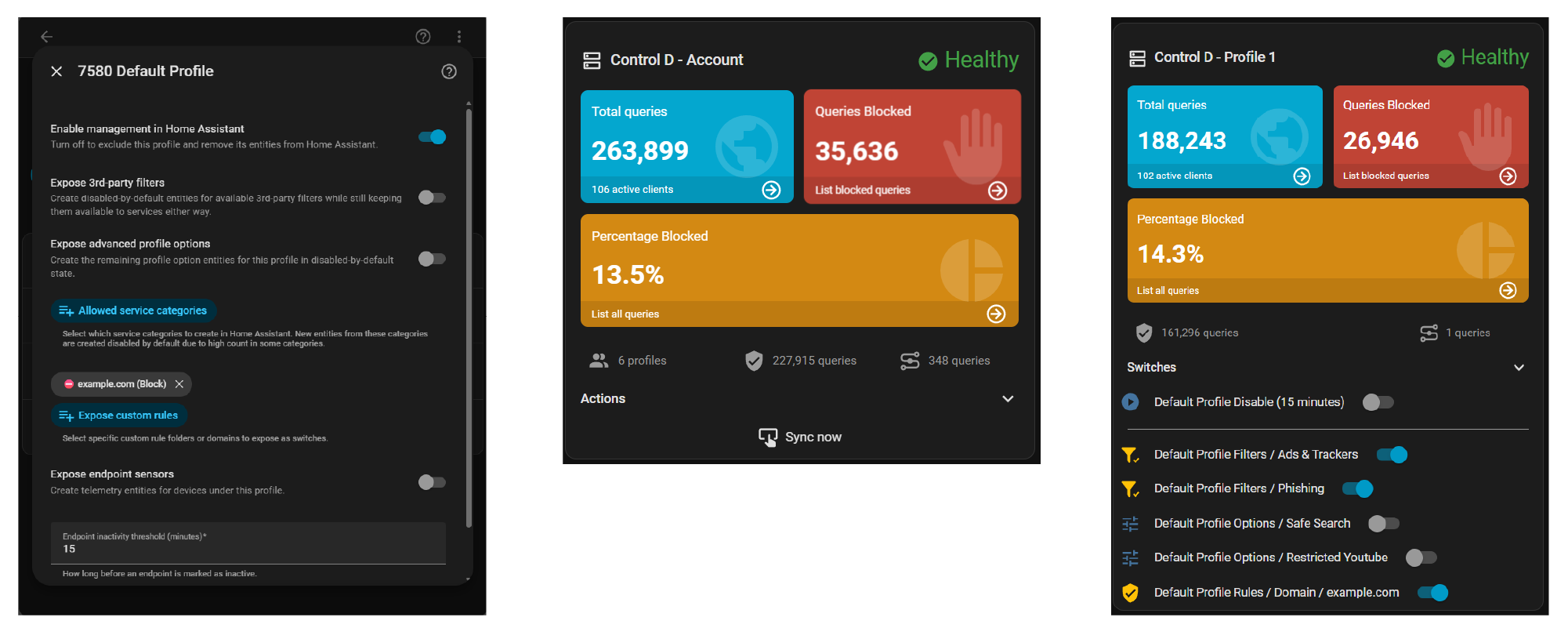
- Zero Entity Bloat: Control D has thousands of possible filters. A naive integration would flood your HA registry. This uses a strict opt-in model: you explicitly choose which specific filters or custom rules actually become HA UI switches.
- Stateless Pausing: Pass a duration payload to
disable_profileand let the Control D cloud handle the countdown timer natively. - Pi-Hole Card Parity: Exposes normalized analytics sensors mapped to standard translation keys. You can drop this right into the popular
custom:pi-holeLovelace card for an instant, beautiful dashboard (despite limited compatibility due to it being built for a different platform, the compatibility is incredibly functional).
Links & Installation
- GitHub Repository: https://github.com/ccpk1/controld-manager-ha
- Installation: Available via HACS (Add as a custom repository)
I built this adhering strictly to HA core standards (DataUpdateCoordinators, strict typing, entry-scoped runtime) so it feels like a native part of your smart home, not a hacked-together web wrapper.
I’d love for the community to test it out—whether you just want to manage your kid’s iPad, or you want to orchestrate 15 different VLANs—and let me know what you think!

 Support the Project
Building and maintaining integrations takes countless hours of development, testing, and covering hardware and tool costs. If Control D Manager is giving you the network control you’ve been hoping for, here is how you can help keep the project alive:
 Star this repository! (The Non-Negotiable)
If you install this integration and get value out of it, clicking the Star button at the top of the page is the easiest—and free—way to say thanks. It takes two seconds, helps others discover the project, and shows me that the community is actively using it.
 Sponsor or Tip (The Ultimate Motivator)
While stars let me know the integration is alive, a sponsorship or tip is the absolute best way to affirm that the time and money spent building this tool is providing real value.
Financial support is never required, but it is the strongest motivation for me to keep fixing bugs, adding features, and maintaining this project long-term. If Control D Manager makes your smart home better, consider showing your support!


 Smarter Syncing & Zero Entity Bloat
 Upgrade Notes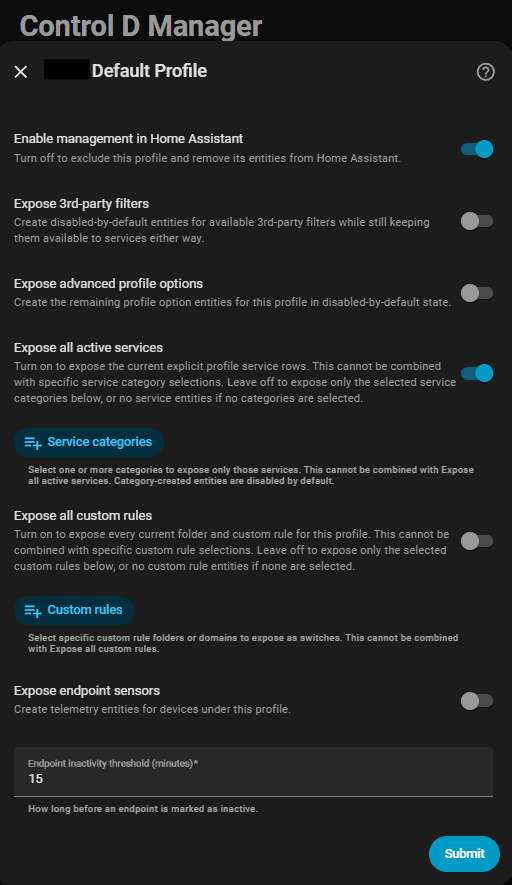
 )
) Version 1.3.0 — Smarter entities & Easier setup
 Version 1.3.1 — No more entity state flickering