Control D Manager v1.2.0 is now live! 
Hey everyone,
Following up on the recent updates, version 1.2.0 is now available via HACS. This release is entirely focused on making the integration smarter, cleaner, and much easier to manage, keeping your Home Assistant entity registry completely free of bloat.
 The Big Enabler: Control D v2.0.14
A few days ago, Control D released platform update v2.0.14, which included a new "See All Active Services" view in their web dashboard.
Previously, you had to expose entire Service Categories in HA (which could contain 100+ disabled entities) just to manually enable the two or three services you actually cared about. Because Control D now centralizes your active services upstream, I was able to completely rewrite how this integration syncs that data.
 Smarter Syncing & Zero Entity Bloat
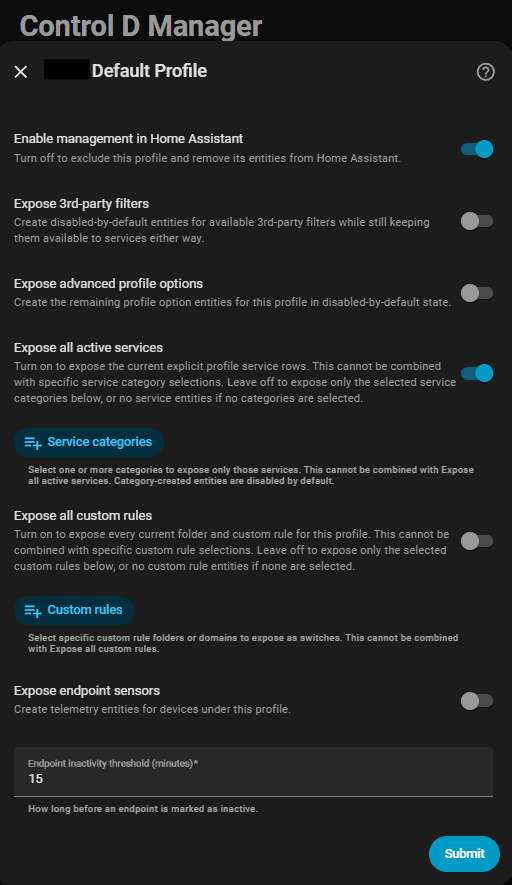
- "Expose all active services" (The New Default): The integration now directly syncs with the explicit live service rows you already have present on your Control D profile. No more category dumping or sifting through hundreds of disabled entities.
- "Expose all custom rules": You now have a one-click, opt-in policy to expose the full, live custom-rule surface for a specific profile without picking folders or rules one by one.
The Recommended Workflow: Switch your profile in the integration options to "Expose all active services," then simply manage what's active directly in the Control D web UI. The integration will automatically sync and expose only those active services as entities.
(Note: The old manual category-based method is still available if you genuinely need that broader surface, but the active sync is the new recommended path).
 Upgrade Notes
- No breaking changes and no migration steps, just upgrade from HACS and restart Home Assistant.
- Existing profiles that had no manual service categories saved will automatically migrate to the new "Expose all active services" behavior.
- Existing profiles that were already using explicitly stored service categories will retain those categories and do not migrate automatically.
- Note: Because Home Assistant remembers entity-registry choices after creation, some entities may require manual enable/disable cleanup in HA after changing your exposure settings.
Here is a look at the updated configuration options:
You can check out the full changelog on the GitHub repository. Enjoy the cleaner registry, and let me know how the new syncing workflow feels for your setup!
 Support the Project
Building and maintaining integrations takes countless hours of development, testing, and covering hardware and tool costs. If Control D Manager is giving you the network control you've been hoping for, here is how you can help keep the project alive:
 Star this repository! (The Non-Negotiable
  )
)
GitHub repository
 Sponsor or Tip (The Ultimate Motivator)