Greetings all,
You can see my current Home assistant settings below, but the TLDR is
Home Assistant running on a Raspberry Pi installed from the official Home Assistant Pi Image
What I am trying to do
A) Put a Volume slider in a card on a dashboard that allows me to change the volume for the speaker ( I know media player has one, but I only want the slider, there is technically, no media playing)
B) Set a default volume level for the speaker on restart of HA.
Current Setup / testing.
Connected to My Pi, I have a USB Microphone and a USB Speaker
They both work, but the only way I see them is via Piper / Openwakeword and Microphone Assistant add ons. (ie in the configuration).
It’s essentially created my speaker as a media_player.Pi_speaker.
After a bit of back and forth swearing at AI and myself, I managed to set up the below scripting / automations.
I can manually run this script to test TTS which outputs to the expected speaker attached to the Pi
sequence:
  - action: tts.speak
    metadata: {}
    data:
      cache: true
      message: >-
        hello? which speaker is this? At first I was alone, I was petrified,
        thinking I could never live without you by my side. Something, something
        divorce
      options:
        voice: GLaDOS-medium
      language: en_US
      media_player_entity_id: media_player.pi_speaker
    target:
      entity_id: tts.piper
alias: TTS_Testing Pi Speaker
description: ""
mode: single
While this is playing, I can run another script to change the output volume (I can substitute the volume_level: value and it works right away.
sequence:
  - action: media_player.volume_set
    data:
      volume_level: 0.35
    target:
      entity_id: media_player.pi_speaker
alias: Set Media Player Volume
mode: single
description: manually set volume on selected speaker
I can also play a media sample using MPD and control the volume with the GUI slider successfully.
So, Here is the issue. The current Card code
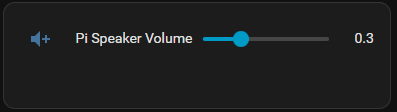
type: entities
entities:
  - entity: input_number.pi_speaker_volume
And the helper:
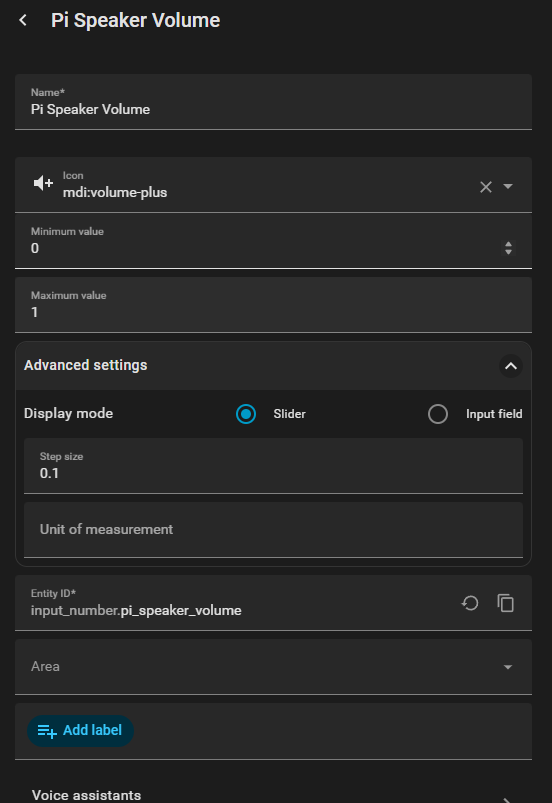
And finally the Automation for the slider
alias: Sync Pi Speaker Volume
description: Syncs the volume slider to the Pi Speaker
triggers:
  - entity_id: input_number.pi_speaker_volume
    trigger: state
conditions: []
actions:
  - delay:
      milliseconds: 200
  - action: media_player.volume_set
    metadata: {}
    data:
      volume_level: "{{ states('input_number.pi_speaker_volume') | float }}"
    target:
      entity_id: media_player.pi_speaker
    continue_on_error: true
mode: restart
max_exceeded: silent
Seems to work, ie, If I run the TTS script and move the slider volume goes up or down. No issue.
BUT
Trying to set the default volume on the slider / speaker on boot
alias: Set Pi Speaker Volume on Startup
triggers:
  - event: start
    trigger: homeassistant
actions:
  - delay:
      seconds: 30
  - action: input_number.set_value
    target:
      entity_id: input_number.pi_speaker_volume
    data:
      value: 0.3
  - action: media_player.volume_set
    target:
      entity_id: media_player.pi_speaker
    data:
      volume_level: 0.35
mode: single
Gives me:
Logger: homeassistant.components.automation.set_pi_speaker_volume_on_startup
Source: components/automation/init.py:738
integration: Automation (documentation, issues)
First occurred: 3:39:17 PM (1 occurrence)
Last logged: 3:39:17 PM
Error while executing automation automation.set_pi_speaker_volume_on_startup: Entity media_player.pi_speaker does not support action media_player.volume_set
Which is odd, because the card slider and scripts version does …which uses media_player.volume_set.
Anyway… any thoughts or if anyone knows a simple way to control the volume on A speaker connected directly to the Raspberry Pi with the Home Assist Image on it please let me know. 
If you got this far, you are a champion… Thank you
Open to any suggestions
Thank you
V