Who came here for troubleshooting please vote for the issue at Shift + mouse-drag no longer copies text to the system clipboard in Terminal & SSH addon · Issue #3608 · home-assistant/addons · GitHub
Using the Terminal & SSH add-on, this issue had been killing me. I wanted to copy and paste somewhere else but the shift-click-drag-outside-the-terminal method didn’t get it onto the clipboard.
I remembered that Chrome now includes Google Lens, using that I was able to get text from the terminal onto my clipboard.
Never too late to share. Ive realized if you press CTRL and right mouse button you can just paste it normally on the context menu. worked for me from windows 11 on the web terminal addon.
Still broken, when viewing Terminal&SSH from Safari on macOS.
-
Once you hold down the shift key, you are no longer able to sweep out a region with the left button of the mouse until you release the shift key and start over.
-
There is no Insert key on the Mac keyboard.
-
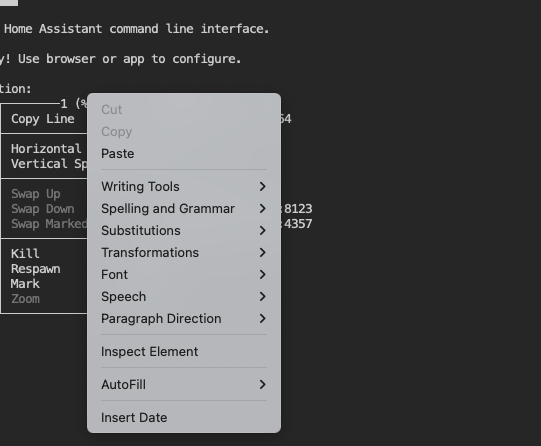
Holding down the right mouse button causes Safari to draw its standard contextual menu, covering the one from Terminal&SSH:
It worked for me when I didn’t leave the area.
I used it on Firefox.
None of the shift holding stuff worked for me alas.
For me the problem was that tmux was capturing mouse events. To disable this, edit .tmux.conf
nano ~/.tmux.conf
and change the line ‘set -g mouse on’ to
set -g mouse off
Save and exit with CTLR-X, Y. Then exit the session, and restart it.
this is the solution
I confirm this is the solution on Mac as there is no Insert button.
Thanks a lot for that
But we nice if the maintainer of the terminal would document the clip board commands
thank you, wild that we need to go to these lengths to copy & paste
Turning tmux mouse input off works for me, but introduces a new problem: it disables mouse scrolling in the terminal, in cases where you want to go back and copy text that has scrolled off the top of the screen.
Turns out tmux has something for this:
After you've disabled mouse input with
tmux set -g mouse off
then do
tmux copy mode
to regain the ability to scroll back in the terminal.
I am using win11 & home assistant VM on Synology, commands in SSH in a terminal that worked with me:
With a mouse: Click and drag over the text to highlight it.
Double-click: Copy a single word.
Triple-click: Copy an entire line.
Ctrl + Shift + V: Paste into the terminal.
After using tmux copy mode I get an error: command copy-mode: too many arguments (need at most 0)
Is this still right?
October 24, 2026 - macOS 27.0.1 with Chrome to access HAOS web UI.
This edit to ~/tmux.conf FIXED THE PROBLEM
Apparently tmux in this environment is the problem.
NOTE: I’m using a Mac M4 mini for this and a standard 101-key keyboard which does have an INSert key but it doesn’t work as expected.