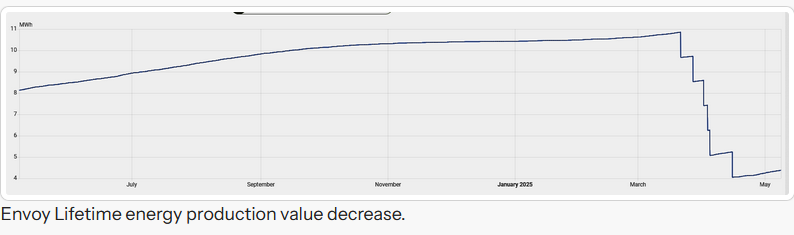
This blueprint will calculate a corrected solar production value for the enphase_envoy integration aggregated envoy or individual inverter solar production value. The envoy firmware calculates inverter production data in a 32 bit value which will reset to zero when reaching 1.193 MWh.
This 1.193 MWh is the (rounded) equivalent of 4294967296 Joule which is the maximum value that can be stored in a 32 bit integer. Due to this limit a single inverter value will drop to zero when this value is reached. Also the aggregated value of all inverters will get a drop of 1.193 MWh at the moment any inverter reaches this value.
So both aggregated and individual inverter data drops with this value. This blueprint will detect these resets and account for it in a corrected value. It will also recognize if these drops are repaired and increase with same amount.
Implement one for the Envoy aggregated solar production, and if tracking individual inverter production data, one for each of enabled inverters in the enphase_envoy integration.
This blueprint requires the home assistant Uptime integration to be installed and a template sensor for it be created and passed to the blueprint. This uptime sensor is used to detect Home Assistant restarts and avoid long delays before detecting value changes in the production sensors after HA restart.
Template
In your template configuration yaml file add one template like below for each envoy solar production entity to correct.
This example adds a new sensor named sensor.envoy_123456789012_lifetime_energy_production_corrected which is tracking sensor.envoy_123456789012_lifetime_energy_production and calculates a corrected value for overflows.
- use_blueprint:
    path: marcelhoogantink/correct_envoy_livetime_production_energy.yaml
    input:
      # entity-id of original sensor to be corrected
      envoy_entity: sensor.envoy_123456789012_lifetime_energy_production
      # uptime in seconds
      uptime: sensor.envoy_ha_uptime
      # uom for target
      uom: MWh
  # friendly name of the new sensor for correction
  name: Envoy 123456789012 lifetime energy production corrected
  # unique_id of the new sensor for correction
  unique_id: envoy_123456789012_lifetime_energy_production_corrected
Uptime
In your template configuration yaml file add one template like below for the uptime sensor to pass to each blueprint created.
- sensor:
  - name: Envoy HA Uptime
    # this sensor needs the Update integration
    # (https://www.home-assistant.io/integrations/uptime/)
    # and updates every minute as now() changes every minute by default
    unique_id: envoy_ha_uptime
    state: >
      {{ (as_timestamp(now()) - as_timestamp(states('sensor.uptime')))|int }}
    unit_of_measurement: 's'
    device_class: duration
    state_class: measurement
More information on the development of this blueprint can de found here:
No, it does not. But it can turn a e.g. a daily total in an ever increasing one.
I have no clue what such a step down means so if your sensors do that they are pretty useless. If a step down is both the sensor dropping some data and adding some new in the process, there is no way you can infer anything from that. This is also not behaviour caused by the limits of 32 bits. It seems do fundamentally broken you cannot do anything with it. My guess is that there is something else entirely going wrong here.
It looks like a statistics sensor that has data dropping out of its calculation window.
My total yield is not yet at your range 8MWh) but has not misbehaved yet. If it does, I’ll use the daily sensor in a utility meter to fix it.
Data as shown in the picture is directly from the Envoy (physical) device. The envoy reports aggregated lifetime solar production by summing reported values from individual inverters.
These inverters sum in production in joules. 32 bit max=4294967296 joule => 4294967296 / 3600 = 1193046 => wH = 1193.046 KwH => 1.193046 MWh.
So when the solar panel has produced 1.193 MWh in it’s life, with current firmware, the value overflows and starts at zero. The Envoy shows this in a sudden drop of value with that amount in the aggregated value.
In my solar installation the aggregated value is at 25.1 MWh for 24 panels and lifetime of 2.5 years. With all individual panels now between 0.9 and 1.14 MWh. Not at overflow point yet, but moving towards it.
Many others reported these steps and experienced this phenomena already.
The drop with this 1.193 amount and some added new production during the 15 min reporting cycle of the Envoy is pretty recognizable. Any (small) drop implies the issue already as production should only increase. Divide the drop by 1.193 MWh and the ceiling is count of panels that dropped in the polling period.
The utility meter can indeed be used for this by creating a daily one for each individual inverter and summing these. Not all Envoy firmware versions offer individual inverter energy production, so this is an alternative.
Not sure how daily utility meter on the aggregated value would handle these drops.
HA has many methods to deal with issues, one of it strong points. With this issue, most important is to prepare now, rather then late as any new sensor created will not have stats for the Energy dashboard to look back in time.
For use with the energy dashboard specifically, one can correct the original lifetime production statistics outlier using the developer tools / statistics and correct the value at the moment of a drop. That will not correct the entity value, but allow correct energy calculations.
This is also happening to my Envoy system. Went from 18MWh lifetime production to 7MWh in a couple of months, is there any way to fix the envoy_122148009146_lifetime_energy_production data? Or only fixing the statistics for the energy dashboard?
Not a simple method I know off (which doesn’t mean there isn’t one).
Fixing the statistic outliers on the lifetime values will make the energy dashboard look normal again.
Option I’m considering, is implementing the correction blueprint, then export the original lifetime data, correct it, and import statistics dated before correction creation using spook import statistics. Haven’t tried it yet, so can’t say how cumbersome or if it even will work.
I agree that would be the best solution. But the nature of the integration is that it has no knowledge of prior data when it starts. It could detect such a change while running, but not over HA or integration reloads. So it would not provide a 100% solution which above blueprint is designed for. No a readily available solution at this moment.
Thank you for the blueprint. It is a good safeguard.
I too have the issue that the app shows something else compared to the integration value.
Is there a way to force the integration to report the (web) app-value for lifetime production?
I have had some firmware updates over the course of time. THis resulted in significant drops of total lifetime production energy from 42 now down to 13 MWh now.
The local api retrieves local data on the envoy, including the lifetime value
This value is incorrect actually.
I am a bit unsure what the enphase integration reports actually.
i have an old envoy S, non-metered. I do have fw 8.x though.
Many thanks for helping me with more insights on this
Is there a way to force the integration to report the (web) app-value for lifetime production? … I am a bit unsure what the enphase integration reports actually.
The (HA core) enphase integration reports data from the local Envoy. It is not getting data from the Enphase portal.
This resulted in significant drops of total lifetime production energy from 42 now down to 13 MWh now.
This actually may be these overflows. If they happened already this blueprint is not able to correct. It is only protection for future overflows.
Once the blueprint is installed it’s possible to change the number of corrections by changing the total_overflows attribute of the corrected entity. That may work in getting to a correct corrected value. (You’ll get bumps when using the corrected value in the energy dashboard and need to correct the statistics of it to remove those)
i have an old envoy S, non-metered. I do have fw 8.x though.
For non-metered Envoy S (I have that one also), it reports data from /api/v1/production and /ivp/pdm/device_data. This is data reported by the individual inverters and aggregated in the Envoy.
In an other approach you might add some automations or templates that sum the lifetime value to an input_number and get the correct value. By setting the input_number to the value offset you can correct after each outage.
I’ve had a couple of issues installing this blueprint.
In the template sensor there is a typo - livetime instead of lifetime.
When the tempate was imported, it created config/blueprints/template/marcelhoogantink/Correct Envoy lifetime production energy.yaml. That is, the blueprint name had spaces in it. So the use_blueprint template failed because it couldn’t find the file. I had to manually change the file name to correct_envoy_lifetime_production_energy.yaml. I also changed the name in the blueprint itself to match.
Lastly, the corrected value seems to be to 2 decimal places, whereas the original sensor is to 3.
There’s definitely some loose ends we overlooked. Thanks for reporting that @Sddawson.
Lastly, the corrected value seems to be to 2 decimal places, whereas the original sensor is to 3.
That is the default HA display precision format. In entities page open the corrected value properties and change the Display precision to your preference
That is the default HA display precision format. In entities page open the corrected value properties and change the Display precision to your preference
Ok. I mistakenly assumed the calculations were rounding. All good now!
I was expecting a drop in the Total amount kWh, which happened, but I expected also a drop in the kWh value of the inverter itself. This did not happen, it just keeps increasing while the Total amount did drop.
It looks like the Envoy-error is not in the converter, but in the calculations of the Total amount …