CCA 2026.01.22 - Force Recovery Resident Sensor Fix
Fixed force recovery ignoring resident sensor status (#332): Force recovery (BRANCH 12) now validates resident sensor conditions before returning to background state. Previously, when a force function was disabled, the cover could execute an invalid action if the resident sensor status had changed while the force function was active.
CCA 2026.01.23 - Force Features & Ventilation Recovery Fix
Fixed covers closing during ventilation despite active force features (#337): Ventilation recovery now properly respects force features (force-open, force-close, etc.). Previously, covers would close when windows closed even when force-open was still active. Force feature checks are now centralized in YAML anchors for consistent behavior across all branches.
short question:
with the normal timecontrol its possible to have diifferent times for workday and non-workday. If nothing else is set the “late” time is used to open/close the cover, thats fine. Now its possible to optionaly implement the sun elevation. But there it could be that it is working only for workday or non workday!
Example:
Workday opening: 7-8 am
Non-Workday opening: 8-9 am
sun elevation is set to a value which will be reached between 7 and 8 am
So in this case the cover will open “randomly” between 7 and 8 on workdays, but still at 9 on non-workday. If i set the elevation to a value which will be reached between 8 and 9, the cover will always open at 8 on workdays and between 8 and 9 on non-workdays! So is there a smooth way to set different elevation values for workday and non-workday?
I open a “issue” in github!
Hi, thanks for this automation, it keeps getting better!
I noticed something since the latest updates. When I open and then close my window, the automation triggers the blind to open even though it is already at 100%.
While this doesn’t cause any movement, it still triggers the relay every time unnecessarily.
I have attached the trace logs. I noticed that current_tilt_position is showing as 101 there, which might be related.
@Herr.Vorragend I am not sure if the latest Update changed something but the Force Action on my Bathroom Window worked well until the last days - cannot tell if it stopped working with the update but at least nothing else was changed.
Could you maybe have a look on my trace?
When I close my bathroom door, the Cover should go down via Force Action - Close but it doesn’t.
There was no manual intervention and the Helper also seems to reflect correct state.
What do I miss here?
this is a fantastic blueprint! Thank you for sharing and maintaining! It took some time to understand all the features and I am testing at one of my blinds (Somfy) before roll out to all.
There are two things on my wishlist I am thinking about. Maybe it is not foreseen or I did not realize the full range of functions jet.
I would like to use the time of my alarm clock to raise the blinds x minutes before alarm clock ist ringing. “Additional Condition” works as an AND- Condition, is it? So my workarround would be to trigger a “Force Features” opening event by switching a helper entity by an additional automation. Is there a smarter way?
if shading ends the shutter can stay closed by activating this option. But there ist no way to fully open the tilt nevertheless, is it? [Edit 2026-02-20/08:34: “Additional Actions After Disabling Sun Shading” would do the thing, right?]
Maybe one of the other users can support me either to relieve Herr.Vorragend
@Herr.Vorragend, sorry for triggering you once again:
I have recognized incomprehensible behaviour.
I have a blind, set up “Tilt Wait Mode” to " Wait Until Idle (Z-Wave)".
Closing blind works fine. Even with “Forced Features”.
If I trigger “Sun Shading” with “Forced Features” (for testing purposes), it starts closing but immediatly tilts to defined value without closing to defined “Sun Shading Position”.
Maybe the change vom “idle” to “moving” takes some time and there is a delay for checking idle-status of blind in “Closing”, but not in “Sun Shading”?
For your first question, I would just use the “Resident” setting… create a Helper and set the Helper to On/Off whenever you go to sleep and wake up or your alarm rings an sets it to off…
The option you explain in your second question is more meant to not open the cover after shading ends, when it actually will soon close for the evening - like prevent going down, then up and then down again.
For your third question, did you set individual values for each option in Cover Positions and Tilt positions, that do not overlap even with threshold setting?
All Values for Close, Open, Shading, Ventilation must be different and non overlapping (count manual override threshold setting in).
Hello Avalon,
thank you for answering my questions. Feedback on your suggestions regarding the three topics:
The “Resident” setting does not fit my wish. The normal opening should not be blocked, if no alarm is set up. I will think about it, how to get this idea done.
The Ventilation-Option “Using the ventilation position when the sun shade is ended” is the function I can use for preventing opening the blind but getting light into the room
open, close and shading had no overlapping positions. Ventilation (not active jet) was same as close position - will test tomorrow, whether it makes a difference.
My resident helper is triggered by my alarm and (for weekends when I don’t have an alarm set up) by a movement detector outside the bedroom (with the condition that it has to be later than a given time, in order not to fire, when I go to toilet during the night).
But I plan to replace this by a webhook sent from the Tasker app, when bedtime mode is ended on my phone.
You both are right. This is a good way. Cause I have no motion sensor jet, I turn off the resident sensor templated by “alarm-time” and by “normal-open-time” and turn off by “normal-close-time” (all three input_datetime). First I assumed, “Morning Opening” and “Evening Closing” automation can be deactived now, but the opening is depending on “Time For Drive Up - Early”, so when “Morning Opening” is not active, resident awake do not trigger uppering, right?
The shading problem is still present. From an fully opend blind the trigger “Closing” (target-position 0%, 25% tilt) is fullfilled as expected, the trigger “Shading start” (target-position 1%, 35% tilt) results in 94% position and 35% tilt.
All position settings are unique (tolerance 0%).
My YAML-configuration for helping debugging:
and the Trace:
There are two traces one minute later with ids “t_manual_position” and “t_manual_tilt”. I assume they are because of the not reached target position?
Thanks alot!
Edit: I have done some testing. After “Activation Sun Shading” (via automatism or forced by entity) the positioning is randomly successful, I estimate one of five releases on average. When unsuccessfull, blind move between 2 and 3 seconds down, then tilting to the right tilt-position.
I can’t make head nor tail of why it happens while shading, but not while closing - the code seems identical to me but different variables!?
Edit 2: Setting “Tilt Wait Mode” to “Fixed Delay (Standard)” would get shading to work, but is not a prefered solution, because of the long lag before tilting, if the current- and target-positions (height) are close together.
Hi @Herr.Vorragend, I have done extended testing and assume that I have found the triggering circumstances of the Shading issue:
The blind (Somfy J4 IO) changes its status from [open/close] to [opening/closing] with an random delay of 1-3 seconds after the comand was sent (and blind immediately started moving). If there is a short delay, all works fine. If the delay is about 2-3 seconds, the movement is abborted by the change of status.
If the target position (height) is 0% or 100% there is no problem (even if the change of status takes 3 seconds). If it is in between of 0% and 100% the issue is present, same behaviour in all functions (closing, shading, …)
Hello, I have one question as I´m not sure how it should work.
When I open my Window completly, the binary for full ventilation is true, then it´s getting dark outside, the closing time passes and late in the night the door is closed. The trigger is running and the trace result is to return to previous position, were I would expect it would close the shades. How should it be?
Hi @Herr.Vorragend !
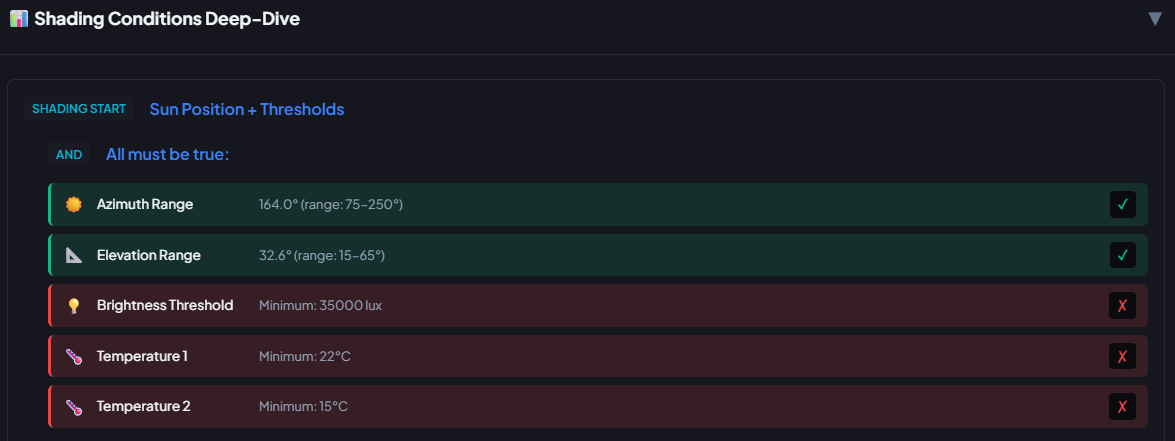
I’m using your CCA since March 2025 and it worked properly. Last week I read about your new features with dynamic sun etc. and updated your blueprint. I adapted all my five shading automations to the new features. Now, although all conditions in sun shading are met, the trace analyzer says that three thresholds are not reached. But they are definitely reached! I compared all values with live data in Home Assistant. Why does this happen?
I’ve been using the blueprint for quite some time, and recently the shutter has started closing as soon as I close my patio door — even during the day. I’m not exactly sure whether this started after a Home Assistant update or after an update to the blueprint.
I had only configured the door for lockout protection. The shutter automatically going down is not intended by me .
Can someone help me?
same here, i dont have temp2 and brightness but its still listed as condition in shading conditions deep-dive but automation is working! maybe its a bug in trace analyzer?
I recently came across to this Cover Automation by chance and can only say: wow. Herr.Vorragend has clearly put an incredible amount of work and passion into this project. Many thanks for creating such a great integration.
At the moment, however, I’m struggling with setting up the Dynamic Sun Elevation Mode and the required template sensors with sinusoidal interpolation. I have followed the guide several times, updated my configuration.yaml, and restarted Home Assistant, but the sensor simply does not get created.
The configuration.yaml does not show any errors, and no errors appear in the logs either.
Hi! First I would like to say thanks for this great blueprint. I’ve been looking into this for a long time but did not yet switch from my own automations because of some points I couldn’t solve. Maybe you have any ideas how to do it.
I have blinds with tilt positions. For some windows I do not drive them up during the day, but only open the cover by tilt position. So my “open position” is 0% (position) and 100% (Tilt).
For “doors”, I use the full ventilation mode with a sensor. But in that case CLA drives to the defined “open” position (which is 0%) and only open to Tilt 100%. How can I manage to drive up completely in that case and drive back to normal “day position” (0% cover, 100% tilt)? I think for that, I would need the option to define a “full ventilation” position, which is not possible, right?
I really ilke the “return to target” mode at force features. But I would also need a “pause all actions” feature, while in the background all states and target-positions are still derived. I want to be able to switch between “manual mode” and “automatic mode”. I can do it with conditions and “global helper switch”, but in that case, if I switch to “automatic mode”, the target positions will not run immediately, but only when the next triggers appear.
 CCA 2026.01.22 - Force Recovery Resident Sensor Fix