This feature will be included in the next version.
1 Like
Of course, this varies from person to person and also depends on how you’ve organized your configuration.
I use packages and different directories for the entities.
If you already have a template trigger sensor, feel free to adapt the code example to your version.
This was a display issue in the Trace Analyzer — all 7 conditions are calculated internally (showing true as a bypass when no sensor is configured), but the Trace Analyzer couldn’t distinguish “not configured” from “condition met.” The next blueprint update adds shading_start_conditions_active, which the Trace Analyzer uses to correctly label non-configured conditions. Your automation was working correctly the whole time.
The trace captures sensor values at the exact moment the automation ran, not your current live values. Please compare the sensor values shown inside the trace with the thresholds, not today’s live readings. If you’re using the Trace Analyzer, the new version will also clearly show which conditions were actively configured vs. which ones were bypassed as “not configured.”
Yes, in theory I’d need more information, as described in the FAQ. But you’d be better off waiting for the new version, which will be released in a few days. I’m quite confident about this.
I’ve been a bit quieter in this thread over the past few months. There was a reason for that. I’ve redesigned the logic and priorities in the Blueprint. I’ve now implemented multiple levels with different priorities.
The JSON Cover Status Helper will become mandatory. And I’m storing all levels in the helper.
Why am I saying this?
Because it makes it easier and more stable to control when CCA should move to which position.
Please wait until the next release. I won’t be fixing the current code anyway. I’ve been working in a different direction for three months now.
┌─────────────────────────────────────────────────────────────────┐
│  Layer 1: FORCE                                                 │
│  ├─ force != "none" → return force state                        │
│  ├─ Examples: Rain protection, wind protection, frost           │
│  └─ Variable: state_force                                       │
├─────────────────────────────────────────────────────────────────┤
│  Layer 2: LOCKOUT                                               │
│  ├─ window == "open" → return "lock" (100% open)                │
│  ├─ Purpose: Prevent closing on open windows                    │
│  └─ Variable: state_window == "open"                            │
├─────────────────────────────────────────────────────────────────┤
│  Layer 3: VENTILATION                                           │
│  ├─ window == "tilted" AND allow_ventilate → return "vent"      │
│  ├─ Purpose: Allow air flow through tilted windows              │
│  └─ Variable: state_window == "tilted" + resident_allow_vent    │
├─────────────────────────────────────────────────────────────────┤
│  Layer 4: PRIVACY                                               │
│  ├─ resident == 1 AND closing_trigger → return "close"          │
│  ├─ Purpose: Privacy / darkness when resident is sleeping       │
│  └─ Variable: state_resident + resident_closing_enabled         │
├─────────────────────────────────────────────────────────────────┤
│  Layer 5: SHADING                                               │
│  ├─ shade == true AND allow_shade → return "shade"              │
│  ├─ Purpose: Sun protection during hot periods                  │
│  └─ Variable: state_shade + resident_allow_shading              │
├─────────────────────────────────────────────────────────────────┤
│  Layer 6: BASE                                                  │
│  ├─ return base ("open" or "close")                             │
│  ├─ Purpose: Time-based schedule (morning/evening)              │
│  └─ Variable: state_base + resident_allow_opening (for "open")  │
└─────────────────────────────────────────────────────────────────┘
3 Likes
Hi,
i am very impressed by the Automation. But one question. Why is my shading not ending and the shutter going up?
I thought if one condition is not met in the set time shading is ending and the cover is going up. But my covers coming down exactly with the set conditions, but never going up again.
Unfortunately, my crystal ball is currently being cleaned.  (sorry)
To answer that, I’d need a little more information.
Please take a look at the FAQ. There you’ll see what information you can provide when submitting a support request.
Oh, I’m very excited to see when the new version will be released.
1 Like
I’ve focused less on features and more on bulletproofing. I’ve tested a wide variety of scenarios myself using virtual cover devices.
All that’s left is to make the decision to release it and finalize the documentation.
I’ve taken another week off and need to get a handle on the outstanding issues.
3 Likes
Hello,
I just started with CCA and managed to setup the time controlled settings for two covers.
The next thing would be sun protection for one of the covers. How do I achieve different positions for different sun azimuths? E.g. azimuth 186° cover position 60%, azimuth 207° cover position 38% etc.
Is this possible?
CU
Jens
As already mentioned, even sensors which are not configured are shown in the conditions. But there seems to be another bug:
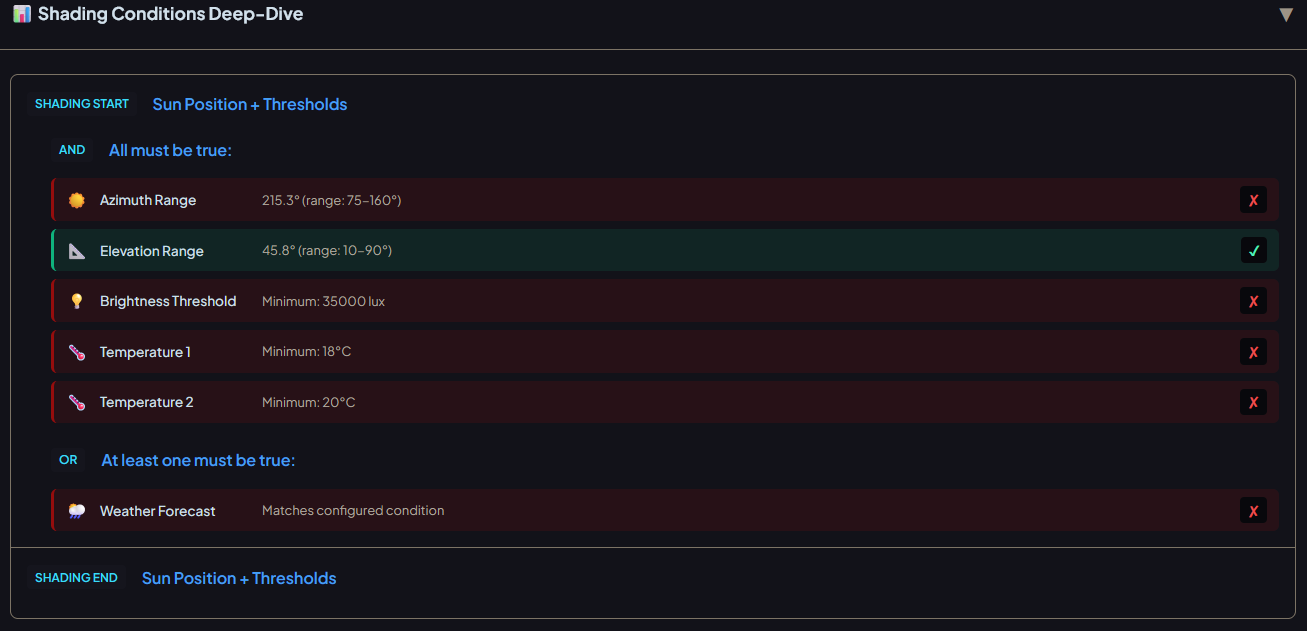
The analyzer shows that the only OR condition is the weather forecast.
Which isnt true, as you can see at the bottom under "shading conditions:
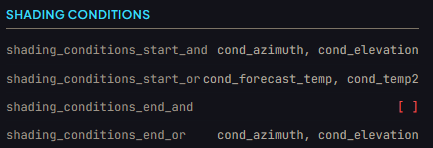
The the information shown on second screenshot matches my config.
btw, nice tool! Makes things a lot easier.
So I live in South Africa around 25 degrees south latitude, it can get pretty hot here during the day. Our way of thinking about blinds is a bit different from shall I say the European way 
We typically close blinds when the sun shines directly into the home (to keep the home cool in the summer), and close when the sun does not.

So… while the normal CCA automation as shown above is to open in the morning and close in the evening, the way I need to use blinds is probably the exact opposite.
Would this be possible using CCA?
I have the same case, is there some usefull function? Regards Chris
check out the “sun protection part” this is based on the sun parameters! This should do the think you are looking for!
Otherwise yo also can close the covers in the morning and open them in the evening
Brightness Hysteresis – redundant when Start/End are separate values?
quick question about the shading brightness config:
We already have separate Start (e.g. 35000 lx) and End (e.g. 25000 lx) values, which by themselves create a 10000 lx dead band. Adding a Hysteresis on top just widens that band further.
For the temperature sensors the hysteresis clearly makes sense – they only have a single threshold. But for brightness with two thresholds, the hysteresis feels redundant.
Is there a use case I’m missing, or could this parameter be removed for the brightness case?
Thanks!
Hi,
I’m a little confused, even though I’ve been using CCA for quite some time now.
It’s slowly getting to be that time of year again when we need sun protection, and for some reason, CCA isn’t working quite as well for me right now.
This morning, for example, only one out of four blinds went down, even though I thought they all should have closed.
According to the trace, several criteria weren’t met, but according to the history in HA, all of them were met at that time.
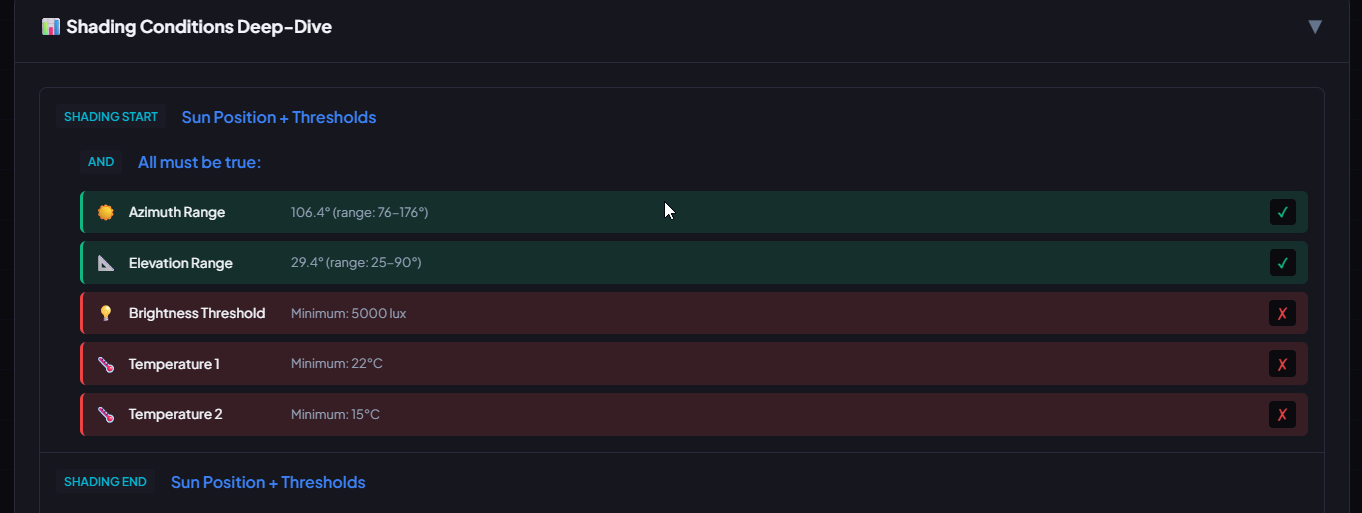
Hi Herr.Vorragend,
I love the idea of CCA, and i am actively using. But i cant fix my Sun elevation.
What i tried:
- Time setup alone works (drives up at 7am, closes at 10 pm)
- sun elevation (static with sun.sun) does not work (neither up, nor down)
- sun elevation (hybrid/dynamic) does not work (using the provided default template
But i can find a trigger in the history:
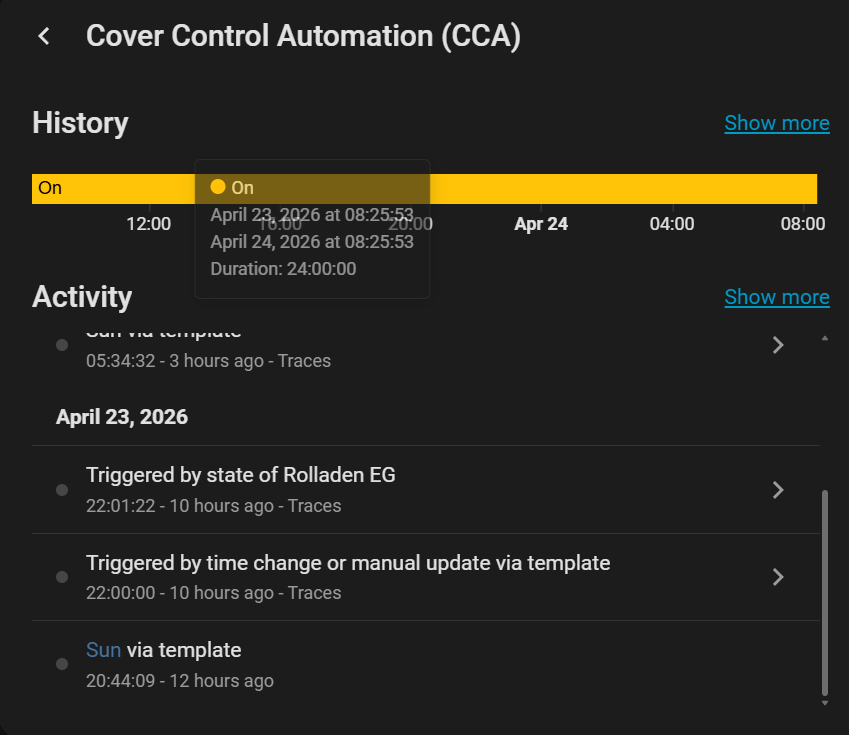
my config
alias: Cover Control Automation (CCA)
description: ""
use_blueprint:
  path: hvorragend/cover_control_automation.yaml
  input:
    individual_config: []
    cover_status_options: cover_helper_disabled
    cover_status_helper: input_text.shutter_status_helper
    blind: cover.rolladen_eg
    auto_options:
      - auto_sun_enabled
      - auto_up_enabled
      - auto_down_enabled
    shading_position: 69
    time_up_early: "07:00:00"
    time_down_early: "22:00:00"
    time_down_early_non_workday: "22:00:00"
    time_down_late: "22:00:00"
    time_down_late_non_workday: "22:00:00"
    sun_elevation_up: -6.6
    sun_elevation_down: -2
    time_up_late: "07:00:00"
    time_up_late_non_workday: "07:00:00"
    shading_forecast_sensor: weather.forecast_home
    shading_forecast_type: daily
    shading_forecast_temp: 20
    shading_temperatur_sensor1: sensor.shellyht_outdoor_temperature
    shading_waitingtime_start: 180
    shading_waitingtime_end: 180
    check_config: true
    workday_sensor: binary_sensor.workday_sensor
    workday_sensor_tomorrow: binary_sensor.workday_sensor
    default_sun_sensor: sun.sun
    sun_elevation_mode: hybrid
    sun_elevation_up_sensor: sensor.sun_elevation_up_dynamic
    sun_elevation_down_sensor: sensor.sun_elevation_down_dynamic
Edit: I am fairly new to home assistant… i just found the trace of the sun elevation in the morning, but i cant quite understand the problem:
report
CCA TRACE ANALYSIS REPORT
=========================
Generated: 2026-04-24T09:27:44.392Z

SUMMARY
-------
Status: finished
Start: 2026-04-24T03:34:32.618672+00:00
End: 2026-04-24T03:34:33.006694+00:00
Run ID: 48ed021dfd191976bbd487678c4b0cfc

TRIGGER
-------
ID: t_open_5
Description: Sun elevation exceeded opening threshold
Entity: sun.sun

BRANCH
------
Number: None
Name: No Branch
Description: No branch was matched or executed

LAST STEP
---------
Path: action/6/default/1
Interpretation: 1

HELPER STATUS
-------------
Open: false
Closed: false
Shaded: false
Start Pending: false
End Pending: false
V-Part: false
V-Full: false
Manual: false

KEY VARIABLES
-------------
Position: 0
is_up_enabled: true
is_down_enabled: true
is_shading_enabled: false
in_open_position: false
in_close_position: true

---
Generated by CCA Trace Analyzer v3
hi,
the problem is, that you have fixed values for up and down.
You need a time range (early and late)!
for example:
for upset the time between 7 (early) and 8 (late) and down between 20 and 22
Now there are 2 time slots! During this timeslots, if the sun elevation will be trigger, the cover will open or close!
In your case the sun parameter was trigger at 20:44 but you have no “timeslot”…try to change the early close to 20 and you will see, the cover will close when the sun elevation is reached!
Hello, I need a little help with sun protection…
I want to start the cover at a specific azimuth and elevation and stop it when the azimuth or elevtion is outside the range. In that case, the cover should open again.
The first part—starting the shading—works!
The second part doesn’t work. The cover stays in the shaded position and doesn’t open again…
Is there a specific step I’ve forgotten?
Here my config:
alias: Rolllade Wohnzimmer links auf/ab (CCA)
description: ""
use_blueprint:
  path: hvorragend/cover_control_automation.yaml
  input:
    blind: cover.rolllade_wohnzimmer_links
    auto_options:
      - auto_up_enabled
      - auto_down_enabled
      - auto_ventilate_enabled
      - auto_shading_enabled
    cover_status_helper: input_text.rolllade_wohnzimmer_links_cca_helfer
    ventilate_position: 30
    time_down_early: "21:15:00"
    time_down_early_non_workday: "21:00:00"
    workday_sensor: binary_sensor.arbeitstag
    workday_sensor_tomorrow: binary_sensor.arbeitstag
    ignore_after_manual_config: []
    check_config: true
    cover_status_options: cover_helper_enabled
    drive_time: 30
    resident_config: []
    time_control: time_control_calendar
    time_up_early: "05:25:00"
    time_down_late_non_workday: "23:45:00"
    contact_delay_trigger: 3
    contact_delay_status: 4
    auto_ventilate_options:
      - ventilation_delay_enabled
    shading_position: 50
    calendar_entity: calendar.rolllade_wohnzimmer
    time_down_late: "23:45:00"
    shading_conditions_start_and:
      - cond_azimuth
      - cond_elevation
    shading_azimuth_start: 190
    shading_azimuth_end: 245
    shading_elevation_min: 15
    shading_conditions_end_or:
      - cond_azimuth
      - cond_elevation
    shading_elevation_max: 89
    shading_end_immediate_by_sun_position: true