Thanks for the explanation — that makes total sense! With 15 Somfy covers you need the fixed delay to stagger the morning/evening drives and avoid queue overload, but when you tilt a single window you'd expect the cover to react instantly.
Currently there's no way to disable the drive delay specifically for ventilation start — the delay applies globally to all movements. The ventilation_delay_enabled option only controls the delay on ventilation end (window closes), not on ventilation start (window opens/tilts).
I'll look into adding a similar option to skip the drive delay on ventilation start. Since typically only one or two covers are involved when a window opens or tilts, the Somfy queue shouldn't be an issue there.
Don't worry. I haven't forgotten you. Some things are just more complicated and take a little longer. And at least it's still on the same day.
The shading pending armed correctly at 06:55, but the execution aborted because ts.due (= now + waitingtime) resolved to a time before your opening window (07:00). The execution trigger fired too early, failed the time window check, and the retry mechanism also couldn't proceed. So it permanently aborted.
This is a confirmed bug, fixed in #475 . After the fix, ts.due is deferred to the window start when arming before it, so the execution only fires once the window is open.
Feature: New ventilation option to disable the drive delay when ventilation starts (window opens/tilts) — useful for setups with many covers where a large fixed delay is needed for staggering, but single-cover ventilation reactions should be instant
Fix: Shading start pending armed before time window opens no longer aborts immediately — ts.due is now set to max(now + waitingtime, window_start), ensuring execution fires after the window opens instead of aborting with only seconds elapsed of a multi-hour max_duration budget (#475)
CCA 2026.05.26
Fix: Contact handler incorrectly lowered cover to ventilation position when base state was open (bas=opn) and window transitioned from fully open to tilted (#460)
Improvement:effective_state now reads the window state from live contact sensors instead of the stale helper field — eliminates an entire class of stale-state bugs where effective_state returned lock instead of the correct cascade result during contact handler execution
Fix: Shading condition regex "shd"\s*:\s*1 falsely matched the ts.shd timestamp (e.g. "shd":1779701945) inside the nested ts object, blocking all t_shading_start_pending_* triggers even when shading was inactive (#467)
Fix: Shading End never executed when using Calendar time control — t_shading_end triggers were missing from the calendar.get_events performance filter, causing is_shading_allowed_window to always evaluate to false (#477)
CCA 2026.05.25
Fix: Shading start pending blocked when status helper is uninitialized (e.g. after fresh setup)
Trace Analyzer: Shading Conditions Deep-Dive now shows independent temperature mode status — displays whether the temperature bypass is active and the effective start decision. This makes it visible when independent mode overrides the standard AND/OR conditions. (#459)
@Herr.Vorragend thanks for implementing this feature so fast, absolutely awesome work!
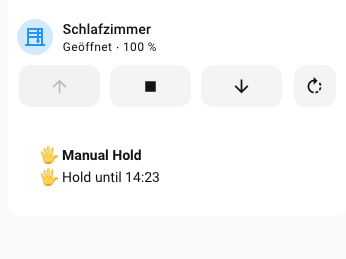
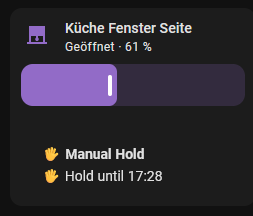
Something else I just saw (only cosmetics), when manual override is active the status shows "Hold until HH:MM" but the time is not the actual reset time (after 1 Hour in my case) but the time the manual override happened.
Thanks for spotting that! The field ts.man stores when the manual override was activated , not when it expires. So the card was showing the wrong label. Fixed in the next release: it'll say "Active since HH:MM" instead of "Hold until HH:MM", which correctly reflects what's actually stored.
Hi there, I have a question to make sure I understand:
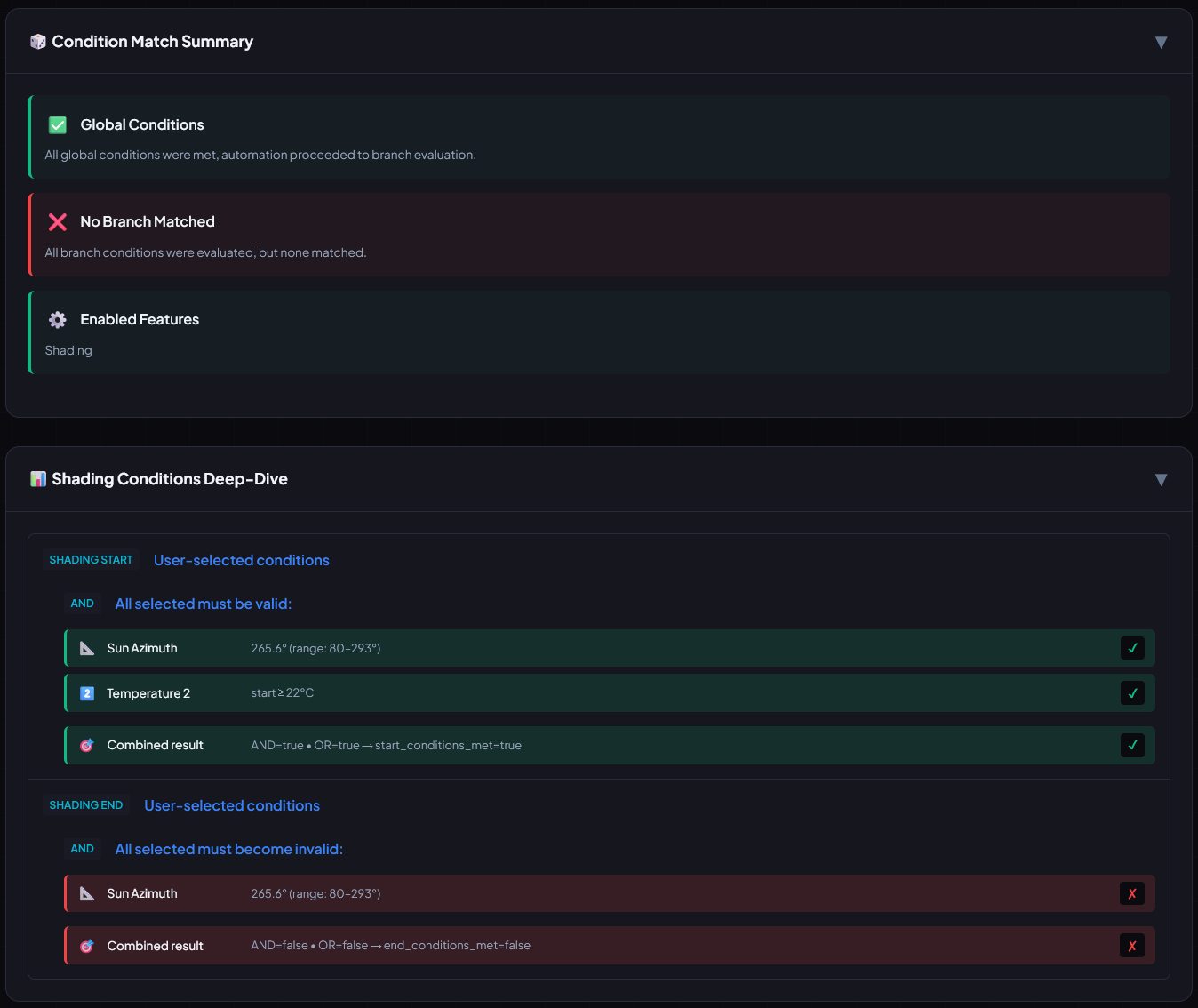
If all the AND conditions for shading are met, then the corresponding branch should be activated, right?
The CCA Trace Analyzer shows different (from my point of view)
Good question! The Trace Analyzer's "Shading Conditions Deep-Dive" only shows the user-configured conditions (azimuth, temperature, etc.) — but those are just one piece of the puzzle. The shading branch has several additional internal conditions that must also be true for it to match.
The most common reasons for "No Branch Matched" despite valid shading conditions:
Wrong trigger — The shading branch only responds to specific trigger IDs (t_shading_start_*, t_open_1). If a different trigger fired (e.g. time, contact sensor, resident sensor), the shading branch won't match — that's by design.
Time window — If time control is enabled, shading can only start within the configured time window (is_shading_allowed_window).
Already shaded — If the cover is already in the shading position, the branch may be skipped.
Daily limit — If "prevent multiple shading" is enabled and shading already ran today.
Manual override — If you manually moved the cover and "ignore shading after manual" is configured.
Force active — If a force function (force open/close/ventilate) is currently active.
To help diagnose your specific case, could you share:
The full HA automation trace (Settings → Automations → your CCA → Traces) — this shows which trigger fired and which conditions failed
The current helper JSON (the input_text entity state)
With that info we can pinpoint exactly which condition blocked the branch.
Question to the round: Some might know the usecase in sumertime in the sleeping rooms to ventilate at darkness. Means: Shutter close in the evening and reopen eg at 00.30 at night, hence shutter and window open to leave in fresh wir. At around 4.00 early in the Morning when all are asleep the shutter should close to block rising sun.
What is the most reasonable way to handle that one ?
Nighttime Ventilation in Summer – Recommended Setup
The use case (close in the evening → reopen at night for fresh air → close again before sunrise) is best solved by combining CCA's Force Ventilation feature with a simple separate automation that toggles the force entity on a time schedule.
Why not auto_ventilate_condition?
Important: The auto_ventilate_condition input only gates normal ventilation triggered by window contact sensors. It does not restrict the Force Ventilation entity (auto_ventilate_force). If your force entity is permanently on, the cover stays in forced ventilation mode all day, regardless of any time condition set in auto_ventilate_condition.
Setup
1. Create an input_boolean for Force Ventilation (if you don't have one already), and assign it to auto_ventilate_force in the CCA blueprint config.
2. Create a small helper automation that toggles the boolean on/off at your desired times:
3. Remove auto_ventilate_condition from your CCA config (set it to empty/default) – the timing is now handled by the on/off toggle of the force entity.
How it works
Time
What happens
23:00
CCA closes the cover normally (bas=cls)
00:30
Helper automation turns force boolean on → CCA immediately sets frc=vnt → cover moves to ventilation position
04:00
Helper automation turns force boolean off → CCA auto-recovers to background state (bas=cls) → cover closes again
09:00
CCA opens the cover normally (bas=opn)
Why this approach works well
Force has the highest priority in CCA's cascade – no other trigger (shading, closing, etc.) can override it while active
Automatic recovery: When the force ends at 04:00, CCA returns to the correct background state (closed, since the closing time was 23:00)
Clean separation: CCA handles all cover logic, the helper automation only controls when ventilation is active
Easy to adjust: Change the times in the helper automation without touching the CCA config. You can also add conditions (e.g., only in summer, only above a certain outside temperature)
Fix: Contact sensor "window closed" branches no longer destroy active shading pending phase (pnd, ts.due, ts.arm) — briefly opening and closing a door/window during shading-start or shading-end pending no longer prevents shading from executing (#484)
Fix: "Window closed" branches no longer fire spuriously when cover is at open position but was never in ventilation mode — removed overly broad in_open_position fallback from the "was ventilating before" OR condition (#484)
Fix: Shading end never triggered when only elevation (or only azimuth) was configured as end condition — the combined sun-position trigger t_shading_end_pending_5 used OR logic for azimuth and elevation in a single template, so when azimuth left the range first (without meeting end conditions), the trigger stayed TRUE and never re-fired when elevation later dropped below threshold (#483)
@Herr.Vorragend
Hello,
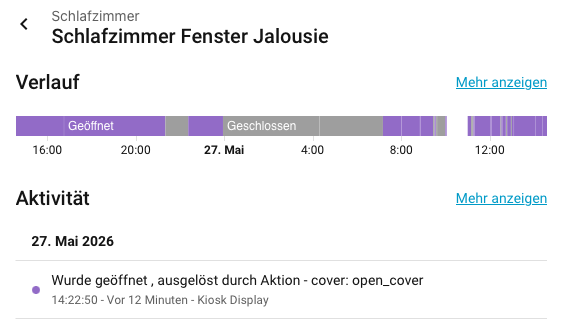
I can't figure out why the shutter is closed. I set it to open at 7:30 a.m. (which works fine), and the shading control kicks in early in the afternoon (south-facing), but at 10:00 a.m., after I close the window, the shutter closes.
I've been trying to figure this out for three days now (but haven't had much luck...)
The configuration, trace, and helper files are here Files CCA
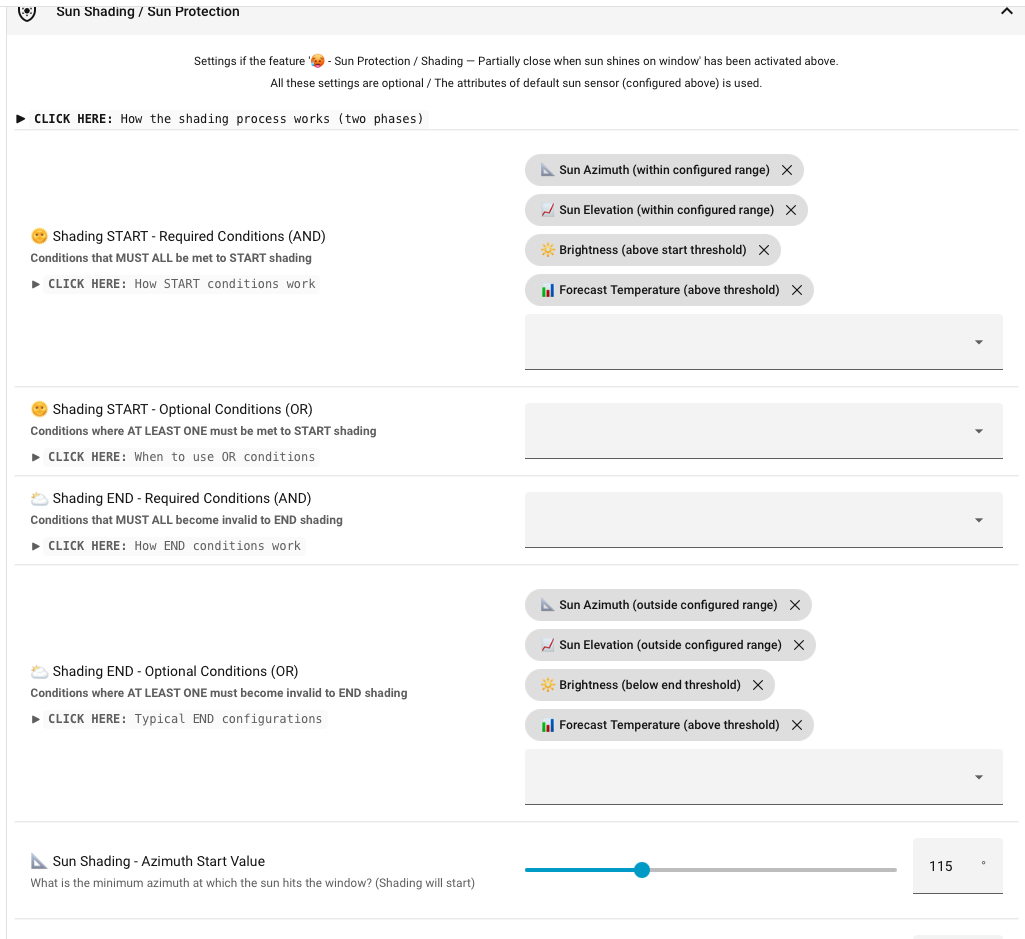
@Herr.Vorragend one more thing I just saw, the Forecast option is also named "above threshold" for the Shading End function and I am not sure if its just wrong naming or if the option itself is wrong to be used in Shading End Function because it would check above threshold and not below threshold as I would expect it to do.
Good catch — it's just a wrong label, not a logic bug.
The underlying logic is correct: shading ends when the forecast temperature
drops below your threshold (forecast < threshold − hysteresis), exactly as
you'd expect. Only the dropdown label was wrong — it still said "above threshold",
copied from the START side instead of being inverted like the other END conditions
(azimuth → outside, brightness → below end, etc.).
Fixed the END labels:
📊 Forecast Temperature → now "below threshold"
🌦️ Forecast Weather Conditions → now "no longer matching configured conditions"
(same copy/paste issue — the END logic checks not matching)
Pure label change, no behavior impact. Your existing config keeps working as before.
Fix: Cover no longer closes when the window is closed while a resident is present but privacy-closing is not configured. The contact "window closed" handler treated any resident presence as a privacy-close trigger ("Return to open" required the resident to be absent; "Return to close" fired on mere presence). It now mirrors effective_state: privacy-close applies only when resident_closing_enabled is configured, or when opening is not permitted (resident_allow_opening unset). With bas=opn and no shading, the cover correctly returns to the open position after the window closes.
@Herr.Vorragend:
short hint to your cover_status_tile_card:
i moved the cover manually at 5:28 pm, than in the card the following text is shown: "hold until 5:28 pm"!
But that makes no sence! It should be "hold SINCE..." or "hold until ..." but than with the rigth ending time, in my case 5:28 pm + 120 min (reset time of the manual override) or the specified time for the reset!
EDIT: i see that you possibly corrected this yesterday
Feature: New input "Independent Temperature Threshold" (shading_independent_temp) for the "Independent Shading via Temperature Comparison" mode — previously this mode shared the same threshold as the normal forecast condition, causing both paths to be blocked simultaneously when the threshold wasn't met. The dedicated threshold can be set lower (e.g. 23 °C) while keeping a stricter value in the AND conditions, without either path interfering with the other (#491)
Improvement: Clarified selector label and description for "Also trigger if Temperature Sensor 2 exceeds Forecast Temperature Value" — the previous label implied a forecast-vs-sensor comparison but the actual logic checks whether Sensor 2 exceeds the (independent) threshold
 Feature: New ventilation option to disable the drive delay when ventilation starts (window opens/tilts) — useful for setups with many covers where a large fixed delay is needed for staggering, but single-cover ventilation reactions should be instant
 Fix: Shading start pending armed before time window opens no longer aborts immediately —
  Improvement: