I’m working with esphome web for the moment and created a yaml file.
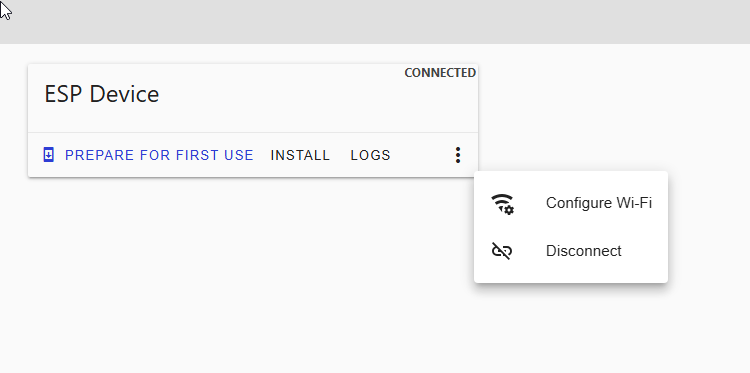
To upload this file o the esp32, I need to convert this yaml to a bin file. How can I do this ?
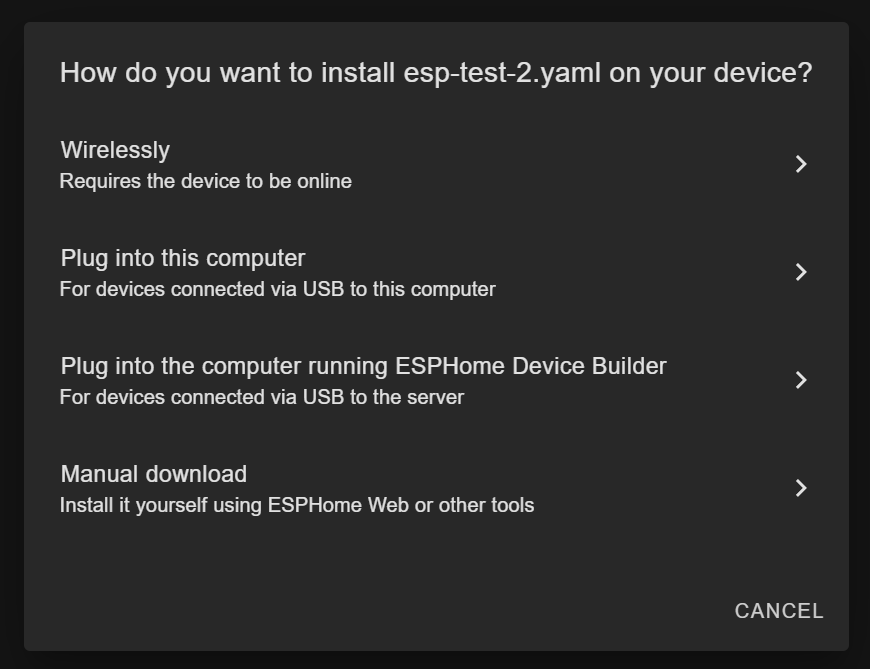
On esphome dashboard open your device and click Install.
Choose manual download
It will give you factory.bin file
And it takes a while…
Neither do I. But somewhere you need to compile your yaml.
I use esphome standalone installation on my laptop.
I tried the ready made projects (empty esphome device) and flashed the esp32. But how to go further.
Please find the log :
type or paste code here
```[11:06:39]ets Jul 29 2019 12:21:46
[11:06:39]
[11:06:39]rst:0x1 (POWERON_RESET),boot:0x13 (SPI_FAST_FLASH_BOOT)
[11:06:39]configsip: 0, SPIWP:0xee
[11:06:39]clk_drv:0x00,q_drv:0x00,d_drv:0x00,cs0_drv:0x00,hd_drv:0x00,wp_drv:0x00
[11:06:39]mode:DIO, clock div:2
[11:06:39]load:0x3fff0030,len:6380
[11:06:39]ho 0 tail 12 room 4
[11:06:39]load:0x40078000,len:15916
[11:06:39]load:0x40080400,len:3860
[11:06:39]entry 0x40080630
[11:06:39]I (29) boot: ESP-IDF 5.5.1 2nd stage bootloader
[11:06:39]I (29) boot: compile time Jan 17 2026 01:55:29
[11:06:39]I (29) boot: Multicore bootloader
[11:06:39]I (31) boot: chip revision: v3.0
[11:06:39]I (33) boot.esp32: SPI Speed      : 40MHz
[11:06:39]I (37) boot.esp32: SPI Mode       : DIO
[11:06:39]I (41) boot.esp32: SPI Flash Size : 4MB
[11:06:39]I (44) boot: Enabling RNG early entropy source...
[11:06:39]I (49) boot: Partition Table:
[11:06:39]I (51) boot: ## Label            Usage          Type ST Offset   Length
[11:06:39]I (58) boot:  0 otadata          OTA data         01 00 00009000 00002000
[11:06:39]I (64) boot:  1 phy_init         RF data          01 01 0000b000 00001000
[11:06:39]I (71) boot:  2 app0             OTA app          00 10 00010000 001c0000
[11:06:39]I (77) boot:  3 app1             OTA app          00 11 001d0000 001c0000
[11:06:39]I (84) boot:  4 nvs              WiFi data        01 02 00390000 0006d000
[11:06:39]I (90) boot: End of partition table
[11:06:39]I (94) esp_image: segment 0: paddr=00010020 vaddr=3f400020 size=27cd8h (163032) map
[11:06:39]I (157) esp_image: segment 1: paddr=00037d00 vaddr=3ffbdb60 size=056f8h ( 22264) load
[11:06:39]I (165) esp_image: segment 2: paddr=0003d400 vaddr=40080000 size=02c18h ( 11288) load
[11:06:39]I (170) esp_image: segment 3: paddr=00040020 vaddr=400d0020 size=dbd78h (900472) map
[11:06:39]I (478) esp_image: segment 4: paddr=0011bda0 vaddr=40082c18 size=18a6ch (100972) load
[11:06:39]I (517) esp_image: segment 5: paddr=00134814 vaddr=50000000 size=00020h (    32) load
[11:06:39]I (531) boot: Loaded app from partition at offset 0x10000
[11:06:39]I (531) boot: Disabling RNG early entropy source...
[11:06:40][I][logger:121]: Log initialized
[11:06:40][C][safe_mode:084]: Unsuccessful boot attempts: 1
[11:06:40][D][esp32.preferences:149]: Writing 1 items: 0 cached, 1 written, 0 failed
[11:06:40][I][app:077]: Running through setup()
[11:06:40][C][component:208]: Setup preferences took 1ms
[11:06:40][C][component:208]: Setup esp32_ble took 0ms
[11:06:40][C][component:208]: Setup esp32_ble_server took 0ms
[11:06:40][C][component:208]: Setup esp32_improv took 0ms
[11:06:40][C][component:208]: Setup web_server_base took 0ms
[11:06:40][C][component:208]: Setup captive_portal took 0ms
[11:06:40][C][wifi:372]: Starting
[11:06:40]  Local MAC: A8:42:E3:56:BF:7C
[11:06:40][D][wifi:387]: Loaded settings:  uFi_BCDB49
[11:06:40][I][wifi:319]: Starting scan
[11:06:40][D][wifi:958]: Starting scan
[11:06:40][C][component:208]: Setup wifi took 93ms
[11:06:40][C][component:208]: Setup esphome.ota took 2ms
[11:06:40][C][component:208]: Setup safe_mode took 0ms
[11:06:40][C][component:208]: Setup web_server.ota took 0ms
[11:06:40][W][component:333]: api set Warning flag: unspecified
[11:06:40][C][component:208]: Setup api took 1ms
[11:06:40][C][component:208]: Setup improv_serial took 0ms
[11:06:40][C][component:208]: Setup mdns took 3ms
[11:06:40][I][app:124]: setup() finished successfully!
[11:06:40][D][esp32_ble:398]: Enabling
[11:06:40][W][component:490]: esp32_ble took a long time for an operation (502 ms)
[11:06:40][W][component:493]: Components should block for at most 30 ms
[11:06:40][W][component:342]: wifi set Warning flag: scanning for networks
[11:06:40][I][app:194]: ESPHome version 2025.12.6 compiled on Jan 17 2026, 01:54:27
[11:06:40][I][app:196]: Project esphome.web version 26.1.0
[11:06:40][C][logger:261]: Logger:
[11:06:40]  Max Level: DEBUG
[11:06:40]  Initial Level: DEBUG
[11:06:40][C][logger:267]:   Log Baud Rate: 115200
[11:06:40]  Hardware UART: UART0
[11:06:40][C][logger:274]:   Task Log Buffer Size: 768
[11:06:40][C][esp32_ble:656]: BLE:
[11:06:40]  MAC address: A8:42:E3:56:BF:7E
[11:06:40]  IO Capability: none
[11:06:40][C][esp32_ble_server:232]: ESP32 BLE Server:
[11:06:40][C][esp32_improv.component:305]: ESP32 Improv:
[11:06:40][C][captive_portal:118]: Captive Portal:
[11:06:40][D][esp32_ble_server:089]: BLE server setup successfully
[11:06:40][C][wifi:1132]: WiFi:
[11:06:40]  Connected: NO
[11:06:40][C][wifi:897]:   Local MAC: A8:42:E3:56:BF:7C
[11:06:40][C][wifi:908]:   SSID: ''[redacted]
[11:06:40]  BSSID: 00:00:00:00:00:00[redacted]
[11:06:40]  Hostname: 'esphome-web-56bf7c'
[11:06:40]  Signal strength: -127 dB ××××
[11:06:40]  Channel: 5
[11:06:40]  Subnet: 0.0.0.0
[11:06:40]  Gateway: 0.0.0.0
[11:06:40]  DNS1: 0.0.0.0
[11:06:40]  DNS2: 0.0.0.0
[11:06:40][C][esphome.ota:092]: Over-The-Air updates:
[11:06:40]  Address: esphome-web.local:3232
[11:06:40]  Version: 2
[11:06:40][C][safe_mode:018]: Safe Mode:
[11:06:40]  Successful after: 60s
[11:06:40]  Invoke after: 10 attempts
[11:06:40]  Duration: 300s
[11:06:40][C][web_server.ota:241]: Web Server OTA
[11:06:40][C][api:211]: Server:
[11:06:40]  Address: esphome-web.local:6053
[11:06:40]  Listen backlog: 4
[11:06:40]  Max connections: 8
[11:06:40][C][api:223]:   Noise encryption: NO
[11:06:40][C][improv_serial:063]: Improv Serial:
[11:06:40][C][mdns:177]: mDNS:
[11:06:40]  Hostname: esphome-web-56bf7c
[11:06:46][D][wifi:1068]: Found networks:
[11:06:46][I][wifi:1041]: - ' uFi_BCDB49' (0E:9B:8F:53:50:03) [redacted]▂▄▆█
[11:06:46][D][wifi:1044]:   Channel:  6, RSSI: -27 dB, Priority:    0
[11:06:46][D][wifi:1361]: Retry phase: INITIAL_CONNECT → SCAN_CONNECTING
[11:06:46][I][wifi:774]: Connecting to ' uFi_BCDB49'[redacted] (0E:9B:8F:53:50:03)[redacted] (priority 0, attempt 1/2 in phase SCAN_CONNECTING)...
[11:06:47][W][wifi_esp32:773]: Disconnected ssid=' uFi_BCDB49' bssid=0E:9B:8F:53:50:03[redacted] reason='Auth Expired'
[11:06:48][W][wifi:1210]: Connecting to network failed (callback)
[11:06:48][D][wifi:1532]: Failed ' uFi_BCDB49'[redacted] (0E:9B:8F:53:50:03)[redacted], priority 0 → 0
[11:06:48][D][wifi:1603]: Retry attempt 2/2 in phase SCAN_CONNECTING
[11:06:48][I][wifi:774]: Connecting to ' uFi_BCDB49'[redacted] (0E:9B:8F:53:50:03)[redacted] (priority 0, attempt 2/2 in phase SCAN_CONNECTING)...
[11:06:49][I][wifi:1149]: Connected
[11:06:49][C][wifi:897]:   Local MAC: A8:42:E3:56:BF:7C
[11:06:49][C][wifi:904]:   IP Address: 192.168.43.94
[11:06:49][C][wifi:908]:   SSID: ' uFi_BCDB49'[redacted]
[11:06:49]  BSSID: 0E:9B:8F:53:50:03[redacted]
[11:06:49]  Hostname: 'esphome-web-56bf7c'
[11:06:49]  Signal strength: -25 dB ▂▄▆█
[11:06:49]  Channel: 6
[11:06:49]  Subnet: 255.255.255.0
[11:06:49]  Gateway: 192.168.43.1
[11:06:49]  DNS1: 192.168.43.1
[11:06:49]  DNS2: 0.0.0.0
[11:06:49][D][wifi:1173]: Disabling AP
[11:06:49][W][component:373]: wifi cleared Warning flagYou have to install esphome to compile the yaml file to a bin file.
I installed esphome on my windows computer following this tutorial.
but I’m blocked because I have on some way convert my yaml file to a bin file.
With esphome I have to install the bin-file, but I only heve the yaml file
After the installation you have to use it. Please read the documentation.
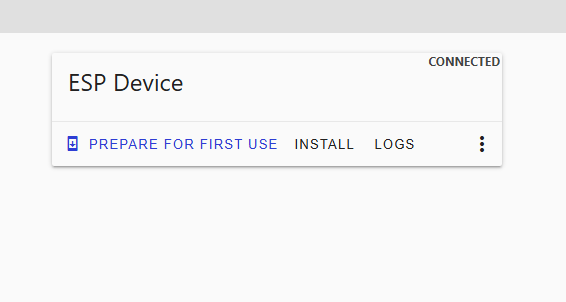
You are using ESPHome-Web, which is different from ESPHome and serves just the purpose of flashing a device.
What documentation ? Is there a step by step tutorial ?
I followed the documentation you mentioned.
All the documentation I found talks about the yaml file, but I cannot find anything how I go from a yaml file to a bin file to upload.
Actually I flashed the 'empty esphome device 'project. I can se the esp32 on my network with his IP-address (192.168.43.94) but I cannot connect to him.
Do a search on Google “esphome how to use” and you will get some advice like youtube videos that explain how to use it, like this one: https://youtu.be/XMpNJgozF-c?si=gGlbn-zOhxEy4ZeS
You need to “build” your yaml through the esphome builder dashboard:

there you can click EDIT and install:

then choose manual download to create the bin file:
Thanks, but this video does not show how to create the bin-file with esphome-web. They do it again with home assistant.
Because I have no homeassistant, I cannot use the esphome builder in HA
You can’t create the bin file using esphome-web. You must use ESPHome that you have installed on windows. Try to type the command esphome on your windows machine.
Here is a youtuber explaining it for windows: https://youtu.be/BX6tDsux_X4?si=qVthkjlyuZwlfZ-2
With this video I move some steps forward but now I’m block with running esphome in terminal with following message :
"Processing ap (board: esp32dev; framework: arduino, espidf; platform: https://github.com/pioarduino/platform-espressif32/releases/download/55.03.37/platform-espressif32.zip)
Git not found in PATH, please install Git.
Git is needed for Platform espressif32 to work."

Do you have an Internet connection from your Windows pc?
No fix ethernet. I work over Wifi with my mobile as hotspot
I think problem is solved. I removed python and esphome and installed an older version of both.
Python 3.13.7
Esphome 25.0.8
Where is the bin-file stored ( directory on the PC) ? I can only see that the file is uploaded to the esp32
something like C:\User/{username}/.esphome/build/{your_device}/.pioenvs/{your_device}/firmware.bin