Create entities for not supported device Tuya

Hi all,

i added the Lidl/Parkside Smart Battery Charger (PLGS 2012 A1) in the Tuya Smart App, everything works fine. Home Assistant detected the device, but declared as unsupported like the screenshots above my thread. According the Github of the LocalTuya Integration, it´s supported.
Can anybody tell me if there is a problem with the integration, or is there a way to add manually this device in a YAML File?

br Benji

I have some unsupported devices with the official Tuya integration.
My method to use these devices is:

  1. Create automatisation(s) with SmartLife App wich use this device, these automations will be imported in HA as Read-Only "Scene"s
  2. Create in HA an entity (input_boolean, button…) for the device
  3. Create in HA automations triggered by this entity to call the imported Tuya scenes

It’s a bit hard, but that work fine.

7 Likes

Good to make it work but you don’t have any feedback. HA cannot know the device status.

Yes, but nearly all of these devices are IR or RF remotes without feedback.
I also have Tuya ZigBee gateways and they send the states of ZigBee devices even if the gateway itself is « unsupported ».

Not really true. All mine have feedback.
Anyway, I have found Tuya local integration which should do the magic.
Note that Tuya local is different than Local Tuya.
See Tuya Local set up

1 Like

Taky to mám stejně

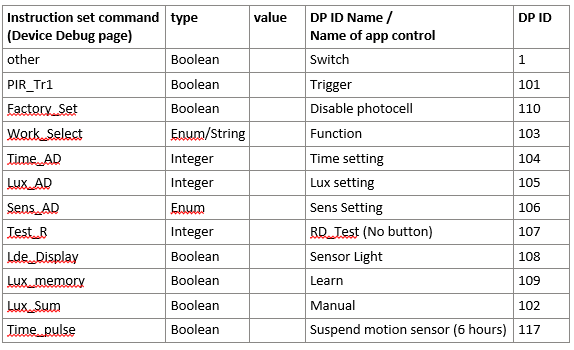
I bought a TimeGuard WiFi PIR (WFPIRB) and it shows as “unsupported”, but I have been able to get it to work using the Local Tuya HACS integration.

It’s a bit of a faff compared to using the non-HACS Tuya integration.

This video helped me: https://www.youtube.com/watch?v=VCd0kYWLvMQ,

However, nothing showed up even in the Tuya Developer Platform. I had to change the “Instruction Set”. (Sorry, I didn’t make notes and I don’t think it can be changed back).

If anyone else buys one of these, here’s a mapping table:
image
(This should become clear once you watch the video).

HTH

2 Likes

Hi there, is there still no solution for the Home Assistant Tuya Integration? I have LIDL Plug which are shown as unsupported. But out of 6 parameters, 5 are available, just the Energy Meter which measures the total consumption in kWh (which I need for the Energy Tab) is not supported. It is shown in the Diagnostic Data… I want to add this as Entity, but no idea how…

I just bought a tuya compaticle wallbox charger and of course the normal tuya integration just shows “unsupported”.

Instead use GitHub - make-all/tuya-local: Local support for Tuya devices in Home Assistant

I installed it via HACS, added the User Code (That you can get from the app as explained here: Tuya - Home Assistant) and then it instantly asked me if I wanted to add the wallbox I had added to the app prior.

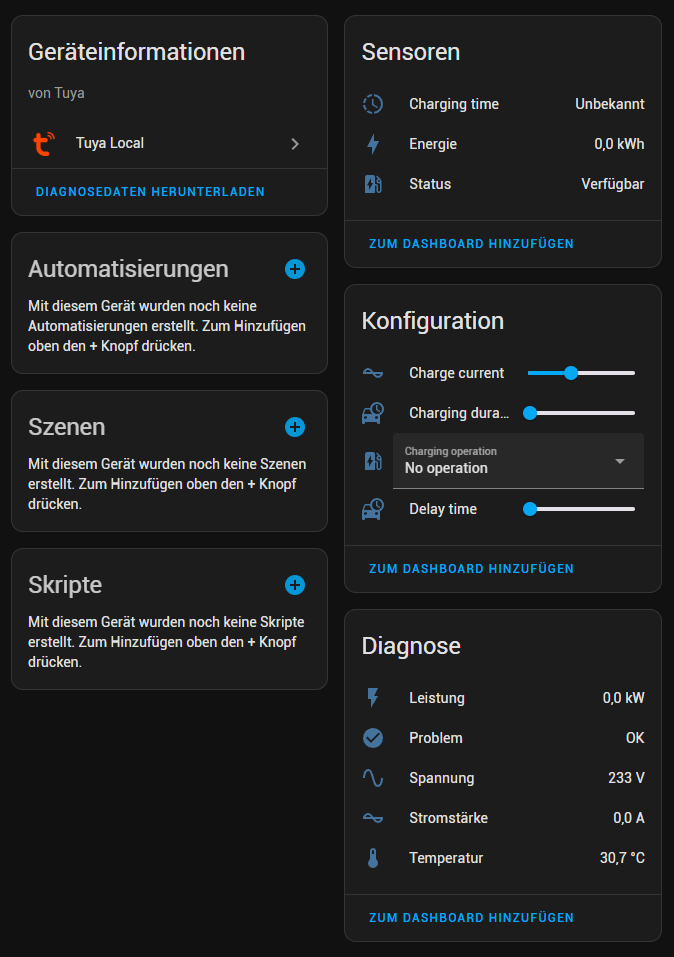
Now I have a new device:

Haven’t tested it on my car yet, but if I change the “Charge current” setting then it instantly changes on the device and vice versa.

Edit: Tested it on my Kia Cee’d Hybrid: While charging you can adjust the Charge current and the car will switch to that current immediately.

I do have to say that you can set charge currents that aren’t supported. I started with 6A and the charger just said “Connecting”. Once I changed it to 8A, which the normal charging brick for the car can do too, and plugged the charger into the car the car started charging. I also only testes 8A, 10A and 12A, since that is what the normal charging brick can do.

And to top it all off I’ve only tested this with a single phase. The charger supports 3 phases, but we need to get a 3 phase CEE outlet for that first.

1 Like

I have 4 of the time guard PIRs on the packaging they are sold as alexa compatable, but they dont show up there either. I have contacted Time guard and they are aware of a probelm! West base where I got mine from have now altered the web page regarding the Works with Alexa. I just wish I could get a simple set of insrtructions to follow, as above is way above my skill level

I found this very good job: How to integrate unsupported Tuya devices on Home Assistant and now it works perfectly for my weather station (it is a remote station not on the same HA network, so I need cloud data).

1 Like

I’m facing the same problem.
I’m completely new to HA so I apologize beforehand.

I have 4 identical temperature sensors on my Tuya WiFi platform.
1 functions just fine and gives me temperature and humidity correctly.
The other 3 show unsupported, so don’t show up.

When I compare the diagnostics from the sensor that works to the one that says “no enitities” , the difference is in the function, status_range and status in the JSON.
The rest of the file is identical (apart from product_id)

The not function one just has:

    "function": {},
    "status_range": {},
    "status": {},

While the functioning one has:

        "function": {
      "temp_unit_convert": {
        "type": "Enum",
        "value": {
          "range": [
            "c",
            "f"
          ]
        }
      }
    },
    "status_range": {
      "va_temperature": {
        "type": "Integer",
        "value": {
          "unit": "\u2103",
          "min": -200,
          "max": 600,
          "scale": 1,
          "step": 1
        }
      },
      "va_humidity": {
        "type": "Integer",
        "value": {
          "unit": "%",
          "min": 0,
          "max": 99,
          "scale": 0,
          "step": 1
        }
      },
      "battery_state": {
        "type": "Enum",
        "value": {
          "range": [
            "low",
            "middle",
            "high"
          ]
        }
      },
      "temp_unit_convert": {
        "type": "Enum",
        "value": {
          "range": [
            "c",
            "f"
          ]
        }
      }
    },
    "status": {
      "va_temperature": 210,
      "va_humidity": 46,
      "battery_state": "middle",
      "temp_unit_convert": "c"
    },

So I was thinking if I could just add this info to the not functioning sensor this would fix things. Is there a way to do that. If so, where?
It would avoid creating cloud Tuya developer account etc. etc.
How is it that HA retrieves the diagnostic file? Can a script do it? If so then the json file could be parsed.