Hi there,
Wonder if anyone can help me.
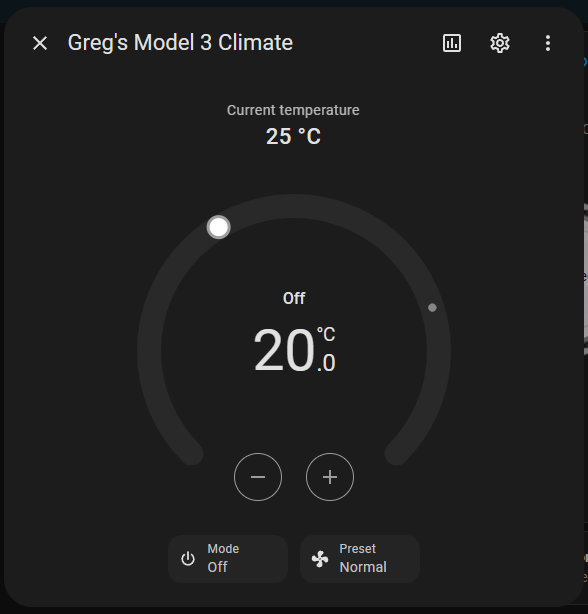
I have created a picture-elements card for my Tesla from a template written by @alexbeatle (thank you!). But I wanted to know if I can get the popup from the climate entity card which looks like this when the entity is clicked/tapped.
I want to be able to click/tap the climate icon in the picture-elements card and have the above popup so that I can control the temperature etc.
At the moment I have the climate icon working as a call-service climate.turn_on, but this only turns on and off and doesn’t bring up the dialog to adjust temperature etc.
Is this doable?
Here is the code for the climate part of the picture-elements card.
  - type: conditional
    conditions:
      - entity: climate.greg_s_model_3_climate
        state: 'off'
    elements:
      - type: icon
        icon: mdi:fan-off
        tap_action:
          action: call-service
          service: climate.turn.on
          service_data: {}
          target:
            entity_id: climate.greg_s_model_3_climate
        double_tap_action: none
        hold_action: none
        style:
          top: 7%
          left: 50%
          color: rgb(150,150,150)
  - type: conditional
    conditions:
      - entity: climate.greg_s_model_3_climate
        state: heat_cool
    elements:
      - type: icon
        icon: mdi:air-conditioner
        tap_action:
          action: call-service
          service: climate.turn_off
          service_data: {}
          target:
            entity_id: climate.greg_s_model_3_climate
        double_tap_action: none
        hold_action: none
        style:
          top: 7%
          left: 50%
          color: '#039be5'
Thanks in advance for any help.
karwosts
August 4, 2024, 3:13pm
2
Instead of a “icon” element, use a “state-icon” element. You can override the displayed icon. Add your climate as the entity. Then your default tap action will be to open the more-info dialog for the climate.
does this do what you want?
- type: conditional
    conditions:
      - entity: climate.greg_s_model_3_climate
        state: 'off'
    elements:
      - type: icon
        icon: mdi:fan-off
        tap_action:
          action: more-info
          target:
            entity_id: climate.greg_s_model_3_climate
        double_tap_action: none
        hold_action: none
        style:
          top: 7%
          left: 50%
          color: rgb(150,150,150)
  - type: conditional
    conditions:
      - entity: climate.greg_s_model_3_climate
        state: heat_cool
    elements:
      - type: icon
        icon: mdi:air-conditioner
        tap_action:
          action: more-info
          target:
            entity_id: climate.greg_s_model_3_climate
        double_tap_action: none
        hold_action: none
        style:
          top: 7%
          left: 50%
          color: '#039be5'
I use browser mod for pop-ups throughout my dashboard.
I also use better thermostat throughout my dashboard, just because I like it over the stock thermostat.
But surely the stock or any other one can be used similarly.
Since I have those two, it was easy to setup…
      - type: conditional
        conditions:
          - entity: climate.<car_name>_hvac_climate_system
            state: 'off'
        elements:
          - type: icon
            icon: mdi:fan-off
            hold_action: none
            double_tap_action: none
            tap_action:
              action: call-service
              service: browser_mod.popup
              data:
                content:
                  type: custom:better-thermostat-ui-card
                  entity: climate.<car_name>_hvac_climate_system
                  name: Tesla Climate
                  disable_window: true
                  disable_summer: true
                  disable_eco: true
                  set_current_as_main: true
                  disable_menu: true
                  disable_off: false
                  disable_battery_warning: false
                  disable_buttons: false
                  layout:
                    mode:
                      headings: true
                      icons: true
                      names: true
            style:
              top: 6.5%
              left: 36.6%
              color: black
      - type: conditional
        conditions:
          - entity: climate.<car_name>_hvac_climate_system
            state: heat_cool
        elements:
          - type: icon
            icon: mdi:air-conditioner
            hold_action: none
            double_tap_action: none
            tap_action:
              action: call-service
              service: browser_mod.popup
              data:
                content:
                  type: custom:better-thermostat-ui-card
                  entity: climate.<car_name>_hvac_climate_system
                  name: Tesla Climate
                  disable_window: true
                  disable_summer: true
                  disable_eco: true
                  set_current_as_main: true
                  disable_menu: true
                  disable_off: false
                  disable_battery_warning: false
                  disable_buttons: false
                  layout:
                    mode:
                      headings: true
                      icons: true
                      names: true
            style:
              top: 6.5%
              left: 36.6%
              color: '#039be5'
Still strying to figure out how to use “climate” with Celsius, while I have US units globally.
2 Likes
Thanks so much. This is exactly what I am after. Great work on the card, cheers!
1 Like