I have been playing with Cury by Shelly in Home Assistant, and I honestly did not expect a fragrance diffuser to become such an interesting smart home device.
At first glance, Cury is simply a connected fragrance diffuser. But once it is added to Home Assistant, it becomes another proper part of the home: something that can react to presence, location, doors and windows, schedules, the car, scenes, and pretty much anything else Home Assistant knows about.
And in my case, I actually prefer using it through Home Assistant rather than through Shelly Cloud / Shelly Smart Control.
What Cury actually is
Cury has two independent vial slots, so you can have two different fragrances installed at the same time, or combine a fragrance with something like a mosquito-repellent vial.
The vials are also more interesting than normal fragrance refills. Cury can identify the installed vial and report information such as the fragrance name and remaining level. Shelly describes this as its smart vial identification system.
Each slot can also be controlled independently.
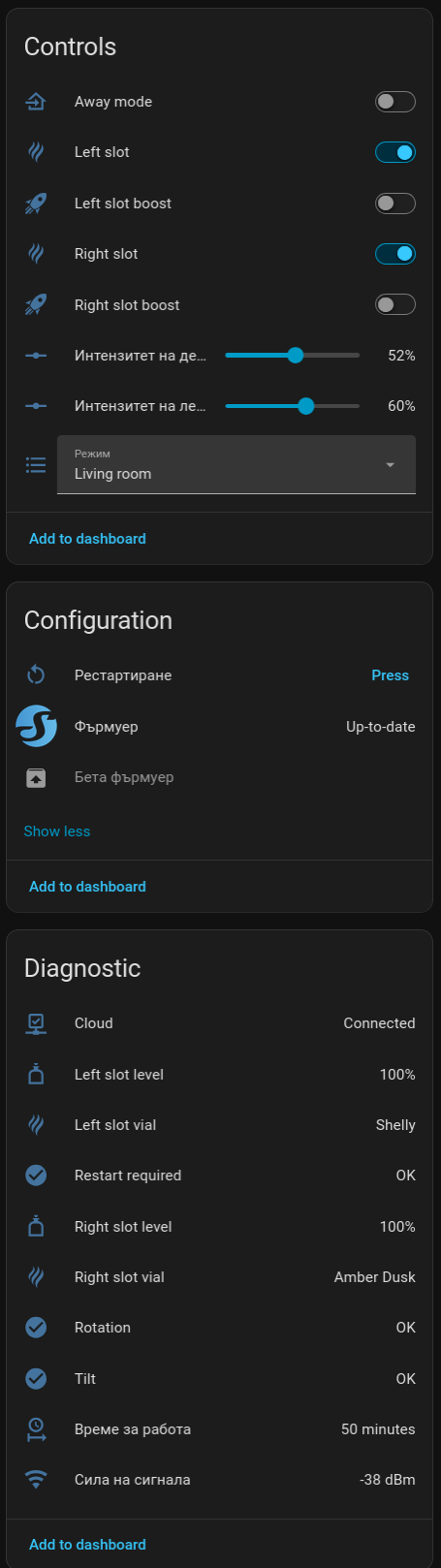
In Home Assistant I currently get:
- Away mode
- Left slot ON/OFF
- Left slot Boost
- Right slot ON/OFF
- Right slot Boost
- Left slot intensity – 0–100%
- Right slot intensity – 0–100%
- Operating mode / room profile
- Left vial level
- Left vial name
- Right vial level
- Right vial name
- Rotation status
- Tilt status
- plus the normal Shelly diagnostics such as Wi-Fi signal, uptime, cloud status, firmware information, etc.
The room/mode selector currently supports profiles including Hall, Bedroom, Living Room, Lavatory Room, Reception and Workplace.
This is what my device page currently looks like:
This is where Home Assistant makes Cury really useful
The interesting part for me is not manually moving an intensity slider from 50% to 60%.
It is allowing Home Assistant to decide when the diffuser should actually be running.
For example, my phone already tells Home Assistant whether I am home.
So something as simple as this becomes possible:
Nobody home → stop Cury.
When I leave the Home zone, Home Assistant can disable both fragrance slots or enable Away mode.
When I come back, it can restore the normal Living Room profile.
That immediately makes more sense than letting a fragrance diffuser run in an empty house.
Use the car as presence detection
You can take this one step further.
If your car integration exposes location or presence to Home Assistant, the diffuser can react to the car arriving or leaving home.
For example:
Car leaves home → turn Cury off
Car enters the Home zone → start the living-room fragrance
Or you could create a larger zone around your home and start the fragrance when the car enters that zone, so the room already smells good by the time you arrive.
That is the type of automation that makes Home Assistant interesting to me: the Cury does not need to know anything about the car. The car does not need to know anything about Cury.
Home Assistant connects the two.
Stop wasting fragrance when a window is open
Another obvious automation is using door/window sensors.
If a window stays open:
Pause the fragrance.
When all windows are closed again:
Resume it.
Shelly itself actually promotes a similar use case with its door/window sensors, but inside Home Assistant the sensor does not have to be a Shelly sensor at all. It can be Zigbee, Z-Wave, Matter, ESPHome, KNX or anything else HA supports.
And during summer you can reverse the logic if one of the Cury slots contains mosquito repellent.
For example:
Terrace door opens → activate the repellent slot.
That is much more useful than simply scheduling a fragrance from 18:00 to 22:00.
Presence-based fragrance
Another nice one:
No movement in the room for 30 minutes → Cury off
Person detected → Cury on
You could even use mmWave presence sensors instead of PIR sensors, so it continues running while somebody is sitting on the sofa without moving much.
For a bathroom, hallway or entrance, this could work extremely well.
Shelly also shows motion-triggered fragrance as one of the intended Cury use cases.
Different scent for different situations
Because there are two independently controlled slots, there are some fun possibilities.
During the day:
Left vial → fresh fragrance, 50–60%
In the evening:
Right vial → warmer fragrance, 30–40%
Movie scene:
Lights dim + TV on + evening fragrance
Good night scene:
Turn most devices off + set Cury to a lower intensity
Morning:
Fresh fragrance + lights + blinds + coffee machine
You can basically treat fragrance as another element of a Home Assistant scene, just like lighting, temperature or music.
That is something I had never really considered before using Cury.
Notifications when a vial is almost empty
Because Home Assistant receives the remaining vial percentage, another easy automation is:
Left or right vial below 10% → send a notification to my phone.
You could also put the levels directly on your dashboard.
Instead of realizing the fragrance has disappeared and then checking the device manually, HA already knows that the vial is running low. The integration exposes the individual vial levels as percentage sensors.
Safety information is exposed too
I also like that Home Assistant exposes Cury’s orientation diagnostics.
There are entities for:
Tilt
and
Rotation
Cury uses orientation protection because the device uses heating-based diffusion and should be installed correctly. The device also includes overheating protection and automatic shutdown functionality.
From an HA perspective these may only look like diagnostic entities, but they are still useful.
For example, you could receive a notification if someone knocks the diffuser into an incorrect position.
Why I actually prefer the Home Assistant integration
This surprised me a little.
The dedicated Cury/Shelly interface is obviously designed specifically for the device, and it looks good.
But personally, I prefer how Cury is represented in Home Assistant.
Instead of one isolated smart product, I get a group of normal Home Assistant entities.
I can see the two slots, vial levels, vial names, boost controls, intensity controls, operating mode and diagnostics all in the same place.
More importantly, I can combine them with everything else in my home.
My phone.
My car.
Presence sensors.
Door sensors.
Lights.
Alarm system.
HVAC.
Time of day.
Home/away state.
Scenes.
That is where I think Home Assistant gives the device much more value.
The diffuser stops being a standalone IoT gadget and becomes part of the house logic.
One thing I really miss: the RGB / ambient light
There is one thing that bothers me with the Home Assistant integration.
I cannot control Cury’s RGB / ambient light from Home Assistant.
Cury itself has customizable ambient lighting, and the lighting can be controlled through other supported interfaces, but currently I do not get a normal light entity for it in Home Assistant. Shelly’s documentation describes the ambient lighting capability, while there has also been a Home Assistant Core feature request specifically about the missing Cury light control.
This is a shame because it would complete the integration perfectly.
I would love to have something like:
light.cury_ambient
with:
On / Off
Brightness
RGB color
Then Cury could participate properly in Home Assistant scenes.
For example:
Movie mode → fragrance 35% + Cury light warm orange
Night mode → fragrance 20% + ambient light very dim
Away mode → fragrance off + light off
The hardware already has the lighting, so exposing it to Home Assistant feels like the missing final piece.
Overall
Cury is probably one of the more unusual devices I have added to Home Assistant recently.
I expected:
smart fragrance diffuser
but what I ended up with was:
a dual-channel controllable environmental device with presence, geofencing, scenes, sensors and automation possibilities.
And that is exactly why I enjoy Home Assistant.
It takes devices that normally live inside their own apps and lets them interact with completely unrelated systems.
I am curious what other people are doing with Cury.
Has anyone created some interesting automations for it?
And especially: would anyone else like to see the Cury RGB/ambient light exposed as a proper Home Assistant light entity?